Database Partitioning
When one table grows too large, split it inside the same database. Compare range and hash partitioning, see partition pruning and instant retention, and avoid hot partitions.
🎯 What you'll learn
- Why huge tables hurt
- Horizontal (rows) vs vertical (columns) partitioning
- Choosing a partition key
- Skew and hot partitions
📚 Before you start
1Why a Single Table Stops Being Enough
A table on a single database server is bounded by that server's disk, memory, and CPU. As row count and query volume grow, three symptoms show up together: queries that used to hit an index cleanly start scanning more data than fits in the buffer cache, writes contend for the same B-tree pages (see databases/indexing-storage/02-b_tree/), and backups/vacuums/maintenance windows on the table take longer than the business can tolerate. Partitioning is the general answer: split one logically-single dataset into smaller physical pieces, each cheaper to scan, index, and maintain than the whole.
This topic covers partitioning generally. 03-sharding/ in this same group is the specific case where the pieces live on separate database server instances rather than just separate physical structures on one server — read this topic first, since sharding is partitioning plus a distribution-across-machines problem layered on top.
2Horizontal Partitioning — Splitting Rows
Horizontal partitioning divides a table by row, using a partition key: every row's value on that key determines which partition it lives in, but every partition has the identical column structure.
-- PostgreSQL native declarative partitioning, by range on order_date
CREATE TABLE orders (
  id         BIGSERIAL,
  order_date DATE NOT NULL,
  customer_id BIGINT NOT NULL,
  total       NUMERIC(10,2)
) PARTITION BY RANGE (order_date);

CREATE TABLE orders_2024 PARTITION OF orders
  FOR VALUES FROM ('2024-01-01') TO ('2025-01-01');
CREATE TABLE orders_2025 PARTITION OF orders
  FOR VALUES FROM ('2025-01-01') TO ('2026-01-01');
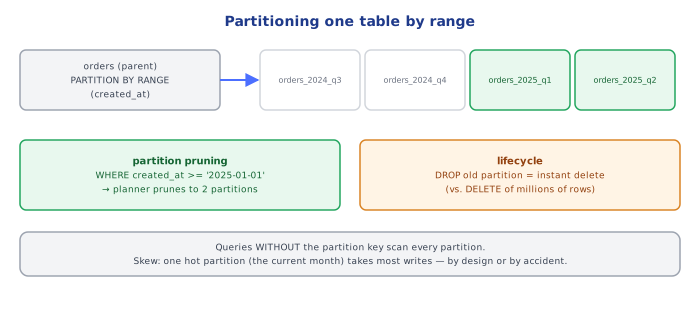
A query with a WHERE order_date BETWEEN ... predicate that falls entirely within one partition's range only ever touches that partition — this is partition pruning, and it's the entire performance case for horizontal partitioning: instead of scanning (or index-scanning) one enormous table, the planner scans one much smaller one.
Common partitioning schemes:
- Range partitioning — by date, by ID range. Natural for time-series/append-mostly data (orders, logs, events); old partitions can be dropped or archived wholesale instead of run through a slow
DELETE. - List partitioning — by a discrete category (region code, tenant ID, status). Natural when queries are almost always scoped to one category value.
- Hash partitioning — the partition key is hashed and the result modulo the partition count picks the partition. Used when there's no natural range/list split and the goal is just to spread rows evenly.
3Vertical Partitioning — Splitting Columns
Vertical partitioning divides a table by column, keeping the same rows (same primary key) but splitting infrequently-used or large columns into a separate table.
-- Before: one wide table, cheap columns and an expensive blob column together
CREATE TABLE user_profile (
  id         BIGINT PRIMARY KEY,
  username   TEXT,
  email      TEXT,
  last_login TIMESTAMPTZ,
  bio_html   TEXT,        -- large, rarely read
  avatar_blob BYTEA       -- large, rarely read
);

-- After: hot columns and cold columns split, joined only when the cold data is needed
CREATE TABLE user_profile (
  id         BIGINT PRIMARY KEY,
  username   TEXT,
  email      TEXT,
  last_login TIMESTAMPTZ
);
CREATE TABLE user_profile_media (
  user_id    BIGINT PRIMARY KEY REFERENCES user_profile(id),
  bio_html   TEXT,
  avatar_blob BYTEA
);
The motivation is different from horizontal partitioning: it's not about which rows a query touches, it's about how many bytes a query has to read per row it does touch. A query that only needs username and last_login for a million users, run against the wide table, still pays the I/O cost of the large bio_html/avatar_blob columns sitting on the same physical pages (row-store databases typically store a row's columns contiguously) — even though it never reads them. Splitting cold, large columns out shrinks the hot table's row size, so more rows fit per page, more pages fit in the buffer cache, and scans of the hot table get proportionally cheaper.
4Partition Key Selection
The single highest-leverage decision in horizontal partitioning is the partition key, because it determines whether real queries actually benefit from pruning:
-- Good: the overwhelming majority of queries filter by order_date already
SELECT * FROM orders WHERE order_date >= '2025-01-01' AND customer_id = 42;
-- -> partition pruning kicks in on order_date, only recent partitions scanned

-- Bad: if the actual query pattern is "all orders for a customer, any date"
SELECT * FROM orders WHERE customer_id = 42;
-- -> every partition must be scanned, since order_date wasn't in the predicate;
--    partitioning by order_date bought nothing for this access pattern and
--    added overhead (partition routing, more planning work) for no benefit
The rule: pick the partition key to match the column(s) that appear in the WHERE clause of the highest-volume real queries, not the column that "feels" most natural to the schema. A partition key chosen by intuition rather than by the actual query log is a common, expensive mistake to discover after the fact.
5Skew and Hot Partitions
Partitioning only helps if load is roughly even across partitions. A poorly chosen key can concentrate a disproportionate share of reads or writes onto one partition — a hot partition — which then becomes exactly the bottleneck partitioning was meant to eliminate, just at a smaller scale (one partition instead of one table, but still one point of contention).
List-partitioned by region, but 80% of the user base is in one region:

region='us'  -> [======================================] 80% of traffic
region='eu'  -> [======]                                  12%
region='apac'-> [====]                                     8%
Range partitioning on a monotonically increasing key (an auto-incrementing ID, or "now") has a related failure mode: all current writes land in the single newest partition, no matter how many older partitions exist — old partitions become read-only/cold while one partition absorbs 100% of write load. This is often acceptable (and even desirable, since old data staying untouched simplifies archival), but it must be a deliberate choice, not a surprise.
⚠️ Common Pitfalls
- Partitioning without checking the actual query log first — a partition key that doesn't match real
WHEREclauses buys no pruning benefit and adds routing overhead for nothing. - Confusing vertical partitioning with normalization — vertical partitioning splits one entity's columns for physical/performance reasons and typically keeps a 1:1 relationship; normalization splits data to eliminate redundancy for correctness reasons (see
databases/modeling/01-normalization_and_denormalization/). They can look similar in SQL but solve different problems. - Choosing a hash-partitioned key that's also the primary access filter — hash partitioning distributes evenly but destroys range-query pruning (a
BETWEENquery on a hash-partitioned column must scan every partition, since hash output has no ordering relationship to input). - Ignoring hot-partition risk on monotonic keys — assuming partitioning always spreads load evenly, when a naive range-on-timestamp scheme concentrates all writes on the newest partition by construction.
- Treating partitioning as a substitute for indexing — a partition without a good index inside it is still a full scan, just of a smaller table; the two are complementary, not alternatives.
📋 Quick Reference
Horizontal partitioning: split by ROW (partition key decides which partition a row lives in)
  Range   -> time-series/append-mostly data, enables dropping old partitions wholesale
  List    -> discrete category, queries scoped to one category value
  Hash    -> no natural range/list, goal is even spread (kills range-query pruning)

Vertical partitioning: split by COLUMN, same primary key, hot columns vs cold/large columns

Partition key choice: match the WHERE clause of your highest-volume real queries
Partition pruning: query touches only the partition(s) matching its predicate on the key
Hot partition: uneven load concentrated on one partition — the thing partitioning should avoid

Next: 03-sharding/ for partitioning across separate DATABASE SERVERS, not just tables
🧠 Key takeaways
- Partitioning splits a table within one database; sharding splits it across servers.
- Range (time) partitions enable pruning and instant retention via DROP; hash spreads load evenly.
- Choose a key present in most queries; otherwise every partition is scanned.
- Watch for skew/hot partitions; vertical partitioning moves rarely used wide columns out.
🎤 Interview Q&A
Q1What is partitioning and how does it differ from sharding?core▾
Partitioning splits a large table into smaller pieces by a key. Usually 'partitioning' refers to splitting within one database server (Postgres declarative partitioning), while sharding spreads partitions across multiple servers.
- Main benefit within one server? Partition pruning and cheap data retention (drop old partitions).
Q2Range vs hash vs list partitioning?core▾
Range (by date): great for time-series and dropping old data, but recent partitions are hot. Hash: even distribution, no range pruning. List (by region or tenant): explicit groupings.
- Best for logs and events? Range by time.
Q3Vertical vs horizontal partitioning?core▾
Horizontal: split rows across partitions (same columns). Vertical: split columns into separate tables, e.g. moving large or rarely used columns (blobs, profile details) away from hot columns.
- When is vertical partitioning useful? When wide rows hurt cache efficiency for frequent queries.
Q4What are the pitfalls of partitioning?senior▾
Queries that don't include the partition key scan all partitions; unique constraints must include the partition key; too many partitions increase planning overhead; and choosing the wrong key leads to hotspots.
- How many partitions is too many? Postgres handles thousands, but planning time grows; aim for hundreds, not tens of thousands.
Q5How do you use partitioning for data retention?core▾
Partition by time (daily/monthly) and drop or detach old partitions, which is instant compared with a huge DELETE that bloats tables and the WAL. Tools like pg_partman automate creating future partitions.
- Archive instead of drop? Detach the partition and move it to cheap storage.
🛠️ Practice exercises
Each exercise is a file in this topic folder. Code exercises are self-checking: run them and make the checks pass.
✅ Check yourself
Answer the questions — feedback is instant.