EKS (Elastic Kubernetes Service)
EKS runs the Kubernetes control plane for you; you choose the compute and integrate with AWS networking and IAM. Learn managed node groups vs Karpenter vs Fargate, the VPC CNI, and how pods get AWS credentials without keys.
🎯 What you'll learn
- What EKS manages and what you still own
- Compute options: managed node groups, Karpenter, Fargate
- Networking with the VPC CNI and load balancer controller
- IAM in two directions: access entries and Pod Identity/IRSA
📚 Before you start
1What EKS Provides
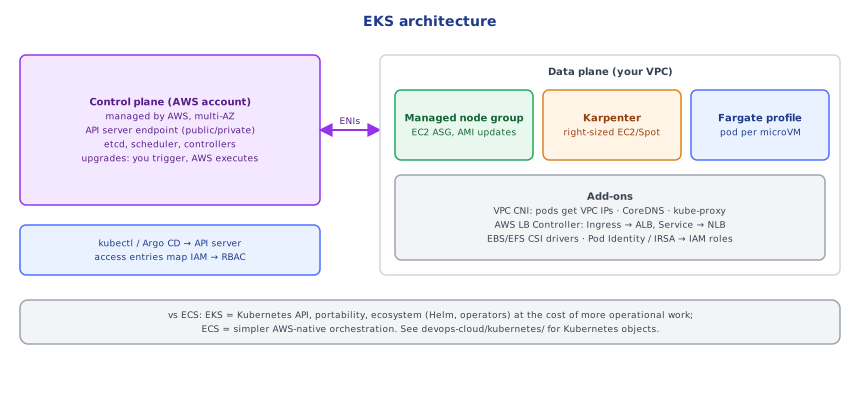
Amazon EKS runs the Kubernetes control plane for you (API server, etcd, scheduler, controllers) across three AZs, upgraded and patched by AWS. You run the data plane — the nodes where pods run — or let AWS manage that too. Kubernetes itself is covered in devops-cloud/kubernetes/; this topic is about how it integrates with AWS.
                ┌──────────── EKS control plane (AWS-managed, multi-AZ) ────────────┐
kubectl/CI ───► │ API server · etcd · scheduler · controllers   (~$0.10/hour/cluster)│
                └───────────────▲──────────────────────────────────▲───────────────┘
                     ENIs in your VPC                         node registration
     ┌──────────────────┴────────────┐       ┌───────────────────┴───────────────┐
     │ managed node group (EC2 ASG)   │       │ Fargate profile / Karpenter nodes │
     │ pods get VPC IPs (VPC CNI)     │       │                                   │
└────────────────────────────────┘ └───────────────────────────────────┘2Compute Options
| Option | You manage | Notes |
|---|---|---|
| Managed node groups | instance types, scaling bounds | AWS handles node provisioning, AMI updates (rolling), draining |
| Self-managed nodes | everything (ASG, AMI, upgrades) | maximum control, most work |
| Karpenter | NodePool constraints | provisions right-sized EC2 instances just-in-time for pending pods, consolidates underused nodes, Spot-friendly — the modern default for autoscaling |
| EKS Auto Mode | almost nothing | AWS-managed Karpenter, networking, storage and load balancing components |
| Fargate profiles | nothing (per-pod micro-VMs) | no DaemonSets, no GPUs, higher per-pod cost; simple for small workloads |
3Networking: The VPC CNI
By default (Amazon VPC CNI), every pod gets a real VPC IP address from the node's subnet (secondary IPs/prefixes on the node's ENIs). Pods are directly routable inside the VPC — security groups, VPC flow logs and NLBs work at the pod level — but IP exhaustion is a real risk: size subnets generously (e.g. /19 per AZ for nodes+pods), enable prefix delegation (assign /28 blocks per ENI slot to raise pod density), or use secondary CIDR ranges (100.64.0.0/10) for pods.
Load balancing: the AWS Load Balancer Controller watches Kubernetes Ingress (→ ALB) and Service type: LoadBalancer (→ NLB) objects and provisions/configures them, using IP targets that point directly at pod IPs.
4IAM: Two Directions
Humans/CI → cluster (authentication + RBAC):
- EKS access entries map IAM principals (roles) to Kubernetes permissions (access policies like
AmazonEKSClusterAdminPolicy, or Kubernetes groups bound with RBAC). This replaces editing the oldaws-authConfigMap. - Use roles assumed via SSO/OIDC, not IAM users.
Pods → AWS APIs (workload identity):
- EKS Pod Identity (recommended): associate an IAM role with a Kubernetes service account; the Pod Identity agent hands pods temporary credentials.
- IRSA (IAM Roles for Service Accounts): the cluster's OIDC provider issues service-account tokens that STS exchanges (
AssumeRoleWithWebIdentity) for role credentials. - Never give the node role broad permissions — every pod on the node could use them (block IMDS access from pods with hop limit 1).
5Add-ons and Day-2 Operations
- Managed add-ons: VPC CNI, CoreDNS, kube-proxy, EBS CSI driver (persistent volumes), Pod Identity agent — versioned and upgraded via EKS.
- Common extras: AWS Load Balancer Controller, Karpenter, external-dns (Route 53 records from Ingress), cert-manager, metrics-server, CloudWatch Container Insights / Prometheus + Grafana, Fluent Bit, external-secrets (Secrets Manager → Kubernetes Secrets).
- Upgrades: Kubernetes minor versions get ~14 months of standard support (then paid extended support). Upgrade the control plane one minor version at a time, then add-ons, then nodes (managed node groups roll; Karpenter drifts nodes to the new AMI). Check deprecated API usage first.
- Cost: control plane fee + EC2/Fargate + load balancers + NAT/data transfer; Karpenter consolidation and Spot are the big levers.
6ECS or EKS?
Pick EKS when you need Kubernetes APIs and ecosystem (Helm charts, operators, service meshes, GitOps with Argo CD), multi-cloud/hybrid portability, or already have Kubernetes skills. Pick ECS (15-ecs_fargate_and_ecr/) for simpler AWS-only container platforms with less operational overhead.
Under the HoodHow a Pod Gets an IP and AWS Credentials▾
When the scheduler binds a pod to a node, the kubelet calls the VPC CNI plugin, which takes a free secondary IP (or an address from a delegated /28 prefix) already attached to one of the node's ENIs by the ipamd daemon (which keeps a warm pool of IPs to make pod startup fast), creates a veth pair into the pod's network namespace and sets routes — no overlay, no encapsulation. For credentials with Pod Identity, the pod's service account is associated with an IAM role; EKS injects environment variables pointing the AWS SDK's container credentials provider at the Pod Identity agent (a DaemonSet listening on a link-local address). The agent exchanges the pod's projected service-account token with the EKS Auth API for temporary role credentials, scoped to that pod's identity — so two pods on the same node can have completely different AWS permissions.
⚠️ Common Pitfalls
- Small subnets — pods run out of IPs.
- Broad node IAM roles used implicitly by every pod.
- Skipping upgrades until versions fall out of support.
- Managing
aws-authby hand (use access entries) and losing cluster access. - No resource requests on pods — Karpenter/cluster autoscaler can't size nodes correctly.
- Public API endpoint open to the world without restrictions — use private endpoint or CIDR allow-lists.
📋 Quick Reference
control plane managed (~$0.10/h) · compute: managed node groups / Karpenter / Auto Mode / Fargate
VPC CNI: pod = VPC IP → size subnets, prefix delegation · LB Controller: Ingress→ALB, Service LB→NLB
IAM: access entries (who can use the cluster) · Pod Identity / IRSA (what pods can call) · minimal node role
add-ons: CNI, CoreDNS, kube-proxy, EBS CSI · upgrade one minor at a time (control plane → add-ons → nodes)
🧠 Key takeaways
- EKS manages a multi-AZ control plane; you own nodes/add-ons, upgrades scheduling, and workloads.
- Compute: managed node groups, Karpenter (right-sized, Spot, consolidation) or Fargate profiles.
- The VPC CNI gives pods VPC IPs (plan subnet size!); the AWS Load Balancer Controller maps Ingress → ALB, Service → NLB.
- IAM both ways: access entries map IAM → RBAC; Pod Identity/IRSA gives pods least-privilege roles.
🎤 Interview Q&A
Q1What does EKS manage and what do you manage?core▾
AWS runs the Kubernetes control plane (API server, etcd) across AZs. You manage worker nodes (managed node groups, Fargate profiles or Karpenter), add-ons, networking, upgrades of nodes, and workloads.
- How often must you upgrade? Kubernetes minor versions roughly every few months; EKS supports each ~14 months standard.
Q2How do pods get AWS permissions?core▾
IRSA (IAM Roles for Service Accounts via OIDC) or EKS Pod Identity: each service account maps to an IAM role, giving pods least-privilege credentials instead of using the node's role.
- Why not the node role? Every pod on the node would get the same permissions.
Q3How does networking work in EKS?senior▾
The VPC CNI assigns real VPC IP addresses to pods, so pods are directly routable in the VPC; this can exhaust subnet IPs (mitigated with prefix delegation or larger subnets). The AWS Load Balancer Controller creates ALBs/NLBs from Ingress/Service resources.
- IP exhaustion fix? Prefix delegation or secondary CIDRs.
Q4How do you autoscale EKS?core▾
HPA scales pods on metrics; Karpenter (or Cluster Autoscaler) adds and removes nodes based on pending pods, choosing instance types and Spot capacity efficiently.
- Why Karpenter? Faster, more flexible provisioning without fixed node groups.
Q5How do you upgrade an EKS cluster safely?core▾
Check deprecated APIs, upgrade the control plane one minor version at a time, update add-ons (CNI, CoreDNS, kube-proxy), then roll nodes with PodDisruptionBudgets in place; or blue/green clusters for major changes.
- Tool to detect deprecated APIs? pluto or kubent.
🛠️ Practice exercises
Each exercise is a file in this topic folder. Code exercises are self-checking: run them and make the checks pass.
✅ Check yourself
Answer the questions — feedback is instant.