# Next.js Fundamentals
## 1. What Next.js Actually Is
React is a rendering library — it turns component trees into UI, but it has no opinion on routing, data fetching, bundling, or how your app gets from source files to a running server. Next.js is a **framework built on top of React** that supplies all of that: a file-system router, a build pipeline (based on Webpack or Turbopack), a server runtime, and a rendering model that mixes server-rendered and client-rendered output in the same tree.
```
React → component model, reconciliation, hooks
Next.js → routing, bundling, server runtime, rendering strategy, deployment target
Your components → written in React, orchestrated by Next.js conventions
```
The unit you install is `next`, plus `react` and `react-dom` as peer dependencies — Next.js does not replace React, it wraps it.
## 2. Project Structure (App Router)
```
my-app/
app/
layout.tsx # root layout — wraps every page, required
page.tsx # route: /
globals.css
about/
page.tsx # route: /about
blog/
[slug]/
page.tsx # route: /blog/:slug
public/ # static assets served at /
next.config.js
package.json
```
Every folder under `app/` is a **route segment**. A folder becomes a navigable URL only when it contains a `page.tsx` — folders without one are just structural (e.g. for co-locating components) and add nothing to the URL unless combined with routing conventions covered in the Routing topic.
## 3. `layout.tsx` vs `page.tsx`
```tsx
// app/layout.tsx
export default function RootLayout({ children }: { children: React.ReactNode }) {
return (
{children}
);
}
```
```tsx
// app/page.tsx
export default function HomePage() {
return
Welcome
;
}
```
`layout.tsx` renders the shared chrome (nav, footer, providers) and receives `children` — the matched page or nested layout. `page.tsx` is the actual leaf content for that route. The root `layout.tsx` is mandatory because it owns the `` and `` tags; Next.js does not inject them for you elsewhere.
## 4. Rendering Models
| Model | When it runs | Output |
|---|---|---|
| Static Rendering (SSG) | at build time | pre-rendered HTML, served from cache/CDN |
| Dynamic Rendering (SSR) | per request, on the server | fresh HTML generated per request |
| Client Rendering (CSR) | in the browser | JS executes, renders/updates the DOM |
| Streaming | server, incrementally | HTML sent in chunks as pieces become ready |
A component is **static by default** unless it reads something request-specific (cookies, headers, search params, an uncached `fetch`) or is explicitly marked dynamic — at which point Next.js opts the route into per-request rendering.
```tsx
// app/page.tsx — static by default: no request-specific data read
export default async function Page() {
const data = await fetch("https://api.example.com/posts", {
cache: "force-cache", // default — enables static rendering
}).then((r) => r.json());
return ;
}
```
```tsx
// app/page.tsx — dynamic: reading cookies opts the route out of static rendering
import { cookies } from "next/headers";
export default async function Page() {
const theme = (await cookies()).get("theme")?.value ?? "light";
return
...
;
}
```
## 5. The Build Pipeline
```
next dev → dev server, fast refresh, on-demand compilation (Turbopack or Webpack)
next build → production build: type-checks, bundles, statically analyzes every route,
pre-renders static routes to HTML, generates the route manifest
next start → runs the production server produced by `next build`
```
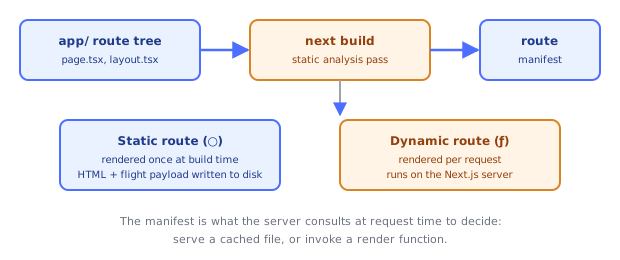
`next build` prints a route table classifying every route as `○` (Static), `ƒ` (Dynamic), or streaming-capable — this is Next.js telling you, per route, which rendering model it picked based on the code you wrote, not a setting you configure globally.
## 6. Data Fetching Is Just `fetch` (Extended)
Next.js patches the global `fetch` on the server to add caching and revalidation options that plain `fetch` doesn't have:
```tsx
fetch(url, { cache: "force-cache" }); // cache indefinitely (default for GET)
fetch(url, { cache: "no-store" }); // always fetch fresh, forces dynamic rendering
fetch(url, { next: { revalidate: 60 } }); // Incremental Static Regeneration — revalidate every 60s
```
This is the mechanism ISR (Incremental Static Regeneration) is built on: a statically rendered page is served from cache, and after `revalidate` seconds elapse, the next request triggers a background re-render that replaces the cached HTML.
## 7. Metadata
```tsx
// app/page.tsx
export const metadata = {
title: "My App",
description: "A Next.js app",
};
```
Exporting a `metadata` object (or a `generateMetadata` async function for dynamic values) from a `page.tsx`/`layout.tsx` is how Next.js builds `` tags — no manual `` component like the old Pages Router required.
## Under the Hood
**`next build` is a static analysis pass over your route tree, not just a bundler run.** When you run `next build`, Next.js's compiler walks every file under `app/`, determines for each route segment whether it can be fully pre-rendered (no dynamic APIs used, no uncached fetch) or must be server-rendered per request, and emits a **route manifest** — a JSON description of every route, its rendering strategy, and which JS chunks it needs. This manifest is what the Next.js server (or the platform running it, e.g. Vercel) consults at request time to decide: serve a cached HTML file straight from disk/CDN, or invoke a server-side render function.
**The dev server and the production server are genuinely different code paths.** `next dev` runs an on-demand compiler: routes are compiled lazily, the first time they're requested, which is why the first hit to a fresh page in dev is slow and subsequent hits are fast (module compilation is cached in memory). `next build` + `next start` runs the fully compiled, statically analyzed production server — every route's code and rendering strategy is fixed ahead of time, so per-request work is just "run the render function this route was determined to need," not "figure out what this route needs."
**Static rendering means literally writing an HTML file (plus a serialized RSC payload) to disk at build time.** For a route Next.js determines is static, `next build` executes your Server Components once during the build, captures the resulting HTML and the React Server Component "flight" payload (the serialized tree format covered in depth in the Server Components topic), and writes both to `.next/server/app/`. At request time, the server (or CDN) just streams those pre-built files back — no React rendering happens per request at all for a purely static route.
## Common Pitfalls
1. **Forgetting the root `layout.tsx` must contain `` and ``** — omitting them is a build error, since Next.js does not inject them automatically outside the Pages Router's `_document.js` equivalent.
2. **Assuming every component is "server-side rendered" the same way** — a route can mix static, dynamic, and streamed segments; "SSR" isn't one blanket mode, it's a per-route (and per-component, once Client Components enter the picture) decision Next.js makes from your code.
3. **Not realizing `fetch` caching defaults changed across Next.js versions** — historically `fetch` cached by default; more recent versions default to `no-store` for certain contexts. Always pass an explicit `cache`/`next.revalidate` option rather than relying on the implicit default.
4. **Treating `public/` and `app/` the same** — only literal static files (images, fonts, `favicon.ico`) belong in `public/`, served as-is at the root URL; components and routes belong in `app/`.
5. **Expecting `next dev` performance to predict production performance** — dev mode trades runtime speed for fast iteration (unminified bundles, on-demand compilation); always benchmark against a `next build && next start` run.
## Quick Reference
```
app/layout.tsx → shared shell, must include / at root
app/page.tsx → route leaf content
app//page.tsx → nested route
public/ → static files served at /
metadata export → builds tags
fetch(url, {cache: "force-cache"}) → static (default)
fetch(url, {cache: "no-store"}) → dynamic, per-request
fetch(url, {next: {revalidate: N}}) → ISR, revalidate every N seconds
next dev / next build / next start → dev server / production build / production server
```