# Next.js Server Components — Part 2: The Flight Protocol, For Real
## 1. Server Components Don't Render to HTML Directly
It's tempting to think "Server Component runs on the server, so it must just produce an HTML string." That's not what happens. A Server Component tree is first serialized into React's own wire format — informally called **"Flight"** or the **RSC payload** — and *that* is what the server sends. HTML is generated from the Flight payload as a separate step (for the initial page load); on subsequent client-side navigations, the Flight payload is sent alone and the client's React runtime updates the DOM from it directly, with no full HTML re-render at all.
## 2. What the Flight Payload Actually Looks Like
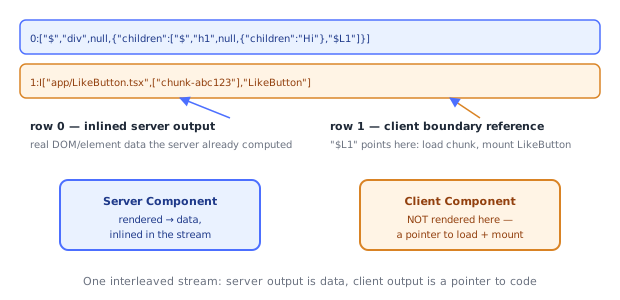
It's a compact, streaming, line-oriented format — not JSON, not HTML. A simplified real excerpt for a tree like `` looks roughly like:
```
0:["$","div",null,{"className":"page","children":[
"$","article",null,{"children":[
"$","h1",null,{"children":"Hi"},
"$L1"
]}
]}]
1:I["app/LikeButton.tsx",["chunk-abc123"],"LikeButton"]
```
Two structural ideas make this format what it is:
- **Server-rendered elements are inlined directly** — `["$", type, key, props]` tuples describe actual DOM/host elements the server already resolved, including everything a Server Component computed (data it fetched, loops it ran, conditionals it evaluated).
- **Client Component boundaries are references, not inlined output** — `"$L1"` is a placeholder pointing at row `1`, which is an `I[...]` ("import") instruction telling the client runtime: *don't try to render this inline — instead, load the JS module for `LikeButton` from this chunk, and mount it here, on the client.*
This is the literal mechanism behind "Server Components render on the server, Client Components render (or at least hydrate/mount) on the client, in the same tree": the payload is one interleaved stream where server output is data and client output is a pointer to code.
## 3. Streaming: Why It's Sent in Chunks, Not One Blob
```
0:["$","div",null,{"children":["$","h1",null,{"children":"Post"},"$L1"]}]
1:I["app/Comments.tsx",["chunk-xyz"],"Comments"]
/* ... network gap while the server awaits a slow data source for Comments ... */
2:["$","ul",null,{"children":[["$","li",null,{"children":"First comment"}], ...]}]
```
Because Flight is a **stream** of numbered rows, not a single JSON document, the server can send the shell of the page immediately and append rows as slower `async` Server Components resolve — this is the actual mechanism `loading.tsx`/`` rely on: the fallback is shown from the rows already received, and swapped for real content the moment the corresponding later row arrives, without waiting for the entire tree to finish.
## 4. `"use client"` Is a Real Compiler Directive, Not a Runtime Flag
```tsx
"use client";
export default function Counter() {
/* ... */
}
```
When the string literal `"use client"` appears as the first statement in a file, Next.js's compiler treats the **entire module** as a client boundary at build time — this changes what gets bundled, not just how the code behaves at runtime:
1. The compiler bundles `Counter.tsx` and everything it imports into a client-side JS chunk, the same way any client bundler (Webpack/Turbopack) would bundle browser code.
2. In the **server** build, that same file is replaced with a small stub — a reference object carrying the chunk ID and export name — instead of the real function. This is exactly the `I["app/LikeButton.tsx", [...], "LikeButton"]` instruction from Section 2: it exists because the server-side module graph literally does not contain `Counter`'s real implementation anymore, only a pointer to where the client can fetch it.
3. Every module `Counter.tsx` imports transitively also gets pulled into the client bundle — this is why putting `"use client"` at the top of a file that imports a huge library pulls that whole library into the browser bundle, even if only a small piece of the file is actually interactive.
The inverse is not marked at all: **Server Components have no directive** — the default, un-annotated state — because they're the baseline; `"use client"` is the opt-out that tells the compiler "stop treating this subtree as server-only, start treating it as a real client bundle entry point, and insert a boundary reference here."
## 5. Hydration on the Client
```tsx
// generated (conceptually) by Next.js's client entry point
import { hydrateRoot } from "react-dom/client";
import { createFromFetch } from "react-server-dom-webpack/client";
const flightResponse = createFromFetch(fetch("/page-rsc-payload"));
hydrateRoot(document, flightResponse);
```
On the initial page load, the browser already has server-rendered HTML (for fast paint) *and* the Flight payload (embedded in a `