# Tailwind CSS
## 1. Utility-First, Not Component-Scoped
Tailwind is a CSS framework built entirely from small, single-purpose **utility classes** — each one maps to one CSS declaration (or a tightly related group of them). Instead of writing a `.card { padding: 1rem; border-radius: 0.5rem; }` rule in a separate stylesheet and applying `className="card"`, you compose the same result directly in markup from existing utilities:
```tsx
// Traditional component-scoped CSS
// styles.css: .card { padding: 1rem; border-radius: 0.5rem; background: white; box-shadow: ...; }
...
// Tailwind: compose from utilities, no separate stylesheet to maintain
...
```
The tradeoff is explicit: markup gets more verbose (a long `className` string), but you never invent new class names, never hunt through a stylesheet to find what `.card` does, and never worry about a class colliding with an unrelated one elsewhere in the app — the class names themselves already say exactly what they do.
## 2. Spacing, Sizing, and Color Scales
```tsx
```
Spacing utilities (`m-`, `p-`, `w-`, `h-`, `gap-`, ...) use a consistent numeric scale (Tailwind's default step is `0.25rem` per unit, so `p-4` = `1rem`), and color utilities (`text-`, `bg-`, `border-`, ...) draw from a fixed palette with numbered shades (`50` lightest to `950` darkest) per color name — the scale is what keeps an app's spacing/colors visually consistent without a design system being separately maintained and cross-checked by hand.
## 3. Responsive Prefixes
```tsx
{/* text-sm by default (mobile-first base), text-base at md breakpoint+, text-lg at lg+ */}
```
```
sm: >= 640px
md: >= 768px
lg: >= 1024px
xl: >= 1280px
2xl: >= 1536px
```
Every utility can be prefixed with a breakpoint name, and unprefixed utilities apply at **all** sizes as the mobile-first base — a prefixed utility only overrides at that breakpoint and above (`min-width` media queries under the hood), never below it. There's no separate "mobile stylesheet"; responsiveness is expressed inline, per element, exactly where the rest of that element's styling lives.
## 4. State Variants
```tsx
```
`hover:`, `focus:`, `active:`, `disabled:`, `first:`, `last:`, `even:`/`odd:`, and many more prefix any utility to apply it only in that state — this compiles to the equivalent CSS pseudo-class/selector (`:hover`, `:disabled`, `:nth-child(even)`, ...) rather than requiring any JavaScript state tracking for purely visual state changes.
## 5. Composing Classes Conditionally
```tsx
import clsx from "clsx"; // or a project-specific `cn` helper wrapping clsx + tailwind-merge
function Badge({ variant, active }: { variant: "success" | "error"; active: boolean }) {
return (
{variant}
);
}
```
Because a Tailwind `className` is just a string, conditional styling is plain JavaScript string composition — no CSS-in-JS runtime, no dynamically generated class names. `clsx` (or `classnames`) is a small utility for building that string cleanly from a mix of static strings and conditional expressions; `tailwind-merge` additionally resolves conflicts when two conditional branches supply competing utilities for the same property (e.g. `p-2` and `p-4` both present — last one shouldn't just get appended, it should replace).
## 6. The `@apply` Escape Hatch
```css
/* styles.css */
.btn-primary {
@apply px-4 py-2 rounded-lg bg-blue-600 text-white font-medium hover:bg-blue-700;
}
```
`@apply` lets a small number of utilities be bundled into one named class inside an actual CSS file — used sparingly, for a handful of patterns repeated so often across unrelated markup that inlining the same long utility string everywhere becomes real duplication (a shared button style used in dozens of places). It's explicitly not meant to become "write component-scoped CSS again for everything," which would undo the traceability benefit of seeing every element's exact styling at its usage site.
## 7. Configuration and Content Scanning
```js
// tailwind.config.js
module.exports = {
content: ["./src/**/*.{js,jsx,ts,tsx}"], // files Tailwind scans for class names
theme: {
extend: {
colors: { brand: "#5b21b6" }, // adds text-brand, bg-brand, etc. alongside the defaults
},
},
};
```
The `content` array tells Tailwind's build step which files to scan for class name usage — this is what enables production builds to ship only the CSS actually used (see Under the Hood), and `theme.extend` is how a project layers custom design tokens (brand colors, custom spacing) on top of the default scale without discarding it.
## Under the Hood
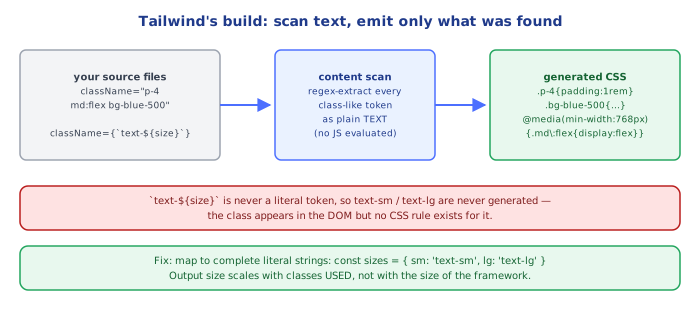
**Tailwind generates no CSS speculatively — it scans your actual source files for class name strings and emits only what's found.** Unlike a traditional framework that ships a fixed stylesheet with every possible rule pre-defined, Tailwind's build step (a PostCSS plugin) treats every file matched by `content` as plain text, extracts every substring that looks like a utility class name via pattern matching, and generates CSS rules only for the classes it actually finds used. A project that never writes `mt-96` never ships CSS for `mt-96`, no matter how large Tailwind's theoretical utility set is — this is why the framework can offer such an enormous combinatorial utility surface (every spacing value × every property × every breakpoint × every state) without shipping a correspondingly enormous stylesheet.
**This scanning is naive string matching, not JavaScript evaluation — which is why dynamically constructed class names silently produce no CSS.** Because the scanner just looks for literal substrings in your source text, `className={\`text-${size}\`}` never works as expected: at build time, the scanner sees the literal text `` `text-${size}` `` in the file, not the resolved string `text-lg` that only exists at runtime — so no `text-lg` rule ever gets generated, and the class silently does nothing when the app runs. The fix is always to write out every possible full class name literally somewhere the scanner can see it (e.g. a lookup object mapping `size` to a complete class string, as shown in Common Pitfalls), never to interpolate a partial class name.
## Common Pitfalls
1. **Dynamically constructing class names via string interpolation** (`` `bg-${color}-500` ``) — the content scanner can't see the resolved string, so no CSS is generated for it; use a static lookup object mapping known values to complete literal class strings instead.
2. **Reaching for `@apply` everywhere** — turns Tailwind back into hand-maintained CSS files with all the original downsides (a name to invent, a separate file to open to see what it does); reserve it for genuinely repeated, stable patterns.
3. **Manually concatenating conflicting utilities** (`className={\`p-2 ${isLarge ? "p-8" : ""}\`}`) without a merge-aware helper — both classes end up in the DOM and CSS's normal cascade/specificity rules (usually declaration order) decide the winner, which is fragile; use `tailwind-merge`/`cn` to resolve the conflict deterministically instead.
4. **Forgetting the `content` glob doesn't cover a directory** (e.g. a shared UI package outside `src/`) — classes used there get silently purged from the production build even though they render fine in dev (where Tailwind's JIT watches more broadly), because production scanning only trusts `content`.
5. **Assuming responsive prefixes are "this breakpoint only"** — `md:text-lg` applies at `md` **and every wider breakpoint** unless overridden by a later, more specific prefixed utility (`min-width` cascading, not range-bound), which trips up anyone expecting `max-width`-style exclusive ranges.
## Quick Reference
```
Spacing: p-4 / m-2 / px-6 / py-3 / gap-4 (scale: n * 0.25rem by default)
Sizing: w-64 / h-32 / max-w-md
Color: text-{color}-{50..950} / bg-{color}-{50..950} / border-{color}-{50..950}
Responsive: {none}=mobile-base sm: md: lg: xl: 2xl: (min-width, cascades upward)
State: hover: focus: active: disabled: first: last: even: odd:
Composition: clsx(base, cond && "utility", ...) — or tailwind-merge/cn to resolve conflicts
@apply → bundle a few utilities into one named class in real CSS (use sparingly)
content: [] in tailwind.config.js → files scanned to decide which utilities ship in prod
Pitfall: no dynamic `` `text-${x}` `` interpolation — scanner needs the literal string present
```