React Fundamentals
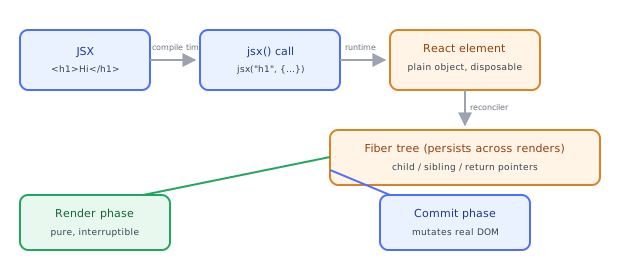
React lets you describe UI as a function of state and handles DOM updates for you. Follow JSX as it compiles to function calls, becomes plain element objects, and is reconciled into real DOM.
🎯 What you'll learn
- What problem React solves
- JSX as syntactic sugar; elements as plain objects
- Components as functions returning elements
- Rendering to the DOM: from JSX to pixels
1What Problem React Solves
Before React, updating the DOM directly (document.createElement, .appendChild, .innerHTML) meant you had to track, by hand, exactly which nodes were stale and how to mutate them without breaking the rest of the page. That's manageable for a button but becomes unmanageable for an app with hundreds of interdependent UI states.
React's core idea: you describe what the UI should look like for a given state, and React figures out how to make the real DOM match. You never call .appendChild yourself. You write a function that returns a description of the UI, and React diffs that description against what's currently on screen.
// Imperative (you manage every mutation)
const btn = document.createElement("button");
btn.textContent = "Count: 0";
let count = 0;
btn.addEventListener("click", () => {
  count++;
  btn.textContent = `Count: ${count}`; // YOU find and update this node
});
document.body.appendChild(btn);

// Declarative (React manages the mutation)
function Counter() {
  const [count, setCount] = useState(0);
  return <button onClick={() => setCount(count + 1)}>Count: {count}</button>;
}
In the declarative version you never touch the DOM. You describe the button for the current count, and call setCount when it should change. React re-runs Counter, gets a new description, and patches only the text node that actually changed.
2JSX Is Syntactic Sugar
JSX (<button>...</button> inside a .tsx file) is not HTML and is not a runtime feature of JavaScript. It's compiled away entirely before your code ever runs — by the TypeScript compiler or Babel, depending on your toolchain.
const element = <h1 className="title">Hello, {name}</h1>;compiles to (modern "automatic" JSX runtime, React 17+):
import { jsx as _jsx } from "react/jsx-runtime";
const element = _jsx("h1", { className: "title", children: `Hello, ${name}` });
_jsx (or the older React.createElement) is just a function call. JSX is purely a more readable way to write nested function calls — there is no special parser magic happening at runtime, only at build time.
3React Elements Are Plain Objects
Calling jsx(...) (or React.createElement(...)) does not create a DOM node. It creates a plain, lightweight, serializable JavaScript object called a React element:
// Roughly what <h1 className="title">Hello</h1> becomes at runtime:
{
  $$typeof: Symbol.for("react.element"),
  type: "h1",
  key: null,
  props: { className: "title", children: "Hello" },
}
This matters: elements are cheap to create and throw away. Every render of a component creates a brand-new tree of these plain objects — React never mutates an old element object, it always builds a fresh tree and compares it to the previous one (see the "Rendering and reconciliation" topic for exactly how that comparison works).
type can be a string ("h1", "div" — a host/DOM element) or a function/class (your own component) or certain special symbols (Fragment, Suspense, etc.).
4Components: Functions That Return Elements
A component is just a function that takes props and returns a React element tree (or null).
type GreetingProps = { name: string };

function Greeting({ name }: GreetingProps) {
  return <p>Hello, {name}!</p>;
}

// Using it — this call also just produces a plain element object:
// { type: Greeting, props: { name: "Ana" } }
const el = <Greeting name="Ana" />;
Critically: <Greeting name="Ana" /> does not call Greeting() immediately. It creates an element object with type: Greeting. React itself calls Greeting(props) later, during rendering, when it walks the tree.
5Rendering to the DOM
The one place your app touches the real DOM directly is the entry point, where you mount the root:
// main.tsx
import { createRoot } from "react-dom/client";
import App from "./App";

const container = document.getElementById("root")!;
const root = createRoot(container);
root.render(<App />);
createRoot creates a React root tied to one real DOM node. root.render(<App />) hands React an element tree; from that point forward, React owns everything inside container — it decides which real DOM nodes to create, update, or remove, and you never call DOM APIs on that subtree yourself again.
6Function Components vs Class Components
Modern React code is almost entirely function components with hooks. Class components still work (React has no plans to remove them) but are considered legacy for new code:
// Function component (current standard)
function Welcome({ name }: { name: string }) {
  return <h1>Welcome, {name}</h1>;
}

// Class component (legacy, still supported)
class WelcomeClass extends React.Component<{ name: string }> {
  render() {
    return <h1>Welcome, {this.props.name}</h1>;
  }
}
Both produce the identical kind of output (a React element tree). The difference is entirely in how they hold local state and hook into lifecycle — covered in the "State" and "Component lifecycle" topics.
Under the HoodFrom JSX to Pixels▾
Compile time: JSX becomes function calls
Your build tool (esbuild/SWC in Vite, or Babel in CRA) transforms every JSX tag into a jsx(type, props, key) call before the browser or Node ever sees your code. TypeScript itself can do this transform too when jsx: "react-jsx" is set in tsconfig.json — it's not React-specific magic, it's a compiler transform target that any tool can implement.
First render time: elements become a Fiber tree
When root.render(<App />) runs, React doesn't just recurse through your element tree and produce DOM nodes directly. It builds a parallel data structure called the fiber tree — one fiber (a plain JS object) per component/host element, forming a linked structure (child, sibling, return pointers — not an array of children) that mirrors your element tree but persists across renders and carries bookkeeping React needs (memoizedState, memoizedProps, flags, etc). Fibers are the actual unit of work React's reconciler processes; elements are just the ephemeral, disposable description each render produces.
<App>                         Fiber tree (persists across renders)
  <Header/>          ─────►   FiberRoot
  <Main>                        └─ App fiber
    <Counter/>                      ├─ Header fiber
  </Main>                           └─ Main fiber
</App>                                   └─ Counter fiber
The two phases: render and commit
React processes work in two distinct phases:
- Render phase — React calls your component functions, builds/updates the fiber tree, and computes what changed. This phase can be paused, thrown away, or redone (React uses this for concurrent features like time-slicing) because it has no visible side effects — nothing touches the real DOM yet.
- Commit phase — React walks the fiber tree's recorded effects and applies them to the real DOM in one synchronous pass: inserting, updating, and removing actual nodes, then running layout effects and (asynchronously, after paint) passive effects (
useEffect). This phase is not interruptible — once it starts, it runs to completion, because a half-applied DOM mutation would leave the screen in a broken state.
This two-phase split is the mechanical reason your component function body must stay pure (no DOM mutation, no side effects) — it can run multiple times, or be discarded, before anything ever reaches the screen. Only code inside useEffect/useLayoutEffect is guaranteed to run exactly once per actual commit.
⚠️ Common Pitfalls
- Treating JSX as HTML — attributes are camelCase (
className,onClick,htmlFor), and every tag must close (<img />, not<img>). It's JavaScript, not markup. - Assuming
<Component />calls the function immediately — it only builds an element object; React decides when (and whether) to actually invoke your function. - Mutating the DOM directly alongside React (e.g.
document.querySelector(...).style.color = "red"inside a component body) — React doesn't know about that change, so the next render can silently overwrite or conflict with it. - Forgetting a component must return a single root — return a
Fragment(<>...</>) or array, not multiple sibling elements with no wrapper. - Putting side effects (network calls, subscriptions) directly in the component body — the render phase can run more than once per commit (React may call your function again to recompute) or be thrown away, so anything with a real-world effect belongs in
useEffect, not in the function body itself.
📋 Quick Reference
| Concept | What it actually is |
|---|---|
| JSX | Compile-time syntax sugar for jsx()/createElement() calls |
| React element | A plain, immutable JS object describing what to render ({ type, props }) |
| Component | A function that takes props and returns elements |
| Fiber | A persistent JS object per component/host node; the reconciler's real unit of work |
| Render phase | Calls components, builds/diffs fiber tree — pure, interruptible, no DOM writes |
| Commit phase | Applies DOM mutations, runs layout/passive effects — synchronous, not interruptible |
createRoot(...).render(<App />) | The one place your code hands React ownership of a real DOM subtree |
🧠 Key takeaways
- React: UI = f(state); you describe the result, React updates the DOM.
- JSX compiles to
jsx()/createElementcalls that return plain element objects. - Components are functions returning elements; React calls them, not you.
- Rendering = compute the tree; commit = apply minimal DOM changes.
🎤 Interview Q&A
Q1What is React and what problem does it solve?core▾
A library for building UIs from components, where UI is a function of state: you describe what the UI should look like for a given state and React updates the DOM efficiently when state changes. It replaces manual, error-prone DOM manipulation.
- Library or framework? A library; frameworks like Next.js add routing, data fetching and rendering strategies.
Q2What is JSX?core▾
Syntax sugar that compiles to React.createElement/jsx() calls producing element objects. It allows embedding JavaScript expressions in {} and uses className, camelCase event handlers and self-closing tags.
- Why must components return one root? A function returns one value; use fragments
<>…</>to group.
Q3What does 'declarative' mean in React?core▾
You describe the desired UI for the current state, and React figures out the DOM operations, instead of imperatively adding/removing elements yourself.
- What's one-way data flow? Data flows down via props; changes flow up via callbacks.
Q4Why are keys needed in lists?core▾
Keys identify items across renders so React can match, move, add or remove the right elements and preserve their state. Use stable unique IDs, not array indexes when lists can reorder or change.
- Bug from index keys? Input values or component state attached to the wrong item after reordering.
Q5What are React's rendering strategies in modern apps?senior▾
Client-side rendering (SPA), server-side rendering with hydration, static generation, and React Server Components that render on the server and stream to the client, combined with Suspense.
- Why SSR? Faster first paint and better SEO.
🛠️ Practice exercises
Each exercise is a file in this topic folder. Code exercises are self-checking: run them and make the checks pass.
✅ Check yourself
Answer the questions — feedback is instant.