# State
## 1. Props vs State
Props are data handed to a component from outside; **state** is data a component owns and manages itself, which can change over time and causes the component to re-render when it does.
```tsx
function Counter() {
const [count, setCount] = useState(0); // state: owned by Counter
return ;
}
```
`count` belongs to this exact instance of `Counter`. No parent passed it in; nothing outside `Counter` can read or change it directly.
| | Props | State |
|---|---|---|
| Owner | Parent component | The component itself |
| Mutable by | Parent (by re-rendering with new props) | The component (via its setter function) |
| Triggers re-render on change | Yes | Yes |
| Initial value set by | Parent, every render | The component, only on first render |
## 2. Declaring State with `useState`
```tsx
const [value, setValue] = useState(initialValue);
```
`useState` returns a pair: the current value, and a function to request a change to it. Calling the setter does **not** mutate `value` in place — it schedules a re-render in which `useState` will return the new value.
```tsx
function NameForm() {
const [name, setName] = useState("");
return (
setName(e.target.value)} />
);
}
```
## 3. State Updates Are Asynchronous (Batched) and Don't Merge
Two things trip people up constantly:
```tsx
function BuggyCounter() {
const [count, setCount] = useState(0);
function handleClick() {
setCount(count + 1); // count is still 0 here (closed over from this render)
setCount(count + 1); // still reads count === 0 — NOT count === 1
// net effect: count becomes 1, not 2
}
return ;
}
```
`count` inside `handleClick` is a value captured from the render that created this closure — it never changes mid-function no matter how many times you call `setCount`. Use the **updater function** form to base a new value on the actual latest state:
```tsx
function FixedCounter() {
const [count, setCount] = useState(0);
function handleClick() {
setCount((prev) => prev + 1); // prev is guaranteed the latest value
setCount((prev) => prev + 1); // net effect: count becomes 2
}
return ;
}
```
Also — unlike class `this.setState`, the `useState` setter **replaces** the value entirely; it does not shallow-merge object state for you:
```tsx
const [user, setUser] = useState({ name: "Ana", age: 30 });
setUser({ age: 31 }); // ❌ WRONG — name is now gone, user is { age: 31 }
setUser((prev) => ({ ...prev, age: 31 })); // ✅ correct — spread to merge
```
## 4. State Is Local to the Component Instance
Each rendered instance of a component gets its own, independent state — even if it's the exact same function, rendered twice:
```tsx
function App() {
return (
<>
{/* has its own count */}
{/* completely separate count, starts at 0 */}
);
}
```
Clicking one ``'s button never affects the other's — they are different fiber instances (see the "Under the Hood" section for exactly how React tells them apart).
## 5. Deriving State vs Storing It
A very common source of bugs: storing something in state that could instead be **computed** from existing state/props during render.
```tsx
// Unnecessary state — fullName can drift out of sync with first/last
const [firstName, setFirstName] = useState("Ana");
const [lastName, setLastName] = useState("Lee");
const [fullName, setFullName] = useState("Ana Lee"); // ❌ redundant, can desync
// Just derive it — always correct, no separate state to manage
const fullName = `${firstName} ${lastName}`; // ✅
```
Rule of thumb: if a value can be computed from other state/props in one line during render, don't put it in `useState` — compute it directly (or with `useMemo` if the computation is expensive; see "Performance optimization").
## 6. Lifting State Up
When two sibling components need to share/coordinate state, the state moves to their closest common parent, which then passes it down as props (to both) plus a callback (to whichever needs to change it):
```tsx
function Parent() {
const [selectedId, setSelectedId] = useState(null);
return (
<>
);
}
```
Neither `List` nor `Details` owns `selectedId` — it lives one level up, in the component that's the common ancestor of everyone who needs it.
## 7. Under the Hood: Where `useState`'s Value Actually Lives
### It's not a closure variable — it's a linked-list entry on the fiber
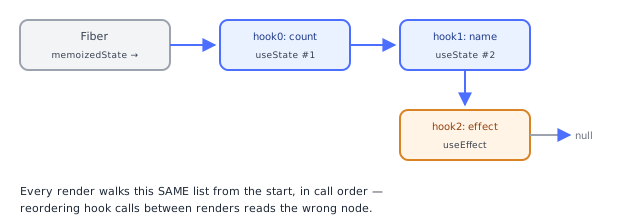
`useState` does not store its value in some hidden module-level map keyed by component. It stores it as a node in a **singly linked list of hooks** hung off the component's own fiber, at `fiber.memoizedState`. Each hook object looks roughly like:
```
{ memoizedState: , queue: , next: }
```
Every `useState`/`useEffect`/`useRef`/etc. call in your component appends one node to this list, **in call order**. This is exactly why the fiber, not a closure, is the source of truth — the fiber persists across renders (see "React fundamentals"), so the linked list (and the values inside it) survives even though your component *function* runs fresh, top to bottom, every single render.
### What actually happens when your component function runs again
On every re-render, React walks the *same* linked list from the start, and each `useState()` call in your function simply reads the *next* node in that list — it doesn't create a new one. This is why hook call order has to be identical every render (the Rules of Hooks): if render N calls `useState` then `useEffect`, but render N+1 calls `useEffect` then `useState`, React reads the wrong node for each — there's no name-based lookup happening, only positional linked-list traversal.
```
Fiber.memoizedState → [hook0: count] → [hook1: name] → [hook2: effect] → null
(useState #1) (useState #2) (useEffect)
```
### What `setCount(x)` actually does
Calling the setter doesn't write `x` into `memoizedState` synchronously. It pushes an **update object** onto that specific hook's `queue`, and schedules a re-render (marks the fiber as needing work, via the scheduler's lane mechanism). On the next render pass, React processes the queue for that hook — folding all pending updates in order (running any updater functions with the previous state as input) — and *that* result becomes the new `memoizedState` for the hook. This queue-then-process design is exactly why multiple `setCount(count + 1)` calls in the same event handler don't stack additively when they all close over the same stale `count` — they each push "set to 0 + 1" onto the queue, not "increment," unless you use the updater-function form, which pushes an actual increment operation instead of a fixed value.
### Why two instances of the same component don't share state
Each rendered `` gets its **own fiber**, and therefore its own `memoizedState` linked list — "state belongs to the fiber" is not a metaphor, it's the literal storage location, and two fibers are two separate objects in memory no matter how identical their component function is.
## 8. Common Pitfalls
1. **Reading stale state from a closure in the same handler** — use the `setCount(prev => ...)` updater form when the new value depends on the previous one.
2. **Assuming `setState` merges objects** — it replaces; spread the previous state yourself (`{ ...prev, field: newValue }`).
3. **Calling hooks conditionally or inside loops** — breaks the positional linked-list traversal described above; always call hooks unconditionally, at the top level, in the same order every render.
4. **Storing derivable values in state** — causes desync bugs; compute during render instead (see section 5).
5. **Expecting `setState` to update `count` immediately after calling it** — it doesn't; the new value is only visible on the *next* render, not on the very next line of the same function.
## 9. Quick Reference
```
const [value, setValue] = useState(initial);
setValue(newValue); // replace — direct value
setValue(prev => prev + 1); // replace — computed from latest actual state (use for correctness in handlers)
setValue(prev => ({...prev, field: x})); // merge an object manually
```
| Situation | Use |
|---|---|
| New value depends on previous state | Updater function: `setX(prev => ...)` |
| New value is independent | Direct value: `setX(newValue)` |
| Value can be computed from other state/props | Don't store it — derive it during render |
| Two siblings need the same state | Lift it to their common parent |