{isOnline ? "Online" : "Offline"}
; } ``` The `use` prefix is not enforced by the language or by React at runtime — it's a convention the linter (`eslint-plugin-react-hooks`) relies on to know which functions must follow the Rules of Hooks (stable call order, top-level calls only). Naming a hook-calling function without the `use` prefix silently disables that linting, which is exactly why the convention matters in practice even though nothing crashes without it. ## 2. Why Extract One: Sharing Stateful Logic, Not State Itself Before hooks, sharing logic that involved lifecycle + state (like "track window width" or "subscribe to a WebSocket") required patterns like higher-order components or render props, both of which added a wrapper layer to the component tree. A custom hook shares the *logic* directly, with each call site getting its own **independent** instance of the underlying state: ```tsx function useWindowWidth(): number { const [width, setWidth] = useState(window.innerWidth); useEffect(() => { const onResize = () => setWidth(window.innerWidth); window.addEventListener("resize", onResize); return () => window.removeEventListener("resize", onResize); }, []); return width; } function Sidebar() { const width = useWindowWidth(); // its own independent useState/useEffect pair return ; } function Header() { const width = useWindowWidth(); // a SEPARATE independent pair — not shared state return{extra}
: null; } ``` 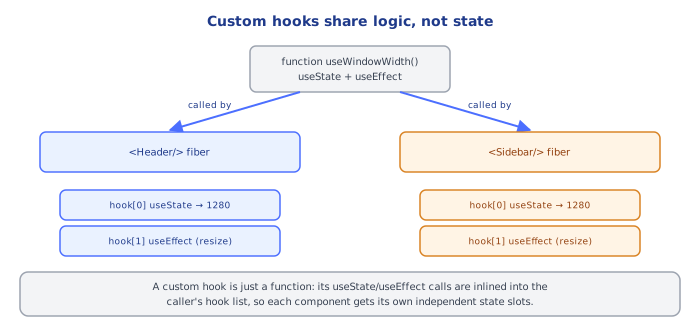 ## 6. Under the Hood React does not attach state to the component *function* — a function component is just a function, called fresh every render with no persistent memory of its own. Hook data lives on the **fiber**, React's internal object representing one component instance, in a **singly linked list of hook objects** hanging off `memoizedState`, one node per hook call, walked in the exact order those calls happen every render. The critical fact about custom hooks is that this mechanism has **no awareness of function boundaries**. When `Sidebar` calls `useWindowWidth()`, and `useWindowWidth` internally calls `useState(...)` and then `useEffect(...)`, React's hook-list walk for `Sidebar`'s fiber does not see a nested call into another function — it just sees, in sequence, "a `useState` call, then a `useEffect` call," and allocates/reads nodes 1 and 2 on `Sidebar`'s fiber exactly as if `Sidebar` had written those two hook calls directly in its own body. The custom hook function is inlined, conceptually, into the caller's flat sequence of hook calls at the point it's called. This is why calling the same custom hook from two different components produces two completely independent sets of hook-list nodes, on two different fibers — there is no shared node, no shared `memoizedState`, and no communication between the two calls at all, only identical *logic* being run twice against separate storage. This also explains precisely why the Rules of Hooks apply transitively. If `useWindowWidth` were called conditionally inside `Sidebar`, the hook-list walk for `Sidebar`'s fiber would, on some renders, skip straight past the two nodes `useWindowWidth` would have claimed — and every hook call *after* it in `Sidebar`'s body would silently read and write the wrong node, exactly as if `Sidebar` had written a raw `useState` inside an `if`. There is no special case in React's hook-matching algorithm for "this hook call came from inside another function" — call order is call order, regardless of how many function-call frames deep the actual `useState`/`useEffect` invocation sits. Because of this, a custom hook is best understood not as "a new kind of hook" but as **named, reusable call-order logic** — a way to give a sequence of built-in hook calls (plus whatever plain JS glue sits between them) a name and a return value, so that sequence can be reused verbatim across components without copy-pasting it. All the underlying machinery — the fiber, the linked list, `Object.is` comparisons for any `useMemo`/`useCallback`/`useEffect` inside it, the transition tracking for any `useActionState`/`useOptimistic` inside it — is exactly the same machinery covered in every other topic in this curriculum. Nothing new is invented for custom hooks; they are purely an organizational technique built on top of everything else. ## 7. Common Pitfalls 1. **Expecting two calls to the same custom hook to share state** — each call site gets its own independent hook-list nodes; sharing actual state across components requires lifting it up (`useContext`, a shared store, or passing it down as props), not just calling the same custom hook twice. 2. **Calling a custom hook conditionally or inside a loop** — breaks the fixed call-order the fiber's hook list depends on, exactly as with any built-in hook, because the custom hook's internal calls are just more entries in that same flat sequence. 3. **Omitting the `use` prefix** — silently opts the function out of the `eslint-plugin-react-hooks` checks that catch Rules-of-Hooks violations and stale-dependency bugs; the convention is what makes the tooling recognize it as a hook at all. 4. **Forgetting cleanup logic inside a custom hook's internal `useEffect`** — a custom hook that subscribes to something (events, sockets, timers) needs the same cleanup-function discipline as any standalone `useEffect`; skipping it leaks the subscription every time a component using the hook unmounts. 5. **Over-abstracting trivial logic into a custom hook** — wrapping a single `useState` call with no additional logic (`function useCount() { return useState(0); }`) usually adds indirection without benefit; extract a hook when there's real shared behavior (effects, derived values, composed hooks), not just to reduce two lines to one. ## 8. Quick Reference ``` function useSomething(...) { // calls other hooks internally — useState, useEffect, useMemo, etc. return value; // or [value, setter], or { field1, field2 } } Naming: MUST start with "use" — enables eslint-plugin-react-hooks checks Rules of Hooks apply transitively — no conditional/looped calls, ever Each call site = independent hook-list nodes on that caller's own fiber Shared LOGIC, not shared STATE — lift state up separately if truly shared ```