Arrays
An array is a specialized object with numeric-string keys and automatic length management, whose prototype is Array.prototype. typeof [] === "object"; use Array.isArray() to detect arrays specifically.
🎯 What you'll learn
- Arrays Are Objects
- Mutating vs Non-Mutating Methods
- The Core Iteration Methods
reduceDeep Dive- Copying, Slicing, Flattening
1Arrays Are Objects
An array is a specialized object with numeric-string keys and automatic length management, whose prototype is Array.prototype. typeof [] === "object"; use Array.isArray() to detect arrays specifically.
2Mutating vs Non-Mutating Methods
This is the single most important distinction to memorize — mixing these up causes some of the most common array bugs.
| Mutates the original array | Returns a new array / value |
|---|---|
push, pop | concat |
shift, unshift | slice |
splice | map |
sort | filter |
reverse | reduce |
fill | flat, flatMap |
copyWithin | spread [...arr] |
const nums = [3, 1, 2];

const sorted = nums.sort();   // MUTATES nums in place, also returns it
console.log(nums);            // [1, 2, 3] — original changed!

const doubled = nums.map(n => n * 2); // does NOT mutate nums
console.log(nums);             // [1, 2, 3] — unchanged
console.log(doubled);          // [2, 4, 6]
Rule of thumb: if you need to keep the original array intact (common in React/Redux state updates), always use the non-mutating column, or copy first: [...nums].sort().
3The Core Iteration Methods
| Method | Purpose | Returns |
|---|---|---|
map(fn) | transform each element | new array, same length |
filter(fn) | keep elements matching a condition | new array, ≤ length |
reduce(fn, initial) | fold all elements into one value | any single value |
forEach(fn) | side effects only, no return use | undefined |
find(fn) | first matching element | element or undefined |
findIndex(fn) | index of first match | number or -1 |
some(fn) | does at least one element match? | boolean |
every(fn) | do all elements match? | boolean |
const orders = [
  { id: 1, total: 50, paid: true },
  { id: 2, total: 30, paid: false },
  { id: 3, total: 90, paid: true },
];

const paidTotal = orders
  .filter(o => o.paid)
  .reduce((sum, o) => sum + o.total, 0); // 140

const hasUnpaid = orders.some(o => !o.paid); // true
const allPaid = orders.every(o => o.paid); // false4reduce Deep Dive
reduce is the most general iteration method — map and filter can both be implemented on top of it:
// map via reduce
const doubled = [1, 2, 3].reduce((acc, n) => { acc.push(n * 2); return acc; }, []);

// filter via reduce
const evens = [1, 2, 3, 4].reduce((acc, n) => { if (n % 2 === 0) acc.push(n); return acc; }, []);

// grouping — a common real-world reduce use case
const grouped = orders.reduce((acc, o) => {
  const key = o.paid ? "paid" : "unpaid";
  (acc[key] ??= []).push(o);
  return acc;
}, {});
Always pass an explicit initial value as the second argument — omitting it uses the first array element as the initial accumulator, which breaks on empty arrays and is a common source of bugs.
5Copying, Slicing, Flattening
const original = [1, [2, 3], [4, [5, 6]]];

original.slice(1, 3);      // [[2, 3], [4, [5, 6]]] — shallow copy of a range, non-mutating
original.flat();            // [1, 2, 3, 4, [5, 6]] — flattens ONE level by default
original.flat(Infinity);    // [1, 2, 3, 4, 5, 6] — flattens ALL levels
original.flatMap(x => [x, x]); // map + flatten one level, in a single pass6Destructuring and Spread
const [first, second, ...rest] = [1, 2, 3, 4]; // first=1, second=2, rest=[3,4]
const combined = [...[1, 2], ...[3, 4]];         // [1, 2, 3, 4]
const [, , third] = [1, 2, 3];                   // skip elements with empty slots — third=3
Under the HoodElements Kinds — Arrays Are Not All Stored the Same Way▾
A JavaScript array is not one fixed data structure internally — V8 tracks an elements kind per array and silently switches representation as the array's contents change, trading flexibility for speed wherever possible.
The elements kind ladder
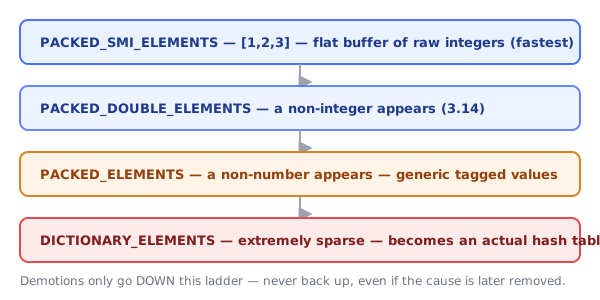
| Elements kind | What it holds | Storage |
|---|---|---|
PACKED_SMI_ELEMENTS | only small integers, no holes | flat buffer of raw tagged SMIs — fastest possible |
PACKED_DOUBLE_ELEMENTS | numbers including non-integers, no holes | flat buffer of raw doubles |
PACKED_ELEMENTS | any mix of value types, no holes | flat buffer of generic tagged values (objects, strings, mixed numbers) |
HOLEY_* variants of the above | same content types, but with gaps | same buffer, PLUS a hole-check on every single read |
DICTIONARY_ELEMENTS | extremely sparse arrays | an actual hash table (same structure as the Hashing topic), not a flat buffer at all |
const a = [1, 2, 3];        // PACKED_SMI_ELEMENTS — fastest tier
a.push(3.14);                 // now contains a non-integer -> demoted to PACKED_DOUBLE_ELEMENTS
a.push("text");                // now contains a non-number -> demoted to PACKED_ELEMENTS
Transitions only go one direction
const b = [1, 2, 3];         // PACKED_SMI_ELEMENTS
b[10] = 1;                    // creates indices 3-9 as HOLES -> demoted to HOLEY_SMI_ELEMENTS
b.length = 3;                  // shrinking back does NOT undo the demotion — still holey internally
Once an array is demoted to a more general elements kind, it never gets promoted back, even if every element that caused the demotion is later removed. This is why the array-methods table in section 2 matters beyond just "does it mutate": operations that introduce holes (delete arr[i], sparse index assignment) or mix types permanently shift the array onto a slower access path for its entire remaining lifetime.
Why delete arr[i] is different from splice
const c = [1, 2, 3, 4];
delete c[1];        // leaves a HOLE at index 1 — length stays 4, elements kind becomes HOLEY_*
c.splice(1, 1);       // actually removes the element, shifts everything after it left, length becomes 3
delete never shrinks the array or shifts anything — it just punches a hole, forcing every subsequent read of that array to carry a hole-check (HOLEY_* kinds check "is this slot actually empty?" on every access, which PACKED_* kinds skip entirely). splice costs more up front (O(n) shifting) but keeps the array dense and fast afterward.
push/pop vs shift/unshift, precisely
A flat array buffer supports appending/removing at the end by just adjusting a length pointer — O(1) amortized, identical in spirit to a hash table's amortized resize (Map/Set topics). Removing or inserting at the front requires physically shifting every remaining element's index by one slot — a real O(n) memory move, not just a pointer adjustment. This is a direct, concrete consequence of arrays being stored as contiguous buffers rather than linked structures.
Dictionary-mode arrays: when a "sparse" array becomes a hash table
const sparse = [];
sparse[0] = "a";
sparse[100000] = "z"; // 99,999 holes between them
Allocating a contiguous buffer for 100,001 slots to hold two real values would waste enormous memory. Past a sparseness threshold, V8 gives up on the flat-buffer representation entirely and stores the array's elements in a dictionary (hash table) keyed by index — the same fundamental trade-off Objects make when demoted to dictionary mode (see the Objects topic). sparse.length still reports 100001 correctly, but iteration and access no longer behave like a simple buffer walk underneath.
⚠️ Common Pitfalls
sort()sorts as strings by default —[10, 2, 1].sort()gives[1, 10, 2], not[1, 2, 10]. Always pass a comparator for numbers:.sort((a, b) => a - b).- Mutating an array you meant to copy — e.g. calling
.sort()or.reverse()on a state array in React without spreading first. forEachcannot bebreak-ed or awaited meaningfully — usefor...of(supportsbreak,continue,await) when you need early exit or sequential async work.reducewithout an initial value on an empty array throws aTypeError.delete arr[i]leaves a hole instead of shrinking the array — usesplice(i, 1)to actually remove an element.- Sparse arrays behaving inconsistently — holes are skipped by
map/forEach/filterbut counted bylength.
📋 Quick Reference
map/filter/reduce/slice/concat/flat  → non-mutating, safe to chain
push/pop/shift/unshift/splice/sort/reverse/fill → mutating, use with care
[...arr]                              → cheap shallow copy before mutating methods
🎤 Interview Q&A
Q1Which array methods mutate and which don't?core▾
Mutating: push, pop, shift, unshift, splice, sort, reverse, fill. Non-mutating: map, filter, reduce, slice, concat, flat, and the newer toSorted, toReversed, toSpliced, with.
- Why care? Mutation causes bugs in React state and shared data.
Q2What's the gotcha with sort()?core▾
Without a comparator, sort converts elements to strings: [10, 2, 1].sort() gives [1, 10, 2]. Use sort((a, b) => a - b). Sort is stable in modern engines.
- Does sort mutate? Yes; use toSorted for a copy.
Q3How do map, filter and reduce work?core▾
map transforms each element into a new array of the same length; filter keeps elements passing a predicate; reduce folds the array into a single value using an accumulator.
- Common reduce mistake? Forgetting the initial value, which fails on empty arrays.
Q4How do you remove duplicates or find items efficiently?core▾
[...new Set(arr)] for primitives; find/findIndex/some/every/includes for searches; for many lookups, build a Set or Map first (O(1) lookups instead of O(n)).
- Dedupe objects by id? Use a Map keyed by id.
Q5What are sparse arrays and array-likes?senior▾
Sparse arrays have holes ([1, , 3]), which some methods skip. Array-likes (arguments, NodeList) have length and indexes but not array methods; convert with Array.from.
- Array.from with mapping?
Array.from({length: 3}, (_, i) => i).
🛠️ Practice exercises
Each exercise is a file in this topic folder. Code exercises are self-checking: run them and make the checks pass.