Callbacks
A callback is a function passed into another function to be invoked later — either synchronously, during the outer function's execution, or asynchronously, at some future point (a timer firing, data arriving, a user clicking).
🎯 What you'll learn
- Definition
- Synchronous Callbacks
- Asynchronous Callbacks
- The Node.js Error-First Callback Convention
- Callback Hell
1Definition
A callback is a function passed into another function to be invoked later — either synchronously, during the outer function's execution, or asynchronously, at some future point (a timer firing, data arriving, a user clicking).
function greetUser(name, callback) {
  const message = `Hello, ${name}`;
  callback(message); // invoking the callback synchronously
}
greetUser("Ana", msg => console.log(msg));
Every callback is a higher-order-function argument (see the Higher-Order Functions topic) — "callback" is the specific name used when the function is invoked later, not necessarily immediately.
2Synchronous Callbacks
map, filter, sort, forEach all take synchronous callbacks — the callback runs to completion before the outer function returns.
console.log("before");
[1, 2, 3].forEach(n => console.log("item:", n));
console.log("after");
// prints: before, item:1, item:2, item:3, after — strictly in order3Asynchronous Callbacks
setTimeout, DOM event listeners, and Node's older-style APIs (fs.readFile) take callbacks that run later, after the current synchronous code has finished — handed off to the event loop (covered fully in the async topics).
console.log("1: start");
setTimeout(() => console.log("3: timeout callback"), 0);
console.log("2: end");
// prints: 1: start, 2: end, 3: timeout callback — even with a 0ms delay
The callback never runs during the current synchronous block, no matter how short the delay.
4The Node.js Error-First Callback Convention
Before Promises were standard, Node.js established a convention: the callback's first parameter is always reserved for an error (or null if none occurred).
const fs = require("fs");

fs.readFile("data.txt", "utf8", (err, contents) => {
  if (err) {
    console.error("Failed to read file:", err.message);
    return;
  }
  console.log(contents);
});
Always check err first and return early — forgetting this check is one of the most common Node.js bugs.
5Callback Hell
Nesting multiple async callbacks produces deeply indented, hard-to-follow code — the classic motivation for Promises and async/await (covered in the async topics):
getUser(id, (err, user) => {
  if (err) return handleError(err);
  getOrders(user.id, (err, orders) => {
    if (err) return handleError(err);
    getOrderDetails(orders[0].id, (err, details) => {
      if (err) return handleError(err);
      console.log(details); // 3 levels deep, and growing with each new step
    });
  });
});6Passing Arguments to a Callback (Common Bug Source)
function delayedGreet(name, callback) {
  setTimeout(callback, 1000, name); // WRONG-looking but actually correct:
                                      // setTimeout's 3rd+ arguments ARE passed to the callback
}

// The classic mistake — calling the function immediately instead of passing a reference:
setTimeout(sayHi(), 1000);  // BUG: sayHi() executes immediately, its RETURN VALUE
                              // (probably undefined) is passed to setTimeout instead

setTimeout(sayHi, 1000);     // correct — passes the function reference itself
setTimeout(() => sayHi(), 1000); // also correct — wraps the call in a new function
Under the HoodWhere a Pending Callback Actually Lives▾
Passing a callback to setTimeout or an event listener doesn't hand the function off to some abstract "later" — it stores a real reference to that function object inside a concrete runtime data structure, where it waits until conditions are met.
Node.js: callbacks live in libuv's data structures
setTimeout(() => console.log("hi"), 5000);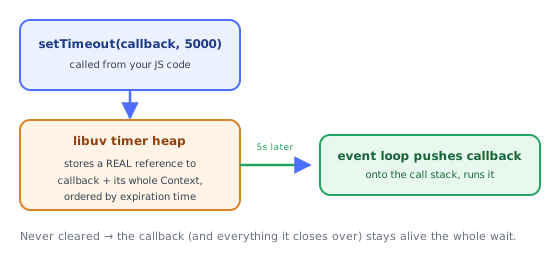
Node's underlying C library, libuv, maintains an actual timer heap (a min-heap ordered by expiration time) — calling setTimeout inserts an entry into this heap holding a pointer back to your JavaScript callback. The event loop's "timers" phase (see the Event Loop topic) checks this heap on each iteration and fires any callback whose time has come. The callback function object — and everything it closes over (see the Closures topic) — is kept alive in memory by this heap entry for the entire waiting period, even if nothing else in your program still references it.
Why an uncleared timer/interval is a real memory-leak vector
function startPolling(largeDataset) {
  const id = setInterval(() => {
    console.log(largeDataset.length); // captures largeDataset via closure
  }, 1000);
  // if `id` is lost and clearInterval is never called, this callback —
  // and the ENTIRE Context holding largeDataset — stays reachable
  // and alive in memory forever, because libuv's timer structure still
  // references it, even though nothing else in the program does
}
This connects directly to the Closures topic's memory section: the callback's Context object stays reachable (and therefore un-garbage-collectible) for as long as the timer/interval registration itself exists — clearTimeout/clearInterval isn't just "stopping a timer," it's removing the last reference keeping that closure (and whatever it captured) alive.
Browsers: the same idea, different concrete queue
A browser's callback queues (per the Event Loop topic) work on the same principle — addEventListener's callback reference is stored in the DOM node's internal listener list; setTimeout's callback is stored in the browser's own timer/task-queue implementation. The exact data structures differ by engine, but the governing idea is identical: a "pending callback" is a real, retained reference sitting in a runtime structure, not a conceptual promise that resolves itself.
⚠️ Common Pitfalls
- Forgetting to check the error argument first in Node-style callbacks — silently proceeding with
undefineddata. - Calling a function instead of passing its reference —
setTimeout(fn(), 1000)vssetTimeout(fn, 1000). - Losing
thisinside a callback — a callback passed as a bare reference loses implicit binding (see thethiskeyword topic); fix with an arrow function or.bind(). - Assuming callbacks always run asynchronously — some APIs (like
Array.prototype.forEach) call back synchronously; mixing sync and async callback conventions inconsistently causes subtle ordering bugs. - Calling a callback more than once by accident — especially in error-handling paths where both a success path and an error path might each call it.
📋 Quick Reference
node-style:  callback(err, result)  → always check err first
setTimeout(fn, ms, ...args)          → args are forwarded to fn when it fires
passing fn                            → correct: reference
passing fn()                          → wrong: calls immediately, passes return value
🎤 Interview Q&A
Q1What is a callback?core▾
A function passed to another function to be called later: synchronously (array methods) or asynchronously (events, timers, Node-style I/O).
- Node error-first convention?
(err, result) => {}with err first.
Q2What is callback hell and how was it solved?core▾
Deeply nested callbacks for sequential async steps, with duplicated error handling and hard-to-follow flow. Solved by named functions, then Promises, then async/await.
- Converting Node callbacks?
util.promisifyorfs/promises.
Q3What is 'inversion of control' with callbacks?senior▾
You hand your continuation to third-party code, trusting it to call it once, with the right arguments, not too early or late. Promises restore control with guaranteed single resolution.
- Zalgo problem? APIs that sometimes call back synchronously and sometimes asynchronously.
Q4How do you handle errors in callback-based code?core▾
Check err first in every callback and propagate or handle it; throwing inside an async callback can't be caught by an outer try/catch.
- Why can't try/catch catch it? The callback runs later on a different call stack.
Q5Are callbacks still relevant?core▾
Yes: event listeners, array methods, streams and many APIs use them; but for one-shot async results, promises are preferred.
- Event emitters? Callbacks for repeated events.
🛠️ Practice exercises
Each exercise is a file in this topic folder. Code exercises are self-checking: run them and make the checks pass.