Cancellation / AbortController
Once a Promise is created, there is no built-in way to "cancel" it — it will eventually settle regardless of whether you still care about the result. AbortController provides a standard, separate signaling mechanism that async operations can choose to observe and stop early.
🎯 What you'll learn
- The Problem: Promises Can't Be Cancelled Directly
- Basic Usage
signal.abortedand theabortEvent- Using AbortSignal in Your Own Async Functions
AbortSignal.timeout()— Built-in Timeout Signals
1The Problem: Promises Can't Be Cancelled Directly
Once a Promise is created, there is no built-in way to "cancel" it — it will eventually settle regardless of whether you still care about the result. AbortController provides a standard, separate signaling mechanism that async operations can choose to observe and stop early.
2Basic Usage
const controller = new AbortController();
const signal = controller.signal;

fetch("/api/data", { signal })
  .then(res => res.json())
  .then(data => console.log(data))
  .catch(err => {
    if (err.name === "AbortError") {
      console.log("Request was cancelled");
    } else {
      console.log("Request failed:", err.message);
    }
  });

controller.abort(); // triggers cancellation — fetch rejects with an AbortError
AbortController doesn't force-stop code that's already running synchronously — it signals "please stop" to APIs that specifically check for it (fetch, and any custom code you write to respect it).
3signal.aborted and the abort Event
const controller = new AbortController();
const { signal } = controller;

console.log(signal.aborted); // false

signal.addEventListener("abort", () => {
  console.log("Received abort signal, reason:", signal.reason);
});

controller.abort("user cancelled"); // reason is optional, defaults to an AbortError
console.log(signal.aborted); // true4Using AbortSignal in Your Own Async Functions
function cancellableDelay(ms, signal) {
  return new Promise((resolve, reject) => {
    if (signal.aborted) {
      reject(new DOMException("Already aborted", "AbortError"));
      return;
    }
    const timeoutId = setTimeout(resolve, ms);
    signal.addEventListener("abort", () => {
      clearTimeout(timeoutId); // stop the pending work
      reject(new DOMException("Aborted", "AbortError"));
    });
  });
}
Any custom async function can accept a signal parameter and check signal.aborted (for already-cancelled cases) or listen for the "abort" event (for cancellation that happens mid-flight) — this is the standard pattern for making your own code cancellable.
5AbortSignal.timeout() — Built-in Timeout Signals
fetch("/api/data", { signal: AbortSignal.timeout(5000) })
  .catch(err => {
    if (err.name === "TimeoutError") console.log("Request took too long");
  });
A modern shortcut that creates a signal which auto-aborts after the given number of milliseconds — no manual setTimeout + controller.abort() boilerplate needed.
6Practical Use Case: Cancelling a Stale Request (Search-as-you-type)
let currentController = null;

async function search(query) {
  if (currentController) currentController.abort(); // cancel the PREVIOUS in-flight request
  currentController = new AbortController();

  try {
    const res = await fetch(`/search?q=${query}`, { signal: currentController.signal });
    return await res.json();
  } catch (e) {
    if (e.name === "AbortError") return null; // expected — an old request was superseded
    throw e;
  }
}
Without cancellation, rapid typing could cause an earlier (slower) search's response to arrive after a later, faster one — showing stale results. Aborting the previous request eliminates this race condition entirely.
Under the HoodAbortSignal's Real Internal State and Dispatch Timing▾
AbortSignal is a real EventTarget with two internal slots
AbortSignal extends the same EventTarget base class that DOM nodes and countless other browser/runtime objects use for event dispatch. Per spec, it carries two internal slots: [[AbortReason]] (holds whatever value .abort(reason) was called with, defaulting to a fresh AbortError) and an internal abort flag that signal.aborted simply reads.
new AbortController()
  → creates a fresh AbortSignal with abort flag = false, [[AbortReason]] = undefined
.abort() fires its event synchronously, not as a task
controller.abort("done");
console.log("this line runs AFTER every abort listener has already fired");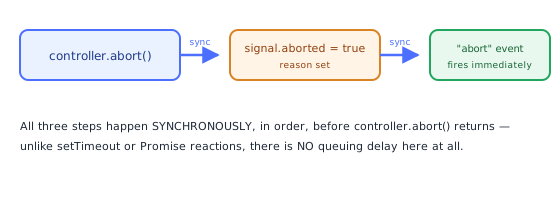
Unlike setTimeout callbacks or Promise reactions (which are always deferred to a queue — see the Event Loop and Microtasks topics), calling .abort() runs through its algorithm synchronously, immediately, in place: set the abort flag, set [[AbortReason]], then synchronously dispatch the "abort" event to every registered listener, one after another, all before .abort() itself returns control to whatever called it. This is why a signal.addEventListener("abort", ...) handler is guaranteed to have already run by the time the line after controller.abort() executes — there's no queuing delay to reason about here, unlike almost every other async-adjacent mechanism covered in this stack.
Why fetch integration doesn't need polling
fetch(url, { signal });fetch doesn't periodically check signal.aborted in a loop — it registers its own internal "abort" listener on the signal at request start, exactly like the cancellableDelay pattern from section 4. When .abort() fires synchronously, that listener runs immediately as part of the same synchronous dispatch, which is what lets fetch reject its pending Promise essentially instantly rather than on some later polling interval.
Why a signal can only ever abort once
The internal abort flag, like a Promise's [[PromiseState]] (Promises topic), is a one-way transition — once set to true, calling .abort() again is a no-op (the reason and event don't fire a second time). This is the concrete reason section 7's advice to create a new AbortController per cancellable operation isn't just convention — a signal genuinely cannot be "reset" and reused; its internal state permanently reflects the first abort, if any.
⚠️ Common Pitfalls
- Assuming
abort()stops code instantly, everywhere — it only affects code that explicitly checkssignal.abortedor listens for the"abort"event; unrelated synchronous code keeps running regardless. - Reusing a controller after calling
.abort()— once aborted, a controller's signal stays aborted forever; create a newAbortControllerfor each new cancellable operation. - Forgetting to remove
abortevent listeners in long-lived code — can cause memory leaks or duplicate handling if the same signal is reused (though a single controller/signal is normally single-use). - Not distinguishing
AbortErrorfrom real failures in a.catch()— treating a deliberate cancellation as an actual error can trigger unwanted error UI/logging.
📋 Quick Reference
const controller = new AbortController();
fetch(url, { signal: controller.signal });
controller.abort();                        → triggers cancellation
signal.aborted                              → boolean
signal.addEventListener("abort", handler)     → react to cancellation
AbortSignal.timeout(ms)                        → built-in auto-abort after ms
🎤 Interview Q&A
Q1What is AbortController?core▾
A standard API to cancel async operations: create a controller, pass controller.signal to APIs (fetch, addEventListener, streams, many libraries), and call controller.abort(reason); the operation rejects with an AbortError.
- Does it work in Node? Yes, globally available.
Q2How do you add a timeout to fetch?core▾
fetch(url, { signal: AbortSignal.timeout(5000) }), or combine signals with AbortSignal.any([userSignal, AbortSignal.timeout(5000)]).
- Error name on timeout? TimeoutError (vs AbortError for manual aborts).
Q3How do you make your own functions abortable?core▾
Accept a signal option, check signal.aborted/call signal.throwIfAborted() at checkpoints, listen to the abort event to clean up (clear timers, close resources), and pass the signal down to nested calls.
- Why pass it down? Cancellation should propagate through the whole operation.
Q4How is AbortController used in React?senior▾
Create a controller in an effect, pass its signal to fetch, and abort in the cleanup so outdated requests don't update state after dependencies change or unmount.
- Handle the AbortError? Ignore it, since it's expected.
Q5Can one signal remove many event listeners?core▾
Yes: addEventListener(type, fn, { signal }) removes the listener when the signal aborts, making cleanup of multiple listeners a single call.
- Use case? Component teardown.
🛠️ Practice exercises
Each exercise is a file in this topic folder. Code exercises are self-checking: run them and make the checks pass.