Modules and Packages
Any .py file is a module. Importing it runs the file top-to-bottom exactly once, and binds the result as a namespace:
🎯 What you'll learn
- A Module Is Just a File
- Import Variants
- Packages — Directories of Modules
__name__ == "__main__"- Absolute vs. Relative Imports
1A Module Is Just a File
Any .py file is a module. Importing it runs the file top-to-bottom exactly once, and binds the result as a namespace:
# math_utils.py
PI = 3.14159

def square(x):
return x * x# main.py
import math_utils
print(math_utils.PI) # 3.14159
print(math_utils.square(4)) # 16import math_utils doesn't copy math_utils.py's contents into main.py — it executes math_utils.py once, creates a module object holding everything it defined, and binds the name math_utils to that object. Every attribute access (math_utils.PI) is a lookup into that module object's namespace.
2Import Variants
import math_utils                       # bind the whole module object
import math_utils as mu                  # bind it under an alias
from math_utils import PI, square          # bind specific names directly into this namespace
from math_utils import square as sq          # alias a specific imported name
from math_utils import *                       # bind ALL public names — generally discouraged
from math_utils import PI copies the current value of PI into the importing module's namespace at import time — if math_utils.PI is reassigned later, the importing module's PI does not automatically update, because it's now an independent binding to whatever object PI pointed to at import time (mutable objects, like a list, are a partial exception: mutating the object in place is visible everywhere, since both names still point at the same object).
3Packages — Directories of Modules
A package is a directory containing an __init__.py (marking it as a package) plus other modules or subpackages:
myapp/
    __init__.py
    utils.py
    models/
        __init__.py
user.pyfrom myapp.utils import helper_fn
from myapp.models.user import User__init__.py runs once when the package is first imported — it can be empty, or it can import and re-export names from submodules so callers don't need to know the internal file layout (from myapp.models.user import User inside myapp/models/__init__.py lets callers write from myapp.models import User instead).
4__name__ == "__main__"
# calc.py
def add(a, b):
    return a + b

if __name__ == "__main__":
    print(add(2, 3))   # only runs when calc.py is EXECUTED directly, not when imported
Every module has a __name__ attribute. When a file is run directly (python calc.py), Python sets __name__ to the string "__main__" for that module. When the same file is imported from elsewhere, __name__ is set to the module's actual name ("calc") instead — this is how a file can serve as both an importable library and a standalone script without its script-only code running on every import.
5Absolute vs. Relative Imports
# inside myapp/models/user.py
from myapp.utils import helper_fn      # absolute — full path from the top-level package
from ..utils import helper_fn            # relative — ".." means "go up one package level"
from . import order                        # relative — "." means "this same package"
Absolute imports are generally preferred (unambiguous, easy to grep for, don't break if a file moves within the package as easily) — relative imports exist mainly for large packages that need to remain renameable/relocatable as a unit without rewriting every internal import.
6sys.path and How Python Finds Modules
import sys
print(sys.path)   # a list of directories Python searches, in order, for modules to import
sys.path typically includes: the directory of the script being run (or the current directory, for -c/REPL), the PYTHONPATH environment variable's directories, and the standard library plus installed third-party packages' locations. import foo searches these directories, in order, for a match — the first foo.py or foo/ package found wins, which is exactly why a local file accidentally named random.py can shadow the standard library's random module for that script.
7__all__ and Controlling from module import *
# mymodule.py
__all__ = ["public_fn"]

def public_fn(): ...
def _private_helper(): ... # leading underscore signals "internal" by conventionfrom mymodule import *
# only public_fn is imported — _private_helper is excluded by leading underscore
# convention AND by __all__ explicitly restricting the wildcard import's scope__all__ is a list of strings defining exactly what from module import * exports; without it, import * exports every name not starting with an underscore. Neither __all__ nor a leading underscore actually makes anything "private" in an enforced sense — both are conventions, not access control (see Under the Hood).
Under the Hoodsys.modules, One-Time Execution, and Circular Imports▾
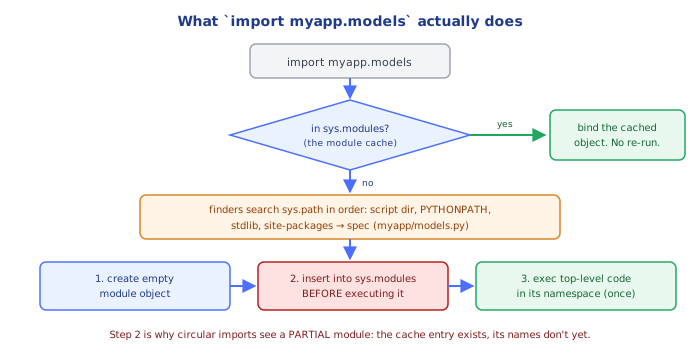
Every module is executed exactly once per process, then cached
The first time anything imports a module, Python runs that file's top-level code and stores the resulting module object in the dict sys.modules, keyed by the module's fully qualified name. Every subsequent import of that same module — anywhere else in the program — is just a dictionary lookup into sys.modules, not a re-execution of the file.
import sys

import math_utils
print("math_utils" in sys.modules)   # True

import math_utils   # does NOT re-run math_utils.py's top-level code a second time
This is why side effects at module level (print statements, opening a file, starting a connection) run only once no matter how many places import that module, and it's the exact mechanism behind why mutating a module-level variable from one importer is visible from every other importer — they all hold a reference to the same cached module object in sys.modules, not separate copies.
Circular imports fail because of partial module objects, not a hard prohibition
# a.py
import b
def f(): return b.g()

# b.py
import a
def g(): return a.f()
When a.py runs import b, Python creates a (still-empty) module object for a in sys.modules before executing a.py's body — this is what allows b.py's import a to succeed at all instead of infinite-looping. But if b.py tries to access a.f at import time (module level, not inside a function body), it fails with AttributeError, because a's module object exists in sys.modules but is still empty — a.py hasn't gotten past its own import b line yet to define f. This is exactly why the functions above work (they only look up b.g/a.f when called, by which point both modules have finished executing) while equivalent module-level code (X = b.g() written directly in a.py, outside any function) would fail.
__all__ and the underscore convention are cosmetic, not enforced
Nothing prevents from mymodule import _private_helper — a leading underscore only excludes a name from a wildcard import (import *); it's fully importable and callable by explicit name. __all__ is read by the import * machinery specifically, and by some documentation tools — it is not consulted by import module_name or from module import specific_name at all. Python's privacy model at the module level is a social convention enforced by linters and code review, not by the interpreter.
⚠️ Common Pitfalls
- Naming a local file the same as a standard-library or third-party module (
random.py,json.py,queue.py) — because the script's own directory is searched first, this silently shadows the real module, producing confusingAttributeErrors for functions that "should" exist. - Circular imports that access module-level attributes of each other before both finish loading — as shown in Under the Hood, this fails specifically for top-level access, not calls made later inside functions; restructuring to import inside a function body (a "lazy import") is a common, valid workaround.
- Assuming
from module import namestays in sync ifmodule.nameis reassigned later — it copies the reference at import time; only mutating the same mutable object (not reassigning the name) stays visible across both bindings. - Using
from module import *in application code — it pollutes the namespace unpredictably (later imports can silently shadow earlier ones) and defeats static analysis tools' ability to tell where a name came from; reserve it for very small, well-controlled contexts (or avoid entirely). - Putting expensive or side-effecting code at module level — since a module only executes once and its top level runs immediately on first import, module-level network calls, file I/O, or heavy computation run at import time, which can slow down or break unrelated code that merely needs one function from the module.
- Forgetting
if __name__ == "__main__":, so a script's demonstration/test code runs every time the file is imported as a library elsewhere, not just when run directly.
📋 Quick Reference
import module                      # bind the whole module object
import module as alias               # bind under a different name
from module import name               # copy a specific name's CURRENT value into this namespace
from module import *                    # import all public names — avoid in real code
from . import sibling                    # relative import, same package
from .. import cousin_package               # relative import, one level up

if __name__ == "__main__":                    # True only when run directly, not when imported
    main()

sys.modules                                     # cache: {module_name: module_object}, populated once
sys.path                                          # search path for import, checked in order

__all__ = ["public_fn"]                             # controls `from module import *` only
🎤 Interview Q&A
Q1Module vs package?core▾
A module is a .py file; a package is a directory of modules (with __init__.py for regular packages). Imports are cached in sys.modules, so module code runs once per process.
- Namespace packages? Directories without __init__.py spanning multiple locations.
Q2What does if __name__ == '__main__': do?core▾
Runs code only when the file is executed directly, not when imported, letting a module be both importable and runnable.
- Modern alternative for CLIs?
python -m packagewith__main__.py, or entry points.
Q3How do you manage dependencies and environments?core▾
Virtual environments per project (venv), dependencies declared in pyproject.toml, locked with tools like uv, Poetry or pip-tools, and installed reproducibly in CI/Docker.
- Why lock files? Reproducible builds across machines.
Q4How do relative and absolute imports differ?senior▾
Absolute imports (from app.services import x) are clear and preferred; relative imports (from .services import x) work within packages. Running modules as scripts breaks relative imports; use python -m.
- Circular imports fix? Restructure, move imports inside functions, or import modules not names.
Q5What's in a modern pyproject.toml?core▾
Project metadata, dependencies, optional dependency groups, build backend, entry points/scripts, and tool configuration (ruff, mypy, pytest).
- Build backends? hatchling, setuptools, poetry-core.
🛠️ Practice exercises
Each exercise is a file in this topic folder. Code exercises are self-checking: run them and make the checks pass.