Latency and Troubleshooting
Latency has physical floors and layered causes. Use the speed-of-light calculator, break a request into DNS, TCP, TLS, TTFB and transfer, and learn which tool (ping, traceroute, mtr, curl -w) answers which question.
🎯 What you'll learn
- What latency measures: RTT, one-way, TTFB, percentiles
- How ping and traceroute work
- The latency breakdown of a web request
- Measuring per-stage timing with curl and the usual causes of latency
📚 Before you start
1What Latency Actually Measures
Latency is the time between sending a request and receiving a response — distinct from throughput (how much data can move per unit time). A connection can have high throughput and still feel slow if latency is high (think: a very fast but very long pipe — lots of capacity, but anything you send takes a while to arrive).
The most basic unit of latency is RTT (Round-Trip Time): the time for a packet to reach a destination and a reply to come back. A huge amount of network troubleshooting is really just breaking down "why is this slow" into "which specific RTT (or which specific sequence of RTTs) is the slow one."
2How Ping Measures RTT
ping sends an ICMP Echo Request to a target and measures the time until the matching ICMP Echo Reply comes back.
$ ping example.com
64 bytes from 93.184.216.34: icmp_seq=1 ttl=56 time=14.2 ms
64 bytes from 93.184.216.34: icmp_seq=2 ttl=56 time=13.8 ms
64 bytes from 93.184.216.34: icmp_seq=3 ttl=56 time=14.5 ms
time=14.2 ms is the RTT for that one packet. Ping tells you nothing about the application-level protocol (HTTP, TLS, etc.) — it measures the rawest possible round trip, useful as a baseline ("is there a fundamental connectivity/latency problem at all") before looking at anything more specific.
3How Traceroute Shows the Path
traceroute (or tracepath/mtr for a continuously-updating version) reveals the sequence of routers a packet passes through, by exploiting the IP TTL (Time To Live) field: it sends packets with TTL=1, then TTL=2, then TTL=3, and so on. Each router that receives a packet whose TTL has hit zero sends back an ICMP "Time Exceeded" message — which reveals that router's address and how long the round trip to it took, one hop at a time.
$ traceroute example.com
 1  192.168.1.1        1.2 ms
 2  10.20.0.1           3.4 ms
 3  203.0.113.1        12.1 ms
 4  198.51.100.9       14.0 ms
 5  93.184.216.34      14.3 ms   <- destination reached
Reading this: hop 3 to hop 4 adds only ~2ms, but hop 2 to hop 3 adds ~9ms — that jump is where most of the total RTT is being spent, which tells you where in the path to focus (is that a geographic distance issue, a congested link, a slow router?) rather than treating the whole path as an undifferentiated black box.
4The Latency Breakdown of a Web Request
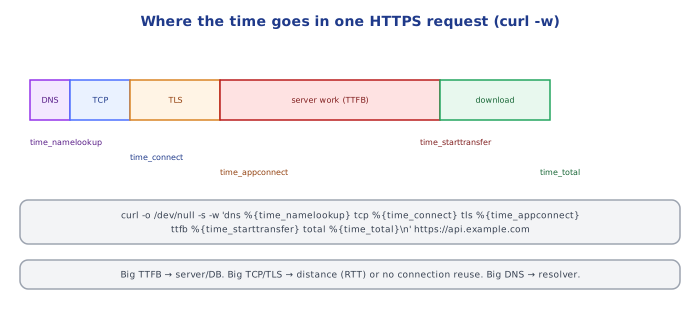
A single HTTPS request is not one round trip — it's several, layered on top of each other, and a slow page load is almost always slow because of one specific stage, not all of them equally:
DNS lookup          — resolve the hostname to an IP (see the DNS topic)
TCP handshake        — SYN / SYN-ACK / ACK  (1 RTT)
TLS handshake        — see the TLS topic     (1 RTT for TLS 1.3, 2 for TLS 1.2)
TTFB (Time To First Byte) — server processing time until the first response byte arrives
Content download — remaining bytes, bound by throughput as much as latency|--DNS--|--TCP handshake--|--TLS handshake--|------TTFB------|--download--|
20ms 15ms 25ms 180ms 40ms
^
the actual bottleneck here —
NOT the network round trips at all,
but server-side processing timeThis breakdown is exactly why "the site feels slow" needs actual measurement rather than guessing — a slow DNS resolver, a distant server adding round-trip latency, and a slow backend database query all feel identical to an end user ("the page took a while"), but require completely different fixes.
5Measuring TTFB and Per-Stage Timing with curl
$ curl -w "dns: %{time_namelookup}s\nconnect: %{time_connect}s\ntls: %{time_appconnect}s\nttfb: %{time_starttransfer}s\ntotal: %{time_total}s\n" -o /dev/null -s https://example.com
dns: 0.021s
connect: 0.036s
tls: 0.061s
ttfb: 0.245s
total: 0.287s
Each field is cumulative from the start of the request, not the duration of just that stage — so the actual TLS handshake duration is tls - connect (0.025s here), and the actual server processing time (TTFB) is ttfb - tls (0.184s here). This distinction (cumulative timestamps vs. per-stage durations) is the single most common source of misreading curl -w timing output.
6Common Causes of Latency
Geographic distance     — light itself takes ~67ms to cross the US and back at fiber speeds;
                            a server on the other side of the planet has an unavoidable RTT floor
Network congestion       — queuing delay at a busy router/link, worse at peak hours
DNS misconfiguration     — a slow or distant DNS resolver, or a resolver chain with unnecessary hops
Slow backend processing  — the TTFB stage; usually the actual bottleneck for "slow site" complaints,
                            not the network itself (a slow database query, an N+1 query pattern, etc.)
TLS handshake overhead   — extra RTT for TLS 1.2 vs 1.3, or an unnecessarily long certificate chain
Packet loss and retransmission — TCP's reliability guarantee costs real time when packets are
                            lost and must be resent, especially painful on lossy/mobile networks
⚠️ Common Pitfalls
- Assuming "the network" is slow without measuring the breakdown — most user-facing "slowness" complaints turn out to be backend TTFB, not network latency at all; measure before diagnosing.
- Misreading
curl -wtimings as per-stage instead of cumulative — subtracting consecutive fields is required to get actual stage durations; using the raw values directly overstates every later stage's cost. - Confusing latency with throughput — a high-bandwidth connection can still have high latency (satellite internet is the classic example: plenty of throughput, terrible RTT due to physical distance to the satellite).
- Treating one traceroute run as definitive — routing paths and per-hop latency can vary run to run (route changes, transient congestion); a single trace is a sample, not a guarantee, especially for intermittent issues.
- Forgetting DNS caching when troubleshooting "it's slow for me but not for others" — a stale or slow-to-propagate DNS answer cached on one machine/resolver can produce a real, reproducible-for-that-user latency difference that has nothing to do with the server itself.
📋 Quick Reference
RTT = round-trip time for one request/reply pair — the base unit of latency

ping: raw ICMP RTT to a host (no application-layer info)
traceroute/mtr: per-hop path + latency, via incrementing TTL and reading ICMP Time Exceeded
curl -w: per-stage CUMULATIVE timings — subtract consecutive fields for actual stage duration

Request breakdown: DNS -> TCP handshake -> TLS handshake -> TTFB -> content download
  TTFB (server processing time) is the most common actual bottleneck, not the network

Causes: geographic distance, congestion, DNS issues, slow backend, TLS overhead, packet loss

Latency != throughput — high bandwidth does not imply low latency
🧠 Key takeaways
- Light in fiber covers ~200 km/ms: distance sets a floor no optimization beats.
- A cold HTTPS request costs DNS + TCP (1 RTT) + TLS (1 RTT) + request/response (1 RTT) + server time.
curl -wsplits timing per stage; ping = RTT, traceroute/mtr = per-hop path and loss.- Common causes: distance, extra round trips, DNS, slow backends/queries, packet loss, cold connections. Reuse connections and cache.
🎤 Interview Q&A
Q1What contributes to network latency?core▾
Propagation (distance at ~2/3 the speed of light in fibre), transmission (bandwidth), processing, and queuing delays, plus protocol round trips: DNS lookup, TCP handshake, TLS handshake, then the request itself.
- Minimum RTT London–New York? About 56 ms by physics; ~70 ms in practice.
Q2Which tools do you use to troubleshoot network issues?core▾
ping (reachability, RTT), traceroute/mtr (path and where loss occurs), dig/nslookup (DNS), curl -v / curl -w (HTTP timing breakdown), nc (port check), ss/netstat (connections), tcpdump/Wireshark (packets), openssl s_client (TLS).
- How do you get timing phases with curl?
curl -w '%{time_namelookup} %{time_connect} %{time_appconnect} %{time_starttransfer}'.
Q3A user reports the site is slow. How do you narrow it down?core▾
Determine scope (one user, region, everyone), check server-side latency metrics vs client-side (RUM) timings, break down DNS, connect, TLS, TTFB and download, check CDN hit rates and recent changes, then trace slow requests on the backend.
- If TTFB is high? The server or its dependencies are slow; look at traces.
Q4How do you reduce latency for global users?senior▾
CDN and edge caching, regional deployments, connection reuse (keep-alive, HTTP/2/3), fewer round trips (bundling, preconnect), TLS 1.3, and moving computation closer to users (edge functions).
- What's TCP Fast Open / 0-RTT? Sending data in the first packet on repeat connections.
Q5What's packet loss's effect on TCP throughput?core▾
Loss triggers retransmissions and congestion window reductions, so even 1% loss can cut throughput drastically on high-latency links. mtr helps locate the lossy hop.
- Does ICMP loss at a middle hop always matter? Not if later hops show no loss; routers often deprioritize ICMP.
🛠️ Practice exercises
Each exercise is a file in this topic folder. Code exercises are self-checking: run them and make the checks pass.
✅ Check yourself
Answer the questions — feedback is instant.