DNS
DNS turns names into addresses through a hierarchy of servers and caches. Follow a cold lookup from the root down to the authoritative server, then a warm one answered from cache, and learn how TTLs shape every change you make.
🎯 What you'll learn
- What DNS does and the domain hierarchy
- Record types: A, AAAA, CNAME, MX, TXT, NS
- Recursive vs authoritative resolution
- TTLs and caching, DNS-based load balancing, DoH/DoT
📚 Before you start
1What DNS Actually Does
DNS (Domain Name System) turns a name a human can remember (api.example.com) into an IP address a computer can route packets to (203.0.113.42). It is not part of HTTP — it's a separate, older protocol (mostly over UDP port 53) that every HTTP request depends on as its very first step, before a single TCP/TLS byte is exchanged:
Client wants: GET https://api.example.com/users
Step 0 (DNS):  api.example.com -> 203.0.113.42     <-- this topic
Step 1 (TCP):  connect to 203.0.113.42:443
Step 2 (TLS):  handshake
Step 3 (HTTP): send the actual request
A slow or failed DNS lookup delays everything after it — this is why DNS caching and TTL tuning (section 5) matter for real-world latency, not just for reducing load on nameservers.
2The Domain Hierarchy
A domain name is read right-to-left as a hierarchy, most general to most specific:
api.example.com.
   |     |    |  |
   |     |    |  +-- root (usually invisible, implicit trailing dot)
   |     |    +----- TLD (Top-Level Domain): com
   |     +---------- registered domain: example.com
   +---------------- subdomain / hostname: api
Each level is served by a different set of nameservers, and resolving a name means walking down this hierarchy one level at a time (section 4).
3Record Types
A DNS zone (the set of records for a domain) is made of typed records. The ones that come up constantly:
| Type | Purpose | Example |
|---|---|---|
A | hostname -> IPv4 address | api.example.com. A 203.0.113.42 |
AAAA | hostname -> IPv6 address | api.example.com. AAAA 2001:db8::1 |
CNAME | hostname -> another hostname (alias) | www.example.com. CNAME example.com. |
MX | mail exchange, with priority | example.com. MX 10 mail.example.com. |
TXT | arbitrary text — SPF/DKIM, domain verification | example.com. TXT "v=spf1 include:_spf.google.com ~all" |
NS | which nameservers are authoritative for this zone | example.com. NS ns1.registrar.com. |
SOA | zone metadata — primary nameserver, serial, refresh/retry/expire timers | example.com. SOA ns1... admin... (2026091601 ...) |
A CNAME cannot coexist with any other record type on the same name (you can't have both a CNAME and a TXT on www.example.com — this is why the apex/root domain, e.g. bare example.com, traditionally can't use CNAME at all and needs an A/AAAA record or a provider-specific "ALIAS"/"ANAME" workaround instead).
4Resolution: Recursive vs Authoritative
Two different roles cooperate on every lookup:
Client's OS
   |
   v
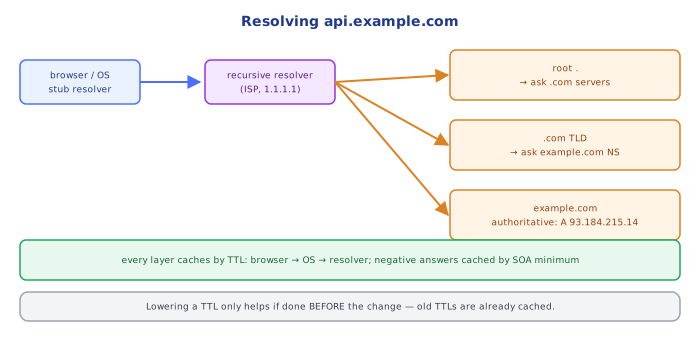
Recursive resolver (ISP, or 1.1.1.1 / 8.8.8.8)  -- does the walking, on the client's behalf
   |
   |--> Root nameserver          "who handles .com?"        -> TLD nameserver's address
   |--> TLD nameserver (.com)    "who handles example.com?" -> authoritative nameserver's address
   |--> Authoritative nameserver "what is api.example.com?" -> the actual A record
   |
   v
Answer returned to the client, and cached at every layer along the way
The client almost never talks to root/TLD/authoritative servers directly — it asks one recursive resolver, which does the multi-step walk (or serves a cached answer immediately) and returns a single final answer. "Recursive" describes that resolver doing the chasing on the client's behalf; the root/TLD/authoritative servers themselves are non-recursive — each answers only "here's who to ask next" (or the final record, at the authoritative level) and never chases further themselves.
5TTL and Caching, at Every Layer
Every DNS record carries a TTL (time-to-live, in seconds), set by whoever controls the zone:
api.example.com. 300 IN A 203.0.113.42
                  ^^^
                  TTL: cache this answer for 300 seconds
That TTL is honored independently by several caches stacked in front of the authoritative server:
OS-level cache (per machine)
   -> Browser's own DNS cache
      -> Recursive resolver's cache (ISP / 1.1.1.1 / 8.8.8.8)
         -> Authoritative nameserver (source of truth)
A short TTL (e.g. 60s) means changes propagate fast but every cache re-queries the authoritative server often — more load, more latency on cache misses. A long TTL (e.g. 86400s / 24h) means fewer lookups and faster repeat resolution, but a record change takes up to that long to be visible to a client that already cached the old answer. This is the entire reason "DNS propagation" isn't instant: it isn't that the new record takes time to spread — the authoritative server can answer with the new value immediately — it's that every cache holding the old value keeps serving it, un-asked, until its individually-tracked TTL expires.
6DNS and Load Balancing / CDNs
Because a name can resolve to different answers for different askers, DNS itself becomes a crude load-balancing and routing layer, entirely before any HTTP request happens:
- Round-robin DNS — a name has multiple
Arecords; resolvers rotate/return them in different orders, spreading load across IPs with zero application-level logic. - GeoDNS — the authoritative server inspects the resolver's location (via the querying resolver's IP, or the
EDNS Client Subnetextension carrying the original client's approximate location) and returns the IP of the nearest datacenter or CDN edge node for that specific asker. - CDN fronting — a hostname like
assets.example.comis typically aCNAMEto the CDN provider's own domain, so the CDN's DNS infrastructure (not the origin's) decides which edge IP each client gets, and can shift that answer instantly (short TTLs) if an edge node goes down.
7DNS-over-HTTPS / DNS-over-TLS
Classic DNS queries are plaintext UDP — visible to any network observer between the client and the resolver (an ISP, a coffee-shop Wi-Fi router). DoH (DNS-over-HTTPS) and DoT (DNS-over-TLS) wrap the same query/response format in an encrypted channel, so the contents of the lookup are hidden from on-path observers. They change confidentiality and (for DoH specifically) make DNS traffic harder to distinguish from ordinary HTTPS traffic — they do not change the underlying hierarchy, record types, or caching/TTL model described above at all.
Under the HoodNegative Caching and SOA▾
A lookup for a name that doesn't exist is also cached — this is negative caching, and its duration is governed not by a normal record's TTL but by the minimum field of the zone's SOA record:
example.com. SOA ns1.example.com. admin.example.com. (
  2026091601  ; serial
  7200        ; refresh
  3600        ; retry
  1209600     ; expire
  300         ; minimum -- negative-cache TTL for NXDOMAIN answers
)
This is precisely why a freshly-created subdomain can appear to "not resolve yet" for a specific client even seconds after the authoritative record was added: if that client's resolver had already cached an NXDOMAIN (no-such-name) answer for that exact name before the record existed, it will keep confidently returning "doesn't exist" for up to the SOA minimum's duration, regardless of how long ago the real record was published — a completely different clock than the new record's own TTL, and the source of a specific, confusing class of "it works for me but not for you" DNS bug.
⚠️ Common Pitfalls
- Expecting a DNS change to be visible everywhere instantly. Every cache layer (OS, browser, resolver) honors its own previously-fetched TTL independently — "propagation delay" is really just "waiting for the slowest stale cache in the chain to expire," which can differ per user.
- Setting a
CNAMEon the bare/apex domain.CNAMEcannot coexist with the other records (likeMX) an apex domain almost always needs — use anA/AAAArecord, or a provider's ALIAS/ANAME feature, at the apex instead. - Setting TTLs too long right before a planned migration. A 24-hour TTL set the day before cutting over to a new IP means some clients keep hitting the old server for up to 24 hours after cutover — lower the TTL well in advance of a planned change, then raise it again afterward.
- Forgetting negative caching exists. A newly-created record can appear to "not exist yet" to a client that cached an earlier
NXDOMAIN, independent of the new record's own TTL (section 8). - Assuming DoH/DoT changes what data is resolved. They only encrypt the query in transit — the hierarchy, the records returned, and the caching/TTL rules are identical to plaintext DNS.
📋 Quick Reference
Resolution order: OS cache -> browser cache -> recursive resolver cache -> root -> TLD -> authoritative
A / AAAA   -> hostname to IPv4 / IPv6
CNAME      -> hostname to hostname (alias); cannot coexist with other records on the same name
MX         -> mail exchange, with priority
TXT        -> arbitrary text (SPF/DKIM/verification)
NS / SOA   -> zone's authoritative servers / zone metadata (serial, refresh, retry, expire, minimum)

TTL          -> how long EVERY cache layer may reuse an answer, set per record
SOA minimum  -> TTL specifically for NEGATIVE (NXDOMAIN) answers -- separate clock from normal TTL
Round-robin DNS / GeoDNS / CDN CNAME -> load balancing and routing done at the DNS layer, pre-HTTP
DoH / DoT    -> encrypts the query in transit only; same hierarchy and caching rules underneath
🧠 Key takeaways
- DNS is a hierarchical, cached database: root → TLD → authoritative.
- Records: A/AAAA (addresses), CNAME (alias), MX (mail), TXT (verification, SPF), NS (delegation).
- Stub → recursive resolver (does the work, caches) → authoritative (owns the zone).
- TTL controls caching everywhere: lower it before migrations; negative answers are cached too (SOA).
🎤 Interview Q&A
Q1How does DNS resolution work?core▾
The client asks a recursive resolver (ISP, 8.8.8.8, 1.1.1.1). If not cached, the resolver queries a root server → the TLD server (.com) → the domain's authoritative server, which returns the record. Each answer is cached for its TTL.
- Where else is DNS cached? Browser, OS, and sometimes the application runtime.
Q2Name common DNS record types.core▾
A (IPv4), AAAA (IPv6), CNAME (alias to another name), MX (mail), TXT (verification, SPF/DKIM), NS (delegation), SOA, SRV (service location), CAA (allowed certificate authorities), plus ALIAS/ANAME at the zone apex.
- Why can't you CNAME the apex domain? CNAMEs can't coexist with other records like SOA/NS; use ALIAS/ANAME.
Q3How do TTLs affect deployments and failover?core▾
Long TTLs reduce lookups but slow changes: clients keep old IPs until expiry. Before migrations, lower TTLs in advance (e.g. to 60 s), make the change, then raise them again.
- Do all clients respect TTLs? No; some cache longer, so keep old endpoints alive for a while.
Q4How can DNS be used for load balancing and failover?senior▾
Return multiple A records (round robin), weighted/latency/geo routing policies, and health-checked failover records (Route 53). It's coarse because of caching and doesn't see server load.
- What's GeoDNS? Answers vary by the resolver's location.
Q5What DNS security concerns exist?core▾
Cache poisoning/spoofing (mitigated by DNSSEC and randomized source ports), DNS hijacking of registrar accounts (use MFA and registry locks), subdomain takeover via dangling CNAMEs, and privacy leaks (DoH/DoT encrypt queries).
- What's a subdomain takeover? A CNAME pointing to a deleted cloud resource that an attacker can claim.
🛠️ Practice exercises
Each exercise is a file in this topic folder. Code exercises are self-checking: run them and make the checks pass.
✅ Check yourself
Answer the questions — feedback is instant.