Logging
Logs are data for future you during an incident. Move from console.log to structured JSON with levels, attach request context with child loggers, and keep secrets and personal data out.
🎯 What you'll learn
- Why console.log isn't enough
- Log levels and structured JSON
- Request context: child loggers and correlation IDs
- What not to log, where logs go, and why fast loggers are fast
📚 Before you start
1Why console.log Isn't Enough
console.log("order created", order.id); // fine on your laptopIn production you have many instances, thousands of requests per second, and a log pipeline (CloudWatch, Loki, Elasticsearch, Datadog) that has to search, filter and aggregate those lines. Plain text forces people to grep with regexes. Production logging needs:
- levels — so noise can be turned down without a deploy
- structure — machine-parseable fields instead of sentences
- context — which request, which user, which trace
- speed — logging must not become the bottleneck
2Log Levels
| Level | Use for | Example |
|---|---|---|
fatal | the process is about to exit | can't bind port, config invalid at startup |
error | an operation failed and needs attention | payment provider returned 500 after retries |
warn | unexpected but handled | retrying a request, deprecated endpoint called |
info | important business/lifecycle events | server started, order placed, job finished |
debug | details for diagnosing problems | SQL query, cache miss, parsed config |
trace | extremely verbose | every function entry/exit |
A logger configured at level info drops debug and trace before doing any formatting work. Production usually runs at info; you raise to debug temporarily (ideally per module or per request) when investigating.
3Structured (JSON) Logging
import pino from "pino";
const logger = pino({ level: process.env.LOG_LEVEL ?? "info" });

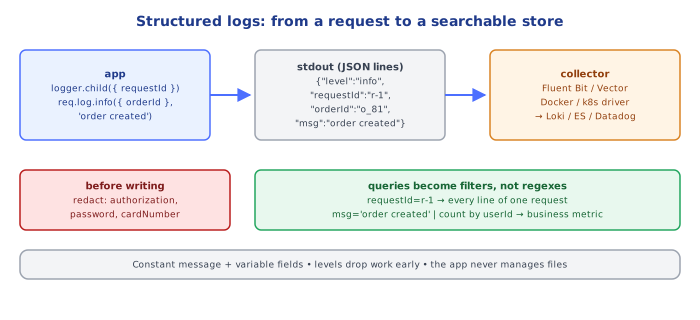
logger.info({ orderId: order.id, userId: user.id, totalCents: order.total }, "order created");{"level":30,"time":1718000000000,"pid":4242,"hostname":"api-7f9c","orderId":"o_81","userId":"u_12","totalCents":4599,"msg":"order created"}Now the log backend can answer "all order created events for userId=u_12 in the last hour" or "p95 of durationMs per route" without regexes. Rules of thumb:
- message is a constant string; variables go in fields (
"order created", not ` - consistent field names across services (
userId, notuser_idhere anduidthere) - log errors as objects (
logger.error({ err }, "charge failed")) so the serializer capturestype,messageandstack
4Request Context: Child Loggers and Correlation IDs
Every log line produced while handling a request should carry the same requestId (and ideally a traceId, see devops-cloud/observability/03-tracing_and_correlation_ids):
app.use((req, res, next) => {
  const requestId = req.headers["x-request-id"]?.toString() ?? crypto.randomUUID();
  req.log = logger.child({ requestId, method: req.method, path: req.path }); // fields bound once
  res.setHeader("x-request-id", requestId);
  const start = performance.now();
  res.on("finish", () => {
    req.log.info({ status: res.statusCode, durationMs: Math.round(performance.now() - start) }, "request completed");
  });
  next();
});

// later, deep in a handler:
req.log.warn({ attempt: 2 }, "payment retry");  // automatically includes requestId/method/path
Passing req.log down is explicit; AsyncLocalStorage (07-request_response_lifecycle/ section 6) lets services get the request's logger without threading it through every call.
5What NOT to Log
| Never log | Why |
|---|---|
passwords, tokens, API keys, session cookies, Authorization headers | logs are widely readable and long-lived; a leaked log = leaked credentials |
| full card numbers, CVV, national IDs | compliance (PCI DSS, GDPR) |
| entire request/response bodies by default | PII + volume + cost |
| high-cardinality spam in loops | cost; drowns real signals |
Use the logger's redaction feature rather than relying on discipline:
const logger = pino({ redact: { paths: ["req.headers.authorization", "*.password", "*.cardNumber"], censor: "[REDACTED]" } });6Where Logs Go
The twelve-factor rule: the app writes an event stream to stdout; it doesn't manage files, rotation or shipping. The platform (Docker/Kubernetes log driver, systemd, a sidecar like Fluent Bit/Vector) collects stdout and forwards it to the backend. That keeps the app simple and the routing configurable per environment. Locally, pipe through a pretty-printer (node app.js | pino-pretty) instead of changing the app's output format.
Under the HoodWhy Fast Loggers Are Fast▾
Logging sits on the hot path of every request, so the implementation matters:
- Level check first.
logger.debug(obj, msg)at levelinforeturns immediately — but the arguments are still evaluated by JavaScript before the call.logger.debug({ dump: JSON.stringify(hugeObject) })pays the stringify cost even when dropped; guard expensive work withif (logger.isLevelEnabled("debug")). - Pre-serialized bindings. A child logger serializes its bound fields (
"requestId":"...") once when created, and splices that string into every line, instead of re-serializing them per call. - No per-line formatting work. pino writes a JSON line with minimal string building; pretty-printing (colors, aligned timestamps) is done by a separate process reading the pipe.
- Asynchronous/batched I/O.
process.stdoutwrites to a pipe can block when the reader is slow. pino can buffer and flush viasonic-boom, or move I/O to a worker thread transport, so a slow log collector can't stall the event loop. The trade-off: on a hard crash, the last buffered lines can be lost — which is whyfatalhandlers flush synchronously before exit.
⚠️ Common Pitfalls
- Interpolating variables into the message — impossible to group "same event" lines.
- Logging secrets in headers, bodies or error messages (
new Error(\login failed for ${password}\)). logger.error(err.message)— loses the stack and error type; log{ err }.- Logging and rethrowing at every layer — the same failure appears five times; log once, where it's handled.
- Synchronous file logging in the request path — blocks the event loop.
- Debug level left on in production — cost and noise explode.
📋 Quick Reference
| Need | pino |
|---|---|
| create | pino({ level: "info" }) |
| log with fields | logger.info({ orderId }, "order created") |
| per-request context | logger.child({ requestId }) |
| errors | logger.error({ err }, "charge failed") |
| redact | pino({ redact: ["req.headers.authorization"] }) |
| check level | logger.isLevelEnabled("debug") |
| pretty locally | node app.js \| pino-pretty |
🧠 Key takeaways
- Use a real logger (pino, winston) with levels: trace/debug/info/warn/error/fatal.
- Log structured JSON with consistent field names; messages are constants, data goes in fields.
- Attach request ID / trace ID / user ID via child loggers or AsyncLocalStorage.
- Redact secrets and PII; write to stdout and let the platform ship logs.
🎤 Interview Q&A
Q1What is structured logging and why use it?core▾
Logging events as key-value data (usually JSON) instead of free text: {level, msg, orderId, traceId}. Logs become searchable and aggregatable in tools like ELK, Loki or Datadog.
- Libraries? pino/winston (Node), Serilog (.NET), structlog (Python).
Q2What should every log entry contain?core▾
Timestamp, level, service name/version, environment, message, correlation/trace ID, and relevant context (user/tenant ID, route). Avoid sensitive data.
- How do you add the trace ID automatically? Logging enrichers or context propagation (AsyncLocalStorage/ILogger scopes).
Q3How do you choose log levels?core▾
Error: needs attention, an operation failed. Warn: unexpected but handled. Info: key business/lifecycle events. Debug/Trace: detailed diagnostics, off in production by default. Don't log every request body at info.
- Can you change levels at runtime? Many setups allow it via config reload or feature flags.
Q4How do you control logging cost at scale?senior▾
Sample high-volume logs, avoid logging in hot loops, drop debug logs in production, set retention tiers, and prefer metrics for counts and traces for latency.
- Logs vs metrics? Metrics are cheap aggregates; logs are expensive per event.
Q5How do you keep secrets and PII out of logs?core▾
Never log raw request bodies/headers by default, redact known sensitive fields (password, token, authorization, card), use logging library redaction features, and scan logs for leaks.
- Why is it important? Logs are widely accessible and retained; leaks there violate GDPR/PCI.
🛠️ Practice exercises
Each exercise is a file in this topic folder. Code exercises are self-checking: run them and make the checks pass.
✅ Check yourself
Answer the questions — feedback is instant.