Request/Response Lifecycle
From bytes on a socket to a JSON response and back. Follow a request through Node's HTTP parser, the event loop, middleware and your handler, and learn why the body is a stream and where request-scoped data should live.
🎯 What you'll learn
- From socket to handler and back
- The Express and NestJS versions
- The body is a stream; the response side
- Request-scoped data with AsyncLocalStorage
📚 Before you start
1From Socket to Handler and Back
Every framework request follows the same overall arc, even though the names differ:
TCP connection accepted
  → HTTP parser reads request line + headers   (Node's llhttp)
  → framework creates req/res objects
  → global middleware                           (06-middleware/)
  → routing: find the handler                   (04-routing/)
  → route-level middleware / guards / pipes
  → handler (controller)                        (05-controllers/)
  → response serialization (JSON, status, headers)
  → bytes written to the socket
  → "finish" event, logging, metrics
Understanding this order answers most "why didn't X happen?" questions: the body parser hadn't run yet; the guard ran before the pipe; the logger was registered after the router; headers were already sent.
2The Express Version
const app = express();
app.use(helmet());           // 1. security headers on every response
app.use(express.json());     // 2. stream + parse the body into req.body
app.use(requestId);          // 3. attach an id for logs
app.use("/api", authenticate);
app.get("/api/orders/:id", loadOrder, (req, res) => res.json(res.locals.order)); // route + handler
app.use(notFound);           // 4. nothing matched → 404
app.use(errorHandler);       // 5. anything called next(err) → error response
Express has exactly one concept — middleware — and the router itself is middleware. The "lifecycle" is literally the order of app.use/app.METHOD calls.
3The NestJS Version
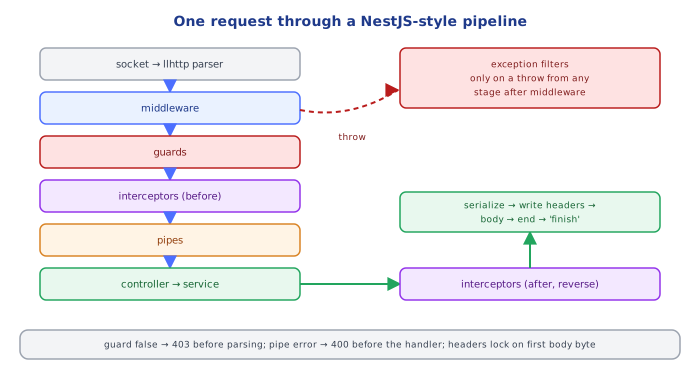
Nest formalizes the stages so each kind of logic has a fixed slot:
Incoming request
  → Middleware            (global, then module-bound)
  → Guards                (global → controller → route)
  → Interceptors, before  (global → controller → route)
  → Pipes                 (global → controller → route → param)
  → Controller method
  → Service(s)
  → Interceptors, after   (route → controller → global — reverse order)
  → Exception filters     (route → controller → global — only if something threw)
→ Response| If you need to... | Use | Because it runs... |
|---|---|---|
| reject unauthenticated/unauthorized calls | Guard | before any parsing/validation work |
validate & transform @Body()/@Param() | Pipe | right before the handler, per argument |
| time, cache, or reshape the response | Interceptor | around the handler (before and after) |
| map exceptions to HTTP errors | Exception filter | only on the error path |
4The Body Is a Stream
The request body is not available when the request object is created — it arrives as a stream of chunks after the headers. A body parser must:
- check
Content-Type(application/json,multipart/form-data, ...) - read chunks until the end, enforcing a size limit (Express default
100kb) - decode and parse, then set
req.bodyand callnext()
That's why a handler that reads req.body before a parser has run sees undefined, and why huge uploads are streamed to disk instead (15-file_uploads/).
5The Response Side
A response has three phases and the order is enforced by HTTP itself:
- Status line + headers — can be changed freely until the first byte is written.
- Body — once writing starts, headers are flushed (
res.headersSent === true) and can no longer change. - End —
res.end(); Node emits"finish"when the last byte is handed to the OS.
res.status(201);
res.setHeader("Location", `/orders/${order.id}`);
res.json(order);          // serializes, sets Content-Type + Content-Length, writes, ends
res.setHeader("X-Late", "1"); // ❌ ERR_HTTP_HEADERS_SENT6Where Request-Scoped Data Lives
Data produced early in the lifecycle (the authenticated user, a request ID, a DB transaction) needs to reach code that runs later:
| Mechanism | Example | Notes |
|---|---|---|
| request object | req.user, res.locals.order | simplest; must be passed down manually |
| AsyncLocalStorage | als.getStore().requestId | available anywhere in the same async call chain, even in services |
| DI request scope | Nest @Injectable({ scope: Scope.REQUEST }) | a new provider instance per request; slower, use sparingly |
import { AsyncLocalStorage } from "node:async_hooks";
const als = new AsyncLocalStorage<{ requestId: string }>();

app.use((req, res, next) => als.run({ requestId: crypto.randomUUID() }, next));

function log(msg: string) {
  console.log(`[${als.getStore()?.requestId}] ${msg}`); // works deep inside services
}
Under the HoodNode's HTTP Server and the Event Loop▾
http.createServer(handler) registers a listener for the "request" event. For each connection, Node's C-based llhttp parser consumes bytes from the socket; once the header block is complete it constructs an IncomingMessage (a readable stream — the body hasn't arrived yet) and a ServerResponse (a writable stream), and emits "request". Express's app is that handler function: it wraps req/res with its prototypes and starts the middleware chain.
Everything then runs on one thread. While one handler awaits a database query, the event loop is free to parse and dispatch other requests — which is why a CPU-heavy synchronous handler (say, a 200ms JSON transform) delays every concurrent request, not just its own. Keep-alive lets one TCP connection carry many sequential requests; server.keepAliveTimeout and headersTimeout bound how long idle or slow clients can hold sockets.
AsyncLocalStorage works because Node tracks async resources: every promise, timer and I/O callback created while a store is active inherits that store, so getStore() in a callback many awaits later returns the context of the request that started the chain.
⚠️ Common Pitfalls
- Reading
req.bodywithout a body parser (or with the wrongContent-Type) →undefined. - Setting headers after the body has started →
ERR_HTTP_HEADERS_SENT. - Validation in a guard, authorization in a pipe — each stage has a job; mixing them makes ordering bugs (e.g. validating a body before rejecting an unauthenticated caller wastes work and leaks validation details).
- CPU-bound work inside a handler blocks every other in-flight request (move it to
node/09-worker_threadsor a background job,16-background_jobs/). - Not responding on every code path — a branch that neither responds nor throws leaves the request hanging.
- Module-level mutable state used as "request state" — shared by every concurrent request; use the request object or AsyncLocalStorage.
📋 Quick Reference
| Stage | Express | NestJS |
|---|---|---|
| cross-cutting pre-processing | app.use(mw) | middleware |
| allow/deny | middleware | guard |
| validate/transform input | middleware (zod/joi) | pipe |
| around-the-handler logic | res.on("finish") | interceptor |
| business logic | handler → service | controller → service |
| errors → responses | 4-arg error middleware | exception filter |
| request-scoped data | req, res.locals, ALS | @Req(), ALS, request-scoped providers |
🧠 Key takeaways
- Node parses HTTP in C, emits
'request'withreq/resstreams, and your framework runs on that callback. - The request body is a stream; parsers read it fully (enforce size limits) or you stream it.
- The response is written once headers are sent (
headersSent): handle errors before streaming. - Store request-scoped data (user, request ID) in
req/res.localsor AsyncLocalStorage, never globals.
🎤 Interview Q&A
Q1Walk through the lifecycle of an HTTP request in a web framework.core▾
Server accepts the connection and parses the request → middleware pipeline (logging, CORS, auth) → routing selects the endpoint → model binding and validation → filters/guards → handler calls services → result serialized → response middleware (compression, headers) → response written → logging/metrics on completion.
- Where are errors caught? Global exception middleware/filters around the pipeline.
Q2How is request-scoped context carried through the code?core▾
Via the request object, DI scopes (scoped services), or async context storage: AsyncLocalStorage in Node, AsyncLocal<T>/HttpContext in .NET, contextvars in Python. Used for user identity, correlation IDs and transactions.
- Why not globals? Concurrent requests would overwrite each other.
Q3What happens when a client disconnects mid-request?senior▾
The server may keep working unless it observes cancellation: HttpContext.RequestAborted in .NET, req.on('close')/AbortSignal in Node. Propagate cancellation to DB queries and downstream calls to save resources.
- Example benefit? Cancelling an expensive report query when the user navigates away.
Q4How does response streaming work?core▾
Instead of buffering the full body, the server sends chunks as they're ready (chunked transfer encoding in HTTP/1.1, frames in HTTP/2): useful for large files, CSV exports and server-sent events. Middleware that buffers (some compression) can break streaming.
- Benefit? Lower memory usage and faster time to first byte.
Q5Where should timeouts be configured?core▾
At every layer: load balancer idle timeouts, server request timeouts, handler-level budgets, and client timeouts for downstream calls, ordered so inner timeouts fire before outer ones.
- Why order them? So the service returns a meaningful error instead of the LB cutting the connection.
🛠️ Practice exercises
Each exercise is a file in this topic folder. Code exercises are self-checking: run them and make the checks pass.
✅ Check yourself
Answer the questions — feedback is instant.