Worker Threads
Worker threads run JavaScript in parallel inside one process. Watch a CPU-heavy task freeze every request on the main thread, then offload it to a worker pool, and learn the costs of copying, transferring and sharing memory.
🎯 What you'll learn
- Why CPU-bound work blocks the event loop
- Workers vs child processes vs cluster
- Creating workers and message passing (structured clone)
- Transferring ArrayBuffers, SharedArrayBuffer and lifecycle
📚 Before you start
1The Problem: CPU-Bound Work Blocks the Event Loop
Node's JS execution is single-threaded — one thread runs your callbacks, timers, and Promise continuations. A CPU-heavy synchronous computation (parsing a huge JSON file, image processing, a tight numeric loop) monopolizes that thread, and everything else stalls: no other request gets handled, no timer fires, no I/O callback runs, until it finishes.
// blocks the event loop for the ENTIRE process — every other request queues up
function fibonacci(n) {
  return n < 2 ? n : fibonacci(n - 1) + fibonacci(n - 2);
}
app.get("/compute", (req, res) => {
  res.send(String(fibonacci(40))); // every other concurrent request waits behind this
});
worker_threads solves this by running that computation on a genuinely separate OS thread, with its own V8 instance and own event loop, leaving the main thread free to keep handling I/O.
2Workers vs. Child Processes vs. Cluster
| Mechanism | Isolation | Shares memory? | Best for |
|---|---|---|---|
worker_threads | separate thread, same process | yes, via SharedArrayBuffer/transferables | CPU-bound work that needs to stay in-process |
child_process | separate OS process | no — only serialized messages | running another program, or isolating a crash-prone task entirely |
cluster | multiple OS processes, same server code | no | scaling an HTTP server across CPU cores (load-balanced) |
worker_threads sits between the two: cheaper to spin up than a full child process (no new OS process, no new V8 startup cost for the module loader in some cases), and — critically — capable of sharing raw memory via SharedArrayBuffer, which no child_process variant can do since processes never share an address space.
3Creating a Worker
// main.js
const { Worker } = require("worker_threads");

const worker = new Worker("./worker-task.js", {
  workerData: { n: 40 }, // passed once, at creation — available in the worker as workerData
});

worker.on("message", (result) => console.log("result:", result));
worker.on("error", (err) => console.error("worker crashed:", err));
worker.on("exit", (code) => console.log(`worker exited with code ${code}`));// worker-task.js
const { parentPort, workerData } = require("worker_threads");
function fibonacci(n) {
return n < 2 ? n : fibonacci(n - 1) + fibonacci(n - 2);
}
const result = fibonacci(workerData.n); // runs on the WORKER's own thread, main thread stays free
parentPort.postMessage(result);workerData is a one-time payload cloned into the worker at creation (via the structured clone algorithm, same rules as postMessage); parentPort is the worker-side handle for sending messages back, mirroring the worker object's .on('message', ...) on the main side.
4Message Passing Is Structured-Clone by Default
worker.postMessage({ type: "task", payload: [1, 2, 3] });
// worker side:
parentPort.on("message", (msg) => { /* a DEEP COPY of the object above */ });
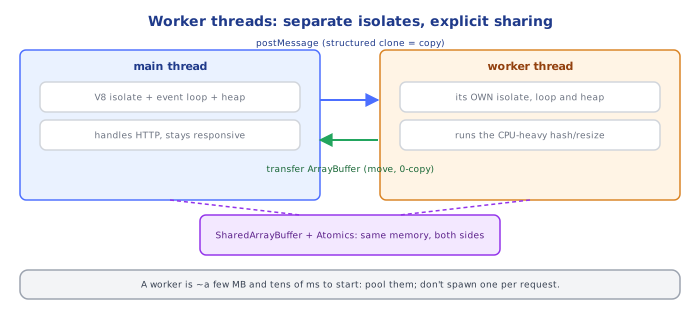
Every postMessage() call copies the data by default (structured clone — same algorithm as structuredClone()), not a live reference. For small/medium messages this is simple and safe; for large data (big typed arrays, buffers), copying on every message becomes the actual bottleneck, which is what the next two mechanisms exist to avoid.
5Transferring Ownership (Zero-Copy for ArrayBuffer)
const buffer = new ArrayBuffer(1024 * 1024 * 100); // 100MB
worker.postMessage({ buffer }, [buffer]); // second arg: list of "transferable" objects

console.log(buffer.byteLength); // 0 — the MAIN thread no longer owns it after transfer!
Passing an ArrayBuffer in the transfer list moves ownership to the receiving side instead of copying it — genuinely zero-copy, but exclusive: the sending side's reference becomes unusable (byteLength becomes 0) the instant the transfer happens, because only one thread may own that memory at a time.
6SharedArrayBuffer — True Concurrent Shared Memory
// main.js
const { Worker } = require("worker_threads");
const sab = new SharedArrayBuffer(4); // 4 bytes = one Int32
const view = new Int32Array(sab);

const worker = new Worker("./increment-worker.js", { workerData: { sab } });
worker.on("exit", () => console.log("final value:", view[0]));// increment-worker.js
const { workerData } = require("worker_threads");
const view = new Int32Array(workerData.sab);
Atomics.add(view, 0, 1); // ATOMIC increment — safe even if multiple workers do this concurrentlyUnlike a plain ArrayBuffer, a SharedArrayBuffer is genuinely shared — both the main thread and any worker holding a reference see the same underlying memory, live, with no copying and no transfer of ownership. This is real shared-memory concurrency, which means real data races are possible; the Atomics API (Atomics.add, Atomics.load, Atomics.store, Atomics.wait/notify) provides the same kind of race-free primitives found in traditional multithreaded languages, and should be used for any value multiple threads read-modify-write concurrently.
7Worker Lifecycle and Termination
const worker = new Worker("./task.js");

worker.terminate().then(() => console.log("terminated")); // forcefully stops the worker

worker.postMessage("done"); // (if the worker script listens for it) a cooperative shutdown signal
.terminate() forcibly stops a worker's execution, similar in spirit to child.kill() for a child process — any in-flight async work in that worker is simply abandoned. A cleaner shutdown, when the worker is doing something that shouldn't be interrupted mid-operation, sends it a message it can act on and then calls process.exit()/lets it finish naturally from inside the worker itself.
Under the HoodWhy Workers Are "Cheap Processes," Not "Cheap Callbacks"▾
Each worker gets its own V8 isolate and libuv event loop
A Worker is not a green thread or a coroutine sharing the main thread's execution — it is a genuine OS thread running its own independent V8 isolate (its own heap, its own garbage collector, its own compiled code cache) and its own libuv event loop for I/O. This is why a worker can run truly parallel CPU-bound JS — there is no shared interpreter lock forcing the two threads to take turns, unlike, say, Python's GIL-constrained threading. It also means workers are meaningfully heavier to spin up than an async callback (real V8 isolate startup cost), which is why the standard advice is to use a worker pool for many short-lived tasks rather than spawning a fresh worker per unit of work.
Why SharedArrayBuffer needs Atomics at all
Because two real OS threads can execute genuinely simultaneously (unlike Node's single JS thread, where "concurrency" between async callbacks is actually cooperative interleaving, never true simultaneity), a plain read-modify-write on shared memory (view[0] = view[0] + 1) from two workers at once is a real, classic data race — both could read the same old value before either writes back the increment, losing an update. Atomics operations map to actual CPU-level atomic instructions, guaranteeing a read-modify-write completes as one indivisible step relative to any other thread touching the same memory.
⚠️ Common Pitfalls
- Spawning a new
Workerper request/task in a hot path — V8 isolate startup cost is real; use a worker pool (reuse a fixed set of long-lived workers) for frequent short tasks instead. - Assuming
postMessage()shares memory by default — it deep-copies (structured clone) unless you explicitly transfer or use aSharedArrayBuffer; large repeated copies are a real performance trap. - Reading a transferred
ArrayBufferfrom the sending side after transfer — itsbyteLengthbecomes0; ownership genuinely moved, it's not a copy you can still use. - Mutating a
SharedArrayBufferwithoutAtomics— a plain read-modify-write across threads is a real data race with lost updates, exactly like shared-memory bugs in any other multithreaded language. - Reaching for
worker_threadsfor I/O-bound work — I/O (network, disk) is already handled efficiently by the single-threaded event loop vialibuv's thread pool internally; workers solve CPU-bound blocking, not I/O concurrency, which async/await already provides.
📋 Quick Reference
new Worker(path, { workerData })  → spawn, own V8 isolate + event loop
parentPort.postMessage(x) / worker.on('message', fn) → structured-clone by default
postMessage(x, [transferable])     → zero-copy ownership TRANSFER (ArrayBuffer)
new SharedArrayBuffer(n)           → true shared memory, visible to all holders
Atomics.add/load/store/wait/notify → race-free ops on shared memory
worker.terminate()                  → forceful stop, abandons in-flight work
worker_threads vs child_process     → thread+shared mem vs full process, no shared mem
worker_threads vs cluster            → one process/many threads vs many processes
Use a WORKER POOL for frequent short tasks — isolate startup cost is real
🧠 Key takeaways
- CPU-bound JS blocks the event loop; offload it to worker threads (or a separate service/queue).
- Workers share a process but have separate V8 isolates and event loops; reuse them via a pool.
postMessagecopies via structured clone; transfer ArrayBuffers for zero-copy;SharedArrayBuffer+ Atomics for shared memory.- Use child processes for isolation/other programs and cluster for multi-core HTTP scaling.
🎤 Interview Q&A
Q1When should you use worker_threads?core▾
For CPU-intensive JavaScript (image processing, hashing, parsing, compression) that would block the event loop. Not for I/O, which Node already handles asynchronously.
- Workers vs child processes? Workers share a process and can share memory; child processes are fully isolated.
Q2How do workers communicate with the main thread?core▾
Through postMessage (structured clone of data), MessageChannel, transferable objects (ArrayBuffer transferred without copying) and SharedArrayBuffer with Atomics for shared memory.
- Why transfer ArrayBuffers? To avoid copying large data.
Q3Why use a worker pool?senior▾
Starting a worker has overhead (new V8 isolate); a pool (Piscina) reuses workers and limits concurrency to the number of cores.
- Pool size? Typically the number of CPU cores, minus one for the main thread.
Q4What are the limitations of worker threads?core▾
Each has its own event loop and memory (heavier than an async task), data passed is copied unless transferred/shared, and shared memory needs careful synchronization.
- Can workers access the DOM-like globals? No; they have their own isolated globals.
Q5How do you handle errors in workers?core▾
Listen to the worker's error and exit events, and propagate errors back through messages; pools typically reject the task promise.
- What if a worker crashes? Replace it in the pool and retry the task if safe.
🛠️ Practice exercises
Each exercise is a file in this topic folder. Code exercises are self-checking: run them and make the checks pass.
✅ Check yourself
Answer the questions — feedback is instant.