The process Object and Environment Variables
The process object is your handle on the running program: arguments, environment, stdio, exit codes and signals. Walk through a graceful shutdown on SIGTERM and learn why process.env is a snapshot taken at spawn time.
🎯 What you'll learn
- process as the global handle
- argv and env
- Standard streams, exit codes and lifecycle events
- Signals and graceful shutdown
📚 Before you start
1process — the Global Handle on the Running Program
process is a global object (no require() needed) that represents the currently running Node instance itself — its arguments, environment, standard streams, and lifecycle.
console.log(process.pid);        // this process's OS process ID
console.log(process.platform);   // "darwin", "linux", "win32", ...
console.log(process.version);    // "v20.11.0" — the Node version running this code
console.log(process.cwd()); // the current working directory the process was launched from2process.argv — Command-Line Arguments
// node script.js foo --bar=baz
console.log(process.argv);
// [ '/usr/local/bin/node', '/path/to/script.js', 'foo', '--bar=baz' ]

const userArgs = process.argv.slice(2); // ['foo', '--bar=baz'] — the actual args YOU care about
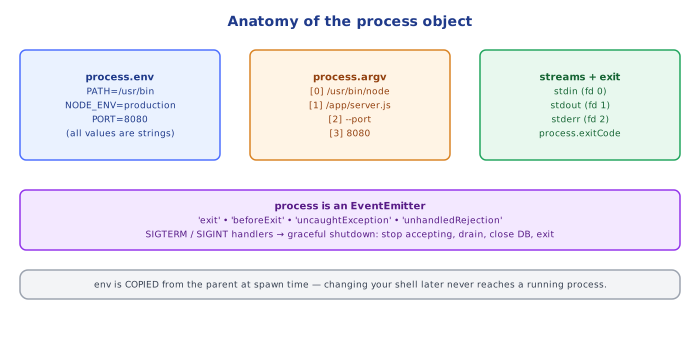
argv[0] is always the path to the Node executable itself, argv[1] is the script path — real user-supplied arguments start at index 2. Parsing flags like --bar=baz manually is normal for small scripts; larger CLIs typically use a parsing library, but the raw array is always there underneath.
3process.env — Reading the Environment
console.log(process.env.HOME);      // e.g. "/Users/ana"
console.log(process.env.PATH);      // the shell PATH string
console.log(process.env.NODE_ENV);  // undefined unless explicitly set

const port = Number(process.env.PORT) || 3000; // common pattern: env override with a fallback default
Every value in process.env is a string — even something that looks numeric or boolean was set as text by whatever launched the process (a shell, a .env file loader, a container orchestrator, a CI system). process.env.DEBUG === "false" is a truthy, non-empty string; you must parse it yourself (=== "true", Number(...), etc.) if you need a real boolean or number.
process.env.MY_VAR = "hello"; // you CAN write to process.env — but it only affects THIS process and its children
console.log(process.env.MY_VAR); // "hello"4Standard Streams and Exit
process.stdout.write("no newline added automatically\n"); // lower-level than console.log
process.stderr.write("goes to stderr, not stdout\n");

process.stdin.on("data", (chunk) => {
  console.log("received:", chunk.toString().trim());
});console.log/console.error are convenience wrappers around process.stdout/process.stderr (with a newline and formatting added); process.stdout/stderr are themselves Writable streams (see the Streams topic), and process.stdin is a Readable.
process.exit(0);  // exit immediately, code 0 = success
process.exit(1);  // exit immediately, any nonzero = failure (convention)
process.exit() terminates the process immediately, without waiting for pending I/O (a scheduled fs.writeFile callback that hasn't fired yet may simply never run). Prefer letting the event loop drain naturally (removing all pending work causes Node to exit on its own with code 0) and reserve explicit process.exit(code) for genuine early-abort scenarios (a fatal startup error, a CLI tool's usage of specific exit codes).
5Process Lifecycle Events
process.on("exit", (code) => {
  console.log(`about to exit with code ${code}`); // ONLY synchronous work allowed here
});

process.on("uncaughtException", (err) => {
  console.error("uncaught:", err);
  process.exit(1); // best practice: log and exit — the process is in an unknown state after this
});

process.on("unhandledRejection", (reason) => {
  console.error("unhandled rejection:", reason);
});
'exit' fires synchronously right before the process actually terminates — no async work (a Promise, a timer, an I/O call) started inside it will ever run. 'uncaughtException'/'unhandledRejection' are last-resort safety nets, not routine error handling — after an uncaught exception, application state may be inconsistent (a half-updated cache, a partially-written file), so the conventional advice is to log and exit rather than try to keep running.
6Signals
process.on("SIGINT", () => {   // Ctrl+C in a terminal
  console.log("caught SIGINT, cleaning up...");
  process.exit(0);
});

process.on("SIGTERM", () => {  // typical "please shut down gracefully" signal (e.g. from Docker/Kubernetes)
  console.log("caught SIGTERM, shutting down gracefully...");
  server.close(() => process.exit(0));
});
Registering a handler for SIGINT/SIGTERM lets a program run cleanup logic (closing database connections, finishing in-flight requests) before exiting, instead of being killed abruptly — this is the standard graceful-shutdown pattern for long-running servers.
Under the Hoodprocess.env Is a Snapshot, Taken Once, at Spawn Time▾
The environment is copied from the parent when the process starts
When any process (Node or otherwise) is spawned by its parent (a shell, a script, an orchestrator), the operating system hands it a copy of the parent's current environment variables at that exact moment — a flat list of KEY=value strings. Node reads that OS-level environment once at startup and exposes it as the process.env object. This has two important, easy-to-miss consequences:
// in a shell, BEFORE running the script:
// export API_KEY=old-value
// node script.js

console.log(process.env.API_KEY); // "old-value" — captured at spawn

// meanwhile, in ANOTHER terminal, someone runs:
// export API_KEY=new-value
// (this does absolutely nothing to the already-running Node process above)- A running process never sees changes to the environment made after it started, by anything external (another shell session, a system-wide env var change). The only way to change what a running process sees is to modify
process.envfrom inside its own JS code, which affects only that process's in-memory copy. - Writes to
process.envinside your code do not propagate backward to the shell/parent that launched Node, and do not retroactively affect the calling shell session after the script exits — they only exist for the lifetime of that Node process (and are visible to any child processes it spawns afterward, per the next point).
Children inherit the environment at the moment they're spawned, not by reference
const { spawn } = require("child_process");

process.env.CUSTOM_VAR = "set-before-spawn";
spawn("node", ["-e", "console.log(process.env.CUSTOM_VAR)"], { stdio: "inherit" });
// child prints "set-before-spawn" — it got a COPY at the moment spawn() was called

process.env.CUSTOM_VAR = "changed-after-spawn"; // does NOT affect the child spawned above; it's already running with its own copy
child_process (own topic) passes the current process.env (or an explicit env option override) to the child at spawn time — the child receives its own independent copy, not a live view. This is exactly the same "snapshot, not a live link" behavior between the OS and any parent-child process boundary, all the way up the chain.
Why .env file loaders (dotenv-style tools) exist at all
Since the OS environment is fixed at spawn time and Node has no built-in way to read a .env file into process.env automatically (older Node versions, at least — recent Node has an experimental --env-file flag), tools like dotenv work by reading a text file at the very start of the program and writing each key into process.env themselves, before any other code that depends on those variables runs. It's not a special "environment file format" Node understands natively (in older versions) — it's just: read a file, split on =, assign into process.env in JS.
⚠️ Common Pitfalls
- Assuming
process.env.PORTis a number — every environment variable is a string;"3000" + 1 === "30001"(string concatenation, not addition) unless you explicitly convert withNumber(...)orparseInt(...). - Expecting a change to the OS/shell environment to affect an already-running process — it won't;
process.envwas copied once at spawn, and there's no live link back to the OS environment afterward. - Calling
process.exit()with pending async work you actually need to complete (an in-flightfs.writeFile, a database write) — it terminates immediately, dropping unfinished I/O; let the event loop drain naturally, or explicitly await/flush critical work first. - Doing async work inside a
process.on('exit', ...)handler and expecting it to run —'exit'fires synchronously in the final moments of shutdown; Promises, timers, and I/O started there will not execute. - Using
uncaughtException/unhandledRejectionas routine error handling instead of a last-resort safety net — application state is considered untrustworthy after an uncaught error; the conventional practice is to log the error and exit, not to swallow it and keep serving requests.
📋 Quick Reference
process.pid / .platform / .version / .cwd() → identity and environment info
process.argv                                  → [nodePath, scriptPath, ...userArgs]
process.env.KEY                                → always a STRING, or undefined if unset
process.env.KEY = "x"                           → sets it for THIS process (and future children) only
process.stdout / .stderr / .stdin                → Writable/Writable/Readable streams
process.exit(code)                                → terminates immediately, 0 = success, nonzero = failure
'exit'                                             → fires synchronously, no async work allowed
'uncaughtException' / 'unhandledRejection'          → last-resort safety nets, log-and-exit is the norm
SIGINT / SIGTERM                                     → interrupt / terminate signals, catchable for graceful shutdown
process.env is a SNAPSHOT                              → copied from the parent at spawn time, never live-synced afterward
🧠 Key takeaways
process.argv(args),process.env(strings only, snapshot at spawn),process.exitCode, stdio streams.- Exit codes: 0 = success, non-zero = failure; prefer setting
exitCodeover abruptprocess.exit(). - Handle SIGTERM/SIGINT for graceful shutdown; SIGKILL can't be caught.
- Log and exit on
uncaughtException/unhandledRejection: state may be corrupt, let the orchestrator restart.
🎤 Interview Q&A
Q1How do you read configuration from environment variables in Node?core▾
process.env.NAME (always strings or undefined). Validate and parse at startup (Zod, envalid), provide defaults, and load .env files in development (dotenv or Node's --env-file).
- Why validate? Typos and missing values otherwise fail at runtime.
Q2How do you handle process signals?core▾
Listen for SIGTERM/SIGINT to shut down gracefully: stop accepting traffic, finish in-flight work, close resources, then exit with an appropriate code.
- What is exit code non-zero for? Signals failure to orchestrators and scripts.
Q3How should a Node process handle uncaught exceptions?senior▾
Log them and exit (the process may be in an inconsistent state), letting the orchestrator restart it. Don't keep running after uncaughtException.
- And unhandled rejections? Node crashes by default on unhandled rejections since v15; handle them properly.
Q4What does NODE_ENV do?core▾
A convention: production enables optimizations in many libraries (Express view caching, less verbose errors, React production builds). It shouldn't be used to encode deployment environments like staging.
- Where should env-specific config go? Separate variables like APP_ENV.
Q5What's on the process object that's useful in production?core▾
process.memoryUsage(), process.cpuUsage(), process.uptime(), process.pid, process.argv, process.exitCode, and process.hrtime.bigint() for timing.
- Why set exitCode instead of exit()? It lets pending I/O finish before exiting.
🛠️ Practice exercises
Each exercise is a file in this topic folder. Code exercises are self-checking: run them and make the checks pass.
✅ Check yourself
Answer the questions — feedback is instant.