Child Processes
Child processes run other programs (or other Node scripts) as separate OS processes. Compare spawn, exec, execFile and fork, avoid shell injection, and handle exit codes, signals, zombies and orphans.
🎯 What you'll learn
- Why spawn a separate OS process
- spawn, exec, execFile and fork
- Streaming vs buffered output; IPC with fork
- Exit codes, signals, zombies and orphans
📚 Before you start
1Why Spawn a Separate OS Process at All
Node's own JS execution is single-threaded — one CPU-bound task blocks everything else on the event loop. The child_process module sidesteps this by handing work to a completely separate operating-system process, with its own memory space, its own event loop if it's also Node, and its own PID. Node communicates with it only through streams (stdin/stdout/stderr) or, for Node-to-Node children, a dedicated IPC channel.
const { spawn } = require("child_process");

const ls = spawn("ls", ["-la", "/tmp"]);
ls.stdout.on("data", (chunk) => console.log(`stdout: ${chunk}`));
ls.stderr.on("data", (chunk) => console.error(`stderr: ${chunk}`));
ls.on("close", (code) => console.log(`child exited with code ${code}`));
This is fundamentally different from worker_threads (own topic): a child process cannot share memory with its parent at all — everything crossing the boundary is serialized bytes (streams) or, for fork(), structured-cloned messages — whereas threads within one process share the same heap.
2The Four Ways to Spawn: spawn, exec, execFile, fork
const { spawn, exec, execFile, fork } = require("child_process");

// spawn: streams output as it arrives, no shell by default, best for
// long-running processes or large output (never buffers the whole thing)
const grep = spawn("grep", ["error", "app.log"]);

// exec: runs through a SHELL (so "ls | grep foo" works), BUFFERS all
// output into memory and hands it to a callback — bad for large output
exec("ls -la | grep '.js'", (err, stdout, stderr) => {
  if (err) return console.error(err);
  console.log(stdout);
});

// execFile: like exec but runs the executable DIRECTLY, no shell —
// safer (no shell-injection risk) and slightly cheaper
execFile("node", ["--version"], (err, stdout) => console.log(stdout));

// fork: a SPECIAL CASE of spawn, specifically for launching another
// NODE.JS script, with an IPC channel automatically set up
const child = fork("./worker-script.js");
child.send({ task: "process", data: [1, 2, 3] });
child.on("message", (result) => console.log("got:", result));| Function | Shell? | Buffers output? | Use for |
|---|---|---|---|
spawn | no (by default) | no — streams | long-running, large/streaming output, any executable |
exec | yes | yes, into memory | short commands needing shell features (pipes, globs) on small output |
execFile | no | yes, into memory | running a known executable with args, no shell features needed |
fork | no | no — streams + IPC | launching another Node.js script that needs to talk back |
spawn can opt into a shell via { shell: true }, and exec/execFile can be told not to buffer by passing very large maxBuffer — but the defaults above are what actually differ, and are what decide which one to reach for.
3Streaming vs. Buffered Output
// spawn/fork: you read output incrementally as Buffer chunks
const child = spawn("some-long-running-tool");
child.stdout.on("data", (chunk) => process.stdout.write(chunk)); // arrives progressively

// exec/execFile: output only becomes available once the process EXITS
exec("some-long-running-tool", (err, stdout) => {
  console.log(stdout); // the ENTIRE output, all at once, only after completion
});exec/execFile accumulate output in an internal buffer up to maxBuffer (default 1MB as of modern Node) and throw/error if the child produces more than that before exiting — a common failure mode for exec-ing a command that turns out to be noisier than expected. spawn has no such buffer ceiling because it never buffers in the first place; you receive and dispose of each chunk as it arrives.
4fork() and the IPC Channel
// parent.js
const { fork } = require("child_process");
const child = fork("./child.js");

child.send({ cmd: "add", a: 2, b: 3 });
child.on("message", (msg) => console.log("parent received:", msg)); // { result: 5 }

// child.js
process.on("message", (msg) => {
  if (msg.cmd === "add") {
    process.send({ result: msg.a + msg.b });
  }
});
fork() is the only one of the four that automatically wires up a bidirectional IPC channel — both child.send()/.on('message') (parent side) and process.send()/process.on('message') (child side, since the forked script is itself a Node process). Messages are structured-cloned, not raw bytes you parse yourself — you send and receive real JS objects (with the same cloning limitations as structuredClone: no functions, no non-plain-object class instances by default).
5Exit Codes and Signals
const child = spawn("some-command");

child.on("exit", (code, signal) => {
  if (signal) {
    console.log(`killed by signal ${signal}`); // e.g. child.kill('SIGTERM') from the parent
  } else {
    console.log(`exited normally with code ${code}`); // 0 = success, nonzero = failure by convention
  }
});

child.on("close", (code, signal) => {
  // fires AFTER 'exit', once stdio streams are fully flushed/closed —
  // prefer 'close' when you need to be sure all output has been read
});

child.kill("SIGTERM"); // ask it to terminate gracefully
child.kill("SIGKILL"); // force-kill, cannot be caught or ignored by the child
'exit' and 'close' are subtly different: 'exit' fires as soon as the OS process itself terminates, but its stdio pipes might still have buffered data in flight; 'close' waits until those streams are fully drained. When correctness depends on having captured all output, listen for 'close', not 'exit'.
6Zombie and Orphan Processes
A child becomes a zombie if it exits but its parent never reads its exit status (rare to hit directly in Node, since Node's bindings read exit status automatically — but relevant when spawning long chains of processes that themselves spawn children without reaping them). A child becomes an orphan if its parent dies first while the child is still running; the OS re-parents it (to init/PID 1 on Unix), and it keeps running detached from the original Node process, invisible to any of that process's 'exit' handlers.
const child = spawn("long-running-task", { detached: true, stdio: "ignore" });
child.unref(); // let the PARENT exit without waiting for this child
{ detached: true } plus .unref() is the deliberate, intentional version of orphaning — used to launch a genuinely independent background process that should outlive its launcher, rather than an accidental leak.
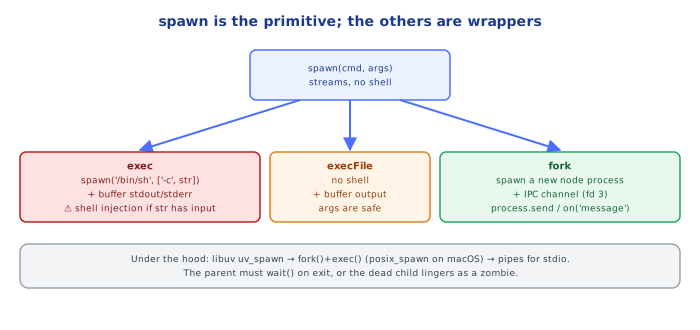
Under the HoodWhy spawn Is the Primitive and the Others Are Built On It▾
exec/execFile/fork are all implemented on top of spawn
Internally, Node's child_process module has exactly one low-level mechanism for creating an OS process (backed by posix_spawn/fork+exec on Unix, CreateProcess on Windows) — spawn() exposes it almost directly. exec() is spawn() plus { shell: true } plus internal buffering logic that accumulates every data event into a string/Buffer and only invokes your callback once the child's 'close' event fires. fork() is spawn() plus forcing the command to process.execPath (the current Node binary) plus automatically creating an extra ipc-type stdio pipe that the higher-level .send()/.on('message') API is built on.
Streams are OS pipes, not an in-memory data structure
When you read child.stdout, you are reading from a real OS-level pipe connecting the child's file descriptor 1 to the parent. Each 'data' event corresponds to a chunk the kernel handed to Node's underlying libuv pipe-reading machinery — this is why output arrives in unpredictable chunk sizes (never assume a chunk boundary lines up with a logical line or JSON object; use a line-splitting or newline-delimited-JSON parsing step if you need that).
⚠️ Common Pitfalls
- Using
exec()on a command that can produce large output — it buffers everything in memory and throws oncemaxBufferis exceeded; usespawn()and stream instead for anything with unbounded output. - Using
exec()with untrusted/user-supplied input in the command string — it runs through a real shell, so unescaped input is a shell-injection vector; preferexecFile()/spawn()with an args array, which never invokes a shell. - Listening for
'exit'when you actually need all output captured — stdio may still be flushing; listen for'close'instead when completeness of output matters. - Forgetting that
fork()messages are structured-cloned, not raw JSON — passing aMap, a class instance, or a function silently drops or mangles data; stick to plain objects/arrays/primitives. - Spawning long-running child processes without ever calling
.kill()on cleanup — an unmanaged child can outlive the parent's intended lifecycle, leaking OS processes.
📋 Quick Reference
spawn(cmd, args)      → streams, no shell, best default choice
exec(cmdString, cb)   → shell, buffered, small output + shell features (pipes)
execFile(cmd, args, cb) → no shell, buffered, safer than exec for known executables
fork(modulePath)      → spawn + IPC channel, for Node-to-Node child scripts
child.send(obj) / process.send(obj)   → structured-clone IPC (fork only)
'exit' (code, signal)  → OS process terminated, stdio may still be flushing
'close' (code, signal) → OS process terminated AND stdio fully drained
child.kill('SIGTERM')  → graceful ask; 'SIGKILL' → forced, uncatchable
{ detached: true } + .unref() → deliberately orphan a background process
🧠 Key takeaways
- Use child processes to run other programs or isolate risky work; workers for in-process CPU parallelism.
- spawn streams; execFile buffers without a shell; exec uses a shell (injection risk); fork adds IPC between Node processes.
- Pass arguments as arrays; never build shell strings from user input.
- Check exit codes and signals, forward SIGTERM, and use an init (tini) in containers to reap zombies.
🎤 Interview Q&A
Q1What are spawn, exec, execFile and fork?core▾
spawn: launches a command with streaming stdio. exec: runs in a shell and buffers output (convenient, but shell injection risk and buffer limits). execFile: runs a binary without a shell. fork: spawns a new Node process with an IPC channel.
- Which for large output? spawn, because it streams.
Q2How do you avoid command injection?core▾
Never pass untrusted input to exec/shell strings; use execFile/spawn with an argument array and shell: false, and validate inputs.
- Example vulnerability?
exec('convert ' + userFilename)with a filename likex; rm -rf /.
Q3When would you use child processes in a backend?core▾
Running external tools (ffmpeg, ImageMagick, git), isolating risky or memory-hungry tasks, or running CLI utilities. For CPU work in JS, worker threads are lighter.
- Resource concern? Each child is a full OS process; limit concurrency.
Q4How do you handle child process lifecycle?senior▾
Handle error, exit and close events, set timeouts and kill hung processes, propagate signals on shutdown, and avoid zombie processes in containers (use an init like tini).
- Why tini in Docker? PID 1 must reap zombie processes and forward signals.
Q5How does fork's IPC channel work?core▾
Parent and child exchange JSON-serializable messages via process.send() and on('message'). Useful for supervisor/worker patterns (cluster module uses it).
- Limitation? Serialization overhead for large messages.
🛠️ Practice exercises
Each exercise is a file in this topic folder. Code exercises are self-checking: run them and make the checks pass.
✅ Check yourself
Answer the questions — feedback is instant.