npm, package.json, and Dependencies
package.json declares what your project needs; the lockfile pins exactly what gets installed. Decode semver ranges, choose between dependencies, devDependencies and peerDependencies, and understand how node_modules is resolved.
🎯 What you'll learn
- package.json as the project's manifest
- dependencies vs devDependencies vs peerDependencies
- Semver ranges and the lockfile
- npm scripts and node_modules resolution
1package.json — the Project's Manifest
Every npm package (including your own application) is described by a package.json at its root — the single source of truth for its name, version, dependencies, and how to run it.
{
  "name": "my-app",
  "version": "1.2.0",
  "main": "index.js",
  "scripts": {
    "start": "node index.js",
    "test": "jest",
    "build": "tsc"
  },
  "dependencies": {
    "express": "^4.19.2"
  },
  "devDependencies": {
    "jest": "^29.7.0"
  },
  "engines": {
    "node": ">=18.0.0"
  }
}
name + version uniquely identify a published package on the npm registry; main points at the file require("my-app") resolves to when this package is depended on by something else.
2dependencies vs. devDependencies vs. peerDependencies
{
  "dependencies": {
    "express": "^4.19.2"
  },
  "devDependencies": {
    "jest": "^29.7.0",
    "eslint": "^9.0.0"
  },
  "peerDependencies": {
    "react": "^18.0.0"
  }
}| Field | Installed in production? | Meaning |
|---|---|---|
dependencies | yes | required for the package to actually run |
devDependencies | no (npm install --production skips them) | only needed for developing/testing/building |
peerDependencies | no — the CONSUMER must provide it | "this only works alongside a compatible version YOU install", used by plugins/libraries (e.g. a React component library declaring react as a peer, not bundling its own copy) |
Getting this split wrong is a common real-world bug: putting a build tool in dependencies bloats production installs; putting a runtime-required package in devDependencies means production deploys silently lack it.
3Semantic Versioning (semver) Ranges
1.2.3
│ │ └─ PATCH: backwards-compatible bug fixes
│ └─── MINOR: backwards-compatible new features
└───── MAJOR: breaking changes{
"dependencies": {
"a": "1.2.3", // EXACT version only
"b": "^1.2.3", // compatible with 1.2.3: allows 1.x.x, NOT 2.0.0 — most common default
"c": "~1.2.3", // allows 1.2.x only (patch-level only), NOT 1.3.0
"d": ">=1.2.3 <2.0.0", // explicit range, equivalent in spirit to ^1.2.3
"e": "*", // any version at all — dangerous, rarely intentional
"f": "1.2.3-beta.1" // a pre-release tag, excluded from normal range matching
}
}^ (caret, npm's default when you npm install foo) is the loosest safe default: it trusts semver's promise that minor/patch bumps within the same major version don't break your code. ~ (tilde) is more conservative — only patch-level updates. An exact version pins completely, trading automatic bug fixes for zero surprise.
4package-lock.json — Reproducible Installs
{
  "name": "my-app",
  "lockfileVersion": 3,
  "packages": {
    "node_modules/express": {
      "version": "4.19.2",
      "resolved": "https://registry.npmjs.org/express/-/express-4.19.2.tgz",
      "integrity": "sha512-..."
    }
  }
}package.json's "^4.19.2" is a range — it doesn't pin an exact version, so two installs weeks apart (or on two different machines) could legitimately resolve to different actual versions (4.19.2 vs. a newer 4.20.0 that satisfies the same range). package-lock.json records the exact resolved version (and a cryptographic integrity hash) of every package in the entire dependency tree at the moment npm install last ran, so npm ci (the lockfile-strict install command, used in CI) reproduces byte-identical node_modules every time. The lockfile should always be committed to version control; node_modules itself should not be.
5npm scripts
{
  "scripts": {
    "start": "node index.js",
    "dev": "nodemon index.js",
    "test": "jest",
    "pretest": "eslint ."
  }
}npm run dev # runs the "dev" script
npm start # "start" and "test" get shorthand — no "run" needed
npm testnpm automatically runs a pre<script> before, and post<script> after, any script with a matching name (pretest above runs automatically before test) — a lightweight built-in hook mechanism with no extra tooling required. Scripts also get node_modules/.bin prepended to PATH for that invocation, which is why "test": "jest" works without a global Jest install — it resolves to the locally installed binary.
6node_modules Resolution
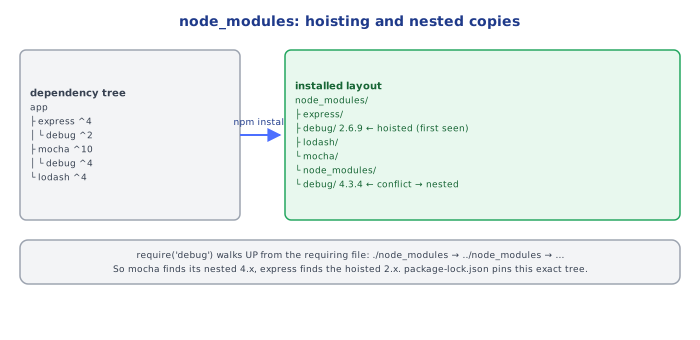
require("lodash");When Node resolves a bare specifier like "lodash", it walks up the directory tree from the requiring file, checking <dir>/node_modules/lodash at each level, stopping at the first match (or the filesystem root, throwing MODULE_NOT_FOUND if none is found). This is why a dependency installed at the project root is visible from a deeply nested file without any relative path — every ancestor directory's node_modules is a valid resolution target.
Under the HoodWhy Nested node_modules Exist, and Why npm Mostly Avoids Them▾
npm v3+ flattens the dependency tree wherever it can
Two packages, A and B, might both depend on C — but at potentially different, incompatible versions. If both A@1.0.0 needing C@^1.0.0 and B@1.0.0 needing C@^2.0.0 exist in the same project, npm cannot install a single shared top-level C that satisfies both. Its resolver flattens as much of the tree as possible into one shared top-level node_modules, but falls back to nesting a package-local copy (node_modules/B/node_modules/C) specifically for the conflicting version — the directory-walk resolution algorithm above means Node finds the nested copy first when resolving from inside B's own files, and the top-level copy everywhere else. This is why node_modules trees can appear inconsistent in depth across a large project: it's conflict resolution, not randomness.
engines is advisory, not enforced by default
{ "engines": { "node": ">=18.0.0" } }Declaring engines.node documents the minimum supported Node version but does not, by itself, block npm install on an incompatible Node version — it only produces a warning unless the project also sets "engine-strict": true in an .npmrc, or a CI pipeline explicitly checks it. Relying on engines alone to prevent "works on my machine" bugs from a Node version mismatch is a common false sense of security.
⚠️ Common Pitfalls
- Putting a build-only tool in
dependenciesinstead ofdevDependencies— bloats every production install with packages never actually needed at runtime. - Not committing
package-lock.json— every fresh install can silently resolve different transitive versions, breaking the "works on my machine" guarantee the lockfile exists to provide. - Assuming
^1.2.3and~1.2.3behave the same —^allows minor bumps (new features),~only allows patch bumps; picking the wrong one either over- or under-constrains updates. - Running
npm installin CI instead ofnpm ci—installcan still adjust the lockfile to satisfy ranges;cifails fast ifpackage.json/package-lock.jsonare out of sync, and always produces the exact locked tree. - Assuming
engines.nodeblocks incompatible installs — it's advisory only unlessengine-strictis explicitly enabled.
📋 Quick Reference
dependencies      → required at runtime, always installed
devDependencies   → dev/build/test only, skipped in production installs
peerDependencies  → consumer must provide a compatible version themselves
^1.2.3  → same MAJOR version (1.x.x), npm's default range
~1.2.3  → same MINOR version (1.2.x) only
package-lock.json → exact resolved versions, commit it, reproducible installs
npm ci            → lockfile-strict install, used in CI, never mutates the lockfile
npm run <script>  → runs scripts.<script>; pre<x>/post<x> run automatically around it
node_modules resolution → walks UP the directory tree, first match wins
🧠 Key takeaways
- dependencies ship with the app; devDependencies only for build/test; peerDependencies must be provided by the host (plugins).
- Semver MAJOR.MINOR.PATCH:
^allows minor+patch,~patch only, exact pins. - Commit the lockfile and use
npm cifor reproducible installs (with integrity hashes). npm runputsnode_modules/.binon PATH; resolution walks upnode_modulesfolders; npm hoists to keep the tree flat.
🎤 Interview Q&A
Q1dependencies vs devDependencies vs peerDependencies?core▾
dependencies: needed at runtime. devDependencies: build/test tools, not installed in production with npm ci --omit=dev. peerDependencies: a library expects the host app to provide a package (e.g. a React component library requires react).
- optionalDependencies? Installed if possible; failures don't break install.
Q2What does semantic versioning mean in package.json ranges?core▾
MAJOR.MINOR.PATCH: breaking, feature, fix. ^1.2.3 allows <2.0.0; ~1.2.3 allows <1.3.0; exact versions pin. Lockfiles record exact resolved versions.
- Does ^0.2.3 allow 0.3.0? No; for 0.x, caret allows only patch updates within 0.2.
Q3Why commit the lockfile and use npm ci?senior▾
The lockfile ensures every install (CI, production, teammates) gets identical dependency trees. npm ci installs exactly from it, fails if it's out of sync, and is faster.
- When does npm install change the lockfile? When package.json ranges allow different versions or packages are added.
Q4How do you manage dependency security?core▾
npm audit, Dependabot/Renovate for updates, lockfile review, minimizing dependencies, pinning or allowlisting install scripts, using provenance/signatures, and watching for typosquatting and compromised packages.
- What's a supply chain attack? Malicious code shipped through a dependency, e.g. a hijacked package version.
Q5What are workspaces and monorepo tools?core▾
npm/pnpm/yarn workspaces manage multiple packages in one repo with shared installs and local linking; tools like Turborepo and Nx add task caching and dependency-aware builds.
- Why pnpm? Content-addressable store saves disk and enforces strict dependency access.
🛠️ Practice exercises
Each exercise is a file in this topic folder. Code exercises are self-checking: run them and make the checks pass.
✅ Check yourself
Answer the questions — feedback is instant.
npm run test find jest?