Streams
Streams process data piece by piece instead of all at once. Wire a readable through a gzip transform into a writable, then watch backpressure keep a fast producer from flooding a slow consumer.
🎯 What you'll learn
- Why streams exist and the four types
- Reading, writing, piping and transforms
- Object mode
- Backpressure, highWaterMark, and paused vs flowing modes
📚 Before you start
1Why Streams Exist
Loading an entire file (or HTTP response body) into memory before processing it works fine for small data, but falls apart for large or unbounded data — a multi-gigabyte file, or a never-ending data feed. Streams process data incrementally, in chunks, keeping memory usage bounded regardless of the total size.
// CommonJS
const fs = require("fs");

// Bad for large files: holds the ENTIRE file in memory at once
fs.readFile("huge.log", (err, data) => { /* data is one giant Buffer */ });

// Good: processes the file in small chunks, memory stays flat
fs.createReadStream("huge.log").on("data", (chunk) => { /* chunk is small */ });2The Four Stream Types
| Type | Direction | Example |
|---|---|---|
| Readable | source of data, you read from it | fs.createReadStream, an incoming HTTP request body |
| Writable | destination for data, you write to it | fs.createWriteStream, an outgoing HTTP response |
| Duplex | both readable AND writable, independently | a TCP socket (net.Socket) |
| Transform | a Duplex where output is derived from input | zlib.createGzip(), a CSV-to-JSON converter |
All four extend Node's EventEmitter (full mechanics in the Events/EventEmitter topic) — streams communicate progress and completion via events ('data', 'end', 'error', 'finish', 'drain').
3Reading From a Readable Stream
const fs = require("fs");
const readable = fs.createReadStream("data.txt", { encoding: "utf8" });

readable.on("data", (chunk) => {
  console.log("got chunk:", chunk.length, "bytes");
});
readable.on("end", () => {
  console.log("done reading");
});
readable.on("error", (err) => {
  console.error("stream error:", err);
});
Attaching a 'data' listener switches the stream into flowing mode — more on paused vs flowing mode in Part 2.
4Writing To a Writable Stream
const fs = require("fs");
const writable = fs.createWriteStream("out.txt");

writable.write("first line\n");
writable.write("second line\n");
writable.end("last line\n"); // signals no more data will be written
writable.on("finish", () => console.log("all data flushed to disk"));
write() returns a boolean — this return value is the entire foundation of backpressure, covered in Part 2. end() both writes a final chunk (optional) and signals the stream is done.
5.pipe() — Connecting a Readable to a Writable
const fs = require("fs");

fs.createReadStream("input.txt")
  .pipe(fs.createWriteStream("output.txt"));
.pipe() handles reading from the source, writing to the destination, AND backpressure management automatically (mechanics in Part 2). It's the idiomatic way to move data between streams without manually wiring 'data'/write() yourself.
// piping through a Transform — e.g. gzip a file while copying it
const fs = require("fs");
const zlib = require("zlib");

fs.createReadStream("input.txt")
  .pipe(zlib.createGzip())
  .pipe(fs.createWriteStream("input.txt.gz"));
Chaining .pipe() calls builds a pipeline where each stage processes data as it flows through, without any stage needing the whole payload in memory at once.
6Transform Streams
const { Transform } = require("stream");

const upperCaseTransform = new Transform({
  transform(chunk, encoding, callback) {
    // `this.push()` sends data downstream; `callback()` signals this chunk is done
    this.push(chunk.toString().toUpperCase());
    callback();
  },
});

process.stdin.pipe(upperCaseTransform).pipe(process.stdout);
A Transform stream's transform() method is called once per incoming chunk; it can push zero, one, or multiple output chunks per input chunk, making it the natural building block for parsers, compressors, and encoders in a pipeline.
7Object Mode
const { Readable } = require("stream");

const objectStream = new Readable({
  objectMode: true, // chunks are arbitrary JS values, not just Buffers/strings
  read() {
    this.push({ id: 1, name: "Ana" });
    this.push({ id: 2, name: "Bo" });
    this.push(null); // signals end of stream
  },
});

objectStream.on("data", (obj) => console.log(obj)); // { id: 1, name: 'Ana' }, ...
By default streams operate on Buffers/strings. objectMode: true lets a stream carry arbitrary JavaScript objects instead — common in data-processing pipelines (e.g. streaming rows out of a database query one object at a time).
1The Problem Backpressure Solves
If a Readable stream produces data faster than a Writable stream can consume it (e.g. reading a fast local file while writing over a slow network connection), and nothing throttles the producer, data piles up in memory without bound — the exact problem streaming was supposed to avoid in the first place. Backpressure is the mechanism that throttles a fast source to match a slow destination.
2highWaterMark — the Internal Buffer Threshold
const fs = require("fs");

const readable = fs.createReadStream("data.txt", {
  highWaterMark: 64 * 1024, // 64KB — default for byte streams
});
Every stream maintains an internal buffer. highWaterMark is the size (in bytes for normal streams, in number of objects for object-mode streams, default 16) at which the stream's internal buffer is considered "full" — the point at which the stream signals the producer to slow down. It's a threshold, not a hard cap — a little overflow past it is normal.
| Stream kind | Default highWaterMark |
|---|---|
| Byte stream (Buffer/string) | 64KB (16KB before Node 18 for some stream kinds — check your version) |
| Object-mode stream | 16 objects |
3Paused vs Flowing Mode (Readable Streams)
const fs = require("fs");
const readable = fs.createReadStream("data.txt");

// FLOWING mode: data pushed automatically, as fast as it's available
readable.on("data", (chunk) => console.log("flowing:", chunk.length));

// vs PAUSED mode: you must explicitly pull data
const readable2 = fs.createReadStream("data.txt");
readable2.on("readable", () => {
  let chunk;
  while ((chunk = readable2.read()) !== null) {
    console.log("paused-mode pull:", chunk.length);
  }
});| Paused mode | Flowing mode | |
|---|---|---|
| Default state | every Readable starts here | entered by adding a 'data' listener, or calling .pipe()/.resume() |
| How data arrives | you call .read() explicitly to pull it | pushed to you automatically via 'data' events |
| Where data sits meanwhile | in the internal buffer, waiting to be pulled | delivered as soon as it's read internally |
| Natural throttling | yes — you control the pace by choosing when to call .read() | no — the source pushes at its own pace unless something pauses it |
A stream can be switched back to paused mode with .pause(), and flowing mode is exactly the state .pipe() needs to actively manage, since nothing else is naturally slowing the source down once it's flowing.
Under the Hood4. What .pipe() Actually Does Under the Hood▾
.pipe() is not magic — it's a fairly small, well-defined orchestration of the primitives above:
1. src.on('data', chunk => {
     const ok = dest.write(chunk);       // write() returns a boolean
     if (!ok) {
       src.pause();                       // internal buffer is over highWaterMark — STOP the source
     }
   });

2. dest.on('drain', () => {
     src.resume();                        // buffer has drained back down — SAFE to resume
   });

3. src.on('end', () => dest.end()); // no more data — close the destination toowrite()'s return value is the actual backpressure signal: true means "keep sending, I can take more," false means "my internal buffer just exceeded my highWaterMark — stop until I tell you otherwise." The 'drain' event fires once the writable's internal buffer has emptied back out, which is .pipe()'s cue to call src.resume().
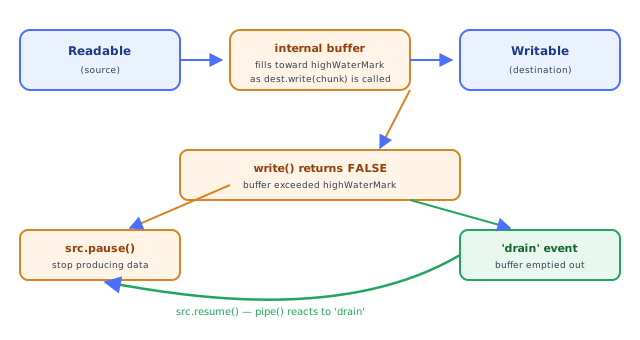
5Manual Backpressure (What .pipe() Saves You From Writing)
const fs = require("fs");

function copyWithBackpressure(srcPath, destPath, onDone) {
  const src = fs.createReadStream(srcPath);
  const dest = fs.createWriteStream(destPath);

  src.on("data", (chunk) => {
    const canKeepGoing = dest.write(chunk);
    if (!canKeepGoing) {
      src.pause(); // destination's buffer is full — stop pulling more
      dest.once("drain", () => {
        src.resume(); // destination caught up — safe to continue
      });
    }
  });

  src.on("end", () => dest.end());
  dest.on("finish", onDone);
}
This is functionally what .pipe() does internally — writing it manually makes the pause/drain/resume cycle concrete instead of hidden behind one method call.
6Building a Custom Readable/Writable Stream
const { Readable, Writable } = require("stream");

class CounterStream extends Readable {
  constructor(max, options) {
    super(options);
    this.current = 0;
    this.max = max;
  }
  _read() {
    // called whenever the internal consumer wants more data
    if (this.current >= this.max) {
      this.push(null); // signal end-of-stream
      return;
    }
    this.push(String(this.current++));
  }
}

class LoggingWritable extends Writable {
  _write(chunk, encoding, callback) {
    console.log("received:", chunk.toString());
    callback(); // MUST be called to signal this write is done — drives backpressure timing
  }
}

new CounterStream(5).pipe(new LoggingWritable());
_read() and _write() are the required low-level implementations; the base Readable/Writable classes handle buffering, highWaterMark tracking, and event emission around them. Calling callback() late in _write() is itself a valid (if unusual) way to intentionally slow down a producer — the next write won't be considered "flushed" until then.
Under the HoodBackpressure Is the Real Point of Streams▾
The paused/flowing state machine and highWaterMark aren't incidental implementation details — they're the actual mechanism that makes streaming safe under mismatched producer/consumer speeds. Without it, "streaming" would just mean "chunking with no throttling," which degrades to the same unbounded-memory-growth problem streams exist to prevent, just spread out over more event-loop turns instead of happening all at once. The write() → false → pause() → 'drain' → resume() cycle in section 4 is the entire mechanism; every higher-level stream utility (.pipe(), stream.pipeline(), async iteration over a Readable) is built on exactly that same feedback loop underneath.
⚠️ Common Pitfalls
- Attaching a
'data'listener and then later needing paused-mode behavior — once a stream starts flowing, switching back requires an explicit.pause(); mixing paradigms carelessly causes missed or duplicated chunks. - Writing to a destination in a loop without checking
write()'s return value — this is exactly the backpressure violation.pipe()exists to prevent; manual loops need the same check. - Forgetting
callback()in a custom_write()/_transform()implementation — the stream will stall forever waiting for it, since it's the internal signal that a chunk has been fully handled. - Not handling
'error'on both ends of a pipe —.pipe()does NOT automatically forward errors from source to destination or vice versa; unhandled stream errors crash the process. Preferstream.pipeline()(fromrequire('stream')), which handles error propagation and cleanup automatically. - Assuming
highWaterMarkis a hard cap — it's a threshold that triggers backpressure signaling, not a strict ceiling; a stream can briefly hold slightly more.
📋 Quick Reference
Readable / Writable / Duplex / Transform → the four stream types
highWaterMark    → internal buffer threshold (bytes, or object count in object mode)
paused mode       → pull manually via .read()
flowing mode        → pushed automatically via 'data' events
write() returns false → destination's buffer exceeded highWaterMark, PAUSE the source
'drain' event           → buffer emptied, safe to RESUME
.pipe()                   → automates the write()/pause()/drain()/resume() cycle
stream.pipeline()           → pipe() + automatic error propagation and cleanup
🧠 Key takeaways
- Four types: Readable, Writable, Duplex, Transform; all are EventEmitters.
- Use
pipeline()(fromstream/promises) instead of.pipe(): it propagates errors and cleans up. - Backpressure:
write()returns false athighWaterMark; wait for'drain'. Async iteration handles it for you. - Object mode streams carry JS objects (count, not bytes); great for ETL row processing.
🎤 Interview Q&A
Q1What are the four types of Node streams?core▾
Readable (source), Writable (sink), Duplex (both, e.g. sockets), Transform (duplex that modifies data, e.g. gzip). They process data in chunks with backpressure.
- Object mode? Streams of JS objects instead of buffers.
Q2What is backpressure in streams?core▾
When a writable can't keep up, write() returns false; the producer must pause until drain. pipe() and stream.pipeline() manage this automatically.
- What happens if ignored? Unbounded memory growth.
Q3Why use stream.pipeline over pipe?core▾
pipeline forwards errors and destroys all streams on failure, preventing leaks of file descriptors and hanging streams; it also supports async generators and returns a promise (stream/promises).
- What's the pipe() pitfall? Errors aren't propagated, so a failing source leaves the destination open.
Q4Give real-world uses of streams in a backend.senior▾
Streaming file downloads/uploads to S3, CSV export of millions of rows from a DB cursor, gzip compression, proxying HTTP responses, and processing log files line by line.
- How do you stream a DB result to an HTTP response? A DB cursor stream → transform to CSV →
pipelineintores.
Q5How do async iterators relate to streams?core▾
Readable streams are async iterable (for await (const chunk of stream)), which is a simple way to consume them with backpressure. Readable.from() creates streams from iterables/generators.
- Web Streams? Node also supports the WHATWG
ReadableStreamAPI used by fetch.
🛠️ Practice exercises
Each exercise is a file in this topic folder. Code exercises are self-checking: run them and make the checks pass.
✅ Check yourself
Answer the questions — feedback is instant.