File System (fs)
The fs module comes in callback, promise and sync flavours. Learn which to use where, calculate when readFile will blow up memory compared with streaming, and understand how libuv fakes async file I/O on the thread pool.
🎯 What you'll learn
- Three API styles: callback, promises, sync
- Reading, writing and file descriptors
- Streaming vs one-shot reads
- Watching files, directories/metadata, and the thread pool
📚 Before you start
1Three API Styles
Node's fs module exposes the same operations in three shapes:
// CommonJS
const fs = require("fs");

// 1. Callback-based (original style)
fs.readFile("/path/file.txt", "utf8", (err, data) => {
  if (err) throw err;
  console.log(data);
});

// 2. Promise-based (fs/promises, or fs.promises)
const fsp = require("fs/promises");
async function read() {
  const data = await fsp.readFile("/path/file.txt", "utf8");
  console.log(data);
}

// 3. Synchronous (blocks the calling thread until done)
const data = fs.readFileSync("/path/file.txt", "utf8");
console.log(data);| Style | Returns | Blocks event loop? | When to use |
|---|---|---|---|
| Callback | nothing (result via callback) | no | legacy code, hot paths avoiding Promise overhead |
Promise (fs/promises) | a Promise | no | modern async/await code (see the Async/Await topic) |
Sync (*Sync) | the result directly | yes | startup scripts, CLI tools, one-off scripts where blocking is acceptable |
2Reading and Writing Files
const fs = require("fs");

fs.writeFile("out.txt", "hello world", (err) => {
  if (err) throw err;
  fs.appendFile("out.txt", "\nmore text", (err2) => {
    if (err2) throw err2;
  });
});
writeFile overwrites the entire file; appendFile adds to the end. Both create the file if it doesn't exist (unless flags say otherwise).
3File Descriptors
fs.open("out.txt", "r", (err, fd) => {
  if (err) throw err;
  // fd is a plain integer — an OS-level handle, same concept as in C or a shell script
  fs.read(fd, Buffer.alloc(100), 0, 100, 0, (err2, bytesRead, buffer) => {
    fs.close(fd, () => {});
  });
});
A file descriptor (fd) is a small integer the operating system hands back when a file is opened — it indexes into the OS's per-process table of open files. High-level calls like readFile open and close a descriptor internally; low-level calls (fs.open/fs.read/fs.write/fs.close) let you manage one directly, useful for reading a file in chunks at specific offsets without loading it all at once.
4Streaming Reads vs One-Shot Reads
// One-shot: loads the ENTIRE file into memory before the callback fires
fs.readFile("huge-video.mp4", (err, data) => {
  // `data` is a single Buffer holding the whole file
});

// Streaming: processes the file in chunks, memory usage stays bounded
const stream = fs.createReadStream("huge-video.mp4");
stream.on("data", (chunk) => {
  // `chunk` is a small Buffer — only a highWaterMark's worth at a time
});
For large files, readFile is dangerous — a 4GB file means a 4GB in-memory Buffer. createReadStream (full mechanics in the Streams topic) reads in bounded chunks, so memory usage stays flat regardless of file size.
5Watching Files for Changes
// Event-driven — backed by the OS's native file-change notification API
fs.watch("config.json", (eventType, filename) => {
  console.log(eventType, filename); // "change" or "rename"
});

// Polling-based — repeatedly stats the file and compares
fs.watchFile("config.json", { interval: 1000 }, (curr, prev) => {
  console.log(curr.mtime, prev.mtime);
});
fs.watch | fs.watchFile | |
|---|---|---|
| Mechanism | OS-native event notification (inotify/FSEvents/ReadDirectoryChangesW) | polling — stat() on an interval |
| CPU cost | low (event-driven) | higher (repeated stat calls) |
| Cross-platform consistency | inconsistent — event names/firing behavior vary by OS, network filesystems often unreliable | consistent, but laggy (bound by poll interval) |
| Typical use | dev tooling (nodemon-style watchers) | simple cases where consistency matters more than efficiency |
6Directories and Metadata
fs.mkdir("data", { recursive: true }, (err) => {});
fs.readdir("data", (err, files) => { console.log(files); }); // array of filenames
fs.stat("data/file.txt", (err, stats) => {
  console.log(stats.isFile(), stats.isDirectory(), stats.size, stats.mtime);
});
fs.rm("data", { recursive: true, force: true }, (err) => {});
{ recursive: true } on mkdir creates intermediate directories (like mkdir -p); on rm it deletes a directory and its contents (like rm -rf).
Under the Hoodlibuv's Threadpool Fakes Async File I/O▾
Sockets are natively async at the OS level; most filesystem calls are not
On POSIX systems (Linux, macOS), the kernel provides genuinely non-blocking, event-driven APIs for network I/O (epoll, kqueue) — a socket can notify the event loop "data is ready" without any thread ever blocking. Regular file I/O has no equivalent non-blocking primitive on most platforms; a read() syscall on a regular file blocks the calling thread until the disk (or page cache) returns data, full stop.
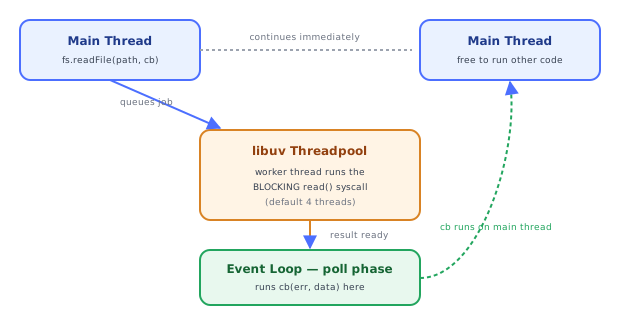
This is why the Node Event Loop / libuv topic's six-phase model has a poll phase primarily built around socket readiness, and why file I/O needs a different trick entirely: libuv maintains a fixed-size threadpool (4 threads by default, configurable via the UV_THREADPOOL_SIZE environment variable, up to 128) specifically to run these blocking filesystem syscalls off the main thread.
fs.readFile("big.txt", cb)
        │
        ▼
  libuv queues the blocking read() syscall onto the threadpool
        │
        ▼
  a threadpool worker thread runs the ACTUAL blocking read() syscall
  (the main thread / event loop is completely free during this time)
        │
        ▼
  worker thread finishes, hands the result back to libuv
        │
        ▼
  libuv schedules `cb` to run on the main thread during the
  event loop's poll phase, on the NEXT iteration where it's due
The async fs API's "non-blocking" behavior on the main thread is therefore not the same mechanism as async networking — it's blocking I/O relocated onto background threads, with the completion callback funneled back through the normal event loop machinery. This is genuinely important for a subtle capacity reason: all fs async calls (plus DNS lookups via dns.lookup, and some crypto functions) share that same small threadpool. Enough concurrent fs.readFile calls can exhaust the pool and start queuing, even though nothing about the code "looks" like it's contending for a shared resource.
Why *Sync methods block the ENTIRE event loop, with no threadpool involved
const data = fs.readFileSync("big.txt"); // main thread runs the blocking syscall directlyfs.readFileSync does not use the threadpool at all — it runs the blocking read syscall directly on the main thread, exactly like a while loop would block on CPU work (see the Call Stack topic). Every timer, incoming request, and pending I/O callback is frozen until the syscall returns. This is precisely why sync fs methods are fine for a one-off CLI script's startup logic but a serious liability inside a request handler in a running server.
Streaming reads avoid loading the whole file, one threadpool read at a time
fs.createReadStream doesn't read the whole file in one threadpool call — it repeatedly issues small read() calls (each one still a threadpool job) sized to the stream's highWaterMark, only pulling the next chunk once the previous one has been consumed downstream (see the Streams topic's backpressure mechanics for exactly how that pacing works).
⚠️ Common Pitfalls
- Calling a
*Syncmethod inside a server request handler — it blocks every other in-flight request for the syscall's full duration, unlike the async variants. - Using
fs.readFileon files whose size isn't bounded (user uploads, logs) — memory usage scales directly with file size since the whole file lands in one Buffer. - Assuming
fs.watchbehaves identically across platforms — event names, whether renames fire twice, and reliability over network filesystems all vary;fs.watchFile's polling is less efficient but more predictable. - Forgetting to close file descriptors opened via
fs.open— each openfdholds an OS resource; leaking them can exhaust the process's file descriptor limit. - Not realizing all async
fscalls share one small threadpool (default size 4) — a burst of concurrent file operations can queue up behind each other even though each individual call is "non-blocking."
📋 Quick Reference
fs.readFile(cb) / fsp.readFile() → async, threadpool, non-blocking main thread
fs.readFileSync()                 → sync, blocks main thread directly, no threadpool
fs.createReadStream()              → chunked, bounded memory, threadpool per chunk
fs.watch()                          → OS-native events, low cost, inconsistent cross-platform
fs.watchFile()                       → polling, consistent, higher cost
UV_THREADPOOL_SIZE                    → env var controlling libuv's fs/dns threadpool size (default 4)
🧠 Key takeaways
- Use
fs/promisesin async code, sync APIs only at startup/CLI scripts, callbacks for legacy code. - readFile loads everything into memory; streams keep memory constant.
- Always close file descriptors (
FileHandle.close()in finally); EMFILE means leaked handles. - fs work runs on the libuv thread pool; many parallel fs operations queue behind each other.
🎤 Interview Q&A
Q1Sync vs callback vs promise fs APIs?core▾
fs.readFileSync blocks the event loop (fine at startup or in CLIs). Callback fs.readFile and fs/promises (await readFile) are non-blocking, run on libuv's thread pool. Use promises in servers.
- Why avoid sync fs in request handlers? It blocks all other requests.
Q2How do you read a very large file efficiently?core▾
Stream it with fs.createReadStream (and readline for lines) or iterate with for await, processing chunks instead of loading the whole file into memory.
- Max buffer size issue? readFile of multi-GB files can exceed memory/buffer limits.
Q3How do you write files safely?senior▾
Write to a temp file and rename atomically to avoid partial files, handle errors and backpressure for streams, use fsync when durability matters, and avoid path traversal by validating user-provided paths.
- What's path traversal?
../../etc/passwdescaping an intended directory; resolve and check prefixes.
Q4How do you watch files for changes?core▾
fs.watch (OS events, efficient but platform quirks) or fs.watchFile (polling). Libraries like chokidar smooth over differences.
- Why are events duplicated sometimes? Editors save via multiple operations; debounce events.
Q5Should a web server store files on local disk?core▾
Not in scalable/containerized deployments: local disks are ephemeral and not shared across instances. Use object storage (S3) or shared volumes.
- Exception? Temporary processing files cleaned up afterwards.
🛠️ Practice exercises
Each exercise is a file in this topic folder. Code exercises are self-checking: run them and make the checks pass.
✅ Check yourself
Answer the questions — feedback is instant.