CommonJS vs ESM in Node.js
Node has two module systems. Compare CommonJS and ES modules side by side, learn how Node decides which one a file is, and watch a circular require hand one side a half-finished exports object.
🎯 What you'll learn
- The basic contrast between CJS and ESM
- require()'s resolution algorithm and cache
- Circular requires: what each side sees
- Module wrapping and CJS/ESM interop
📚 Before you start
languages/javascript/16-modules already covers ES modules in depth — named/default exports, live bindings, the two-phase linking/evaluation model. This topic assumes that content and does not repeat it. Instead it covers CommonJS's own mechanism in depth (Node's original module system, still the default for plain .js files), then the real interop problems that come from having two module systems in one runtime.
1The Basic Contrast
// CommonJS — math.js
const PI = 3.14159;
function square(x) { return x * x; }
module.exports = { PI, square };// CommonJS — app.js
const { PI, square } = require("./math.js");// ESM — math.mjs (covered in languages/javascript/16-modules)
export const PI = 3.14159;
export function square(x) { return x * x; }| CommonJS | ESM | |
|---|---|---|
| Load timing | synchronous, can happen anywhere in code | static top-level (plus dynamic import()) |
| Resolution | Node's own algorithm (this topic) | spec-defined linking phase (see modules topic) |
| Exports | module.exports — a snapshot reference | live bindings |
| File signal | default for .js (no "type": "module"), or .cjs | .mjs, or "type": "module" in package.json |
2require()'s Resolution Algorithm
require("some-specifier") doesn't just "find a file" — it runs a specific, ordered algorithm:
require("X") from module at path Y:

1. If X is a core module ("fs", "path", "http", ...) → return it, done.
2. If X starts with "/", "./", or "../" → resolve as a file/directory:
     a. try X, X.js, X.json, X.node (exact extensions)
     b. if X is a directory: look at X/package.json "main" field, else X/index.js
3. Otherwise (a bare specifier like "lodash") → walk node_modules:
     a. look in Y/node_modules/X
     b. if not found, go to the PARENT directory's node_modules
c. repeat, walking UP the directory tree, until found or reaching the filesystem root/project/src/deep/nested/file.js → require("lodash")
checks: /project/src/deep/nested/node_modules/lodash
/project/src/deep/node_modules/lodash
/project/src/node_modules/lodash
/project/node_modules/lodash ← found here, stop walking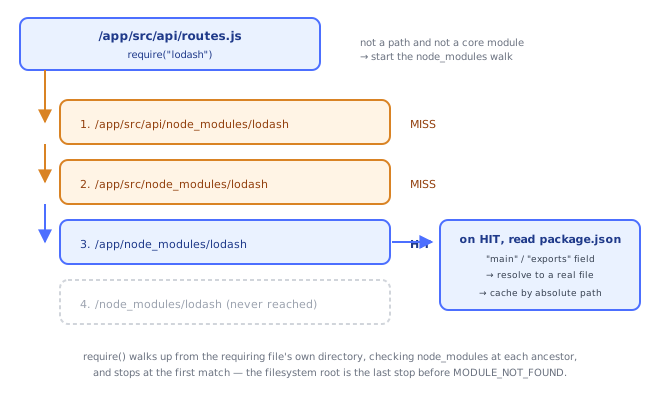
For package imports, Node also checks the target package's own package.json for a "main" field (legacy) or the more specific "exports" field (modern, can restrict/remap what's importable — see section 5) to determine which actual file require("lodash") resolves to.
3The Require Cache — Modules Are Singletons Per Absolute Path
// counter.js
let count = 0;
module.exports = { increment: () => ++count, get: () => count };// a.js
const counter = require("./counter.js");
counter.increment();// b.js
const counter = require("./counter.js"); // SAME object as a.js got — not re-executed
console.log(counter.get()); // sees a.js's increment, because it's the identical cached instanceThe first time a file is require()d, Node executes it and stores the resulting module.exports in require.cache, keyed by the file's fully resolved absolute path. Every subsequent require() of that same resolved path — from anywhere in the program — returns the cached object directly, without re-running the file. This is why requiring the same module twice gives you the same object reference, not a fresh copy, and it's the mechanism that makes singletons like the counter.js example above work naturally.
console.log(require.cache); // inspect what's currently cached, keyed by absolute path
delete require.cache[require.resolve("./counter.js")]; // force a fresh re-require (rarely a good idea)4Circular require() — What Each Side Actually Sees
Because require() is synchronous and cache-based, a circular dependency doesn't deadlock — it returns whatever the partially-completed module.exports looks like at the moment of the circular call.
// a.js
console.log("a starting");
exports.done = false;
const b = require("./b.js");
console.log("in a, b.done =", b.done);
exports.done = true;// b.js
console.log("b starting");
exports.done = false;
const a = require("./a.js"); // a.js is ALREADY in the require cache, mid-execution
console.log("in b, a.done =", a.done); // sees a's EXPORTS OBJECT AS IT EXISTED AT THIS MOMENT
exports.done = true;// main.js
require("./a.js");Trace: main requires a → a starts, sets exports.done = false, then requires b → b starts, sets its own exports.done = false, then requires a again. Because a.js is already present in require.cache (marked as "in progress," with whatever partial exports it had built so far), require("./a.js") inside b.js does not re-run a.js — it immediately returns a's current, still-incomplete exports object, where done is false. b finishes, sets its own done = true, control returns to a, which finishes and sets its done = true. Any code holding onto that early reference to a's exports (like b did) sees the partial snapshot from that early point — it will NOT retroactively see a.done flip to true unless it re-reads a live property off the same object reference after a finishes (property lookups on the shared object do reflect later mutations; it's specifically the timing of when you read it that matters).
5Module Wrapping — Why require, module, __dirname "Look Like" Globals
// what you write:
console.log(__dirname);
module.exports = { hello: () => "hi" };// what Node actually runs — every CommonJS file is wrapped in a function:
(function (exports, require, module, __filename, __dirname) {
console.log(__dirname);
module.exports = { hello: () => "hi" };
});Node wraps every CommonJS file's contents in this function before executing it, then calls that function with the module's real exports, a require bound to that file's directory (for resolving relative paths), the module object itself, and the computed __filename/__dirname. This is why those identifiers are available without any import/declaration — they're just function parameters, scoped to that one file, not actual global variables. It also explains why top-level var/function declarations in a CommonJS file don't leak onto the real global object — they're scoped inside this wrapper function.
Under the HoodCommonJS/ESM Interop▾
Node supports both systems in one runtime, which creates real, well-documented friction points:
import-ing a CommonJS module
// cjs-module.cjs
module.exports = { greet: () => "hi" };// esm-consumer.mjs
import cjsModule from "./cjs-module.cjs"; // module.exports AS A WHOLE becomes the default export
cjsModule.greet();
import { greet } from "./cjs-module.cjs"; // ALSO often works — Node tries to synthesize named exportsWhen ESM code imports a CJS module, module.exports becomes the default export as a whole, always. Node additionally tries to offer named exports by statically analyzing the CJS file's source with a tool called cjs-module-lexer — a static syntactic scan (not actual execution) that looks for recognizable patterns like exports.x = ... or module.exports.x = .... This is a best-effort heuristic: dynamically computed exports (module.exports = someFunction(); module.exports.x = computeLater()) may not be detected, and named imports for those will silently be undefined rather than throwing — a real, sharp interop edge.
You cannot require() a real ESM module
// this throws — ERR_REQUIRE_ESM
const esmModule = require("./real-esm-module.mjs");

// the correct way: dynamic import, which is always async
import("./real-esm-module.mjs").then((mod) => mod.doThing());
require() is fundamentally synchronous, but loading an ES module involves the linking/evaluation phases the modules topic describes, which are asynchronous by spec (to support things like top-level await and cross-origin dynamic loading). There's no way to synchronously "wait" for an ESM module's evaluation from CommonJS — you must use dynamic import(), which always returns a Promise, from an async context.
Package-level module type declarations
| Setting | Effect |
|---|---|
No "type" field, or "type": "commonjs" | .js files are treated as CommonJS |
"type": "module" | .js files are treated as ESM; use .cjs for CommonJS files in that package |
.mjs extension | always ESM, regardless of "type" |
.cjs extension | always CommonJS, regardless of "type" |
"exports" field — controlling what a package exposes, to both systems
{
  "name": "my-package",
  "exports": {
    ".": {
      "require": "./dist/index.cjs",
      "import": "./dist/index.mjs"
    }
  }
}
The "exports" field lets a package author ship both a CommonJS and an ESM build, and have Node automatically pick the right one based on whether the consumer used require() or import — this is the standard mechanism for "dual packages" that need to support both module systems simultaneously without the consumer needing to know or care which one the package internally uses.
⚠️ Common Pitfalls
- Assuming
require.cacheguarantees fresh state per test run — long-running processes (like test suites) can leak stale cached modules between logically separate test cases if you mutate shared module state. - Expecting a circular
require()to see the "final" version of the other module — it sees exactly the partialexportsobject as it existed at the moment of the circular call (section 4); restructure to avoid circular dependencies where the order actually matters. - Named-importing from a CommonJS module and getting
undefined— cjs-module-lexer's static analysis can miss dynamically-assigned exports; falling back to the default import (import cjs from "./x.cjs") and destructuring at runtime is more reliable for tricky CJS modules. - Trying to
require()a package that ships only ESM — increasingly common for modern packages; the fix is dynamicimport(), notrequire(), and it changes your calling code from sync to async. - Forgetting
"type": "module"changes ALL plain.jsfiles in that package, not just the entry point — a lone leftover CommonJS-style.jsfile in a"type": "module"package will fail to parse.
📋 Quick Reference
require("core")            → step 1, no filesystem lookup
require("./x")/require("../x") → resolve relative to caller's directory
require("bare-name")        → walk node_modules UP the directory tree
require.cache               → keyed by resolved absolute path, singleton per path
circular require            → returns the OTHER module's partial exports at that moment
module wrapper               → (exports, require, module, __filename, __dirname) => {...}
import cjsFile.cjs           → module.exports becomes default export; named exports best-effort (cjs-module-lexer)
require(esmFile.mjs)          → ERR_REQUIRE_ESM — use dynamic import() instead
"type": "module"             → .js files in that package are ESM; use .cjs for CommonJS there
"exports" field               → per-package require/import build selection (dual packages)
🧠 Key takeaways
- CJS:
require/module.exports, synchronous, dynamic. ESM:import/export, static, async, live bindings. - Mode is chosen by
"type"in package.json and .mjs/.cjs extensions. - require() resolves (core → relative → node_modules upward), caches by absolute path, wraps code in a function.
- Cycles expose partially initialized exports; restructure instead.
🎤 Interview Q&A
Q1What are the differences between CommonJS and ES modules?core▾
CJS: require/module.exports, synchronous loading, dynamic, evaluated at runtime. ESM: import/export, static structure (enables tree-shaking), asynchronous loading, top-level await, strict mode by default, live bindings.
- How does Node decide?
.mjs/.cjsextensions or"type": "module"in package.json.
Q2Can ESM and CommonJS interoperate?core▾
ESM can import CJS (default import gets module.exports). CJS can't require() ESM in older Node versions (use dynamic import()); recent Node versions support require(esm) for synchronous ESM graphs.
- What's the dual package hazard? A package loaded twice (CJS and ESM copies) with separate state.
Q3What are live bindings in ESM?core▾
Imported names are references to the exporter's variables, so if the module updates an exported let, importers see the new value. CJS exports are copies of values at require time (for primitives).
- Can importers reassign an import? No, imports are read-only.
Q4How do __dirname and JSON imports work in ESM?senior▾
__dirname doesn't exist; use import.meta.dirname (newer Node) or fileURLToPath(new URL('.', import.meta.url)). JSON needs import attributes: import data from './x.json' with { type: 'json' }.
- Why the difference? ESM is URL-based.
Q5How should a library publish for both module systems?core▾
Use the exports field with conditional import/require entries, build both formats (tsup), test both, and avoid shared mutable state to mitigate the dual package hazard. Many new libraries publish ESM-only.
- What does
exportsalso do? Restricts which internal files can be imported.
🛠️ Practice exercises
Each exercise is a file in this topic folder. Code exercises are self-checking: run them and make the checks pass.
✅ Check yourself
Answer the questions — feedback is instant.