Modules (ES Modules)
Before ES modules, all scripts shared one global scope — every <script> tag's top-level variables collided in the same namespace. Modules give each file its own scope, with explicit, opt-in sharing via import/export.
🎯 What you'll learn
- Why Modules Exist
- Enabling ES Modules
- Named Exports
- Default Exports
- Namespace Import
1Why Modules Exist
Before ES modules, all scripts shared one global scope — every <script> tag's top-level variables collided in the same namespace. Modules give each file its own scope, with explicit, opt-in sharing via import/export.
2Enabling ES Modules
| Context | How to enable |
|---|---|
| Browser | <script type="module" src="app.js"></script> |
| Node.js | file extension .mjs, OR "type": "module" in package.json for .js files |
3Named Exports
// math.js
export const PI = 3.14159;
export function square(x) { return x * x; }
export class Vector { /* ... */ }

// or export a group at the bottom:
const E = 2.71828;
function cube(x) { return x ** 3; }
export { E, cube };// app.js
import { PI, square, cube as cubeFn } from "./math.js"; // rename on import with `as`Named exports can be imported selectively, and renamed on either side.
4Default Exports
// user.js
export default class User { /* ... */ }// app.js
import User from "./user.js"; // no curly braces, and the local name can be ANYTHING
import AnyNameAtAll from "./user.js"; // still works — default import isn't tied to the export's nameA module can have at most one default export, but any number of named exports — often combined.
5Namespace Import
import * as math from "./math.js";
math.square(4); // access everything as properties of the namespace object6Re-exporting (Barrel Files)
// index.js — collects and re-exports from multiple files
export { square, cube } from "./math.js";
export { default as User } from "./user.js";
export * from "./constants.js";
Common for creating a single clean entry point (import { square, User } from "./index.js") instead of many deep import paths.
7Module Scope and Hoisting Behavior
console.log(later); // ReferenceError — imports are live bindings, but hoisted like let/const
import { later } from "./somewhere.js";
import statements are hoisted to the top of the module (they must run before any other code can use them), but the actual binding follows the same TDZ-like rules as let/const for anything computed at module-evaluation time.
8Live Bindings, Not Copies
// counter.js
export let count = 0;
export function increment() { count++; }// app.js
import { count, increment } from "./counter.js";
console.log(count); // 0
increment();
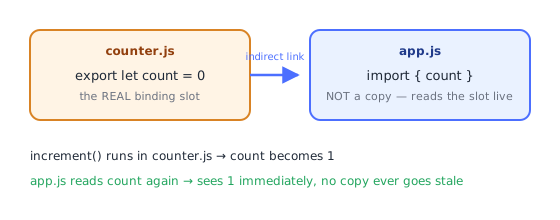
console.log(count); // 1 — the imported binding reflects changes in the source moduleUnlike CommonJS's module.exports (which exports a snapshot object), ES module imports are live references to the exporting module's bindings.
9CommonJS vs ES Modules (Quick Contrast)
CommonJS (require) | ES Modules (import) | |
|---|---|---|
| Syntax | const x = require("./x") | import x from "./x.js" |
| Loading | synchronous, dynamic (any code path) | static (top-level only, analyzed before execution) — plus dynamic import() |
| Exports | module.exports = {...} (snapshot) | live bindings |
| File extension needed in import path | usually optional | usually required (./x.js, not ./x) |
| Default in Node | .js files (unless "type": "module") | .mjs, or "type": "module" |
(Full comparison covered in the Node.js CommonJS vs ESM topic.)
Under the HoodLinking Before Execution, and What "Live Binding" Really Means▾
ES modules are loaded in two distinct, separate phases — this two-phase design is precisely why static import/export behaves so differently from a CommonJS require() call.
Phase 1 — Instantiation (linking), no code runs yet
The engine parses every module in the dependency graph, builds a module record for each one listing its imports and exports, and connects — "links" — each import to the exact binding slot it refers to in the source module. Critically, no module body code executes during this phase — it's pure static analysis of the import/export graph.
app.js imports { count } from counter.js
   ↓ linking phase resolves this to: app.js's `count` binding IS counter.js's `count` slot,
     not a copy of whatever value it currently holds (it may not even be initialized yet)
This static, execute-nothing-yet phase is why import paths can't be computed dynamically at the top level (import { x } from someVariable is a syntax error) — the linker needs to know every dependency before anything runs, which is also what enables tools to catch a typo'd import name before your program ever executes a single line.
Phase 2 — Evaluation, exactly once per module, in dependency order
Only after linking completes does the engine actually run each module's top-level code, exactly once, visiting dependencies before dependents (a module is evaluated before anything that imports from it, following the dependency graph — cycles are handled by evaluating in the order first encountered and leaving not-yet-reached bindings in their TDZ-like unset state, which is the deeper mechanism behind the "partially initialized module" pitfall).
Live bindings are literally indirect references, not copied values
// counter.js
export let count = 0;
export function increment() { count++; }
When app.js does import { count } from "./counter.js", the linking phase does not copy 0 into a new local variable called count. It creates an indirect binding — app.js's count is wired directly to counter.js's actual count slot (the same kind of binding-slot mechanism the Scope topic's Context objects use internally). Reading count in app.js always re-reads the live slot in counter.js; there is no intermediate copy anywhere to go stale. This is a fundamentally different mechanism from CommonJS's module.exports = {...}, which really does hand out a reference to one specific object — mutating a property of that object is visible to importers, but reassigning module.exports itself afterward is not retroactively seen by anyone who already imported it.
⚠️ Common Pitfalls
- Forgetting the file extension in relative import paths for native ESM (
./mathfails;./math.jsis required in browsers and Node ESM, unlike bundler-based setups which often tolerate omitting it). - Mixing default and named import syntax incorrectly —
import { default as X }works but is unusual; preferimport X from "..."for default exports. - Assuming imports are copies — mutating an imported live binding's source elsewhere updates every importer; this differs from CommonJS's snapshot behavior and can surprise developers moving between the two systems.
- Circular imports — two modules importing from each other can result in one side seeing an incomplete (partially initialized) module during the first evaluation pass; restructure to avoid true circular dependencies where possible.
📋 Quick Reference
export const x = 1;           export function f(){}      export default class {}
import { x, f } from "./m.js";  import Default from "./m.js";  import * as ns from "./m.js";
export { x as renamed };        import { x as local };
🎤 Interview Q&A
Q1How do ES modules work?core▾
Files with import/export, statically analyzable, loaded asynchronously, each with its own scope and strict mode, singletons (evaluated once and cached), with live bindings to exports.
- Named vs default exports? Named exports are explicit and refactor-friendly; default exports allow any import name.
Q2What is tree shaking?core▾
Bundlers remove unused exports thanks to ESM's static structure. Side-effectful modules and CommonJS limit it; "sideEffects": false in package.json helps.
- Why prefer named exports for libraries? Better tree shaking and auto-imports.
Q3What are dynamic imports?core▾
import('./module.js') returns a promise, loading code on demand: code splitting, conditional loading, or loading ESM from CommonJS.
- React usage?
React.lazy(() => import('./Page')).
Q4How do circular dependencies behave?senior▾
Modules can import each other; one may see uninitialized bindings (TDZ errors) during evaluation. Restructure to break cycles or defer access to runtime.
- How to detect? madge or bundler warnings.
Q5What's top-level await?core▾
In ES modules, await can be used at the top level, delaying evaluation of the module and its importers until it resolves; useful for config loading but can slow startup.
- Available in CommonJS? No.
🛠️ Practice exercises
Each exercise is a file in this topic folder. Code exercises are self-checking: run them and make the checks pass.