Error Handling
finally always runs — even if catch itself throws, or if try contains a return statement (the finally block runs before the function actually returns).
🎯 What you'll learn
- try / catch / finally
- The Built-in Error Types
- Custom Error Classes
- Re-throwing and Catch-and-Rethrow
- Error Handling in Async Code (Preview)
1try / catch / finally
try {
  JSON.parse("{ invalid json");
} catch (error) {
  console.log("Caught:", error.message);
} finally {
  console.log("Runs regardless of success or failure");
}
finally always runs — even if catch itself throws, or if try contains a return statement (the finally block runs before the function actually returns).
2The Built-in Error Types
| Type | Thrown when |
|---|---|
Error | generic base class — all others extend it |
TypeError | operation on a value of the wrong type (null.foo, calling a non-function) |
RangeError | numeric value outside allowed range (new Array(-1)) |
ReferenceError | referencing an undeclared variable, or a let/const in its TDZ |
SyntaxError | malformed code, usually caught by JSON.parse on bad input |
try {
  null.foo;
} catch (e) {
  console.log(e instanceof TypeError); // true
  console.log(e.name);                  // "TypeError"
  console.log(e.message);               // "Cannot read properties of null (reading 'foo')"
}3Custom Error Classes
class ValidationError extends Error {
  constructor(message, field) {
    super(message);
    this.name = "ValidationError"; // otherwise inherits "Error" as the name
    this.field = field;
  }
}

function validateAge(age) {
  if (age < 0) throw new ValidationError("Age cannot be negative", "age");
}

try {
  validateAge(-5);
} catch (e) {
  if (e instanceof ValidationError) {
    console.log(`Invalid field "${e.field}": ${e.message}`);
  } else {
    throw e; // re-throw anything you don't specifically handle
  }
}
Custom error classes let catch blocks discriminate between different failure types using instanceof, instead of parsing error message strings.
4Re-throwing and Catch-and-Rethrow
function processData(data) {
  try {
    return JSON.parse(data);
  } catch (e) {
    throw new Error(`Failed to process data: ${e.message}`, { cause: e }); // wrap with context, keep the original via `cause`
  }
}
{ cause: e } (ES2022) preserves the original error for debugging while adding higher-level context — check error.cause to trace the root failure.
5Error Handling in Async Code (Preview)
async function loadUser(id) {
  try {
    const response = await fetch(`/users/${id}`);
    if (!response.ok) throw new Error(`HTTP ${response.status}`);
    return await response.json();
  } catch (e) {
    console.error("Failed to load user:", e.message);
    throw e;
  }
}
try/catch works around await exactly like synchronous code (full detail in the Async Error Handling topic) — a rejected Promise is caught the same way a thrown error is.
6What try/catch Does NOT Catch
try {
  setTimeout(() => { throw new Error("boom"); }, 0);
} catch (e) {
  console.log("never runs"); // the callback executes LATER, outside this try block entirely
}
try/catch only guards the synchronous code directly inside it. Errors thrown inside callbacks, setTimeout, or unrelated async work must be caught inside those callbacks themselves, or via .catch() on the resulting Promise.
Under the HoodStack Unwinding and Stack Trace Capture▾
throw triggers a real stack-unwinding walk
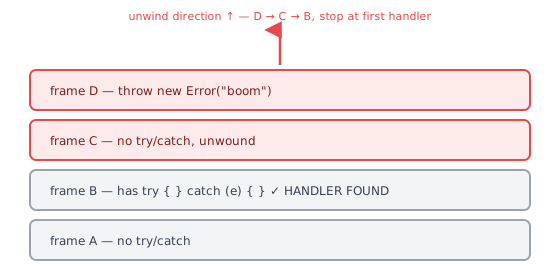
When throw executes, the engine doesn't "search" for a handler in the abstract — it physically walks back up the call stack (see the Call Stack topic), popping one frame at a time, checking at each level whether that frame is inside an active try block with a matching catch. Any finally block belonging to a frame being popped during this walk executes along the way, before the walk continues further up. If the walk reaches the very top of the stack with no handler found, the error becomes uncaught — in Node this crashes the process by default; in a browser it logs to the console and fires a window.onerror event.
throw new Error("boom")   at frame D
  ↓ unwind: is D in a try with a catch? no → pop D, run any finally in D
  ↓ unwind: is C in a try with a catch? no → pop C, run any finally in C
  ↓ unwind: is B in a try with a catch? YES → stop here, run B's catch block
     (A, further up, is never even inspected)
.stack is captured lazily, and it isn't free
Constructing an Error doesn't necessarily do the (relatively expensive) work of walking the call stack and formatting it into the .stack string immediately — V8 defers this: the raw stack frame information is captured cheaply at throw/construction time, but formatting it into the readable string you see only happens the first time something actually reads .stack. This is why creating errors in a tight loop "just in case" (without ever reading .stack) is cheaper than it looks, but reading .stack on every one of them is not. V8 also caps how many frames get captured at all via an internal Error.stackTraceLimit (10 by default) — a deeply nested call chain's stack trace gets truncated, not because the engine forgot the rest, but because capturing unlimited depth on every thrown error would be wasteful for the overwhelming majority of errors that are never inspected that deeply.
try/catch used to block optimization — it no longer does
For years, older JavaScript engines could not apply their optimizing compiler (see the Functions topic's tiered pipeline) to any function containing a try/catch block at all — the function was permanently stuck running in the slower interpreted tier. Modern engines (V8's TurboFan and equivalents in other engines) removed this restriction entirely; try/catch no longer prevents a function from being optimized. This historical fact still circulates as outdated advice ("avoid try/catch in hot loops for performance") — worth knowing it was true once, and is no longer a real concern on current engines.
⚠️ Common Pitfalls
- Swallowing errors silently — an empty
catch {}block hides bugs; at minimum log the error, and re-throw when the caller needs to know. - Catching too broadly — wrapping large blocks of unrelated code in one
trymakes it unclear which line actually failed; keeptryblocks focused. - Forgetting
finallyruns even afterreturn— areturninsidetryis evaluated, butfinallystill executes before control actually leaves the function, and can even override the return value iffinallyitself contains areturn. - Throwing non-Error values —
throw "failed"works but loses the stack trace and.message/.namestructure; alwaysthrow new Error(...)or a subclass. - Expecting
try/catchto catch async callback errors — see section 6; this is one of the most common misunderstandings for developers new to JS.
📋 Quick Reference
try { risky() } catch (e) { handle(e) } finally { cleanup() }
e instanceof TypeError / RangeError / ReferenceError / YourCustomError
class MyError extends Error { constructor(msg) { super(msg); this.name = "MyError"; } }
throw new Error("msg", { cause: originalError })
🎤 Interview Q&A
Q1How does error handling work in JavaScript?core▾
throw any value (prefer Error objects for stack traces), catch with try/catch/finally. Built-in types: TypeError, RangeError, SyntaxError, ReferenceError. finally always runs.
- Why throw Error objects? They carry stack traces and messages.
Q2How do you create custom errors?core▾
class NotFoundError extends Error { constructor(msg) { super(msg); this.name = 'NotFoundError'; } }, optionally with extra fields (statusCode) and the cause option to chain errors.
- What's error.cause?
new Error('Failed to load', { cause: err })preserves the original error.
Q3How do you handle errors in async code?core▾
With async/await, use try/catch; with promises, .catch(). Unhandled rejections crash Node and log errors in browsers, so always handle them at a boundary.
- Global handlers?
window.onerror,unhandledrejection,process.on('unhandledRejection').
Q4Where should you catch errors?senior▾
Where you can handle them meaningfully (retry, fallback, user message) or at boundaries (request handlers, error boundaries) for logging. Avoid swallowing errors silently.
- Anti-pattern?
catch (e) {}.
Q5What's the difference between operational errors and programmer errors?core▾
Operational errors are expected runtime problems (network failures, invalid input) to handle gracefully; programmer errors are bugs (undefined is not a function) that should crash/alert and be fixed.
- Node guidance? Crash and restart on programmer errors.
🛠️ Practice exercises
Each exercise is a file in this topic folder. Code exercises are self-checking: run them and make the checks pass.