Buffers
Buffers are Node's fixed-size byte arrays. See why string length isn't byte length, how slices alias memory, how multi-byte characters break across chunks, and where buffer memory actually lives.
🎯 What you'll learn
- What a Buffer is
- Creating buffers and reading numeric data
- Strings, encodings and chunk boundaries
- Slicing as views, concatenation, and memory outside the V8 heap
📚 Before you start
1What a Buffer Actually Is
A Buffer is a fixed-length chunk of raw binary data — a sequence of bytes (integers 0-255), with no concept of encoding until you explicitly ask for one. JavaScript strings are UTF-16 text; a Buffer is neither text nor any particular format — it's the same kind of raw memory you'd manipulate in C, exposed to JS.
const buf = Buffer.from("hi");
console.log(buf);          // <Buffer 68 69>  — the raw bytes of "hi" in UTF-8
console.log(buf.length);   // 2 — byte length, NOT necessarily character count
console.log(buf[0]);       // 104 — indexing gives you the raw byte value
Buffer predates JavaScript's own TypedArray/ArrayBuffer support; today Buffer is implemented as a subclass of Uint8Array, so every TypedArray method (.slice(), .map() via array-like iteration, etc.) works on it too, plus Node adds buffer-specific conveniences (.toString(), .write(), numeric read/write helpers).
2Creating Buffers
Buffer.alloc(4);              // <Buffer 00 00 00 00> — zero-filled, SAFE
Buffer.alloc(4, 1);           // <Buffer 01 01 01 01> — zero-filled then filled with 1
Buffer.allocUnsafe(4);        // <Buffer ?? ?? ?? ??> — UNINITIALIZED memory, FAST but may contain old data
Buffer.from("hi", "utf8");    // from a string, with an explicit (or default) encoding
Buffer.from([1, 2, 3]);       // from an array of byte values
Buffer.from(existingBuffer); // COPIES the bytes into a new buffer| Method | Zeroed? | Speed | When to use |
|---|---|---|---|
Buffer.alloc(n) | yes | slower (has to zero memory) | default choice — safe by default |
Buffer.allocUnsafe(n) | no | faster | hot paths where you immediately overwrite every byte yourself |
Buffer.from(...) | n/a — copies source data | — | wrapping existing data (string, array, another buffer) |
3Reading and Writing Numeric Data
Buffers store raw bytes, but binary protocols (network packets, file formats) usually encode multi-byte integers in a specific byte order (endianness). Node's numeric read/write methods handle that explicitly:
const buf = Buffer.alloc(4);

buf.writeUInt32BE(1, 0);   // big-endian: most significant byte first
console.log(buf);          // <Buffer 00 00 00 01>

buf.writeUInt32LE(1, 0);   // little-endian: least significant byte first
console.log(buf);          // <Buffer 01 00 00 00>

console.log(buf.readUInt32LE(0)); // 1 — read it back outBE/LE suffixes mean big-endian/little-endian; picking the wrong one against a spec (a file format, a network protocol) silently produces a different number, not an error.
4Strings and Encodings
const buf = Buffer.from("café", "utf8");
console.log(buf.length);              // 5 — "é" takes 2 bytes in UTF-8, not 1 character = 1 byte
console.log(buf.toString("utf8"));    // "café"
console.log(buf.toString("hex"));     // "636166c3a9"
console.log(buf.toString("base64"));  // "Y2Fmw6k="

Buffer.byteLength("café", "utf8");    // 5 — byte length WITHOUT allocating a buffer
"café".length (a JS string) is 4 (character count); buf.length (a Buffer of that same string) is 5 (byte count) — this mismatch between "characters" and "bytes" is the source of a whole category of buffer bugs with multi-byte characters (see Common Pitfalls).
| Encoding | Use case |
|---|---|
"utf8" (default) | text |
"hex" | human-readable representation of raw bytes, 2 hex chars per byte |
"base64" | binary-to-text for transport (email, JSON payloads, URLs with base64url) |
"latin1"/"binary" | 1 byte per character, legacy binary-as-string interop |
"ascii" | 7-bit text, strips the high bit |
5Slicing: Views, Not Copies
const original = Buffer.from("hello world");
const view = original.subarray(0, 5); // "hello" — but NOT a copy

view[0] = 72; // 'H'
console.log(original.toString()); // "Hello world" — the ORIGINAL changed too
.subarray() (and the deprecated but still-common .slice(), which behaves the same way on Buffers) returns a view into the same underlying memory, not a new copy. Writing through the view mutates the original buffer's bytes directly. This is a deliberate performance choice — avoiding a copy — but it means slices are not safe to hand out if the recipient shouldn't be able to affect the source.
const copy = Buffer.alloc(5);
original.copy(copy, 0, 0, 5); // an ACTUAL copy, into a separate allocation6Concatenation and Comparison
const a = Buffer.from("foo");
const b = Buffer.from("bar");

Buffer.concat([a, b]);              // <Buffer 66 6f 6f 62 61 72> — new allocation, copies both in
Buffer.concat([a, b], 5);           // explicit total length — truncates/allocates exactly 5 bytes

a.equals(b);                        // false — byte-for-byte comparison
Buffer.compare(a, b);               // -1, 0, or 1 — for sorting buffers
Buffer.concat always allocates a brand-new buffer and copies every input into it — unlike .subarray(), this one IS a real copy, which matters when building up data incrementally from many small chunks (e.g. reassembling stream chunks) since each concat is O(total size).
⚠️ Common Pitfalls
- Using
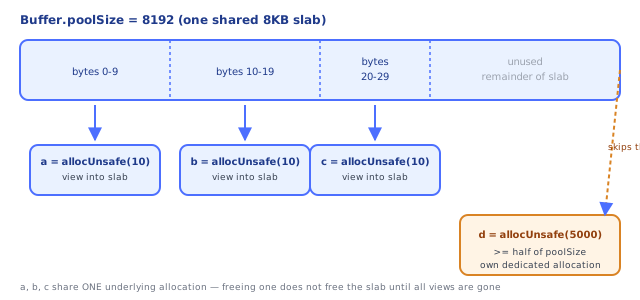
Buffer.allocUnsafe()and forgetting to overwrite every byte — leftover data from a previous, unrelated buffer's slab region can leak into your buffer; only use it when you're about to fill the entire thing yourself. - Slicing a sensitive buffer and handing the slice to untrusted code —
.subarray()/.slice()shares memory with the original; mutations through the slice affect the source, and reads through it can expose bytes beyond what you intended if the slice bounds are wrong. - Confusing string
.length(characters/UTF-16 code units) withBuffer.length(bytes) — multi-byte UTF-8 characters (emoji, accented letters, CJK text) make these numbers diverge; always useBuffer.byteLength(str)when you need a byte count from a string. - Picking the wrong endianness (
BEvsLE) when reading/writing multi-byte integers against a spec that mandates one — produces a different (wrong) number silently, no error thrown. - Building up a large buffer via repeated
Buffer.concatin a loop — each call copies everything into a fresh allocation; for many chunks this is O(n²) total copying. Collect chunks in an array andconcatonce, or use a stream.
📋 Quick Reference
Buffer.alloc(n)          → zero-filled, safe, slightly slower
Buffer.allocUnsafe(n)     → uninitialized, fast, may contain stale data
Buffer.from(str, enc)      → copy bytes from a string/array/another buffer
buf.length                 → byte count (NOT character count for multi-byte text)
buf.toString(enc)           → decode bytes to a string
Buffer.byteLength(str, enc)  → byte count of a string WITHOUT allocating
buf.subarray(start, end)      → VIEW into same memory (mutations affect original)
buf.copy(target, ...)           → actual copy into a separate allocation
Buffer.concat([...])              → new allocation, copies all inputs in
Buffer.poolSize                    → 8192 (8KB) — shared slab size for small allocUnsafe buffers
readUInt32BE/LE, writeUInt32BE/LE     → explicit-endianness numeric access
🧠 Key takeaways
- A Buffer is a
Uint8Arraysubclass of raw bytes, sized at creation. - Encodings (utf8, base64, hex, latin1) convert between strings and bytes; byte length ≠ string length.
subarray/sliceare zero-copy views; copy withBuffer.from(view)when you need independence.- Use
alloc(zeroed) unless you fill immediately; decode streams withsetEncoding/StringDecoder.
🎤 Interview Q&A
Q1What is a Buffer in Node?core▾
A fixed-size chunk of raw binary memory (a Uint8Array subclass) allocated outside the V8 heap, used for files, network data and binary protocols.
- Why not just strings? Strings are UTF-16 text; binary data needs byte-level handling.
Q2Buffer.alloc vs Buffer.allocUnsafe?core▾
alloc(n) returns zero-filled memory; allocUnsafe(n) returns uninitialized memory (faster) that may contain old sensitive data, so it must be fully overwritten before use.
- Deprecated constructor?
new Buffer()for the same safety reasons.
Q3How do encodings work with buffers?senior▾
Convert with Buffer.from(str, 'utf8') and buf.toString('base64' | 'hex' | 'utf8'). Splitting UTF-8 data at arbitrary chunk boundaries can cut multi-byte characters; use StringDecoder or setEncoding on streams.
- Why does that matter? Garbled characters when decoding chunks individually.
Q4How do you compare secrets stored in buffers safely?core▾
crypto.timingSafeEqual(a, b) (equal lengths) to avoid timing attacks, instead of === or buf.equals.
- What's a timing attack? Inferring a secret from how long comparisons take.
Q5What memory considerations apply to buffers?core▾
Buffers count toward process memory but not the V8 heap limit; slicing a small part (subarray) keeps the whole parent buffer alive. Copy small slices you keep long-term.
- How do you see buffer memory?
process.memoryUsage().arrayBuffers/external.
🛠️ Practice exercises
Each exercise is a file in this topic folder. Code exercises are self-checking: run them and make the checks pass.
✅ Check yourself
Answer the questions — feedback is instant.