File Uploads
Uploads are hostile, large and slow. Compare proxying files through your API with presigned direct-to-storage uploads, choose memory, disk or streaming, and validate files as if every one is an attack.
🎯 What you'll learn
- How browsers send files (multipart/form-data)
- Memory vs disk vs streaming
- Presigned uploads directly to object storage
- Validating files and storing references
📚 Before you start
1How a Browser Sends a File
An HTML form with enctype="multipart/form-data" (or fetch with a FormData body) sends a multipart request: one body, split into parts by a random boundary string, each part with its own headers.
POST /avatars HTTP/1.1
Content-Type: multipart/form-data; boundary=----X9f2
Content-Length: 48211

------X9f2
Content-Disposition: form-data; name="userId"

42
------X9f2
Content-Disposition: form-data; name="file"; filename="me.png"
Content-Type: image/png

<binary bytes...>
------X9f2--
A regular JSON body parser can't read this — you need a multipart parser (multer / busboy in Express, FileInterceptor in NestJS, request.formData() in Next.js route handlers).
2Memory vs Disk vs Stream
import multer from "multer";

// in-memory: req.file.buffer — simple, but every concurrent upload sits in RAM
const memory = multer({ storage: multer.memoryStorage(), limits: { fileSize: 2 * 1024 * 1024 } });

// on disk: streamed to a temp file — RAM stays flat
const disk = multer({ dest: "/tmp/uploads", limits: { fileSize: 50 * 1024 * 1024, files: 1 } });

app.post("/avatars", requireAuth, memory.single("file"), async (req, res) => {
  // req.file: { originalname, mimetype, size, buffer }
});| Strategy | Pros | Cons | Use for |
|---|---|---|---|
| memory buffer | simplest; easy to process | RAM × concurrent uploads | small files (avatars) with a tight limit |
| temp file on disk | flat memory | disk cleanup; single-instance local disk | medium files, post-processing |
| stream straight to object storage | flat memory, no local disk | more complex error handling | large files |
| presigned URL (client → S3 directly) | your server never touches the bytes | two-step flow | large/user-generated media at scale |
3Presigned Uploads
For large files the best upload is the one that never passes through your API:
1. client → API:  POST /uploads { filename, contentType, size }
2. API validates (auth, type, size), creates a DB record "pending",
   returns a short-lived presigned PUT URL for key uploads/<uuid>
3. client → S3:   PUT <presigned URL> with the bytes
4. S3 → API (event) or client → API: "upload complete" → verify object, mark "ready"
The presigned URL embeds a signature over the bucket, key, method, content type and expiry — S3 rejects anything that doesn't match. See devops-cloud/aws/04-s3.
4Validate Like the File Is Hostile
Every field of an upload is attacker-controlled: filename, the part's Content-Type, and the bytes.
| Check | How | Why |
|---|---|---|
| size | parser limits.fileSize, and reject early | memory/disk exhaustion |
| count | limits.files, limits.fields | resource exhaustion |
| real type | inspect magic bytes (89 50 4E 47 = PNG), not the extension or declared MIME | evil.php renamed cat.png |
| filename | never use it as a path; generate uuid keys | path traversal (../../etc/passwd), overwrites |
| content | re-encode images (sharp), scan with antivirus for documents | polyglot files, embedded scripts, malware |
| serving | separate domain/bucket, Content-Disposition: attachment, X-Content-Type-Options: nosniff | stored XSS from uploaded HTML/SVG |
const SIGNATURES: Record<string, number[]> = {
  "image/png": [0x89, 0x50, 0x4e, 0x47, 0x0d, 0x0a, 0x1a, 0x0a],
  "image/jpeg": [0xff, 0xd8, 0xff],
  "application/pdf": [0x25, 0x50, 0x44, 0x46], // %PDF
};
function sniff(buf: Buffer): string | undefined {
  return Object.entries(SIGNATURES).find(([, sig]) => sig.every((b, i) => buf[i] === b))?.[0];
}5Storing and Referencing Files
Store the bytes in object storage (S3, GCS, Azure Blob) — not in the database, and not on an app server's local disk (which disappears on redeploy and isn't shared between instances). Store metadata in the database:
CREATE TABLE files (
  id UUID PRIMARY KEY,
  owner_id UUID NOT NULL REFERENCES users(id),
  storage_key TEXT NOT NULL,        -- uploads/2024/06/3f1c...png
  original_name TEXT NOT NULL,      -- for display only
  content_type TEXT NOT NULL,       -- the SNIFFED type
  size_bytes BIGINT NOT NULL,
  sha256 TEXT NOT NULL,             -- dedup / integrity
  status TEXT NOT NULL DEFAULT 'pending',  -- pending → ready | rejected
  created_at TIMESTAMPTZ NOT NULL DEFAULT now()
);
Heavy post-processing (thumbnails, video transcoding, virus scanning) belongs in a background job (16-background_jobs/), not in the request.
Under the HoodStreaming Multipart Parsing▾
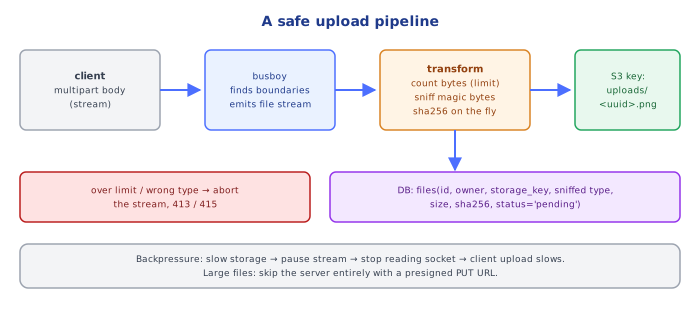
A multipart parser like busboy never needs the whole body in memory. It reads the request stream chunk by chunk and runs a state machine that searches for the boundary sequence (\r\n--<boundary>) — using a Boyer–Moore–Horspool style search so it can scan large chunks quickly and handle a boundary split across two chunks. Between boundaries it parses the part headers, then emits a readable file stream for that part. You pipe that stream wherever it should go (disk, S3 multipart upload, a hash function).
Backpressure makes this safe: if the destination is slower than the client, the destination's write() returns false, the pipe pauses the file stream, busboy stops reading the request socket, TCP's receive window fills, and the client's upload slows down — instead of your process buffering gigabytes. Size limits are enforced as bytes flow: when fileSize is exceeded, the parser truncates the stream and flags it, so you can abort without ever having read the whole file.
⚠️ Common Pitfalls
- No size limit — one request can exhaust memory or disk.
- Trusting
file.mimetypeor the extension — both are client-supplied. - Using
originalnamein the storage path — path traversal and collisions. - Saving to local disk on a multi-instance deployment — files "disappear" depending on which instance serves the request.
- Serving uploads from your main domain with an inline content type — uploaded HTML/SVG executes as your site (stored XSS).
- Processing synchronously in the request — timeouts on large files; move to a job.
- Forgetting cleanup — temp files and abandoned "pending" uploads accumulate.
📋 Quick Reference
| Need | Use |
|---|---|
| parse multipart (Express) | multer / busboy |
| parse multipart (Nest) | @UseInterceptors(FileInterceptor("file")) + @UploadedFile() |
| small files | memory storage + strict fileSize |
| big files | stream to storage or presigned URL |
| type check | magic bytes |
| storage key | generated UUID |
| serve safely | separate origin, nosniff, attachment |
🧠 Key takeaways
- Browsers send files as multipart/form-data; parse with streaming parsers (busboy/multer) and size limits.
- Prefer streaming over memory buffering; for big files use presigned direct uploads to object storage.
- Treat files as hostile: check size, magic bytes (not just extension/Content-Type), scan, and re-encode images.
- Store files in object storage with generated keys; store metadata + key in the DB; serve via signed URLs/CDN.
🎤 Interview Q&A
Q1How do you handle large file uploads?core▾
Upload directly from the client to object storage with pre-signed URLs (multipart for large files), so files bypass your servers. The backend issues the URL, then records metadata after upload completes (via callback or storage event).
- Why avoid proxying through the app? It ties up memory, threads and bandwidth.
Q2How do you secure file uploads?core▾
Enforce size limits, validate type by content (magic bytes) not just extension, rename files (never trust user filenames), store outside the web root or in private buckets, scan for malware, and serve user content from a separate domain with correct Content-Type and Content-Disposition.
- Why a separate domain? To prevent uploaded HTML/SVG from running scripts in your origin.
Q3How do you process uploaded files?senior▾
Asynchronously: storage event → queue → workers that generate thumbnails, transcode, extract text, or scan; update status in the DB and notify the client.
- Why async? Processing is slow and can fail independently.
Q4Streaming vs buffering uploads on the server?core▾
Stream uploads to storage (busboy in Node, streaming in ASP.NET Core) instead of buffering whole files in memory, which would exhaust memory under concurrent uploads.
- Multer memoryStorage risk? Large files fill RAM.
Q5How do you support resumable uploads?core▾
Multipart upload APIs (S3 multipart) or the tus protocol: the file is split into parts uploaded independently, retried individually, and completed with a final call.
- What cleans up abandoned parts? Bucket lifecycle rules for incomplete multipart uploads.
🛠️ Practice exercises
Each exercise is a file in this topic folder. Code exercises are self-checking: run them and make the checks pass.
✅ Check yourself
Answer the questions — feedback is instant.