S3
S3 stores objects (not files) in globally unique buckets with 11 nines of durability. Learn keys and the folder illusion, storage classes and lifecycle, bucket policies vs IAM, Block Public Access, versioning, and presigned URLs that let browsers upload directly.
🎯 What you'll learn
- Buckets, objects, keys and prefixes
- Storage classes and lifecycle rules
- Access control: IAM vs bucket policies, Block Public Access
- Versioning and presigned URLs
📚 Before you start
1What S3 Is
S3 (Simple Storage Service) stores arbitrary blobs of data — objects — inside buckets, addressed by a key (a string, not a filesystem path). S3 is not a filesystem: there is no real directory tree, no partial-file edits, no file locking — every write replaces an object wholesale under its key.
aws s3api create-bucket --bucket my-app-uploads-prod --region us-east-1
aws s3api put-object --bucket my-app-uploads-prod --key uploads/2024/report.csv --body ./report.csv2Buckets Are Globally Unique
A bucket name is unique across all of AWS, not just your account — my-app-uploads-prod is claimed the moment anyone, anywhere, creates it. This is a direct consequence of S3's addressing scheme: https://my-app-uploads-prod.s3.amazonaws.com/... needs the bucket name to resolve via DNS globally.
3Objects, Keys, and the "Folder" Illusion
A key like uploads/2024/report.csv LOOKS like a path, but S3 stores it as one flat string. The Console/CLI render /-delimited prefixes as folders purely as a UI convenience (a "list objects with delimiter /" API call) — there is no actual uploads/ directory object unless you explicitly create one (some tools upload a zero-byte object with a trailing slash to fake it).
aws s3api list-objects-v2 --bucket my-app-uploads-prod --prefix uploads/2024/ --delimiter /
# groups results as if uploads/2024/ were a folder, but it's a prefix filter, not a real directory4Storage Classes and Lifecycle Rules
| Class | Use case |
|---|---|
| Standard | frequently accessed data |
| Standard-IA | infrequent access, still millisecond retrieval, cheaper storage / pricier retrieval |
| Glacier / Glacier Deep Archive | archival, retrieval takes minutes-to-hours, cheapest storage |
| Intelligent-Tiering | AWS auto-moves objects between tiers based on observed access patterns |
A lifecycle rule automates transitions/expiration without application code touching every object:
{
  "Rules": [{
    "ID": "archive-old-logs",
    "Filter": { "Prefix": "logs/" },
    "Status": "Enabled",
    "Transitions": [{ "Days": 30, "StorageClass": "STANDARD_IA" }, { "Days": 90, "StorageClass": "GLACIER" }],
    "Expiration": { "Days": 365 }
  }]
}{ "Rules": [{
"ID": "photos-tiering",
"Filter": { "Prefix": "photos/" },
"Status": "Enabled",
"Transitions": [
{ "Days": 30, "StorageClass": "STANDARD_IA" },
{ "Days": 180, "StorageClass": "GLACIER_IR" }
],
"NoncurrentVersionExpiration": { "NoncurrentDays": 90 },
"AbortIncompleteMultipartUpload": { "DaysAfterInitiation": 7 }
}]}5Access Control: Bucket Policy vs. IAM Policy
Same identity-based / resource-based split from 01-fundamentals_and_iam section 5: an IAM policy attached to a user/role says what that identity can do; a bucket policy attached to the bucket itself says who can act on it — and is the only way to grant a principal in a different AWS account access without them assuming a role in yours.
{
  "Version": "2012-10-17",
  "Statement": [{
    "Effect": "Allow",
    "Principal": { "AWS": "arn:aws:iam::123456789012:role/AppRole" },
    "Action": ["s3:GetObject", "s3:PutObject"],
    "Resource": "arn:aws:s3:::my-app-uploads-prod/*"
  }]
}
Legacy per-object ACLs still exist but are discouraged in favor of bucket policies + IAM — modern buckets have ACLs disabled by default.
6Public vs. Private: Block Public Access
Every bucket has an account-level and bucket-level Block Public Access setting, which — when enabled (the default for new buckets) — overrides any bucket policy or ACL that would otherwise make objects public, as a deliberate last line of defense. A bucket only becomes genuinely public when Block Public Access is explicitly disabled and a policy grants Principal: "*".
7Versioning
Enabling versioning means a PUT to an existing key creates a new version instead of overwriting, and a DELETE inserts a delete marker (the object appears gone, but every prior version is still retrievable) rather than destroying data. This is what makes accidental-overwrite and accidental-delete recoverable.
8Presigned URLs
A presigned URL grants temporary access to a private object without making the bucket public and without the requester needing any AWS credentials at all — the URL itself embeds a signature computed from the issuer's credentials.
aws s3 presign s3://my-app-uploads-prod/uploads/2024/report.csv --expires-in 300
# https://my-app-uploads-prod.s3.amazonaws.com/uploads/2024/report.csv
#   ?X-Amz-Signature=...&X-Amz-Expires=300&X-Amz-Date=...
Under the HoodHow a Presigned URL Is Verified▾
The signature is computed once, client-side (by whoever calls presign), from that caller's secret key + the exact request (bucket, key, HTTP method, expiry timestamp) using AWS's Signature Version 4 algorithm. When the URL is later fetched, S3 recomputes the same signature independently from the query-string parameters and its own copy of that IAM identity's secret key, and compares. No call back to IAM happens at access time — everything needed to verify (or reject, if X-Amz-Expires has elapsed) is self-contained in the URL. This is exactly why a presigned URL cannot be revoked early: there's no session to invalidate, only a signature that stays valid until its baked-in expiry passes.
⚠️ Common Pitfalls
- Disabling Block Public Access "just to test something quickly." This is the single most common cause of accidental public data exposure — it's a deliberate multi-layer guard for exactly this reason.
- Treating
/-delimited keys as real directories — renaming a "folder" actually means copying every object under that prefix to new keys and deleting the old ones; there's no atomic rename. - Assuming deleted objects are gone in a versioned bucket. A delete marker hides the object from normal
GETs but every version remains billable and recoverable until explicitly purged. - Setting a presigned URL's
--expires-intoo long, effectively creating a long-lived, unrevocable credential baked into a shareable link. - Forgetting that a bucket policy Deny overrides an otherwise-fine IAM Allow, exactly like the identity/resource policy interaction covered in
01-fundamentals_and_iam.
📋 Quick Reference
| Concept | Key fact |
|---|---|
| Bucket | globally-unique namespace; objects addressed by flat key |
| Key | a string, NOT a real path — "folders" are a prefix-filter UI illusion |
| Storage class | Standard / IA / Glacier — cost vs. retrieval-speed tradeoff |
| Lifecycle rule | automated transition/expiration by prefix + age |
| Bucket policy | resource-based; only way to grant cross-account access |
| Block Public Access | account/bucket-level guard that overrides policies/ACLs |
| Versioning | overwrite/delete become new versions / delete markers, not destruction |
| Presigned URL | self-contained signed access, verified without a live IAM call |
aws s3api put-bucket-versioning --bucket my-app-uploads-prod --versioning-configuration Status=Enabled
aws s3api put-public-access-block --bucket my-app-uploads-prod --public-access-block-configuration BlockPublicAcls=true,IgnorePublicAcls=true,BlockPublicPolicy=true,RestrictPublicBuckets=true
🧠 Key takeaways
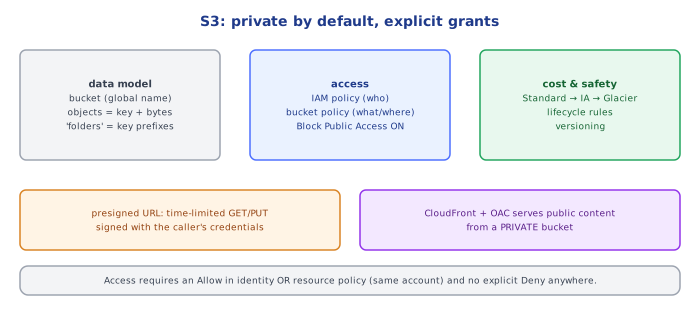
- S3 is object storage: flat keys (prefixes fake folders), buckets globally unique, very high durability.
- Use storage classes + lifecycle rules (IA, Glacier, Intelligent-Tiering) to cut cost.
- Access = IAM policies + bucket policies; keep Block Public Access on and serve public content via CloudFront.
- Enable versioning for important data; use presigned URLs for direct, time-limited uploads/downloads.
🎤 Interview Q&A
Q1What is S3 and what are its guarantees?core▾
Object storage with virtually unlimited capacity, 11 nines of durability (replicated across AZs), and strong read-after-write consistency for all operations. Objects up to 5 TB, addressed by bucket and key.
- Is S3 a file system? No; it's a key-value object store with no real directories or in-place edits.
Q2Which storage classes exist and when do you use them?core▾
Standard (frequent access), Intelligent-Tiering (unknown patterns), Standard-IA / One Zone-IA (infrequent), Glacier Instant/Flexible/Deep Archive (archives with increasing retrieval times). Lifecycle rules move objects between classes automatically.
- Gotcha with IA classes? Minimum storage duration and per-GB retrieval fees.
Q3How do you secure S3 buckets?core▾
Block Public Access on, bucket policies with least privilege, encryption at rest (SSE-S3/SSE-KMS), TLS-only policies, access via VPC endpoints, presigned URLs for temporary access, CloudFront with origin access control for public content, and logging.
- Why so many leaks historically? Public ACLs and overly broad bucket policies.
Q4How do presigned URLs work?senior▾
The backend signs a URL with its credentials granting time-limited permission for a specific operation (GET or PUT) on a specific object; clients upload/download directly to S3 without AWS credentials.
- How do you restrict upload size/type? Presigned POST policies with conditions.
Q5How do you get high performance from S3?core▾
Parallelize requests (multipart uploads, byte-range GETs), spread load across key prefixes (each prefix supports thousands of requests/s), use CloudFront for reads, and Transfer Acceleration for distant clients.
- Request rate per prefix? ~3,500 writes and 5,500 reads per second.
🛠️ Practice exercises
Each exercise is a file in this topic folder. Code exercises are self-checking: run them and make the checks pass.
✅ Check yourself
Answer the questions — feedback is instant.