AWS Fundamentals and IAM
Every AWS call is a signed HTTP request evaluated against IAM policies. Learn accounts, regions and the root user, users vs groups vs roles, policy documents, and how an application gets temporary credentials by assuming a role.
🎯 What you'll learn
- Accounts, regions, AZs and protecting the root user
- IAM users, groups and roles
- Policy document anatomy; identity- vs resource-based policies
- Assuming roles and temporary credentials via STS
📚 Before you start
1What AWS Actually Is
AWS is a collection of independently-scaling services (compute, storage, networking, databases, messaging...) that you rent by the second/request/GB instead of owning hardware. Every single one of those services shares one universal front door: every API call — whether it comes from the Console, the CLI, a Lambda function, or your laptop's curl command — is authenticated and authorized by IAM (Identity and Access Management) before AWS does anything else. There is no service-specific login system; IAM is the single gate for the entire platform.
# Every AWS CLI call is really: sign this HTTP request with credentials, then send it
aws sts get-caller-identity
# {
#   "UserId": "AIDACKCEVSQ6C2EXAMPLE",
#   "Account": "123456789012",
#   "Arn": "arn:aws:iam::123456789012:user/dana"
# }2Accounts, Regions, and the Root User
An AWS account is the billing and isolation boundary — resources in one account cannot see resources in another unless you explicitly connect them (VPC peering, cross-account IAM roles, etc.). Inside an account, resources live in Regions (e.g. us-east-1, eu-west-1), physically separate clusters of data centers, and most resources also live in an Availability Zone (AZ) — an isolated data center (or set of them) within a Region with independent power/cooling/networking, so one AZ failing doesn't take down another.
The root user is the email address you signed up with. It has unrestricted access and cannot be restricted by any policy. Industry practice: lock the root user away (MFA + a password no human routinely uses) and do all daily work as IAM identities instead.
# You should almost never see this used day-to-day in a real account:
aws iam create-account-alias --account-alias my-company-prod3IAM Identities: Users, Groups, and Roles
- IAM User — a persistent identity for a human or a long-lived application. Has long-term credentials (password, access keys).
- IAM Group — not an identity itself; a bucket of users that share attached policies. You cannot log in as a group.
- IAM Role — an identity without long-term credentials. Anyone (or anything — an EC2 instance, a Lambda function, a user in another account) can assume a role and receive short-lived, auto-expiring credentials.
aws iam create-user --user-name dana
aws iam create-group --group-name developers
aws iam add-user-to-group --user-name dana --group-name developers
Roles are the modern default for anything that isn't an interactive human login: EC2 instances get a role via an instance profile, Lambda functions get an execution role, and cross-account access is done by letting an account "assume" a role in yours rather than handing out access keys.
4Policy Documents — The Shape of a Permission
An IAM policy is JSON. Its core is a list of statements, each with an Effect (Allow/Deny), one or more Actions (the API operations, e.g. s3:GetObject), and one or more Resources (ARNs the action applies to).
{
  "Version": "2012-10-17",
  "Statement": [
    {
      "Sid": "ReadOnlyOnOneBucket",
      "Effect": "Allow",
      "Action": ["s3:GetObject", "s3:ListBucket"],
      "Resource": [
        "arn:aws:s3:::my-app-bucket",
        "arn:aws:s3:::my-app-bucket/*"
      ]
    }
  ]
}
Condition blocks narrow a statement further — e.g. only allow the action from a specific IP range, only if MFA was used, or only for objects under a specific S3 key prefix:
{
  "Effect": "Allow",
  "Action": "s3:GetObject",
  "Resource": "arn:aws:s3:::my-app-bucket/*",
  "Condition": {
    "Bool": { "aws:MultiFactorAuthPresent": "true" },
    "IpAddress": { "aws:SourceIp": "203.0.113.0/24" }
  }
}{
"Version": "2012-10-17",
"Statement": [{
"Effect": "Allow",
"Action": ["s3:GetObject", "s3:PutObject"],
"Resource": "arn:aws:s3:::petpal-prod-uploads/pets/*"
}]
}Effect + Action + Resource (+ optional Condition). No wildcards on actions, scoped to one prefix.
5Identity-Based vs. Resource-Based Policies
- Identity-based policy — attached to a user, group, or role. Answers "what can this identity do?"
- Resource-based policy — attached directly to a resource (an S3 bucket policy, an SQS queue policy, a Lambda resource policy). Answers "who can act on this resource?" and is the only way to grant access to a principal in a different AWS account without that account assuming a role in yours.
{
  "Version": "2012-10-17",
  "Statement": [
    {
      "Sid": "AllowOtherAccountRead",
      "Effect": "Allow",
      "Principal": { "AWS": "arn:aws:iam::999999999999:root" },
      "Action": "s3:GetObject",
      "Resource": "arn:aws:s3:::my-app-bucket/*"
    }
  ]
}
Both kinds are evaluated together for any given request — a resource-based Allow can grant access even with no identity-based policy mentioning that resource at all, which is precisely how cross-account S3/SQS/Lambda access works without STS role assumption.
6Assuming a Role
aws sts assume-role \
  --role-arn arn:aws:iam::123456789012:role/DeployRole \
  --role-session-name ci-deploy
# returns temporary AccessKeyId / SecretAccessKey / SessionToken, valid for a limited window (default 1h, up to 12h){
"Version": "2012-10-17",
"Statement": [
{
"Effect": "Allow",
"Principal": { "Service": "ec2.amazonaws.com" },
"Action": "sts:AssumeRole"
}
]
}That second document is a role's trust policy — it doesn't grant permissions, it decides who is allowed to assume the role in the first place. A role therefore always has two documents: the trust policy (who can become this role) and one or more permission policies (what this role can do once assumed).
7Using the SDK
import { STSClient, GetCallerIdentityCommand } from "@aws-sdk/client-sts";

const sts = new STSClient({ region: "us-east-1" });
const identity = await sts.send(new GetCallerIdentityCommand({}));
console.log(identity.Account, identity.Arn);
The SDK resolves credentials the same way the CLI does: environment variables → shared config file (~/.aws/credentials) → an EC2/ECS/Lambda role attached to the compute environment it's running on. This chain is why code that "just works" locally with a personal profile and in production with an attached IAM role, without a single line changing.
Under the HoodHow it works internally▾
IAM's policy evaluation logic is a strict, non-negotiable order — not a "last policy wins" merge. For any single API call, AWS gathers every policy that could apply (identity-based policies on the caller, resource-based policies on the target resource, any Service Control Policies from AWS Organizations, permission boundaries, session policies from assume-role) and evaluates them as one set, not sequentially:
- Start from an implicit deny. If nothing says otherwise, the answer is no. This is why a brand-new IAM user with zero policies attached can do literally nothing, not even view their own profile.
- Check for any explicit
Deny. If even one applicable statement anywhere in the whole set saysDeny, the request is denied — permanently, for this evaluation. It does not matter if ten other statements sayAllow. There is no priority-ordering or "last write wins"; explicit deny is absolute. - If no explicit Deny was found, check for an explicit
Allow. If at least one statement allows the action or resource, the request proceeds. - If neither an explicit Allow nor an explicit Deny matched, fall back to the implicit deny from step 1.
This is why "grant broad Allow, then Deny the exception" is the standard pattern for guardrails (e.g., SCPs that allow normal usage but explicitly deny disabling CloudTrail), and why a permissions boundary can never expand what a role can do — a boundary only ever adds a ceiling (an implicit deny for anything outside it), it can never itself grant a permission; the role's own identity policy must also allow the action for both to intersect into an actual Allow.
The evaluation engine is also why order-of-statements-in-the-JSON is irrelevant — policies aren't executed top-to-bottom like a firewall rule list. All matching statements across all attached policies are collected first, then the deny-check and allow-check run over the full set at once.
⚠️ Common Pitfalls
- Assuming a later "Allow" statement overrides an earlier "Deny." It never does — order in the document (or across documents) is irrelevant; explicit Deny always wins regardless of where it appears.
- Forgetting the resource-based policy side. An S3 bucket can be fully accessible per the IAM user's own policy, yet still return
AccessDeniedbecause the bucket policy denies the action, or because the bucket owner never granted cross-account access in the bucket policy at all. - Attaching permissions to individual users instead of groups or roles. This drifts into unmanageable one-off snowflake permissions; groups (for humans) and roles (for everything else) are the maintainable pattern.
- Using long-lived access keys for workloads that run on AWS compute. An EC2 instance or Lambda function should almost never have hardcoded access keys — an attached role gives short-lived, auto-rotating credentials with no secret to leak.
- Not scoping
Resourceto specific ARNs."Resource": "*"paired with a broadActionis a common source of privilege-escalation paths — e.g.iam:PassRolecombined with"Resource": "*"can let a low-privilege identity attach a highly-privileged role to a new EC2 instance. - Confusing a trust policy with a permission policy. The trust policy on a role controls who can assume it; it grants zero permissions on its own. A role with a wide-open trust policy but a narrow permission policy is safe from a data-access standpoint but may still be an assumption/pivot risk.
📋 Quick Reference
| Concept | Answers | Key fact |
|---|---|---|
| IAM User | "who is this human/app, long-term?" | has long-term credentials |
| IAM Role | "who is this, temporarily?" | short-lived credentials via AssumeRole, no long-term secret |
| Identity-based policy | "what can this identity do?" | attached to user/group/role |
| Resource-based policy | "who can act on this resource?" | attached to the resource itself; enables cross-account access |
| Trust policy | "who may assume this role?" | grants zero permissions by itself |
| Evaluation order | deny-check beats allow-check | explicit Deny > explicit Allow > implicit Deny (default) |
| Permissions boundary | "what's the max this identity could ever do?" | a ceiling, never a grant |
aws iam list-attached-user-policies --user-name dana
aws iam simulate-principal-policy --policy-source-arn <user-arn> --action-names s3:GetObject --resource-arns <bucket-arn>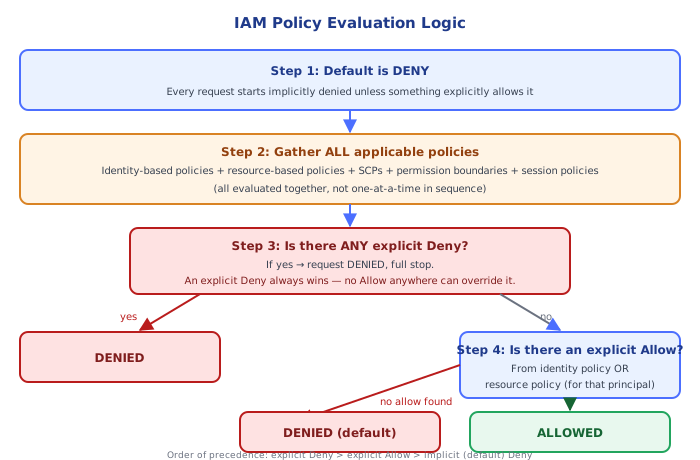
🧠 Key takeaways
- Every API call is a SigV4-signed request evaluated by IAM; everything is denied by default.
- Lock away the root user (MFA, no keys); humans use SSO/roles, workloads use roles, not long-lived keys.
- Policies = Effect, Action, Resource, Condition; resource policies (bucket, key, queue) can grant cross-account access.
- Explicit Deny wins; roles give temporary credentials via STS (instance profiles, task roles, OIDC).
🎤 Interview Q&A
Q1What are regions, availability zones and edge locations?core▾
A region is a geographic area (eu-west-1) with multiple isolated availability zones (separate data centres with independent power and networking, low-latency links). Edge locations are CloudFront/Route 53 points of presence close to users. Deploy across at least two AZs for high availability.
- Why not multi-region by default? Cost and complexity; multi-AZ covers most failures.
Q2Explain IAM users, groups, roles and policies.core▾
Users are long-term identities (avoid for workloads); groups attach policies to sets of users; roles are assumable identities with temporary credentials (for EC2, Lambda, cross-account, SSO); policies are JSON documents allowing/denying actions on resources.
- Why prefer roles? Temporary, automatically rotated credentials; no long-lived keys.
Q3How does IAM policy evaluation work?senior▾
Default deny; an explicit Allow is required; any explicit Deny wins. Organizations SCPs, permission boundaries, session policies and resource policies all can restrict the effective permissions.
- What's a permission boundary? A max-permissions cap for an identity, useful when delegating role creation.
Q4What's the shared responsibility model?core▾
AWS secures the cloud (hardware, facilities, hypervisor, managed service infrastructure); customers secure what they put in it (IAM, data, network configuration, OS patching on EC2, application security). The split shifts with managed services.
- Example of shift? With RDS, AWS patches the DB engine; with EC2-hosted DBs, you do.
Q5How do you secure the root account and access in general?core▾
Enable MFA on root and lock it away, use IAM Identity Center (SSO) for humans, roles for workloads, least-privilege policies, no long-lived access keys, CloudTrail for auditing, and guardrails via Organizations SCPs.
- How do you find over-privileged roles? IAM Access Analyzer and last-accessed data.
🛠️ Practice exercises
Each exercise is a file in this topic folder. Code exercises are self-checking: run them and make the checks pass.
✅ Check yourself
Answer the questions — feedback is instant.