Processes and systemd
Every server runs processes managed by systemd. Read process states, send the right signals, write a hardened unit file, and watch what systemd does on start, crash and stop.
🎯 What you'll learn
- Processes, PIDs, states (R S D T Z) and inspection tools
- Signals and exit codes (137, 143)
- Priorities, limits, cgroups and the OOM killer
- systemd units, hardening, journald and timers
📚 Before you start
1Processes
A process is a running program with its own PID, memory space, open file descriptors, environment, user/group IDs and a parent (PPID). Every process except PID 1 is created by fork() (copy the parent) + exec() (replace the image with a new program). Threads are processes that share memory (in Linux, both are "tasks").
ps aux --sort=-%mem | head            # all processes, biggest memory first
ps -eo pid,ppid,user,stat,%cpu,%mem,etime,cmd --forest   # tree with chosen columns
pgrep -af node                        # find by name
top / htop                            # live view (press P/M to sort, 1 for per-CPU)
pstree -p 1                           # tree from PID 1
cat /proc/1234/status                 # kernel's view: state, memory, threads, capabilities
ls -l /proc/1234/fd                   # open files and sockets
Process states (STAT column)
| State | Meaning |
|---|---|
R | running or runnable (on a CPU or in the run queue) |
S | interruptible sleep (waiting for an event — most processes) |
D | uninterruptible sleep (usually waiting on disk/NFS I/O — can't be killed until I/O completes) |
T | stopped (Ctrl-Z, SIGSTOP, debugger) |
Z | zombie: exited, but the parent hasn't called wait() to collect its exit status |
Zombies use no memory, only a PID slot; fix the parent (or kill it so PID 1 adopts and reaps the children). Many D processes → I/O problems; load average counts both R and D (05-troubleshooting_a_server/).
2Signals
| Signal | Number | Default | Typical use |
|---|---|---|---|
SIGTERM | 15 | terminate | polite stop — apps should clean up (the default for kill, docker stop, Kubernetes) |
SIGKILL | 9 | kill (can't be caught) | last resort; no cleanup |
SIGINT | 2 | terminate | Ctrl-C |
SIGHUP | 1 | terminate | terminal closed; many daemons reload config on it |
SIGSTOP/SIGCONT | 19/18 | stop/continue | pause/resume |
SIGCHLD | 17 | ignore | child exited — parent should wait() |
SIGUSR1/2 | 10/12 | terminate | app-defined (e.g. reopen logs, dump state) |
kill 1234            # SIGTERM
kill -HUP 1234       # reload
kill -9 1234         # only if SIGTERM didn't work after a grace period
pkill -f "node server.js"
Exit codes: 0 success; 1–125 app errors; 126 not executable; 127 command not found; 128+N killed by signal N (137 = SIGKILL, often the OOM killer; 143 = SIGTERM).
kill -9 first
kill -9 $(pgrep -f server.js)
# no cleanup: in-flight requests dropped,
# temp files left, DB transactions aborted
SIGTERM, wait, then SIGKILL
kill -TERM 1234        # app drains and exits
sleep 30
kill -0 1234 2>/dev/null && kill -KILL 1234   # only if still alive
systemd does exactly this with TimeoutStopSec.
3Priorities, Limits and Resources
- nice (−20…19) adjusts CPU priority:
nice -n 10 ./batch.sh,renice +5 -p 1234;ionice -c3for idle I/O priority. - ulimit /
LimitNOFILEcap per-process resources (open files, processes). "Too many open files" → raise the limit and look for fd leaks (ls /proc/PID/fd | wc -l). - cgroups (control groups) limit and account CPU, memory and I/O for groups of processes — the foundation of containers and of systemd's resource control. The kernel OOM killer kills processes when memory runs out (see
dmesg -T | grep -i oom).
4systemd
systemd is PID 1 on almost every modern distribution: it boots the system, starts and supervises services, manages logging (journald), timers, mounts, sockets and cgroups.
# /etc/systemd/system/petpal-api.service
[Unit]
Description=PetPal API
After=network-online.target
Wants=network-online.target

[Service]
Type=simple
User=petpal
Group=petpal
WorkingDirectory=/opt/petpal/api
EnvironmentFile=/etc/petpal/api.env
ExecStart=/usr/bin/node dist/server.js
Restart=on-failure
RestartSec=5
TimeoutStopSec=30           # SIGTERM, then SIGKILL after 30 s
LimitNOFILE=65536
MemoryMax=1G                # cgroup memory limit
CPUQuota=200%
# hardening
NoNewPrivileges=true
ProtectSystem=strict
ProtectHome=true
PrivateTmp=true
ReadWritePaths=/var/lib/petpal

[Install]
WantedBy=multi-user.targetsudo systemctl daemon-reload # after editing unit files
sudo systemctl enable --now petpal-api # start now and at boot
systemctl status petpal-api # state, main PID, recent logs
sudo systemctl restart|reload|stop petpal-api
systemctl list-units --failed
systemctl cat petpal-api # effective unit incl. drop-ins
sudo systemctl edit petpal-api # drop-in override (/etc/systemd/system/petpal-api.service.d/)
journalctl -u petpal-api -f # follow logs
journalctl -u petpal-api --since "1 hour ago" -p err
systemd-analyze security petpal-api # hardening scoreUnit types: .service, .timer (cron replacement), .socket (socket activation), .target (groups like multi-user.target), .mount, .path. Service types: simple (default; the process is the service), exec, forking (legacy daemons), oneshot (scripts), notify (app signals readiness via sd_notify).
Timers instead of cron
# petpal-backup.timer
[Timer]
OnCalendar=*-*-* 03:15:00
Persistent=true              # run missed jobs after downtime
RandomizedDelaySec=300
[Install]
WantedBy=timers.target
Timers give you logs in the journal, dependencies, resource limits and systemctl list-timers.
Under the HoodWhat systemctl start Does▾
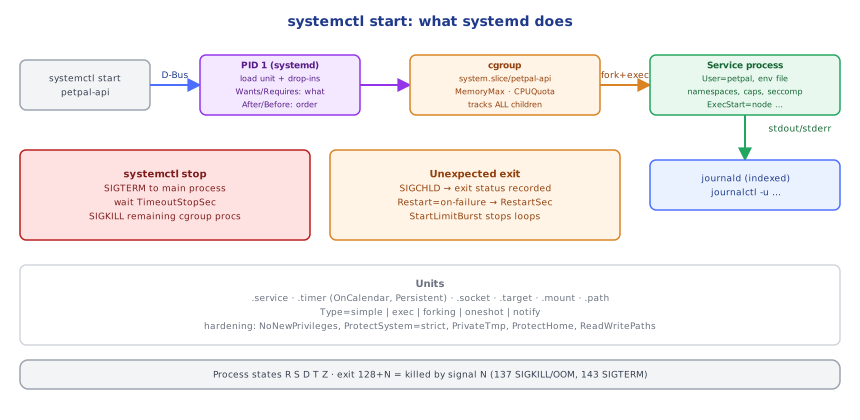
systemctl sends a D-Bus request to PID 1. systemd loads the unit (plus drop-ins), resolves dependencies and ordering (Requires/Wants decide what starts; After/Before decide in which order), and enqueues a start job. For the service it creates a cgroup (/sys/fs/cgroup/system.slice/petpal-api.service) and applies its limits (MemoryMax, CPUQuota), forks a child, sets up the execution environment — user/group, working directory, environment, namespaces for PrivateTmp/ProtectSystem, capabilities, seccomp filters — and execs ExecStart. stdout/stderr are connected to journald, which indexes logs with metadata (unit, PID, priority). Because all of the service's processes live in its cgroup, systemd can track and stop every child, even double-forked ones: on stop it sends SIGTERM to the main process (or all, per KillMode), waits TimeoutStopSec, then SIGKILLs whatever remains. When the main process exits unexpectedly, systemd receives SIGCHLD, records the exit status and applies the Restart= policy (with StartLimitBurst preventing restart loops).
⚠️ Common Pitfalls
kill -9first — skips cleanup, corrupts state.- Running services as root without hardening.
- Forgetting
daemon-reloadafter editing units. - Apps that ignore SIGTERM — every restart waits the full timeout then gets killed.
- Confusing
After=withRequires=/Wants=— ordering vs dependency. - Cron jobs without logs or locking — use timers.
📋 Quick Reference
ps aux --sort=-%mem · ps -eo pid,ppid,stat,cmd --forest · top/htop · /proc/PID/{status,fd}
states R S D T Z · signals TERM(15) KILL(9) HUP(1) INT(2) · exit 128+N (137 OOM/KILL, 143 TERM)
nice/renice/ionice · ulimit/LimitNOFILE · cgroups · dmesg | grep -i oom
systemctl daemon-reload · enable --now · status · restart · edit · list-units --failed · list-timers
journalctl -u svc -f --since -p err · systemd-analyze security svc
🧠 Key takeaways
- Inspect processes with ps, top/htop, /proc/PID; states R S D T Z (D = waiting on I/O, Z = unreaped child).
- Prefer SIGTERM, then SIGKILL; exit 128+N = killed by signal N (137 SIGKILL/OOM, 143 SIGTERM).
- cgroups limit resources; the OOM killer strikes when memory runs out.
- Run services as systemd units: non-root user, restart policy, limits, hardening, journald logs, and timers instead of cron.
🎤 Interview Q&A
Q1How do you inspect processes on Linux?core▾
ps aux, top/htop (CPU, memory, load), pstree, pgrep, /proc/<pid>/ (status, fd, limits), lsof -p <pid> for open files and sockets.
- What does load average mean? Average runnable + uninterruptible tasks over 1/5/15 minutes; compare with CPU count.
Q2Explain signals like SIGTERM, SIGKILL and SIGHUP.core▾
SIGTERM: polite request to terminate, catchable (graceful shutdown). SIGKILL: immediate kill, can't be caught. SIGHUP: terminal hangup, often used to reload config. SIGINT: Ctrl+C.
- What's a zombie process? A finished child not yet reaped by its parent.
Q3How do you run a service with systemd?core▾
Write a unit file (/etc/systemd/system/app.service) with ExecStart, User, Restart=on-failure, environment and limits; then systemctl daemon-reload, enable --now app, and check systemctl status and journalctl -u app.
- Why
Restart=on-failure? Automatic recovery from crashes.
Q4How do you find what's consuming CPU or memory?senior▾
top sorted by CPU/memory, pidstat, perf top for hot functions, smem/ps for memory, and check the OOM killer in dmesg or journalctl -k.
- Steal time in top? CPU time taken by the hypervisor for other VMs.
Q5What are nice values and cgroups?core▾
nice/renice adjust scheduling priority (−20 high to 19 low). cgroups limit and account CPU, memory and I/O for groups of processes; systemd slices and containers use them.
- Example limit in systemd?
MemoryMax=512Min a unit file.
🛠️ Practice exercises
Each exercise is a file in this topic folder. Code exercises are self-checking: run them and make the checks pass.
✅ Check yourself
Answer the questions — feedback is instant.