Filesystem and Permissions
Know where things live, why a disk can be 'full' with free space, and exactly how the kernel decides whether a process may open a file. Step through permission checks, including the surprising cases.
🎯 What you'll learn
- The filesystem hierarchy, mounts and disk usage tools
- Inodes, links and deleted-but-open files
- Owner/group/other bits, umask and special bits
- ACLs, capabilities, SELinux/AppArmor and sudo
📚 Before you start
1The Filesystem Hierarchy
| Path | Contents |
|---|---|
/etc | system configuration (/etc/systemd, /etc/nginx, /etc/ssh/sshd_config) |
/var | variable data: /var/log, /var/lib (databases, docker), /var/cache, /var/tmp |
/opt, /srv | add-on software, served data |
/home, /root | user homes |
/usr/bin, /usr/lib | installed programs and libraries (/bin → /usr/bin on modern distros) |
/tmp | temporary files (often tmpfs, cleared on reboot) |
/proc, /sys | virtual filesystems exposing kernel and process state |
/dev | device files (/dev/nvme0n1, /dev/null) |
/mnt, /media | mount points |
Everything is a file: regular files, directories, symlinks, devices, sockets, pipes. Multiple filesystems (ext4, xfs, tmpfs, overlayfs for containers, NFS) are mounted into one tree:
df -hT                      # filesystems, type, usage
df -i                       # inode usage (full inodes = "No space left" with free space!)
lsblk -f                    # block devices, partitions, filesystems
mount | column -t           # current mounts
du -xh --max-depth=1 /var | sort -h      # what's using space (stay on one filesystem)
sudo ncdu -x / # interactive2Inodes, Links and Deleted-but-Open Files
A file's metadata (owner, mode, size, timestamps, block pointers) lives in an inode; directory entries map names → inode numbers.
- Hard link (
ln a b): another name for the same inode (same filesystem only). - Symbolic link (
ln -s target link): a small file containing a path; can dangle. - A file's data is freed only when its link count is 0 and no process has it open. A deleted log file still held open by a process keeps using disk:
lsof +L1(orlsof | grep deleted) finds them; restart/reload the process or truncate via/proc/PID/fd/N.
$ df -h /var        → 100% used (50G)
$ du -xsh /var      → 18G
$ sudo lsof +L1     → node 9001 /var/log/app.log (deleted) 30G
Someone deleted a 30 GB log that the app still has open; the space is only freed when the file is closed. Fix: restart/reload the app, or : > /proc/9001/fd/7. Prevent it with logrotate's postrotate reload.
3Ownership and Permissions
Every file has an owner user, a group, and permission bits for user / group / others:
-rwxr-x---  1 petpal deploy  4096 Oct 20 10:00 deploy.sh
│└┬┘└┬┘└┬┘
│ u  g  o      r=4 w=2 x=1  → 750
└ type (- file, d dir, l link, s socket, p pipe, c/b device)| Bit | On a file | On a directory |
|---|---|---|
r | read contents | list names |
w | modify contents | create/delete/rename entries (regardless of the files' own permissions!) |
x | execute | enter (cd) and access entries by name |
chmod 640 app.env            # rw-r-----
chmod u+x,go-w script.sh
chmod -R g+rX shared/        # X = execute only on directories (and already-executable files)
chown petpal:deploy app.env
chgrp -R deploy /srv/app
umask 027                    # default perms for new files: 640, dirs: 750
Special bits
| Bit | Octal | Effect |
|---|---|---|
| setuid | 4000 | executable runs as the file's owner (e.g. passwd) — a security hotspot |
| setgid | 2000 | on executables: run as group; on directories: new files inherit the directory's group (shared team dirs) |
| sticky | 1000 | on directories: only owners can delete their files (/tmp is 1777) |
Find risky files: find / -xdev -perm -4000 -type f (setuid), find / -xdev -perm -0002 -type f (world-writable).
Beyond mode bits
- ACLs for extra users/groups:
setfacl -m u:alice:rx file,getfacl file. - Capabilities grant specific root powers to binaries:
setcap cap_net_bind_service=+ep /usr/bin/node(bind port 80 without root). - SELinux/AppArmor mandatory access control can deny access even when mode bits allow it (
ls -Z,audit.log). - sudo with least privilege:
deploy ALL=(root) NOPASSWD: /bin/systemctl restart petpal-apiin/etc/sudoers.d/(edit withvisudo).
4Useful File Tools
find /var/log -name "*.log" -mtime +7 -size +100M     # old big logs
find . -type f -newer marker -print0 | xargs -0 ls -l
stat file                    # inode, mode, timestamps (atime/mtime/ctime)
file blob.bin                # detect type
tar -czf backup.tgz -C /srv app && tar -tzf backup.tgz | head
rsync -avz --delete src/ host:/srv/app/                # mirror (mind the trailing slash)
Log rotation: logrotate (/etc/logrotate.d/app with daily, rotate 14, compress, copytruncate or postrotate reload) or journald limits (SystemMaxUse=).
Under the HoodHow the Kernel Checks Access▾
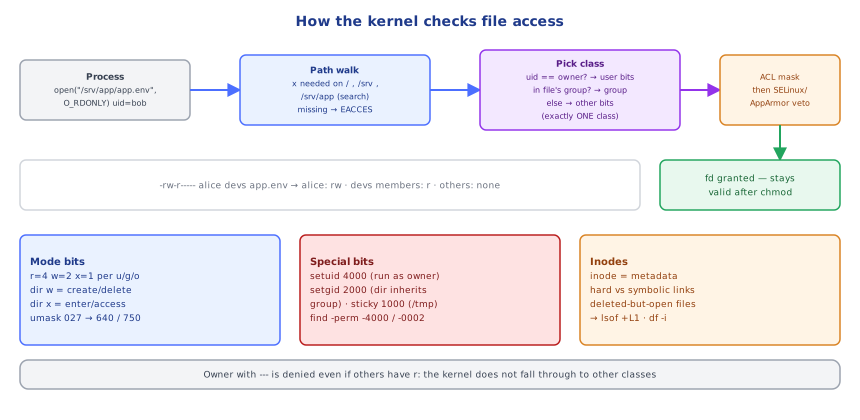
When a process calls open("/srv/app/app.env", O_RDONLY), the kernel resolves the path component by component; for each directory on the way it requires the x (search) permission for the process. At the final inode it picks one permission class: if the process's effective UID equals the file owner → user bits; else if the file's group is among the process's groups → group bits; else → other bits (it does not fall through — an owner with --- is denied even if others have r). UID 0 bypasses most checks via capabilities (CAP_DAC_OVERRIDE), but not MAC policies like SELinux. ACL entries, when present, are evaluated between owner and others with a mask. Then LSMs (SELinux/AppArmor) get a veto. The check happens at open time: a process that already holds a file descriptor keeps its access even if permissions change later — which, together with link counts, explains why deleted-but-open files keep consuming disk.
⚠️ Common Pitfalls
chmod -R 777to "fix" permission errors.- Disk "full" with free space — inodes exhausted (
df -i) or deleted-but-open files. - Missing
xon a parent directory — "Permission denied" despite correct file perms. - Secrets readable by others (
.envfiles with 644). duanddfdisagree — open deleted files or files hidden under a mount point.- rsync trailing slash confusion (
srcvssrc/).
📋 Quick Reference
df -hT · df -i · du -xh --max-depth=1 | sort -h · lsblk -f · lsof +L1
mode: rwx = 4 2 1 for u/g/o · chmod 750 / u+x · chown user:group · umask 027
special: setuid 4000 · setgid 2000 (dirs inherit group) · sticky 1000 (/tmp)
ACLs setfacl/getfacl · setcap · SELinux/AppArmor · sudoers.d via visudo
find -perm -4000 / -0002 · logrotate
🧠 Key takeaways
- Know the hierarchy (
/etc,/var,/proc…); check df -h, df -i (inodes!) and du -x. - Space is freed only when the link count is 0 and no process holds the file:
lsof +L1. - The kernel picks one class (owner → group → others); directories need x to traverse.
- Watch setuid and world-writable files; use ACLs/capabilities/sudoers for least privilege; MAC (SELinux) can still deny.
🎤 Interview Q&A
Q1Explain Linux file permissions.core▾
Read/write/execute for owner, group and others (rwxr-x--- = 750). chmod changes them, chown changes ownership. For directories, x means you can enter/traverse; r lists names.
- What does 644 mean? Owner read/write, group and others read.
Q2What are setuid, setgid and the sticky bit?core▾
setuid runs a file with the owner's privileges (e.g. passwd); setgid with the group's (or new files inherit the directory's group); sticky bit on directories (like /tmp) lets only file owners delete their files.
- Security concern? setuid binaries are privilege-escalation targets.
Q3How do you find what's filling the disk?core▾
df -h (filesystem usage), du -sh * | sort -h to drill down, ncdu, and lsof +L1 for deleted files still held open by processes (space not freed until they close).
- Inodes full?
df -i: many tiny files can exhaust inodes with free space left.
Q4Hard links vs symbolic links?senior▾
A hard link is another name for the same inode (same filesystem only, survives deleting the original). A symlink is a separate file pointing to a path (can cross filesystems, breaks if the target moves).
- Can you hard link directories? No (except internal
./..).
Q5What's important about the Linux filesystem hierarchy for servers?core▾
/etc config, /var/log logs, /var/lib application state, /tmp temporary, /opt add-on software, /proc and /sys virtual kernel interfaces, /home users.
- Why monitor /var? Logs and data growth often fill it.
🛠️ Practice exercises
Each exercise is a file in this topic folder. Code exercises are self-checking: run them and make the checks pass.
✅ Check yourself
Answer the questions — feedback is instant.
df -h shows 35% free but writes fail with 'No space left'. Check…