Linux Networking Tools for DevOps
ip, ss, dig, curl, nc, tcpdump: the practical toolbox for 'why can't A reach B?' Read real outputs, tell 'connection refused' from 'timeout', and follow an incoming connection through the kernel's queues.
🎯 What you'll learn
- Interfaces, routes and DNS configuration
- Sockets and TCP states with ss
- Connectivity, latency, DNS and HTTP/TLS debugging
- Packet capture and firewalls
📚 Before you start
Network concepts (TCP, DNS, TLS, HTTP) are covered in networking-web/fundamentals/; this topic is the practical toolbox for inspecting and debugging them on a Linux server.
1Interfaces, Addresses, Routes
ip -br addr                 # interfaces and IPs (brief)
ip link show                # state, MTU
ip route                    # routing table; "default via 10.0.0.1 dev eth0"
ip route get 8.8.8.8        # which interface/gateway would be used
ip neigh                    # ARP/neighbour table
cat /etc/resolv.conf        # DNS servers and search domains (systemd-resolved: resolvectl status)
hostname -I2Sockets and Ports: ss
ss (replacement for netstat) shows sockets:
ss -tlnp                    # TCP listening sockets, numeric, with process
ss -tunap                   # all TCP/UDP sockets with processes
ss -tan state established '( dport = :5432 )'   # connections to Postgres
ss -tan | awk 'NR>1 {print $1}' | sort | uniq -c   # count by state
ss -s # summary| State | Meaning / smell |
|---|---|
LISTEN | server waiting for connections (check the bind address: 127.0.0.1 = local only, 0.0.0.0/* = all interfaces) |
ESTAB | active connection |
TIME-WAIT | closed by this side, waiting 2×MSL — many = lots of short-lived connections (use keep-alive/pooling) |
CLOSE-WAIT | peer closed, our app hasn't — growing numbers = connection leak in the app |
SYN-SENT | connecting — stuck = firewall/blackhole on the path |
SYN-RECV | half-open on server — many = SYN flood or full accept queue |
lsof -i :8080 shows which process holds a port.
3Connectivity and Latency
ping -c 4 db.internal                  # ICMP reachability + RTT (may be blocked)
traceroute -T -p 443 api.example.com   # path with TCP probes (or mtr for continuous)
mtr -rwc 50 api.example.com            # per-hop loss/latency report
nc -zv db.internal 5432                # is the TCP port reachable? (-u for UDP)
timeout 3 bash -c '</dev/tcp/db.internal/5432' && echo open   # without nc
"Connection refused" = host reachable, nothing listening (or REJECT rule). "Timeout" = packets dropped (firewall, security group, routing, host down) — networking-web/fundamentals/11-latency_and_troubleshooting.
4DNS
dig api.petpal.io +short
dig api.petpal.io A +noall +answer         # with TTLs
dig @8.8.8.8 api.petpal.io                 # ask a specific resolver
dig +trace petpal.io                       # follow delegation from the root
dig -x 203.0.113.10                        # reverse lookup
getent hosts api.petpal.io                 # what the system resolver (nsswitch, /etc/hosts) returns
getent vs dig difference reveals /etc/hosts overrides or search-domain effects (Kubernetes ndots:5!).
5HTTP and TLS
curl -sv https://api.petpal.io/health -o /dev/null          # headers, TLS handshake, redirects
curl -s -o /dev/null -w 'dns=%{time_namelookup} connect=%{time_connect} tls=%{time_appconnect} ttfb=%{time_starttransfer} total=%{time_total} code=%{http_code}\n' https://api.petpal.io/
curl --resolve api.petpal.io:443:10.0.1.20 https://api.petpal.io/   # hit one backend, keep SNI/Host
openssl s_client -connect api.petpal.io:443 -servername api.petpal.io </dev/null | openssl x509 -noout -dates -subject -issuer6Packet Capture
sudo tcpdump -i any -nn port 5432 -c 50
sudo tcpdump -i eth0 -nn 'tcp[tcpflags] & (tcp-syn|tcp-rst) != 0'   # SYNs and RSTs only
sudo tcpdump -i any -w /tmp/cap.pcap host 10.0.1.20                 # save for Wireshark
Capture on both ends to prove where packets disappear.
7Firewalls
- nftables (modern) / iptables (legacy, often nft-backed):
sudo nft list ruleset,sudo iptables -L -n -v. - Front-ends: ufw (Ubuntu:
ufw allow 22/tcp), firewalld (RHEL:firewall-cmd --list-all). - In the cloud, security groups/NACLs act before the host firewall (
devops-cloud/aws/09-security_groups); Kubernetes adds NetworkPolicies and kube-proxy rules (devops-cloud/kubernetes/04-ingress_and_networking).
Under the HoodThe Path of an Incoming Connection▾
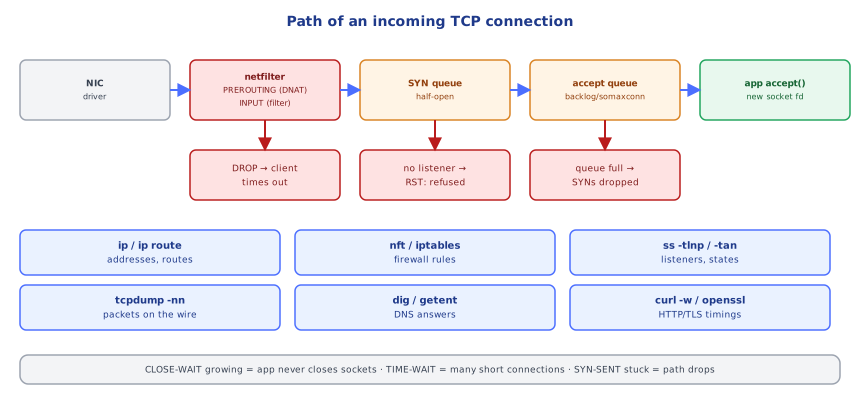
A SYN arrives at the NIC → the driver hands it to the kernel network stack → netfilter hooks (PREROUTING: DNAT, e.g. Docker/Kubernetes port mappings; INPUT: host firewall filtering) decide its fate → if a socket is listening on that address:port, the kernel replies SYN-ACK and holds the half-open connection in the SYN queue; on the final ACK it moves to the accept queue (sized by the listen() backlog and net.core.somaxconn) → the application's accept() takes it, getting a new socket with its own file descriptor. If nothing listens, the kernel sends RST ("connection refused"); if a firewall drops it, the client retransmits SYNs until timeout. If the app is too slow to accept(), the accept queue overflows and SYNs get dropped (visible in nstat -az | grep -i listen / ss -lnt Recv-Q). On close, the side that closes first enters TIME-WAIT; the other side sits in CLOSE-WAIT until its application calls close().
⚠️ Common Pitfalls
- Service bound to 127.0.0.1 while you test from another host.
- Treating "refused" and "timeout" as the same.
- Testing with
pingwhen ICMP is blocked but TCP works (or vice versa). - Ignoring CLOSE-WAIT growth — an app-side leak.
- Forgetting cloud firewalls (security groups) when the host firewall looks fine.
- DNS caching — old answers until TTL expires.
📋 Quick Reference
ip -br addr · ip route (get) · resolvectl status
ss -tlnp · ss -tan state … · ss -s · lsof -i :PORT
ping · mtr · traceroute -T · nc -zv host port · </dev/tcp/host/port
dig +short / +trace / @server · getent hosts
curl -sv · curl -w timings · curl --resolve · openssl s_client
tcpdump -nn -i any port X (-w file) · nft list ruleset · ufw / firewalld
🧠 Key takeaways
- Start with ip addr / ip route / resolvectl: is the interface up, is the route right, is DNS right?
- ss shows listeners and states; watch bind addresses, growing CLOSE-WAIT (app leak) and TIME-WAIT.
- Refused (RST, nothing listening) ≠ timeout (dropped); test ports with
nc -zv, DNS withdig, HTTP phases withcurl -w. - Prove where packets disappear with tcpdump on both ends; remember cloud firewalls sit before the host firewall.
🎤 Interview Q&A
Q1Which tools do you use to inspect network connections?core▾
ss -tulpn (listening sockets and processes), ip addr/ip route (interfaces, routes), ping, traceroute/mtr, dig, curl -v, nc, and tcpdump for packet capture.
- Replacement for netstat/ifconfig?
ssandip.
Q2How do you test if a remote port is reachable?core▾
nc -vz host 5432, curl -v telnet://host:port, or timeout 3 bash -c '</dev/tcp/host/port'. 'Connection refused' means nothing listening; a timeout usually means a firewall drop.
- And TLS?
openssl s_client -connect host:443 -servername host.
Q3How do you capture traffic for debugging?core▾
tcpdump -i any -nn port 443 -w capture.pcap, then analyze in Wireshark. Filter tightly to avoid huge captures and sensitive data exposure.
- Can you see HTTPS content? Not without keys; you see handshakes and metadata.
Q4How do you check DNS resolution on a server?senior▾
dig example.com, dig @8.8.8.8 example.com (compare resolvers), getent hosts example.com (uses the system's NSS config, including /etc/hosts), and check /etc/resolv.conf.
- Why can getent differ from dig? dig bypasses /etc/hosts and NSS.
Q5How do you see connection states and counts?core▾
ss -s for summaries, ss -tan state time-wait | wc -l, to spot many TIME_WAIT or CLOSE_WAIT sockets.
- Many CLOSE_WAIT means? The application isn't closing sockets after the peer closed.
🛠️ Practice exercises
Each exercise is a file in this topic folder. Code exercises are self-checking: run them and make the checks pass.
✅ Check yourself
Answer the questions — feedback is instant.