Bash Scripting for DevOps
Bash glues operations together, and it's full of traps. Start from a safe script skeleton, learn exactly how bash expands a command line (and why unquoted variables bite), then build reusable functions, text pipelines and robust ops scripts.
🎯 What you'll learn
- A safe skeleton: set -Eeuo pipefail, traps, temp dirs
- Quoting, parameter expansion and arrays
- Tests, control flow, functions and exit codes
- Text processing (awk, sed, jq) and ops patterns: getopts, flock, dry-run
📚 Before you start
1A Safe Script Skeleton
#!/usr/bin/env bash
set -Eeuo pipefail          # exit on error (-e), on unset vars (-u), on failure anywhere in a pipe; ERR trap inherited (-E)
IFS=$'\n\t'                 # safer word splitting

readonly SCRIPT_DIR="$(cd "$(dirname "${BASH_SOURCE[0]}")" && pwd)"
log()  { printf '%s [%s] %s\n' "$(date -u +%FT%TZ)" "${2:-INFO}" "$1" >&2; }
die()  { log "$1" ERROR; exit "${2:-1}"; }

tmpdir="$(mktemp -d)"
cleanup() { rm -rf "$tmpdir"; }
trap cleanup EXIT
trap 'die "failed at line $LINENO: $BASH_COMMAND"' ERR

main() {
  [[ $# -ge 1 ]] || die "usage: $0 <environment>" 2
  local env="$1"
  log "deploying to $env"
}
main "$@"
set -e has surprising exceptions (commands in if conditions, &&/|| chains, and pipelines without pipefail), so check critical commands explicitly. Run ShellCheck on every script — it catches most of the pitfalls below.
2Variables and Quoting
name="pet pal"
echo "$name"                 # ALWAYS quote expansions: "$var", "$@", "$(cmd)"
files=("a b.txt" c.txt)      # arrays keep elements intact
for f in "${files[@]}"; do echo "$f"; done
echo "${#files[@]}"          # length
: "${ENVIRONMENT:?must be set}"       # fail if unset/empty
port="${PORT:-8080}"                  # default
echo "${path%/*}" "${path##*/}"       # dirname / basename via parameter expansion
echo "${name^^}" "${file%.log}.gz"    # uppercase (bash 4+), replace suffix
readonly VERSION=1.4.2
local count=0                         # inside functions
Unquoted $var undergoes word splitting and globbing — the #1 source of bash bugs (rm -rf $dir/* with an empty $dir...).
Unquoted expansion
dir="my backups"
rm -rf $dir/*
# expands to: rm -rf my backups/*
# → deletes ./my and everything in ./backups/
Quoted expansion
dir="my backups"
rm -rf "${dir:?}"/*
# expands to: rm -rf 'my backups'/*
# and fails loudly if $dir is empty3Tests and Control Flow
if [[ -f "$file" && -r "$file" ]]; then ...; fi    # [[ ]]: no splitting, supports && || =~
[[ "$branch" == release/* ]]                         # glob match
[[ "$version" =~ ^v([0-9]+)\.([0-9]+)$ ]] && major="${BASH_REMATCH[1]}"
(( retries < 5 ))                                    # arithmetic
case "$1" in
  start|run) start ;;
  stop)      stop ;;
  *)         die "unknown command: $1" ;;
esac
while IFS= read -r line; do ...; done < "$file"      # read lines safely
for i in {1..5}; do ...; done
File tests: -e exists, -f file, -d dir, -s non-empty, -x executable, -nt newer than. String: -z empty, -n non-empty.
4Functions, Exit Codes, Input/Output
retry() {                   # retry <attempts> <cmd...>
  local attempts="$1"; shift
  local n=1 delay=1
  until "$@"; do
    (( n >= attempts )) && return 1
    log "attempt $n failed; retrying in ${delay}s" WARN
    sleep "$delay"; (( n++, delay *= 2 ))
  done
}
retry 5 curl -fsS https://api.petpal.io/health- Functions return status codes (
return 0..255) and output via stdout; capture with$(...). - Redirections:
>>>2>2>&1&>< file, here-docs<<'EOF'(quoted = no expansion), here-strings<<< "$var", process substitutiondiff <(sort a) <(sort b). $?last status;${PIPESTATUS[@]}statuses of a pipeline.
5Text Processing Toolkit
grep -E 'ERROR|WARN' app.log | grep -v healthcheck
awk '$9 >= 500 {c++} END {print c+0}' access.log            # count 5xx (field 9)
awk '{print $1}' access.log | sort | uniq -c | sort -rn | head -5   # top IPs
cut -d, -f2,5 data.csv · sed -n '10,20p' file · sed -i.bak 's/old/new/g' file
jq -r '.items[] | select(.status=="failed") | .id' report.json
xargs -P 4 -n 1 ./process.sh < ids.txt                       # parallel
sort -t, -k3,3n · tr -s ' ' · column -t · tee
Know when to stop: if a script grows past ~150 lines, needs data structures or real error handling, rewrite it in Python/Go/TypeScript.
6Scripts for Operations
- Arguments:
getoptsfor short flags (-e prod -n), or awhile [[ $# -gt 0 ]]; case $1 in --env) ...loop for long ones; always print usage. - Idempotency: running twice should be safe (
mkdir -p, check-before-create,ln -sfn). - Locking:
exec 9>/var/lock/deploy.lock; flock -n 9 || die "already running". - Dry-run flag that prints commands instead of running them.
- Logging to stderr with timestamps; exit codes that mean something.
- Secrets from the environment or a secret manager — never as command-line arguments (visible in
ps).
Under the HoodHow Bash Processes a Command Line▾
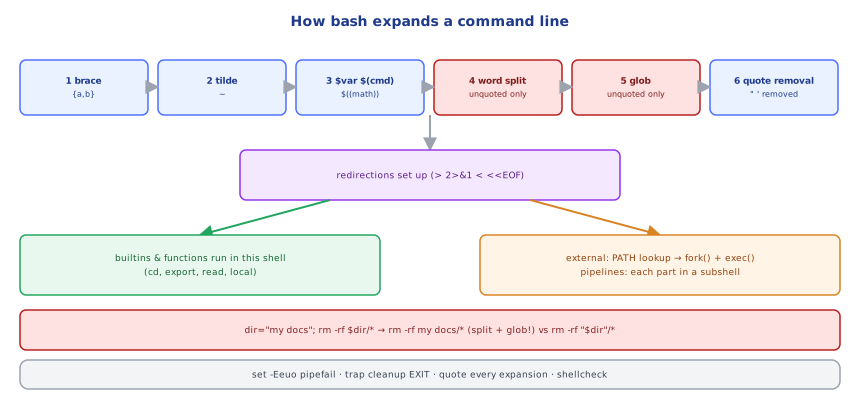
For each command, bash performs a fixed sequence of expansions: (1) brace expansion {a,b}; (2) tilde expansion ~; (3) parameter/variable expansion $var, command substitution $(...), arithmetic $((...)), process substitution — left to right; (4) word splitting of the unquoted results on IFS; (5) pathname expansion (globbing) of unquoted words containing *?[; (6) quote removal. Then redirections are set up, and the command is run: builtins and functions in the current shell; external commands via fork() + exec() after searching PATH (cached in a hash table). Pipelines run each part in its own subshell process connected by pipes — which is why cmd | while read x; do count=$((count+1)); done doesn't change count in the parent shell, and why a pipeline's status is the last command's unless pipefail is set. Quoting stops steps 4 and 5, which is precisely why "$var" is safe and $var is not.
⚠️ Common Pitfalls
- Unquoted variables — splitting and globbing surprises.
- No
set -euo pipefail— scripts continue after failures. - Parsing
lsoutput — use globs orfind -print0. cdwithout checking —cd "$dir" || exit.- Variables set inside a pipeline's
whileloop lost in the parent. - Secrets on the command line.
- Bash 4+ features (
declare -A,${x^^},mapfile) on macOS's bash 3.2.
📋 Quick Reference
set -Eeuo pipefail · trap cleanup EXIT · trap ... ERR · mktemp -d · shellcheck
"$var" "${arr[@]}" ${VAR:-default} ${VAR:?msg} ${p%/*} ${p##*/}
[[ -f x && $a == b* ]] · [[ $s =~ re ]] BASH_REMATCH · (( n < 5 )) · case · while IFS= read -r
functions return codes, output via stdout · getopts · flock · idempotent · dry-run
grep -E · awk · sed · cut · sort | uniq -c | sort -rn · jq · xargs -P
🧠 Key takeaways
- Start every script with set -Eeuo pipefail, a trap cleanup EXIT, and mktemp for temp files; run shellcheck.
- Quote every expansion (
"$var","${arr[@]}"); use${VAR:?}/${VAR:-default}. - Use
[[ ]],(( )),case, andwhile IFS= read -r; functions return codes and print results. - Ops scripts need getopts, idempotency, flock locking and a dry-run mode; rewrite in Python past ~150 lines.
🎤 Interview Q&A
Q1What should every bash script start with?core▾
#!/usr/bin/env bash and set -euo pipefail: exit on error, error on unset variables, and fail pipelines if any command fails. Optionally IFS=$'\n\t' and a trap for cleanup.
- Caveat of set -e? It has surprising exceptions (in conditionals, subshells); still check critical commands.
Q2Why quote variables?core▾
Unquoted $var undergoes word splitting and glob expansion, so spaces or * in values break commands or cause dangerous behaviour (rm $file). Use "$var" and "$@".
- Tool to catch this? ShellCheck.
Q3How do you handle cleanup and errors?core▾
trap 'cleanup' EXIT (and ERR) to remove temp files, mktemp for safe temp files, meaningful exit codes, and logging to stderr.
- Why mktemp? Avoids predictable filenames and race conditions.
Q4How do you process files and text efficiently?senior▾
Pipelines with grep, awk, sed, sort, uniq -c, cut, xargs -P for parallelism, and find -print0 | xargs -0 for filenames with spaces. Use jq for JSON.
- Example: top IPs in a log?
awk '{print $1}' access.log | sort | uniq -c | sort -rn | head.
Q5When should you not use bash?core▾
For complex logic, data structures, error handling or anything beyond ~100 lines: use Python or Go. Bash shines as glue for running commands.
- Why? Bash's error handling and quoting rules make large scripts fragile.
🛠️ Practice exercises
Each exercise is a file in this topic folder. Code exercises are self-checking: run them and make the checks pass.
✅ Check yourself
Answer the questions — feedback is instant.
rm -rf $dir/* dangerous?set -o pipefail change?false | true succeeds.cmd | while read x; do count=…; done is empty afterwards. Why?