Docker Fundamentals
'Works on my machine' disappears when the app ships with everything it needs. Learn what images and containers are, why containers are isolated processes rather than tiny VMs, and what happens when you type docker run.
🎯 What you'll learn
- Images vs containers
- Why containers are processes, not VMs
- CLI, daemon, containerd/runc and registries
- Tags, digests and the container lifecycle
📚 Before you start
1The Problem Docker Solves
"It works on my machine" is a symptom of one thing: an application's behavior depends on more than its own source code. It depends on the OS version, the installed language runtime, system libraries, environment variables, and whatever else happens to be present on the machine that runs it. Historically, teams tried to solve this by writing setup documentation, provisioning scripts, or shipping entire virtual machines — each with real costs: docs go stale, scripts drift from what's actually installed, and VMs are gigabytes in size and slow to boot because each one carries a complete guest operating system.
Docker's answer is the container: a way to package an application together with everything it needs to run — code, runtime, system tools, libraries, configuration — into a single unit that runs identically regardless of where it's deployed, while being small and fast because it does not carry a separate OS.
2Images vs. Containers — The Core Distinction
A Docker image is a read-only template: a snapshot of a filesystem plus metadata (what command to run, what ports to expose, what environment variables to set). An image on disk does nothing by itself — it's inert, like a class definition.
A container is a running (or stopped) instance of an image: the image's filesystem plus a thin writable layer on top, plus an isolated process tree, network stack, and mount namespace. A container is to an image what an object is to a class — you can start many containers from the same image, each isolated from the others.
docker pull node:20-alpine        # download an image from a registry
docker images                     # list images on this machine
docker run node:20-alpine node -v # create + start a container from that image
docker ps -a # list containers (running and stopped)3Containers Are Not Lightweight VMs
This is the single most important mental model correction for anyone coming from VMs. A virtual machine virtualizes hardware: a hypervisor presents fake CPU, memory, disk, and network devices to a full guest operating system, which boots its own kernel. A container virtualizes nothing at the hardware level — it is an ordinary process (or group of processes) running on the host's existing kernel, made to believe it has its own filesystem, process tree, network interfaces, and hostname through kernel features called namespaces, with resource usage capped by another kernel feature called cgroups. No second kernel boots. No hardware is emulated.
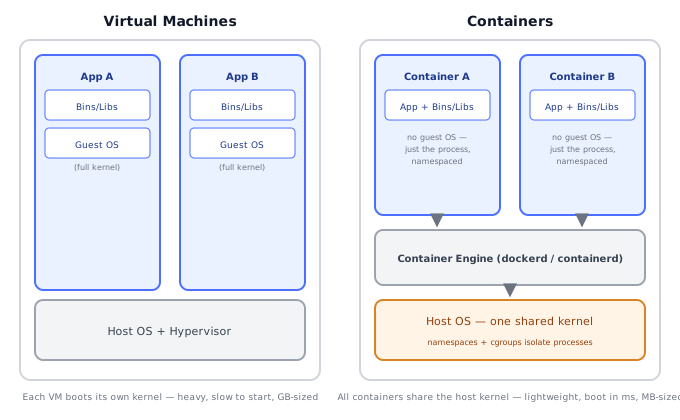
This is why a container starts in milliseconds (it's just fork+exec plus some namespace setup) while a VM takes seconds to minutes (it has to boot an entire OS), and why a minimal container image can be tens of megabytes while a VM image is typically gigabytes.
4The Docker Architecture: Client, Daemon, Registry
┌────────────┐   REST API over    ┌──────────────────┐
│ docker CLI  │ ─── a socket ────► │ dockerd (daemon)   │
│ (client)    │ ◄─────────────────  │ - manages images    │
└────────────┘                    │ - manages containers │
                                   │ - manages networks   │
                                   │ - manages volumes    │
                                   └─────────┬────────────┘
                                             │ pull / push
                                             ▼
                                   ┌──────────────────┐
                                   │ Registry (Docker    │
                                   │ Hub, ECR, GHCR...)  │
└──────────────────┘dockerCLI — the command you type. It's just a client; it doesn't do any of the work itself.dockerd— the daemon (background process) that actually builds images, starts/stops containers, and manages networks and volumes. The CLI talks to it over a local Unix socket (or a TCP socket for remote access).- containerd / runc — under
dockerd, the actual container lifecycle (creating namespaces, cgroups, starting the process) is delegated tocontainerd, which in turn callsrunc, a low-level OCI-compliant tool that does the final namespace/cgroup setup and executes the container's process. Docker itself doesn't reinvent this — it builds on the same OCI (Open Container Initiative) runtime spec that Kubernetes, Podman, and other tools also use. - Registry — a server that stores and serves images by name and tag (
node:20-alpine). Docker Hub is the default public registry; private registries (ECR, GCR, GHCR, self-hosted) work the same way.
5Your First Container
docker run --rm -it ubuntu:22.04 bashBreaking this down:
docker run— create a new container from an image and start it (implicitly pulls the image if not present locally).--rm— automatically delete the container's writable layer when it exits, instead of leaving it around as a stopped container.-it— allocate an interactive pseudo-TTY (-t) and keep STDIN open (-i), so you get an interactive shell instead of the container running and immediately exiting.ubuntu:22.04— the image,name:tag.bash— the command to run inside the container, overriding the image's default command.
Once inside, ps aux will show only the processes belonging to that container's PID namespace — even though, on the host, that shell is just another ordinary process visible in the host's own ps aux output.
6Naming, Tags, and the Registry Model
An image reference has the shape [registry/]repository[:tag]. node:20-alpine really means docker.io/library/node:20-alpine — Docker Hub's default registry and the library namespace are implied when omitted. Tags are just labels a maintainer (or you) chooses to attach to a specific image build — latest is not special to Docker itself, it's simply the tag applied by convention when no other tag is given at build/push time, and it is not guaranteed to be stable since anyone can re-push a different image under the same tag.
docker build -t myapp:1.4.0 .          # tag an image you built
docker tag myapp:1.4.0 myapp:latest     # add a second tag to the same image
docker push myregistry.io/team/myapp:1.4.07Basic Container Lifecycle Commands
docker run -d --name web -p 8080:80 nginx:alpine  # run detached, map host:container ports
docker ps                                           # list running containers
docker logs -f web                                  # stream a container's stdout/stderr
docker exec -it web sh                              # open a shell inside a running container
docker stop web                                     # send SIGTERM, then SIGKILL after a timeout
docker rm web                                       # remove a stopped container
docker rmi nginx:alpine                             # remove an image (must have no containers using it)
Under the HoodHow it works internally▾
Namespaces provide isolation, not virtualization. A Linux namespace wraps a global kernel resource so that a process (or process tree) sees its own private view of it, while the resource still physically exists once on the host. Docker containers use several:
- PID namespace — the container's first process becomes PID 1 inside its own namespace, even though it has some other PID on the host. Processes inside can't see or signal processes outside.
- Mount namespace — the container gets its own filesystem mount table, so
/inside the container is not/on the host; this is what makes the container's filesystem look self-contained. - Network namespace — a private set of network interfaces, routing table, and ports; this is why two containers can each bind port 80 without conflict, and why Docker has to explicitly publish (
-p) a container port to make it reachable from the host. - UTS namespace — a private hostname.
- IPC namespace — private System V IPC / POSIX message queues.
- User namespace (optional, off by default in classic setups) — maps container UID 0 (root) to an unprivileged UID on the host.
cgroups (control groups) provide resource limiting, a separate kernel mechanism from namespaces. A cgroup can cap how much CPU time, memory, disk I/O, or number of PIDs a process tree may consume — this is what backs docker run --memory=512m --cpus=1.5. If a container exceeds its memory cgroup limit, the kernel's OOM killer terminates a process inside it; it has nothing to do with namespaces, which only control visibility, not consumption.
Because both mechanisms operate on ordinary host processes, a container process is visible to ps on the host (with a different, host-assigned PID), consumes host kernel resources, and if the container's process crashes, it's a regular process exit — there's no guest kernel to crash independently of the host. This also means a kernel exploit that escapes namespace/cgroup isolation compromises the host directly, since there is no second kernel acting as a hardware-level isolation boundary the way a hypervisor provides for VMs — an important reason container security (its own topic) is a distinct discipline from VM security.
Images are built from layers, each an immutable, content-addressed diff of a filesystem, stacked via a union filesystem (commonly OverlayFS on Linux). This is covered in depth in the Dockerfile and Images/Containers topics, but the essential point for "fundamentals" is: pulling an image you've partially pulled before only downloads the layers you don't already have, because each layer is identified by a hash of its content, not by which image it belongs to.
⚠️ Common Pitfalls
- Thinking a container is a mini VM with its own kernel — it isn't; it shares the host kernel, which is why a Linux container image cannot run natively on a Windows or macOS host kernel without an intermediary (Docker Desktop on those platforms actually runs a small Linux VM behind the scenes for exactly this reason).
- Confusing
docker stopbehavior — it sendsSIGTERMand waits (10s default) beforeSIGKILL; an app that doesn't handleSIGTERMgracefully will always take the full timeout to actually stop, which matters for rolling deploys and CI teardown speed. - Assuming
latestmeans "newest" or "stable" — it's an ordinary, mutable tag; pinning to an explicit version tag (or digest) is the only way to guarantee reproducible builds. - Forgetting
-pis required to reach a container port from the host — the container's network namespace is private by default; without an explicit port publish, nothing outside the container (including the host) can connect to it, even though the process inside is listening. - Not realizing containers are ephemeral by design — writes to a container's writable layer vanish when the container is removed (
docker rm); anything that needs to persist belongs in a volume (its own topic), not the container's own filesystem. - Running processes as root inside the container without a user namespace or
USERinstruction — since there's no second kernel boundary, container root is closer to host root than VM intuition suggests, which is why this is flagged again in the Container Security topic.
📋 Quick Reference
Image   = read-only template (filesystem snapshot + metadata), inert
Container = running/stopped instance of an image (image + writable layer + isolated process)

Architecture: docker CLI -> dockerd -> containerd -> runc -> namespaces/cgroups
Registry: stores images by name:tag (Docker Hub, ECR, GCR, GHCR, self-hosted)

Isolation mechanisms:
  Namespaces (PID, mount, net, UTS, IPC, user) -> what a process can SEE
  cgroups                                       -> how much a process can USE (CPU/mem/IO)

Containers != lightweight VMs: no guest kernel, share host kernel, start in ms

docker run --rm -it <image> <cmd>   run + auto-remove, interactive
docker run -d --name x -p H:C img   run detached, publish host:container port
docker ps [-a]                      running [+stopped] containers
docker exec -it <name> sh           shell into a running container
docker logs -f <name>               stream logs
docker stop / rm / rmi              stop / remove container / remove image
🧠 Key takeaways
- An image is a read-only template; a container is a running instance with a thin writable layer.
- Containers are isolated processes (namespaces + cgroups) sharing the host kernel, not VMs.
- The CLI talks to dockerd, which delegates to containerd/runc and pulls from registries.
- Use specific tags (or digests) instead of
latest; containers are disposable, so keep data in volumes.
🎤 Interview Q&A
Q1What's the difference between a container and a virtual machine?core▾
VMs virtualize hardware and run a full guest OS on a hypervisor; containers share the host kernel and isolate processes using namespaces and cgroups. Containers are lighter and start in milliseconds; VMs provide stronger isolation.
- Which kernel features enable containers? Namespaces (isolation of PIDs, network, mounts…) and cgroups (resource limits).
Q2What problems does Docker solve?core▾
Consistent environments from laptop to production ('works on my machine'), packaging apps with dependencies as immutable images, fast startup, density, and a standard unit for orchestration.
- What's OCI? Open Container Initiative standards for image formats and runtimes.
Q3What happens when you run docker run nginx?core▾
The CLI asks the daemon; it pulls the image if missing, creates a container (writable layer on top of image layers), sets up namespaces, cgroups and networking, and starts the entrypoint process via containerd/runc.
- What's PID 1 inside a container? Your entrypoint process, which must handle signals.
Q4Why should containers be stateless and ephemeral?senior▾
They can be stopped, replaced and rescheduled anytime; data in the container's writable layer disappears with it. Persist state in volumes or external services.
- How do you see a container's writable changes?
docker diff.
Q5Docker vs containerd vs Kubernetes?core▾
Docker is a developer toolchain (build, run, compose); containerd is the lower-level runtime manager that Docker and Kubernetes use; Kubernetes orchestrates containers across a cluster through the CRI.
- Does Kubernetes still use Docker? Not dockershim; it uses containerd/CRI-O, but runs Docker-built images fine.
🛠️ Practice exercises
Each exercise is a file in this topic folder. Code exercises are self-checking: run them and make the checks pass.
✅ Check yourself
Answer the questions — feedback is instant.
latest tag in production?