VPC, Subnets, and Route Tables
A VPC is your private network in AWS; subnets live in one AZ; route tables, not a checkbox, make a subnet public or private. Trace traffic in and out of each subnet type and plan CIDRs that won't collide later.
🎯 What you'll learn
- What a VPC is and how CIDR blocks work
- Subnets are tied to one Availability Zone
- Route tables decide public vs private
- CIDR sizing, non-overlap, and SGs vs NACLs
📚 Before you start
1What a VPC Is
A VPC (Virtual Private Cloud) is an isolated, software-defined network inside a Region — your own private IP address space that nothing else in AWS can reach unless you explicitly wire it up. You define it with a CIDR block (a range of IP addresses):
aws ec2 create-vpc --cidr-block 10.0.0.0/16 --tag-specifications 'ResourceType=vpc,Tags=[{Key=Name,Value=app-vpc}]'A /16 gives ~65,000 addresses. Nothing runs directly "in" the VPC — the VPC is just the address space; you then carve it into subnets.
2Subnets Are Tied to One Availability Zone
A subnet is a slice of the VPC's CIDR range, and critically, it lives in exactly one Availability Zone — never spread across AZs. This is why high-availability designs always create at least one subnet per AZ per tier (public, private) rather than one giant subnet.
aws ec2 create-subnet --vpc-id vpc-0123456789abcdef0 --cidr-block 10.0.1.0/24 --availability-zone us-east-1a
aws ec2 create-subnet --vpc-id vpc-0123456789abcdef0 --cidr-block 10.0.2.0/24 --availability-zone us-east-1b3Route Tables Define "Public" vs. "Private" — Not a Setting
There is no checkbox that makes a subnet "public." A subnet is public purely because its associated route table sends 0.0.0.0/0 (all internet-bound traffic) to an Internet Gateway (IGW). A subnet is private if that same route instead points nowhere useful for the open internet (or to a NAT Gateway for outbound-only access — see the Internet/NAT Gateway topic).
aws ec2 create-route-table --vpc-id vpc-0123456789abcdef0
aws ec2 create-route --route-table-id rtb-0abc123 --destination-cidr-block 0.0.0.0/0 --gateway-id igw-0def456
aws ec2 associate-route-table --route-table-id rtb-0abc123 --subnet-id subnet-0111Terraform equivalent:
resource "aws_route_table" "public" {
vpc_id = aws_vpc.main.id
route {
cidr_block = "0.0.0.0/0"
gateway_id = aws_internet_gateway.main.id
}
}
resource "aws_route_table_association" "public_a" {
subnet_id = aws_subnet.public_a.id
route_table_id = aws_route_table.public.id
}4The Main Route Table and Local Routes
Every VPC gets an implicit local route (traffic within the VPC's own CIDR range routes directly, always, and cannot be removed) plus a main route table that any subnet uses by default until you explicitly associate it with a different one. Forgetting to associate a subnet with your custom route table means it silently falls back to the main table's rules — a common source of "why can't this subnet reach the internet" confusion.
5CIDR Sizing and Non-Overlap
Subnets within a VPC cannot overlap in address range, and if you ever plan to VPC-peer or connect via Transit Gateway, the two VPCs' CIDR ranges cannot overlap either — this has to be planned up front because it can't be fixed by reconfiguring later without re-addressing everything.
VPC:              10.0.0.0/16   (65,536 addresses)
  public-a:       10.0.1.0/24   (256 addresses, ~251 usable — AWS reserves 5 per subnet)
  public-b:       10.0.2.0/24
  private-a:      10.0.11.0/24
  private-b:      10.0.12.0/24
AWS reserves the first four and the last address in every subnet (network address, VPC router, DNS, future use, broadcast) — a /24 "256 addresses" subnet really gives you 251 usable ones.
6Security Groups vs. NACLs (Preview)
Route tables control where traffic goes; they say nothing about whether it's allowed. That's the job of Security Groups (stateful, attached to instances/ENIs — covered in its own topic) and Network ACLs (stateless, attached to the subnet itself, evaluated in numbered rule order, and the only construct that can explicitly Deny traffic at the network layer). A packet must pass the subnet's NACL AND the resource's security group to be delivered.
Under the HoodHow it works internally▾
A route table lookup is a longest-prefix-match, not a first-match or "any matching rule fires." When traffic leaves an instance, AWS looks at every route in the table for the destination subnet and picks the single most specific (longest) matching CIDR — the local 10.0.0.0/16 route always loses to a more specific 10.0.1.0/24 route if the destination falls inside it, and both lose to a /32 route to one specific host if one exists. This is exactly how VPC peering and VPN routes get inserted safely alongside the default 0.0.0.0/0 internet route without conflicting: a peering route to 172.31.0.0/16 is more specific than 0.0.0.0/0, so peered traffic takes the peering connection while everything else still falls through to the internet gateway.
The local route (traffic to the VPC's own CIDR) is implicit, unremovable, and always the most specific applicable route for in-VPC traffic — which is why two subnets in the same VPC can always reach each other by default regardless of what else is in their route tables, unless a NACL or security group explicitly blocks it. Route tables have no concept of "deny" at all; they are purely a next-hop lookup. Blocking traffic is NACL/security-group territory, not routing territory — a completely separate layer of the stack from "where does this packet's next hop go."
⚠️ Common Pitfalls
- Forgetting to associate a subnet with a custom route table, leaving it silently on the main table — the subnet behaves unexpectedly (often stuck "private" when it was meant to be public) with no error anywhere.
- Overlapping CIDR ranges across VPCs that are later peered — this cannot be resolved without re-IP'ing one of the VPCs, which is disruptive at any scale.
- Treating "has a route to an IGW" and "is actually reachable from the internet" as the same thing — an instance in a route-table-public subnet still needs a public IP/Elastic IP AND a security group allowing the inbound traffic; the route table is necessary but not sufficient.
- Assuming NAT Gateway routes make a subnet "public." A private subnet routing outbound traffic through a NAT Gateway still cannot receive unsolicited inbound connections from the internet — NAT is outbound-initiated only.
- Sizing subnets too small. A
/28(11 usable addresses after AWS's reservations) fills up fast once you add load balancer ENIs, NAT gateway ENIs, and autoscaled instances — undersized subnets are a frequent "why can't I launch another instance" surprise.
📋 Quick Reference
| Concept | What it does |
|---|---|
| VPC | isolated IP address space in a Region (CIDR block) |
| Subnet | slice of the VPC CIDR, tied to exactly one AZ |
| Route table | next-hop lookup by longest-prefix-match; defines public vs private |
| Local route | implicit, unremovable, routes in-VPC traffic directly |
| Internet Gateway | the target of 0.0.0.0/0 that makes a route table's subnet "public" |
| NACL | stateless, subnet-level, ordered rules, can explicitly Deny |
| Security Group | stateful, instance-level, allow-only |
aws ec2 describe-route-tables --filters "Name=vpc-id,Values=vpc-0123456789abcdef0"
aws ec2 describe-subnets --filters "Name=vpc-id,Values=vpc-0123456789abcdef0"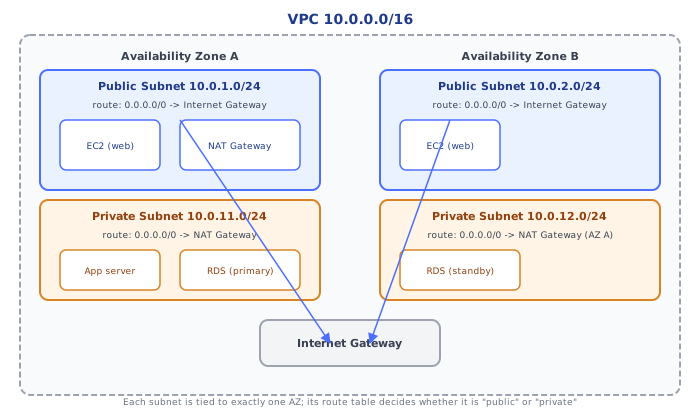
🧠 Key takeaways
- A VPC is a regional private network defined by a CIDR block; subnets are slices of it in one AZ.
- A subnet is public only because its route table sends 0.0.0.0/0 to an internet gateway.
- Private subnets reach out via a NAT gateway; every route table has the local route.
- Plan non-overlapping CIDRs up front (peering/TGW later); SGs are stateful per ENI, NACLs stateless per subnet.
🎤 Interview Q&A
Q1What is a VPC and how do you design one?core▾
A logically isolated virtual network in a region. Pick a non-overlapping CIDR (e.g. 10.0.0.0/16), create public and private subnets in each AZ, route public subnets to an internet gateway and private subnets through NAT gateways, and isolate data tiers.
- Why non-overlapping CIDRs? To allow peering, Transit Gateway and VPN connectivity later.
Q2What makes a subnet public or private?core▾
Its route table: a public subnet has a route 0.0.0.0/0 → internet gateway (and instances need public IPs); a private subnet routes internet-bound traffic to a NAT gateway or has no internet route at all.
- Can a private instance be reached from the internet? Not directly; only through a load balancer, bastion or SSM.
Q3How do VPCs connect to each other and to on-premises?senior▾
VPC peering (1:1, non-transitive), Transit Gateway (hub-and-spoke for many VPCs and VPNs), Site-to-Site VPN, Direct Connect (dedicated link), and PrivateLink for exposing a service privately.
- When Transit Gateway over peering? With many VPCs, to avoid a full mesh of peerings.
Q4What are VPC endpoints and why use them?core▾
Private connections to AWS services without the internet or NAT: gateway endpoints (S3, DynamoDB, free) and interface endpoints (PrivateLink ENIs for other services). They improve security and cut NAT data charges.
- Common cost win? S3 gateway endpoint for workloads pulling lots of data.
Q5How do you troubleshoot connectivity in a VPC?core▾
Check route tables, security groups (stateful), network ACLs (stateless, both directions), the target's listening port, DNS resolution, and use VPC Reachability Analyzer and VPC Flow Logs.
- What do flow logs show? Accepted/rejected traffic metadata per ENI.
🛠️ Practice exercises
Each exercise is a file in this topic folder. Code exercises are self-checking: run them and make the checks pass.
✅ Check yourself
Answer the questions — feedback is instant.