RDS
RDS runs managed relational databases: backups, patching, failover. The distinction that matters most: Multi-AZ is for availability, read replicas are for read scaling. Watch a failover happen as a DNS flip.
🎯 What you'll learn
- What RDS manages for you
- Multi-AZ (synchronous standby) vs read replicas (async, readable)
- Backups, PITR and snapshots
- Network placement, parameter groups and failover mechanics
📚 Before you start
1What RDS Is
RDS (Relational Database Service) runs a managed instance of a real relational engine (PostgreSQL, MySQL, MariaDB, SQL Server, Oracle) — AWS handles patching, backups, and (optionally) failover, but the database itself is still ordinary Postgres/MySQL underneath; every concept from databases/fundamentals, databases/modeling, and databases/scaling applies unchanged.
aws rds create-db-instance \
  --db-instance-identifier app-db-prod \
  --engine postgres \
  --db-instance-class db.t3.medium \
  --allocated-storage 100 \
  --master-username appadmin \
  --manage-master-user-password \
  --multi-az \
  --db-subnet-group-name app-db-subnet-group \
--vpc-security-group-ids sg-0db2Multi-AZ: High Availability, Not Read Scaling
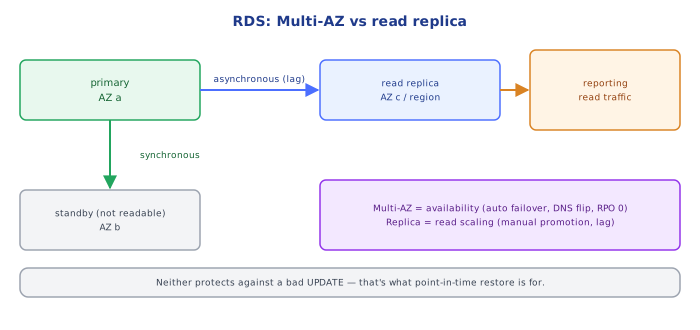
Multi-AZ provisions a synchronous standby replica in a different Availability Zone. Every write is confirmed on both the primary and the standby before RDS acknowledges it back to the application — this is the RDS-managed version of the primary/replica replication pattern from databases/scaling/02-replication, specifically tuned for durability over throughput. If the primary fails, RDS automatically fails over to the standby, typically within about a minute, by flipping a DNS CNAME (the application's connection endpoint never changes).
The standby is not queryable — you cannot send read traffic to it. Multi-AZ exists purely for availability/durability, not for scaling reads.
3Read Replicas: Read Scaling, Not Automatic Failover
A read replica is a separate, queryable copy kept in sync via asynchronous replication — the opposite tradeoff from Multi-AZ's synchronous standby. Applications can point read-heavy queries at one or more replicas to offload the primary, but:
- Replication is asynchronous, so a replica can lag behind the primary by some (usually small) amount — reads from it are eventually consistent, not strongly consistent.
- A read replica does not automatically take over on primary failure; promoting one to a standalone writable instance is a manual (or scripted) action, and it breaks replication with any sibling replicas.
- Read replicas can even live in a different Region, unlike a Multi-AZ standby which is Region-local by definition.
4Multi-AZ vs. Read Replica — the Distinction That Actually Matters
| Multi-AZ standby | Read replica | |
|---|---|---|
| Purpose | availability / durability | read scaling |
| Replication | synchronous | asynchronous |
| Queryable | no | yes |
| Automatic failover | yes | no (manual promotion) |
| Consistency | strong (confirmed before write returns) | eventual (may lag) |
A production database very often runs both: Multi-AZ for HA, plus one or more read replicas of the primary (or in newer RDS engines, of the Multi-AZ deployment itself) for read scaling — the two solve genuinely different problems and are not substitutes for each other.
5Automated Backups and Snapshots
RDS takes a daily automated backup within a configured backup window and continuously archives transaction logs, enabling point-in-time recovery to any second within the retention period (1-35 days). A manual snapshot is a backup you trigger yourself, retained until you explicitly delete it — independent of the automated retention window, useful before a risky schema migration.
6Network Placement
An RDS instance lives inside a DB subnet group — a set of private subnets spanning multiple AZs (from 02-vpc_subnets_route_tables), so Multi-AZ has somewhere to place the standby in a different AZ. By default, RDS instances are not publicly accessible: only resources inside the VPC (or connected via VPN/peering) can reach them, gated further by a security group (09-security_groups) that should allow the database port only from the application tier's security group, never from 0.0.0.0/0.
7Parameter Groups and Option Groups
A DB parameter group holds engine configuration (e.g. max_connections, work_mem) applied to an instance — changing a static parameter requires a reboot, a dynamic one applies immediately. An option group (MySQL/Oracle/SQL Server) enables optional engine features. Both exist so engine tuning is managed declaratively rather than by shelling into the instance — which RDS doesn't even give you OS-level access to.
Under the HoodFailover Is a DNS Flip, Not an IP Migration▾
RDS gives you one stable endpoint hostname (e.g. app-db-prod.xxxxx.us-east-1.rds.amazonaws.com) that never changes for the life of the instance. Under Multi-AZ, that hostname's DNS record is what gets repointed from the failed primary's IP to the standby's IP during failover — the application's connection string is unaffected across a failover event. This is precisely why application code doesn't need any RDS-specific failover logic beyond ordinary "reconnect on connection error" handling: from the app's point of view, a failover looks like a brief connection drop followed by DNS (already updated) resolving to the new primary.
⚠️ Common Pitfalls
- Confusing Multi-AZ with read scaling. The standby cannot be queried — provisioning Multi-AZ alone does nothing for read-heavy load; that's what read replicas are for.
- Assuming read replica data is always current. Asynchronous replication lag means a read immediately after a write can miss that write — a classic read-your-own-writes bug if routed carelessly.
- Leaving an RDS instance publicly accessible ("just for debugging") — the default and correct posture is private-subnet-only, reached through the application tier's security group.
- Forgetting that promoting a read replica breaks its replication link — it becomes an independent writable instance, not a drop-in Multi-AZ-style failover target.
- Sizing storage/IOPS for today's data, not next year's — storage can be scaled up online, but under-provisioned IOPS silently caps query throughput long before disk space runs out.
📋 Quick Reference
| Concept | Key fact |
|---|---|
| Multi-AZ | synchronous standby, HA/durability, auto-failover, NOT queryable |
| Read replica | asynchronous copy, read scaling, manual promotion, queryable |
| Backup window | daily automated backup + continuous transaction log archiving |
| Point-in-time recovery | restore to any second within the retention period |
| DB subnet group | private subnets across multiple AZs |
| Failover mechanism | DNS CNAME flip to the standby; app endpoint unchanged |
aws rds describe-db-instances --db-instance-identifier app-db-prod
aws rds create-db-instance-read-replica --db-instance-identifier app-db-replica-1 --source-db-instance-identifier app-db-prod
🧠 Key takeaways
- RDS manages provisioning, patching, backups and failover; you still own schema, queries and sizing.
- Multi-AZ = synchronous standby for availability (not readable, in classic Multi-AZ).
- Read replicas = async copies for read scaling (with lag), promotable manually.
- Failover is a DNS flip: keep clients' DNS TTL low and retry connections; place DBs in private subnets.
🎤 Interview Q&A
Q1What does RDS manage for you?core▾
Provisioning, patching, automated backups with point-in-time recovery, Multi-AZ failover, read replicas, monitoring and storage scaling for engines like PostgreSQL, MySQL, MariaDB, SQL Server and Oracle. You still own schema, queries, indexes and tuning.
- Aurora vs RDS? Aurora uses a distributed storage layer shared by replicas: faster failover, more replicas, higher cost.
Q2Multi-AZ vs read replicas?core▾
Multi-AZ: a synchronous standby for high availability and automatic failover (not for reads in the classic setup). Read replicas: asynchronous copies for scaling reads, possibly cross-region, with replication lag.
- Failover time? Typically 60–120 s for Multi-AZ; faster with Aurora.
Q3How do you handle connection limits with RDS?senior▾
Use connection pooling in the app, RDS Proxy (especially for Lambda), and size max_connections to the instance class. Many short-lived connections waste resources.
- Why does Lambda need RDS Proxy? Each concurrent invocation may open its own connection.
Q4How do backups and restores work?core▾
Automated daily snapshots plus transaction logs enable point-in-time restore within the retention window (up to 35 days); manual snapshots persist until deleted. Restores create a new instance.
- How do you test backups? Regularly restore into a test environment and verify.
Q5How do you secure RDS?core▾
Private subnets only, security groups allowing only app tiers, encryption at rest with KMS and in transit (TLS), IAM database authentication or Secrets Manager with rotation, and audit logs.
- Can you encrypt an existing unencrypted instance? Snapshot, copy with encryption, restore.
🛠️ Practice exercises
Each exercise is a file in this topic folder. Code exercises are self-checking: run them and make the checks pass.
✅ Check yourself
Answer the questions — feedback is instant.