Elastic Load Balancing and CloudFront
ALB, NLB and CloudFront put your application on the internet. Learn listeners, rules and target groups, put CloudFront in front for caching and TLS at the edge, and route static and dynamic paths differently.
🎯 What you'll learn
- The load balancer family: ALB, NLB, GWLB
- Listeners, rules, target groups and health checks
- CloudFront: origins, behaviors, caching, OAC
- Invalidation vs versioned assets
📚 Before you start
1The Load Balancer Family
| Type | Layer | Use for | Notes |
|---|---|---|---|
| ALB (Application) | L7 HTTP/HTTPS, gRPC, WebSocket | web apps and APIs | path/host/header routing, TLS termination, auth (OIDC/Cognito), WAF |
| NLB (Network) | L4 TCP/UDP/TLS | extreme throughput, static IPs, non-HTTP protocols | preserves client IP, very low latency, Elastic IP per AZ |
| GWLB (Gateway) | L3 | inserting firewall/inspection appliances | GENEVE encapsulation |
| CLB (Classic) | L4/L7 | legacy only | don't use for new work |
(networking-web/fundamentals/10-load_balancers_network_level covers L4 vs L7 in general.)
2ALB Building Blocks
internet → ALB (public subnets, 2+ AZs) ── listener :443 (ACM certificate)
                                              ├─ rule: host = api.shop.co, path /v1/*  → target group "api"
                                              ├─ rule: path /static/*                 → target group "static"
                                              └─ default                               → fixed 404
target group "api": EC2 instances / ECS tasks / IPs / Lambda + health check GET /healthz- Listeners (port + protocol) contain rules (conditions → actions: forward, redirect, fixed response, authenticate).
- Target groups hold targets and define the health check; unhealthy targets get no traffic.
- Weighted target groups in a forward action enable blue-green and canary (
devops-cloud/cicd/02-deployment_strategies). - The ALB itself lives in public subnets; targets should be in private subnets, reachable only from the ALB's security group.
- Clients' real IP arrives in
X-Forwarded-For; scheme inX-Forwarded-Proto.
aws elbv2 create-target-group --name api --protocol HTTP --port 3000 \
  --vpc-id vpc-0abc --target-type ip --health-check-path /healthz \
  --health-check-interval-seconds 10 --healthy-threshold-count 2 --unhealthy-threshold-count 3
aws elbv2 create-listener --load-balancer-arn $ALB --protocol HTTPS --port 443 \
  --certificates CertificateArn=$CERT --ssl-policy ELBSecurityPolicy-TLS13-1-2-2021-06 \
  --default-actions Type=forward,TargetGroupArn=$TG
Behaviour worth knowing: connection draining (deregistration delay, default 300 s) lets in-flight requests finish; cross-zone load balancing (on by default for ALB) spreads evenly across AZs; slow start ramps traffic to new targets; idle timeout 60 s (raise for long-polling/WebSockets).
3CloudFront: the CDN
CloudFront is AWS's CDN with 600+ edge locations (system-design/system-design/03-cdn). A distribution has:
- Origins: S3 bucket, ALB, API Gateway, any HTTP server.
- Behaviors (by path pattern): which origin, allowed methods, cache policy (TTLs, which headers/cookies/query strings form the cache key), origin request policy (what is forwarded but not keyed), viewer protocol policy (redirect HTTP→HTTPS), functions at the edge.
https://shop.co/*            → CloudFront
   /static/*  → S3 origin (OAC)        cache 1 year (hashed filenames)
   /api/*     → ALB origin             caching disabled, forward Authorization + query strings
   /*         → S3 (SPA index.html)    short TTL
Origin Access Control (OAC) lets CloudFront read a private S3 bucket (bucket policy allows only that distribution) — the bucket never needs to be public (04-s3/).
4Putting Them Together
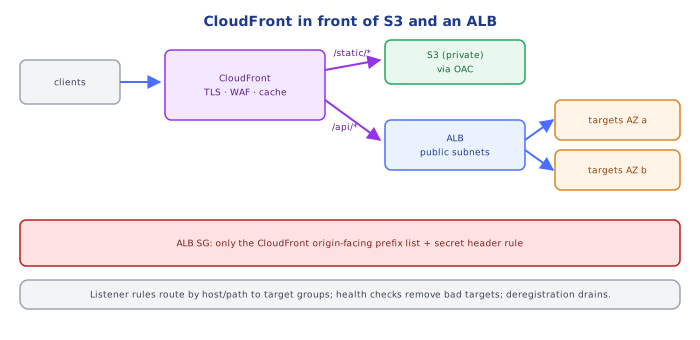
client → Route 53 → CloudFront (TLS, WAF, cache, DDoS protection via Shield)
                         ├─ /static → S3 (private, OAC)
                         └─ /api    → ALB (only accepts CloudFront: managed prefix list in its SG + secret header)
                                        → target groups in private subnets across 2-3 AZs
Locking the ALB to CloudFront (security group with the com.amazonaws.global.cloudfront.origin-facing prefix list, plus a secret custom header checked by an ALB rule) prevents attackers from bypassing the CDN and WAF.
5Invalidation and Versioning
aws cloudfront create-invalidation --distribution-id E123 --paths "/index.html" "/static/*" purges cached copies (first 1,000 paths/month free, then paid; takes seconds to minutes). Prefer versioned file names for assets so you rarely need invalidations.
Under the HoodHow an ALB Scales and Routes▾
An ALB isn't one box: it's a fleet of nodes AWS runs in each enabled AZ, behind a DNS name that resolves to the node IPs (which change as AWS scales the fleet — never cache them or hard-code them; that's why NLB exists for static IPs). Each node terminates TCP/TLS, evaluates listener rules in priority order, picks a healthy target with round robin or least outstanding requests, and opens/reuses a separate connection to the target. Health checks run from every node independently. Because scaling happens by adding nodes and updating DNS, sudden 10× traffic spikes can briefly exceed capacity — AWS can pre-warm for known events, and CloudFront in front absorbs most of such spikes.
CloudFront edges form a two-tier cache: edge locations → regional edge caches → origin; with Origin Shield, a single designated regional cache sits in front of the origin, collapsing duplicate misses from all regions into one origin request.
⚠️ Common Pitfalls
- Targets in public subnets with public IPs — bypass the LB.
- ALB reachable directly while CloudFront/WAF is the intended entry point.
- Health checks hitting a heavy endpoint (or one that checks every dependency) — a DB blip removes every target.
- Caching API responses with a cache key that ignores
Authorization— user data served to other users. - Public S3 buckets behind CloudFront instead of OAC.
- Idle timeout too low for WebSockets/long polling.
📋 Quick Reference
| Need | Use |
|---|---|
| HTTP routing by path/host, TLS, auth | ALB |
| TCP/UDP, static IPs, extreme scale | NLB |
| global caching, edge TLS, WAF | CloudFront |
| private S3 behind CDN | OAC + bucket policy |
| canary / blue-green | ALB weighted target groups |
| purge | versioned assets; invalidation for HTML |
🧠 Key takeaways
- ALB (L7: host/path/header rules, WebSockets, gRPC), NLB (L4: TCP/UDP, static IPs, extreme scale).
- ALB: listeners → rules → target groups with health checks; targets can be instances, IPs, Lambda.
- CloudFront caches at the edge, terminates TLS, adds WAF, and keeps buckets private with OAC.
- Prefer content-hashed asset names over invalidations; route static vs API paths with behaviors.
🎤 Interview Q&A
Q1ALB vs NLB vs GWLB?core▾
ALB (layer 7): HTTP/HTTPS routing by host/path/header, WebSockets, gRPC, auth integration, Lambda targets. NLB (layer 4): TCP/UDP/TLS, ultra-low latency, static IPs, millions of requests/s. GWLB: inserts third-party virtual appliances (firewalls).
- Which for a REST API? ALB.
Q2How do health checks and target groups work?core▾
Targets (instances, IPs, Lambdas) are registered in target groups; the LB polls a health check path and only routes to healthy targets. Deregistration delay lets in-flight requests finish during deploys.
- Typical deregistration delay? Default 300 s; often tuned to 30–60 s.
Q3What does CloudFront add in front of an ALB or S3?core▾
Global edge caching, TLS termination near users, DDoS protection (Shield), WAF integration, origin shielding, compression, and edge functions. With S3, Origin Access Control keeps the bucket private.
- How do you deploy SPA assets? Fingerprinted files cached long; index.html with short TTL or invalidation.
Q4How do you avoid dropping requests during deployments behind an ALB?senior▾
Rolling or blue/green deploys, readiness-based health checks, connection draining via deregistration delay, and graceful shutdown in the app (handle SIGTERM, finish requests).
- What's slow start mode? Gradually increasing traffic to newly registered targets.
Q5How does the ALB pass the client IP to your app?core▾
Via X-Forwarded-For, X-Forwarded-Proto and X-Forwarded-Port. NLB preserves source IPs for instance targets or uses Proxy Protocol v2.
- Why must the app trust only the LB's entry? Clients can forge earlier XFF entries.
🛠️ Practice exercises
Each exercise is a file in this topic folder. Code exercises are self-checking: run them and make the checks pass.
✅ Check yourself
Answer the questions — feedback is instant.