Deployment Strategies
How you release matters as much as what you release. Compare rolling, blue-green and canary deployments with automatic rollback, decouple deploy from release with feature flags, and change databases safely with expand/contract.
🎯 What you'll learn
- Rolling updates and their trade-offs
- Blue-green switches and instant rollback
- Canary releases with metric analysis
- Feature flags, expand/contract migrations, rollback vs roll forward
📚 Before you start
1Why Strategy Matters
Most production incidents are caused by changes. A deployment strategy decides how a new version replaces the old one — and therefore how many users a bad release can hurt, how fast you notice, and how fast you can undo it.
| Strategy | How | Downtime | Rollback speed | Extra capacity | Blast radius |
|---|---|---|---|---|---|
| recreate | stop all old, start all new | yes | slow (redeploy) | none | 100% |
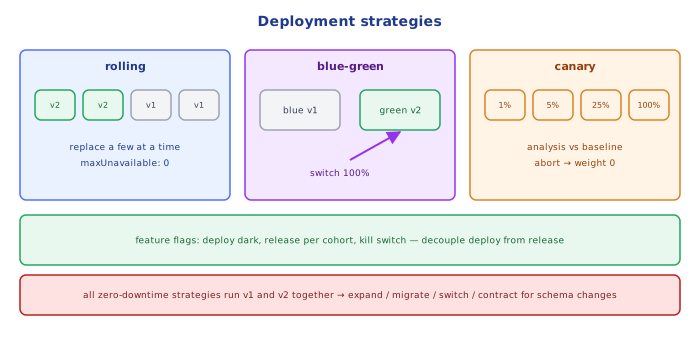
| rolling | replace instances a few at a time | no | medium (roll back again) | small (surge) | grows during rollout |
| blue-green | stand up full new env, switch traffic at once | no | instant (switch back) | 2× | 100% after switch |
| canary | send a small % of traffic to new version, increase gradually | no | fast (route back) | small | small (1–5% first) |
| feature flags / dark launch | deploy code switched off, enable per user/cohort | no | instant (flip flag) | none | as targeted |
| shadow / mirroring | copy live traffic to new version, discard its responses | no | n/a (not serving) | ~2× for that service | zero for users |
2Rolling Updates
# Kubernetes Deployment
strategy:
  type: RollingUpdate
  rollingUpdate:
    maxSurge: 25%        # up to 25% extra pods during the rollout
    maxUnavailable: 0    # never drop below desired capacity
Kubernetes starts new pods, waits for readiness, then terminates old ones. Requirements: readiness probes that reflect real readiness, graceful shutdown, and both versions running at once must be compatible (API and database).
3Blue-Green
Two identical environments; blue serves traffic, green gets the new version and is tested in place; then the router/LB switches 100% to green. Rollback = switch back (blue is still warm). Costs double capacity during the switch, and stateful parts are shared — the database can't be "switched back", so schema changes must be compatible with both colors.
4Canary Releases
v2 gets 1% → watch error rate, latency, business metrics for N minutes
         → 5% → 25% → 50% → 100%
any step: metrics worse than v1 baseline → automatic rollback to 0%- Traffic shifting via a service mesh, ingress controller, or LB weighted target groups (Argo Rollouts, Flagger, AWS CodeDeploy).
- Automated analysis compares canary vs baseline (not vs a fixed threshold only): error ratio, p99 latency, saturation, and a business KPI (checkout conversion).
- Canary by cohort (internal users, one region, one percentage of users with sticky assignment) so a user doesn't flip between versions on every request.
5Feature Flags: Decouple Deploy from Release
Deploying code and releasing a feature become separate steps:
if (flags.isEnabled("new-checkout", { userId, country })) return newCheckout(cart);
return legacyCheckout(cart);
Ship dark, enable for employees → 1% → 10% → everyone; kill switch if needed. Costs: flag debt (remove flags after rollout), combinatorial testing, and the flag service becomes critical infrastructure.
6Database Changes: Expand / Contract
Every zero-downtime strategy runs old and new code at the same time, so schema changes must be backward compatible:
1. expand:   add the new column/table (nullable / with default) — old code ignores it
2. migrate:  deploy code that writes BOTH old and new; backfill existing rows in batches
3. switch:   deploy code that reads the new column
4. contract: once no code uses the old column, drop it (in a later release)
Never rename or drop a column in the same release that stops using it.
1. expand:   ADD COLUMN full_name; app v2 writes BOTH name and full_name
2. backfill: UPDATE … SET full_name = name WHERE full_name IS NULL (batches)
3. switch:   app v3 reads full_name only (v2 still works → safe rollback)
4. contract: DROP COLUMN name, only after v2 is gone for good
Every step is backward compatible with the previous app version.
7Rollback vs Roll Forward
- Rollback: return to the previous artifact (fast if the artifact is immutable and the schema is compatible).
- Roll forward: ship a fix. Necessary when a migration can't be reversed.
- Decide before deploying how you'd undo it — that's what the expand/contract discipline buys.
Under the HoodHow Weighted Canary Routing Works▾
At L7 (Envoy/NGINX/ALB), a route has multiple weighted clusters: for each new request, the proxy draws a random number (or hashes a sticky key like a user ID or cookie) and picks v1 with probability 0.95 and v2 with 0.05. A rollout controller (Argo Rollouts, Flagger) is a loop: update weights → wait for the analysis interval → query the metrics backend (sum(rate(http_requests_total{version="v2",code=~"5.."}[5m])) / sum(rate(http_requests_total{version="v2"}[5m]))) → compare with thresholds or the baseline → promote or abort. With pod-count-based canaries (no mesh), traffic share is only approximately canaryPods / totalPods and can't go below one pod's share — the reason fine-grained canaries need L7 traffic splitting.
⚠️ Common Pitfalls
- Incompatible schema changes deployed with a zero-downtime strategy.
- Readiness probes that lie — rolling updates send traffic to pods that aren't ready.
- Canary without automated analysis — nobody watches the dashboard at 2 a.m.
- Non-sticky canary — users bounce between versions (broken sessions, inconsistent UI).
- Blue-green with a shared, mutated database treated as if it could be switched back.
- Feature flags never removed.
📋 Quick Reference
| Need | Use |
|---|---|
| simplest, downtime OK | recreate |
| default for stateless services | rolling (maxUnavailable 0) |
| instant cutover and rollback | blue-green |
| limit blast radius with real traffic | canary + automated analysis |
| release independent of deploy | feature flags |
| test with production traffic safely | shadow traffic |
| schema changes | expand → migrate → switch → contract |
🧠 Key takeaways
- Rolling updates are simple but mix versions and roll back slowly; blue-green gives instant switch/rollback at double capacity.
- Canaries expose a small slice first and promote or roll back automatically on SLO metrics.
- Feature flags decouple deploy from release; clean them up.
- Databases change with expand/contract so every step is backward compatible; prefer rollback for bad deploys, roll forward for data changes.
🎤 Interview Q&A
Q1Compare rolling, blue/green and canary deployments.core▾
Rolling: replace instances gradually; cheap, but old and new versions run together and rollback is slow. Blue/green: deploy a full new environment and switch traffic at once; instant rollback, double capacity. Canary: send a small percentage of traffic to the new version, watch metrics, then increase; limits blast radius.
- Which catches problems with real traffic earliest? Canary.
Q2How do you automate canary analysis?core▾
Compare canary and baseline metrics (error rate, latency, business KPIs) during each step; automatically promote or roll back (Argo Rollouts, Flagger, AWS CodeDeploy, Spinnaker/Kayenta).
- Why compare with a baseline, not history? It controls for time-of-day and traffic changes.
Q3How do database changes fit into these strategies?senior▾
Both versions run concurrently, so schema changes must be backward compatible (expand-and-contract): add columns first, deploy code, backfill, then remove old columns in a later release.
- Why can't you rollback a destructive migration easily? Data may already be lost or transformed.
Q4What are feature flags' role in deployments?core▾
They decouple deployment from release: code ships dark, then features are enabled gradually per user or percentage, and turned off instantly without redeploying.
- Risk? Combinatorial complexity and stale flags.
Q5What's a shadow (dark) deployment?core▾
The new version receives a copy of production traffic but its responses are discarded, validating performance and correctness without user impact.
- Caution? Side effects (writes, emails) must be disabled in the shadow.
🛠️ Practice exercises
Each exercise is a file in this topic folder. Code exercises are self-checking: run them and make the checks pass.
✅ Check yourself
Answer the questions — feedback is instant.