Pods and Deployments
Pods run containers; Deployments roll them out safely; Services give them a stable name. Watch a zero-downtime rolling update (and a broken one that stalls safely), then follow a request from DNS through kube-proxy to a ready pod.
🎯 What you'll learn
- Pods: containers, resources, probes and lifecycle
- Deployments, ReplicaSets and rolling updates
- Jobs, CronJobs and DaemonSets
- Services, endpoints, readiness and debugging
📚 Before you start
1Pods
A Pod is the smallest deployable unit: one or more containers that share a network namespace (one IP, localhost between them), volumes and lifecycle, always scheduled together on one node. Most Pods run one app container, sometimes with sidecars (log shippers, proxies) or init containers (run to completion before the app starts — migrations, waiting for dependencies).
apiVersion: v1
kind: Pod
metadata: { name: api, labels: { app: api } }
spec:
  initContainers:
    - name: wait-for-db
      image: busybox:1.36
      command: ["sh", "-c", "until nc -z postgres 5432; do sleep 2; done"]
  containers:
    - name: api
      image: ghcr.io/petpal/api:1.4.2
      ports: [{ containerPort: 8080, name: http }]
      resources:
        requests: { cpu: 250m, memory: 256Mi }   # used for scheduling
        limits:   { memory: 512Mi }              # OOMKilled above this
      readinessProbe:
        httpGet: { path: /ready, port: http }
        periodSeconds: 5
      livenessProbe:
        httpGet: { path: /health, port: http }
        initialDelaySeconds: 10
        periodSeconds: 10
        failureThreshold: 3
      securityContext:
        runAsNonRoot: true
        allowPrivilegeEscalation: false
        readOnlyRootFilesystem: true
        capabilities: { drop: ["ALL"] }
Resources
- requests: what the scheduler reserves; the basis for CPU shares and autoscaling percentages.
- limits: CPU limits throttle; memory limits kill (OOMKilled, exit code 137).
- QoS classes:
Guaranteed(requests = limits for all),Burstable,BestEffort(none) — BestEffort is evicted first under node pressure. - Common practice: always set requests; set a memory limit; be careful with CPU limits (throttling hurts latency).
Probes
| Probe | Failing means | Effect |
|---|---|---|
| startup | still starting | other probes wait (slow starters) |
| readiness | can't serve traffic now | removed from Service endpoints (not restarted) |
| liveness | stuck/deadlocked | container restarted |
Liveness must check only the process itself — never dependencies like the database, or a DB blip restarts every Pod.
Pod lifecycle
Phases: Pending → Running → Succeeded/Failed. Container states: Waiting (ContainerCreating, ImagePullBackOff, CrashLoopBackOff), Running, Terminated. Restart policy Always (Deployments), OnFailure/Never (Jobs). On termination Kubernetes sends SIGTERM, waits terminationGracePeriodSeconds (30 s default) and then SIGKILLs — apps must handle SIGTERM by finishing in-flight requests (devops-cloud/docker/ on PID 1 signal handling).
Liveness probe checks the database
livenessProbe:
  httpGet: { path: /health/deep, port: 8080 }  # pings Postgres
# DB blips for 30 s → every pod fails liveness
# → kubelet restarts ALL pods → outage
Liveness = process only; readiness = can serve
livenessProbe:
  httpGet: { path: /livez, port: 8080 }   # event loop alive?
readinessProbe:
httpGet: { path: /readyz, port: 8080 } # deps OK? else leave endpoints2Deployments
A Deployment manages ReplicaSets, which keep N identical Pods running. Changing the Pod template (new image, env, resources) creates a new ReplicaSet and performs a rolling update:
apiVersion: apps/v1
kind: Deployment
metadata: { name: api }
spec:
  replicas: 4
  revisionHistoryLimit: 5
  selector: { matchLabels: { app: api } }
  strategy:
    type: RollingUpdate
    rollingUpdate:
      maxSurge: 1          # at most 5 Pods during rollout
      maxUnavailable: 0    # never fewer than 4 ready
  minReadySeconds: 10
  progressDeadlineSeconds: 300
  template:
    metadata: { labels: { app: api } }
    spec:
      containers:
        - name: api
image: ghcr.io/petpal/api:1.4.3kubectl set image deploy/api api=ghcr.io/petpal/api:1.4.3 # (prefer editing the file + apply)
kubectl rollout status deploy/api
kubectl rollout history deploy/api
kubectl rollout undo deploy/api --to-revision=3
kubectl scale deploy/api --replicas=6
kubectl rollout restart deploy/api # recreate Pods (e.g. to pick up a changed Secret)Recreate strategy kills all old Pods first (downtime; for apps that can't run two versions). Canary and blue/green need extra tooling (Argo Rollouts, Flagger, or two Deployments + traffic splitting — devops-cloud/cicd/).
3Jobs, CronJobs, DaemonSets
- Job: run Pods to completion (
completions,parallelism,backoffLimit,activeDeadlineSeconds,ttlSecondsAfterFinished). - CronJob: Jobs on a schedule (
schedule: "0 3 * * *",concurrencyPolicy: Forbid,timeZone). - DaemonSet: one Pod per (matching) node — node exporters, log agents, CNI.
Under the HoodHow a Rolling Update Proceeds▾
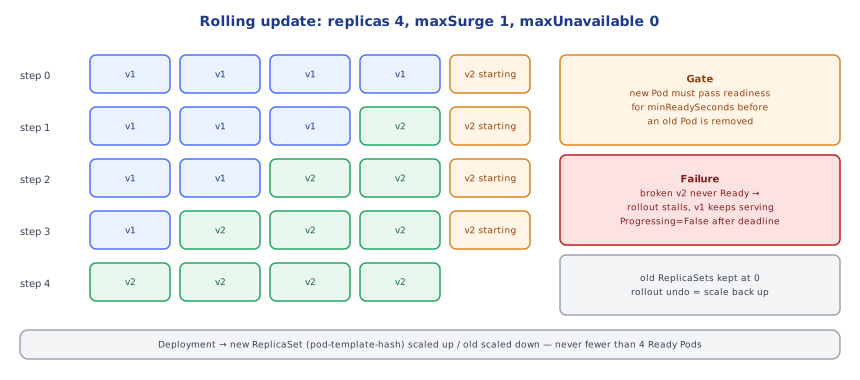
The Deployment controller computes a hash of the Pod template (pod-template-hash label) and creates a new ReplicaSet for it. It then scales the new ReplicaSet up and the old one down in steps bounded by maxSurge (extra Pods allowed above replicas) and maxUnavailable (Pods allowed to be not-ready). With 4 replicas, surge 1, unavailable 0: create 1 new Pod (5 total) → wait until it's Ready for minReadySeconds → scale old to 3 → create another new Pod → … Readiness probes gate every step, so a broken version stalls the rollout with old Pods still serving; if no progress happens within progressDeadlineSeconds, the Deployment condition becomes Progressing=False (CI should fail and roll back). Old ReplicaSets are kept at 0 replicas (up to revisionHistoryLimit) — rollout undo simply scales an old one back up.
⚠️ Common Pitfalls
- No readiness probe — traffic hits Pods before they're ready; rollouts can't detect broken versions.
- Liveness probe checking dependencies — cascading restarts.
- No requests — bad scheduling, noisy neighbours, broken autoscaling.
:latesttags — no rollbacks, unpredictable nodes.- Ignoring SIGTERM — dropped requests during every deploy.
- Running as root with a writable filesystem.
📋 Quick Reference
Pod: containers + init + sidecars share IP/volumes · requests (schedule) vs limits (CPU throttle, mem OOMKill)
probes: startup · readiness (endpoints) · liveness (restart; no deps)
Deployment → ReplicaSet → Pods · RollingUpdate maxSurge/maxUnavailable · rollout status/history/undo
Job · CronJob · DaemonSet · SIGTERM → grace period → SIGKILL1Why Services
Pods are ephemeral: they get new IPs every time they're recreated. A Service gives a stable virtual IP and DNS name in front of a changing set of Pods selected by labels, and load-balances connections across the ready ones.
apiVersion: v1
kind: Service
metadata: { name: api, namespace: petpal }
spec:
  selector: { app: api }        # matches Pod labels
  ports:
    - name: http
      port: 80                  # Service port
      targetPort: http          # container port (name or number)
  type: ClusterIP
Other Pods reach it as http://api (same namespace), http://api.petpal or api.petpal.svc.cluster.local thanks to CoreDNS.
2Service Types
| Type | Reachable from | Use |
|---|---|---|
| ClusterIP (default) | inside the cluster | internal service-to-service traffic |
| NodePort | every node's IP on a port (30000–32767) | rarely directly; building block for LBs |
| LoadBalancer | external cloud load balancer (NLB/ALB, etc.) | expose a TCP/UDP service publicly or internally |
| ExternalName | DNS CNAME to an external name | alias for an external database host |
Headless (clusterIP: None) | DNS returns Pod IPs directly | StatefulSets, client-side load balancing (05-storage_and_statefulsets/) |
HTTP routing by host/path for many services through one load balancer is done with Ingress or the Gateway API (04-ingress_and_networking/).
3Endpoints and Readiness
The EndpointSlice controller keeps a list of IPs of Pods that match the selector and are Ready. A Pod failing its readiness probe is removed from endpoints (no traffic) without being restarted. During termination, a Pod is removed from endpoints at the same time SIGTERM is sent — and because removal propagates asynchronously to every node, apps should keep serving for a few seconds after SIGTERM (a preStop sleep is the common trick):
lifecycle:
  preStop:
exec: { command: ["sh", "-c", "sleep 5"] }4Session Affinity, Traffic Policies, Topology
sessionAffinity: ClientIPpins clients to a Pod (prefer stateless apps instead).externalTrafficPolicy: Localpreserves client source IP and avoids extra hops (only nodes with Pods receive traffic).internalTrafficPolicy: Localand topology-aware routing keep traffic within a node/zone to cut latency and cross-AZ costs.- Long-lived connections (gRPC/HTTP2) are balanced per connection, not per request — use client-side balancing over a headless Service or a service mesh.
5Debugging Services
kubectl get svc,endpointslices -n petpal -l app=api      # are there endpoints?
kubectl get pods -n petpal -l app=api --show-labels       # do labels match the selector?
kubectl run tmp --rm -it --image=busybox:1.36 -- wget -qO- http://api.petpal/health
kubectl port-forward svc/api 8080:80 -n petpal            # reach it from your laptop
90% of "Service doesn't work": selector doesn't match Pod labels, targetPort wrong, or Pods not Ready.
Under the HoodFrom Service IP to Pod▾
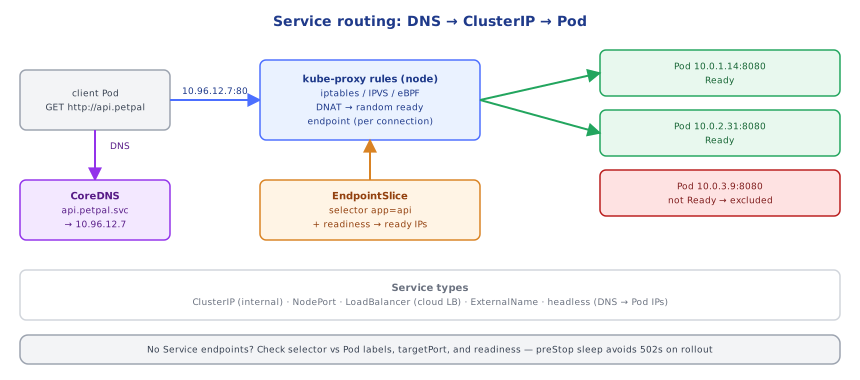
A ClusterIP is virtual — no interface owns it. kube-proxy on every node watches Services and EndpointSlices and programs the kernel: in iptables mode, a KUBE-SERVICES chain matches the Service IP:port and jumps to a per-service chain that picks one endpoint chain at random (probabilistic rules), which DNATs the packet to a Pod IP:port. IPVS mode uses kernel load-balancing tables (better at thousands of Services), and eBPF data planes (Cilium) do the lookup in BPF maps attached to sockets/interfaces, skipping iptables entirely. The CNI then routes the packet to the Pod's IP, possibly on another node (via VPC routing, overlay encapsulation like VXLAN, or BGP). Because the decision happens per connection at the client's node, there's no central load balancer hop for in-cluster traffic. CoreDNS answers api.petpal.svc.cluster.local with the ClusterIP (or Pod IPs for headless Services).
⚠️ Common Pitfalls
- Selector/label mismatch — Service with no endpoints.
LoadBalancerper service — dozens of cloud LBs and bills; use Ingress/Gateway.- No preStop delay — 502s during rollouts.
- gRPC behind a ClusterIP — all requests stick to one Pod.
- Hard-coding Pod IPs.
📋 Quick Reference
Service = stable VIP + DNS (svc.ns.svc.cluster.local) → ready Pods by selector
types: ClusterIP · NodePort · LoadBalancer · ExternalName · headless (clusterIP: None)
EndpointSlices = ready Pod IPs · kube-proxy iptables/IPVS/eBPF DNAT · preStop sleep for graceful drain
debug: endpoints? labels? targetPort? readiness? · port-forward · busybox wget
🧠 Key takeaways
- Pods share network and volumes; always set requests, a memory limit, and readiness/liveness probes (liveness never checks dependencies).
- Deployments roll out new ReplicaSets gated by readiness (
maxSurge/maxUnavailable);rollout undorolls back. - Services give a stable VIP/DNS name over ready pods; kube-proxy DNATs per connection.
- Handle SIGTERM gracefully (with a preStop sleep) so rollouts drop no requests.
🎤 Interview Q&A
Q1What is a pod?core▾
The smallest deployable unit: one or more containers sharing a network namespace (same IP, localhost) and volumes, scheduled together. Usually one main container plus optional sidecars/init containers.
- Why not deploy bare pods? They're not recreated if they die; use controllers like Deployments.
Q2Deployment vs StatefulSet vs DaemonSet vs Job?core▾
Deployment: stateless replicas with rolling updates. StatefulSet: stable identities and per-pod storage (databases). DaemonSet: one pod per node (log agents). Job/CronJob: run-to-completion tasks, optionally scheduled.
- What manages a Deployment's pods? ReplicaSets, one per revision.
Q3Explain Service types.core▾
ClusterIP (internal virtual IP, default), NodePort (port on every node), LoadBalancer (cloud load balancer), ExternalName (DNS alias), and headless services (clusterIP: None) returning pod IPs.
- How does a Service find pods? Label selectors, with endpoints updated from ready pods.
Q4Liveness vs readiness vs startup probes?senior▾
Readiness: whether to send traffic (removed from endpoints when failing). Liveness: whether to restart the container. Startup: gives slow-starting apps time before liveness checks begin. Don't make liveness depend on external dependencies.
- Why not? A DB outage would restart all pods in a loop, making things worse.
Q5How do rolling updates and rollbacks work?core▾
The Deployment creates a new ReplicaSet and scales it up while scaling the old one down within maxSurge/maxUnavailable, gated by readiness. kubectl rollout undo switches back to a previous ReplicaSet.
- Why might a rollout hang? New pods never become ready; progressDeadlineSeconds marks it failed.
🛠️ Practice exercises
Each exercise is a file in this topic folder. Code exercises are self-checking: run them and make the checks pass.
✅ Check yourself
Answer the questions — feedback is instant.