ConfigMaps and Secrets
Keep configuration out of images: ConfigMaps for settings, Secrets for credentials, consumed as environment variables or mounted files. See which of them update live, why base64 isn't encryption, and how to keep secrets out of Git entirely.
🎯 What you'll learn
- ConfigMaps and Secrets, and when to use each
- Env vars vs mounted files and how updates propagate
- Protecting secrets: etcd encryption, RBAC, External Secrets
- Workload identity instead of static cloud keys
📚 Before you start
1Separating Configuration From Images
Twelve-factor apps read configuration from the environment, so the same image runs in dev, staging and prod. Kubernetes provides ConfigMaps (non-sensitive config) and Secrets (sensitive values), consumed as environment variables or mounted files.
apiVersion: v1
kind: ConfigMap
metadata: { name: api-config }
data:
  LOG_LEVEL: info
  FEATURE_FLAGS: "new-checkout,pet-photos"
  app.yaml: |
    server:
      port: 8080
    cache:
      ttlSeconds: 60
---
apiVersion: v1
kind: Secret
metadata: { name: api-secrets }
type: Opaque
stringData:                          # written as plain text, stored base64-encoded
DATABASE_URL: postgres://api:s3cr3t@postgres:5432/petpal2Consuming Them
containers:
  - name: api
    image: ghcr.io/petpal/api:1.4.2
    envFrom:
      - configMapRef: { name: api-config }       # every key → env var
    env:
      - name: DATABASE_URL
        valueFrom:
          secretKeyRef: { name: api-secrets, key: DATABASE_URL }
      - name: POD_NAME
        valueFrom:
          fieldRef: { fieldPath: metadata.name } # downward API
    volumeMounts:
      - { name: config, mountPath: /etc/api, readOnly: true }
volumes:
  - name: config
    configMap:
      name: api-config
items: [{ key: app.yaml, path: app.yaml }] # → /etc/api/app.yaml| Env vars | Mounted files | |
|---|---|---|
| update while running | no — needs Pod restart | yes — kubelet refreshes files (~1 min), app must reload |
| visibility | shows in /proc/*/environ, crash dumps, child processes | file permissions, tmpfs for Secrets |
| best for | simple flags | config files, certificates, secrets |
subPath mounts never update. Immutable ConfigMaps/Secrets (immutable: true) protect against accidental edits and reduce API load; roll changes by creating a new name (e.g. api-config-v7 — Kustomize/Helm add a content hash suffix automatically so Deployments roll when config changes).
3Secrets Are Not Encrypted By Default
A Secret is just base64 — encoding, not encryption. Protect them by:
- Encryption at rest in etcd (
EncryptionConfigurationwith a KMS provider; managed clusters: enable envelope encryption with cloud KMS —devops-cloud/aws/18-secrets_manager_ssm_and_kms). - RBAC: very few subjects may
get/listSecrets (listing Secrets reveals values); remember anyone who can create Pods in a namespace can mount its Secrets. - Never commit Secret manifests to Git in plain text.
Ways to keep secrets out of Git:
| Tool | How |
|---|---|
| External Secrets Operator | ExternalSecret CRD syncs values from AWS Secrets Manager/SSM, Vault, GCP SM into native Secrets |
| Secrets Store CSI Driver | mounts secrets from an external store directly as files (optionally synced to Secrets) |
| Sealed Secrets | encrypt with the cluster's public key; only the in-cluster controller can decrypt — safe to commit |
| SOPS | encrypt values in YAML with KMS/age; decrypt in CI or via Flux/Argo plugins |
apiVersion: external-secrets.io/v1
kind: ExternalSecret
metadata: { name: api-db }
spec:
  refreshInterval: 1h
  secretStoreRef: { name: aws-secrets-manager, kind: ClusterSecretStore }
  target: { name: api-secrets }
  data:
    - secretKey: DATABASE_URL
remoteRef: { key: prod/petpal/api, property: database_url }4Workload Identity Instead of Static Credentials
For cloud APIs, don't put access keys in Secrets at all: bind the Pod's ServiceAccount to a cloud role — EKS Pod Identity / IRSA, GKE Workload Identity, Azure Workload Identity. The Pod receives short-lived, automatically rotated credentials.
Under the HoodHow Secret Values Reach a Container▾
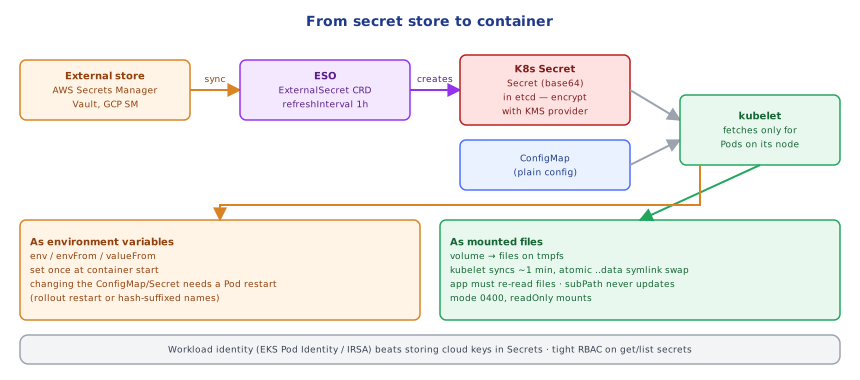
When a Pod referencing a Secret is scheduled, the kubelet on that node fetches the Secret from the API server (node authorization only allows Secrets referenced by Pods bound to that node). For env vars, the values are injected into the container's process environment at start — fixed for the container's lifetime. For volumes, the kubelet writes each key as a file on a tmpfs (memory, never disk) under /var/lib/kubelet/pods/<uid>/volumes/..., and mounts it into the container. It keeps a watch/cache and periodically syncs; updates are applied by writing a new timestamped directory and atomically swapping the ..data symlink, so the app never sees half-written files. In etcd, without an encryption provider the value is only base64 in the stored object; with KMS envelope encryption the API server encrypts each Secret with a data key that is itself encrypted by the cloud KMS key.
⚠️ Common Pitfalls
- Believing base64 is encryption and committing Secret YAML.
- Expecting env vars to update when the ConfigMap changes.
- Broad
get secretsRBAC or giving app teamscreate podsin sensitive namespaces. subPathmounts that silently never update.- Logging config at startup including secrets.
- Cloud access keys in Secrets instead of workload identity.
📋 Quick Reference
ConfigMap (plain) · Secret (base64, type Opaque/tls/dockerconfigjson) · immutable: true · hash-suffixed names
consume: envFrom / valueFrom (restart to update) · volume files (auto-refresh, not subPath)
protect: etcd encryption (KMS) · tight RBAC · ESO / CSI driver / Sealed Secrets / SOPS · workload identity
🧠 Key takeaways
- ConfigMaps hold settings, Secrets hold credentials; both decouple config from images.
- Env vars are fixed at start (restart to update); mounted files refresh (not with subPath).
- Secrets are base64, not encrypted: enable KMS encryption at rest, tighten RBAC, and use External Secrets / Sealed Secrets / SOPS.
- For cloud APIs, use workload identity (Pod Identity/IRSA) instead of keys in Secrets.
🎤 Interview Q&A
Q1ConfigMaps vs Secrets?core▾
Both inject configuration as environment variables or mounted files. Secrets are meant for sensitive data: base64-encoded (not encrypted by default), can be encrypted at rest in etcd, and access is controlled by RBAC.
- Is base64 encryption? No.
Q2How should secrets be managed in Kubernetes production?core▾
Encrypt etcd at rest (KMS provider), restrict RBAC, and source secrets from an external manager with the External Secrets Operator or the Secrets Store CSI driver; for GitOps, use Sealed Secrets or SOPS.
- Why not commit Secret YAML to Git? Base64 is trivially decoded.
Q3Env vars vs mounted files for config?senior▾
Env vars are simple but fixed at container start and can leak via process listings/crash dumps. Mounted files update automatically when the ConfigMap/Secret changes (with delay) and suit larger configs and certificates.
- Does the app reload automatically? Only if it watches the file; otherwise restart pods.
Q4How do you roll out a config change?core▾
Change the ConfigMap and trigger a rolling restart (kubectl rollout restart), or embed a hash of the config in pod annotations (Helm checksum pattern) so config changes automatically roll pods.
- Immutable ConfigMaps? Prevent accidental changes and reduce API server load.
Q5What size limits apply?core▾
ConfigMaps and Secrets are limited to 1 MiB each because they're stored in etcd.
- Large config alternatives? Object storage or volumes.
🛠️ Practice exercises
Each exercise is a file in this topic folder. Code exercises are self-checking: run them and make the checks pass.
✅ Check yourself
Answer the questions — feedback is instant.