CI/CD Fundamentals
Continuous integration keeps main always working; continuous delivery keeps it always deployable. Follow one push through a GitHub Actions pipeline (lint, test, build, scan, publish, deploy) and learn what keeps pipelines fast and secure.
🎯 What you'll learn
- CI vs continuous delivery vs continuous deployment
- The stages of a typical pipeline
- GitHub Actions: workflows, jobs, caching, environments
- Speed, trustworthiness and pipeline security (OIDC, pinned actions)
📚 Before you start
1Definitions
- Continuous Integration (CI): every change is merged to the main branch frequently (at least daily) and automatically built and tested. The goal: integration problems surface in minutes, not at the end of a sprint.
- Continuous Delivery (CD): every change that passes the pipeline is releasable — deploying to production is a business decision (a button), not an engineering project.
- Continuous Deployment: every change that passes the pipeline is deployed to production automatically, with no human gate.
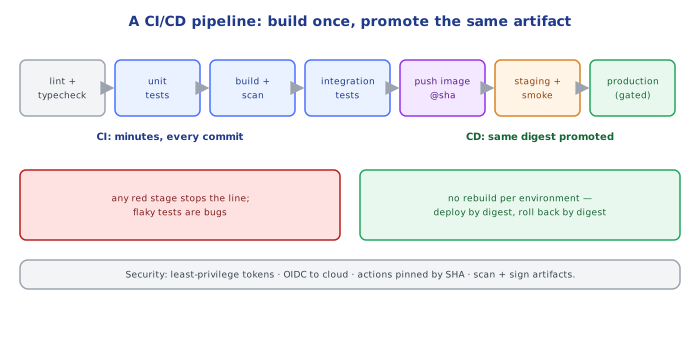
commit → build → test → package (image) → deploy to staging → checks → deploy to production
└──────────── CI ──────────────┘└──────────────── CD (delivery / deployment) ────────────────┘2A Typical Pipeline
| Stage | What happens | Fails the build when |
|---|---|---|
| checkout + setup | fetch code, restore dependency cache | — |
| lint / format / type-check | static checks (ESLint, Prettier, tsc --noEmit) | any error |
| unit tests | fast, isolated tests | a test fails, coverage drops below the threshold |
| build | compile, bundle, build the container image | build error |
| security | dependency audit, secret scan, SAST, image scan | high/critical findings with fixes available |
| integration tests | app + real DB/broker in containers (service containers, Testcontainers) | a test fails |
| publish artifact | push the image tagged with the commit SHA (immutable) | — |
| deploy staging | deploy the same artifact | rollout fails |
| smoke / e2e tests | a few critical journeys against staging | a test fails |
| deploy production | promote the same artifact (manual approval or automatic) with a safe strategy (02-deployment_strategies/) | health checks / SLO burn → automatic rollback |
Principles: build once, promote the same artifact through environments (never rebuild for prod); fast feedback first (lint and unit tests before slow stages); everything as code (pipeline YAML in the repo).
3GitHub Actions in Practice
name: ci
on:
  pull_request:
  push:
    branches: [main]

concurrency: { group: ci-${{ github.ref }}, cancel-in-progress: true }   # stop superseded runs
permissions: { contents: read }                                         # least privilege by default

jobs:
  test:
    runs-on: ubuntu-24.04
    strategy:
      matrix: { node: [20, 22] }
    services:
      postgres:
        image: postgres:16
        env: { POSTGRES_PASSWORD: test }
        ports: ["5432:5432"]
        options: >-
          --health-cmd "pg_isready -U postgres" --health-interval 5s --health-retries 10
    steps:
      - uses: actions/checkout@v4
      - uses: actions/setup-node@v4
        with: { node-version: "${{ matrix.node }}", cache: npm }
      - run: npm ci
      - run: npm run lint && npm run typecheck
      - run: npm test -- --coverage
        env: { DATABASE_URL: postgres://postgres:test@localhost:5432/postgres }

  image:
    needs: test
    if: github.ref == 'refs/heads/main'
    runs-on: ubuntu-24.04
    permissions: { contents: read, packages: write, id-token: write }
    steps:
      - uses: actions/checkout@v4
      - uses: docker/setup-buildx-action@v3
      - uses: docker/login-action@v3
        with: { registry: ghcr.io, username: "${{ github.actor }}", password: "${{ secrets.GITHUB_TOKEN }}" }
      - uses: docker/build-push-action@v6
        with:
          push: true
          tags: ghcr.io/acme/api:${{ github.sha }}
          cache-from: type=gha
          cache-to: type=gha,mode=max
Key concepts: workflows (YAML files) triggered by events; jobs run on runners in parallel unless linked with needs; steps run commands or reusable actions; matrix fans out over versions; services start sidecar containers; secrets and environments (with required reviewers) gate deployments.
4Keeping Pipelines Fast and Trustworthy
- Cache dependency downloads and Docker layers; run independent jobs in parallel; split slow test suites (sharding).
- Target: < 10 minutes to a green PR. Slow pipelines get bypassed.
- Flaky tests destroy trust — quarantine and fix them; never "just re-run until green".
- Trunk-based development with short-lived branches and feature flags keeps integration continuous.
- Branch protection: required checks and reviews before merging to
main.
5Pipeline Security
The CI system holds the keys to production — treat it as production:
- least-privilege tokens (
permissions:per job), OIDC federation to clouds instead of long-lived cloud keys in secrets - pin third-party actions to a commit SHA, not a moving tag
- don't expose secrets to workflows triggered by forks (
pull_request_targetpitfalls) - secret scanning on every push; never
echosecrets - sign artifacts and record provenance (SLSA, cosign attestations)
Under the HoodWhat Happens When You Push▾
- The Git host emits a webhook event (
push,pull_request) to the CI service. - The CI service evaluates the workflow files at that commit, expands the job graph (matrix × jobs), and queues jobs.
- A runner (an ephemeral VM or container for hosted runners) picks up a job, gets a short-lived job token, checks out the exact commit SHA, and executes steps as processes — each
uses:action is itself code (JavaScript, a container, or composite YAML) downloaded at its pinned version. - Steps share the workspace filesystem within a job; jobs don't share files unless they upload/download artifacts or use caches.
- Results are reported back as commit statuses/checks, which branch protection uses to allow or block merges.
Because hosted runners are fresh each time, every byte not cached must be re-downloaded — which is why caching and image layer reuse dominate pipeline speed.
⚠️ Common Pitfalls
- Rebuilding for each environment — what you tested isn't what you ship.
- Mutable tags (
:latest) for deployments — you can't tell what's running or roll back precisely. - Slow pipelines that developers bypass.
- Flaky tests tolerated.
- Long-lived cloud credentials in CI secrets; unpinned third-party actions.
- No automated rollback — CD without a way back.
📋 Quick Reference
CI: merge often · build + test every change · fast feedback (< 10 min)
CD: same artifact promoted through environments · tagged by commit SHA · gated or automatic
GitHub Actions: on → jobs (needs, matrix, services) → steps (uses / run) · permissions · environments
security: least privilege · OIDC to cloud · pin actions by SHA · scan · sign
🧠 Key takeaways
- CI integrates and tests every change; continuous delivery keeps main releasable; deployment automates release.
- Pipeline: lint/test → build once (SHA tag) → scan → publish → deploy → verify.
- Keep it fast (caching, parallel jobs, fail fast) and trustworthy (no flaky tests, reproducible builds).
- Secure it: OIDC instead of keys, least-privilege tokens, pinned actions, protected environments.
🎤 Interview Q&A
Q1What's the difference between continuous integration, delivery and deployment?core▾
CI: every change is merged frequently and automatically built and tested. Continuous delivery: every change that passes the pipeline is releasable, with a manual approval to production. Continuous deployment: every passing change goes to production automatically.
- What's a prerequisite for continuous deployment? Strong automated tests, monitoring and fast rollback.
Q2What stages does a good pipeline have?core▾
Checkout → install with cache → lint and static analysis → unit tests → build artifact/image once → security scans → integration tests → deploy to staging → smoke/E2E tests → deploy to production (progressively) → post-deploy verification.
- Why build once? The exact artifact tested is the one deployed; only config changes per environment.
Q3How do you keep pipelines fast?core▾
Cache dependencies and Docker layers, run jobs in parallel, split test suites, run only affected tests in monorepos, use incremental builds, and keep slow suites in later stages.
- Target PR feedback time? Under 10 minutes.
Q4What is trunk-based development and why does it help CI/CD?senior▾
Developers merge small changes to main frequently (at least daily), using short-lived branches and feature flags for incomplete work. It avoids long-lived branches and painful merges, enabling true CI.
- How do you hide unfinished features? Feature flags.
Q5How do you secure a CI/CD pipeline?core▾
Least-privilege credentials via OIDC federation (no long-lived cloud keys), secrets in a vault, pinned actions/images by digest, protected branches and required reviews, signed artifacts and provenance (SLSA), and isolated runners.
- Why OIDC for GitHub Actions to AWS? Short-lived credentials scoped to repo/branch, nothing to leak.
🛠️ Practice exercises
Each exercise is a file in this topic folder. Code exercises are self-checking: run them and make the checks pass.
✅ Check yourself
Answer the questions — feedback is instant.