Dockerfile
A Dockerfile is a recipe where each instruction becomes a cached layer. Learn the instructions that matter, then see how instruction order makes builds take two seconds or two minutes.
🎯 What you'll learn
- FROM, WORKDIR, COPY vs ADD, RUN
- ENV vs ARG, EXPOSE, CMD vs ENTRYPOINT
- .dockerignore and build context
- How the layer cache key works and how to order for it
📚 Before you start
1What a Dockerfile Actually Is
A Dockerfile is a plain-text, line-by-line recipe: a sequence of instructions that docker build executes in order, each one producing (or reusing, from the Images and Containers topic's build cache) exactly one image layer. It is not a shell script — most instructions have their own syntax and semantics, and a handful of them (FROM, COPY, ADD) do things a shell script cannot do on its own, like reaching into the build context or starting a new image entirely.
FROM node:20-alpine
WORKDIR /app
COPY package.json ./
RUN npm install
COPY . .
EXPOSE 3000
CMD ["node", "src/index.js"]
Every one of these seven lines is a distinct instruction with its own job. The rest of this topic goes through the instruction set that matters in practice.
2FROM — the Starting Point
FROM node:20-alpineEvery Dockerfile starts with FROM, naming the base image everything else builds on top of. FROM scratch is the one special case — an entirely empty base image with no filesystem at all, used for extremely minimal images (a single static binary, for example). Always pin an explicit tag (node:20-alpine, not node/node:latest) — latest is just a mutable label, not a guarantee of "the newest stable version," and an unpinned base image means your build can silently produce a different image tomorrow than it does today.
3WORKDIR — Setting the Working Directory
WORKDIR /appSets the working directory for every instruction that follows (RUN, COPY, CMD, etc.) and creates the directory if it doesn't exist. Prefer WORKDIR over RUN mkdir /app && cd /app — a plain RUN cd /app has no effect on later instructions, because each RUN executes in its own new shell process; cd doesn't persist across instructions, but WORKDIR explicitly sets image-level state that does.
4COPY vs ADD
COPY package.json ./         # copy a file/dir from the build context into the image
COPY src/ ./src/
ADD https://example.com/f.tar.gz /tmp/   # ADD can fetch a URL
ADD archive.tar.gz /app/                  # ADD auto-extracts local tar archives
COPY does exactly one thing: copies files from the build context (the directory you pass to docker build, e.g. the . in docker build -t x .) into the image. ADD does everything COPY does, plus two extra behaviors: it can fetch a remote URL, and it auto-extracts local tar archives. This apparent convenience is why ADD is generally the wrong default — its extra behaviors are rarely what you actually want and can surprise you (a compressed file you meant to copy as-is gets silently unpacked). The practical rule: use COPY unless you specifically need ADD's URL-fetch or auto-extract behavior.
5RUN — Executing Build-Time Commands
RUN apk add --no-cache curl
RUN npm install
Each RUN executes a command inside a temporary container built from the layers so far, and commits the filesystem changes as a new layer. Chaining related commands with && inside one RUN (instead of separate RUN lines) keeps them in a single layer — this matters most for install-then-cleanup patterns:
# Two layers: the second CANNOT shrink the layer the first one created
RUN apt-get update && apt-get install -y curl
RUN rm -rf /var/lib/apt/lists/*

# One layer: cleanup happens BEFORE the layer is committed, so the
# downloaded package lists never end up in the image at all
RUN apt-get update && apt-get install -y curl \
    && rm -rf /var/lib/apt/lists/*
Because layers are immutable diffs (from the Images and Containers topic), deleting a file in a later layer doesn't shrink the image — the file still physically exists in the earlier layer underneath; it's merely hidden by the union filesystem's merged view. Cleanup only saves space when it happens inside the same RUN that created the mess.
6ENV and ARG
ARG NODE_ENV=production      # build-time only, not present in the final container
ENV PORT=3000                 # persists into the running container
ARG defines a variable available only during the build (overridable with docker build --build-arg NODE_ENV=development) — it does not exist as an environment variable in containers run from the finished image. ENV sets an actual environment variable that's baked into the image and present in every container started from it, unless overridden at docker run time with -e. A common pattern is using an ARG to set an ENV's default value:
ARG APP_VERSION
ENV APP_VERSION=${APP_VERSION}7EXPOSE — Documentation, Not Enforcement
EXPOSE 3000EXPOSE does not publish a port to the host — that's still -p at docker run time (covered in Docker Fundamentals). EXPOSE is purely documentation embedded in the image metadata, telling anyone reading the Dockerfile (or running docker inspect) which port the containerized process listens on. Omitting it doesn't break anything functionally; including it is a courtesy to whoever runs your image next.
8CMD vs ENTRYPOINT
ENTRYPOINT ["node"]
CMD ["src/index.js"]
Both specify what runs when the container starts, and both accept exec form (["cmd", "arg1"], runs directly, no shell) or shell form (cmd arg1, wrapped in /bin/sh -c, allows shell features like && and env-var expansion but adds a shell process and loses direct signal delivery to your actual process). The distinction between them:
CMDalone sets the default command, fully overridable:docker run myimage other-commandreplaces it entirely.ENTRYPOINTalone sets the command that always runs; anything passed ondocker run myimage foois appended as arguments to the entrypoint, not a replacement for it.- Both together (the common pattern above) —
ENTRYPOINTis the fixed program,CMDsupplies its default arguments, whichdocker run myimage --other-flagcan still override without touching the fixed entrypoint program itself.
ENTRYPOINT ["node"]
CMD ["src/index.js"]
# docker run myimage             -> node src/index.js
# docker run myimage src/dev.js -> node src/dev.js (CMD's default overridden)9.dockerignore
# .dockerignore, sits next to the Dockerfile
node_modules
.git
*.log
.env
Everything in the build context directory is sent to the Docker daemon before the build even starts, whether or not any instruction ends up COPYing it — a .dockerignore file (same syntax as .gitignore) excludes files from that context entirely. This matters for two independent reasons: build speed (a huge node_modules or .git folder slows down context transfer even if never copied) and correctness/security (accidentally COPY . .-ing a .env file with real secrets into an image is a classic and serious mistake .dockerignore prevents outright, since an excluded file can never be copied no matter what a later instruction says).
Under the HoodInstructions, Layers, and the Cache Key▾
Not every instruction produces a filesystem layer. FROM, RUN, COPY, and ADD do (they touch the filesystem or pull one in). ENV, WORKDIR, EXPOSE, CMD, ENTRYPOINT, and ARG only change image metadata — they still occupy a row in docker history (each instruction leaves a record), but contribute effectively 0 bytes to the image's actual disk footprint, because there's no filesystem diff to store.
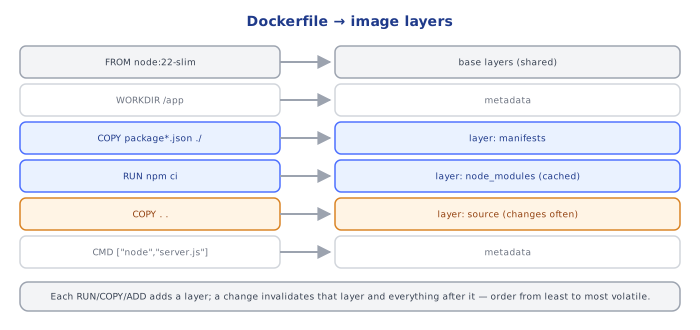
The build cache (introduced in Images and Containers) keys each layer-producing instruction on: the instruction's exact text, whether every layer before it in this build also hit the cache, and — specifically for COPY/ADD — a content hash of the files being copied, not their timestamps. This is why touching a file's mtime without changing its content still counts as a cache hit for COPY, but why reordering instructions or changing base image tags cascades a cache miss through every subsequent instruction, even ones that didn't themselves change.
⚠️ Common Pitfalls
COPY . .beforeRUN npm install— the single most common Dockerfile mistake; it makes every source-code edit invalidate the dependency-install layer, turning a 200ms rebuild into a multi-minute one. Copy the dependency manifest first, install, then copy the rest (see the Images and Containers topic's cache-ordering exercise).- Using
ADDout of habit for a plain local file copy — its auto-extract and URL-fetch behaviors are surprising defaults for a case whereCOPYis both simpler and more predictable. - Separate
RUN apt-get installandRUN rm -rf /var/lib/apt/lists/*lines — the cleanup doesn't shrink the image because the installed files already live in the earlier, immutable layer. - Forgetting
.dockerignore— slow builds from a huge context, or worse, secrets/credentials accidentally baked into an image layer via an overly broadCOPY . .. - Using shell-form
CMD/ENTRYPOINTfor a long-running process — the extra/bin/sh -cwrapper process means your actual process is not PID 1 and doesn't receiveSIGTERMdirectly, which can makedocker stophang for the full grace period beforeSIGKILL. - Assuming
EXPOSEpublishes a port — it's documentation only;-p/--publishatdocker runis what actually maps a host port.
📋 Quick Reference
FROM <image>:<tag>           base image, always pin an explicit tag
WORKDIR /path                 set + create working dir for later instructions
COPY <src> <dest>              copy from build context (no URL fetch, no auto-extract)
ADD <src> <dest>                COPY + URL fetch + local tar auto-extract (rarely the right choice)
RUN <cmd>                       execute at BUILD time, commits a new layer
ENV KEY=value                   persists into the running container
ARG KEY=default                  build-time only, not in the final image
EXPOSE <port>                    documentation only, does NOT publish
CMD ["cmd","arg"]                default command, fully overridable at `docker run`
ENTRYPOINT ["cmd"]               fixed command; CMD becomes its default arguments
.dockerignore                    exclude files from build context (speed + secrets)

Layer-producing: FROM, RUN, COPY, ADD
Metadata-only (0 bytes, still in docker history): ENV, WORKDIR, EXPOSE, CMD, ENTRYPOINT, ARG
Cache key for COPY/ADD: content hash of copied files, not mtime
🧠 Key takeaways
- Each instruction produces (or reuses) a layer; a cache miss rebuilds every later layer.
- Copy dependency manifests first, install, then copy source; chain RUN cleanup in the same layer.
- ARG is build-time only, ENV persists; EXPOSE is documentation; prefer COPY over ADD.
- Use exec form for CMD/ENTRYPOINT, a
.dockerignore, pinned base images, and a non-root USER.
🎤 Interview Q&A
Q1What are Dockerfile best practices?core▾
Small, trusted base images; copy dependency manifests and install before copying source (cache efficiency); combine and clean up in the same RUN layer; use .dockerignore; run as a non-root USER; use exec-form CMD/ENTRYPOINT; pin versions; add a HEALTHCHECK where useful.
- Why copy package.json first? Dependencies are reinstalled only when it changes.
Q2CMD vs ENTRYPOINT?core▾
ENTRYPOINT defines the executable; CMD provides default arguments (or the default command if no entrypoint). docker run image args overrides CMD but not ENTRYPOINT.
- Shell vs exec form? Exec form (
["node","server.js"]) makes your process PID 1 and receive signals; shell form wraps it in/bin/sh -c.
Q3COPY vs ADD?core▾
COPY copies local files. ADD also extracts local tar archives and can fetch URLs, which is less transparent; prefer COPY unless you need extraction.
- Remote files? Use curl in a RUN step with checksum verification, or BuildKit's ADD with checksums.
Q4How do you pass secrets at build time safely?senior▾
BuildKit secret mounts (RUN --mount=type=secret,id=npmrc …) so secrets never land in a layer. Never use ARG or ENV for secrets: they're visible in history.
- How do you check image history?
docker history --no-trunc.
Q5How do you keep images small?core▾
Multi-stage builds, slim/alpine/distroless bases, removing build tools and caches, production-only dependencies, and .dockerignore to avoid copying node_modules, .git and test data.
- Alpine caveat? musl libc can cause compatibility or performance issues with some native modules.
🛠️ Practice exercises
Each exercise is a file in this topic folder. Code exercises are self-checking: run them and make the checks pass.
✅ Check yourself
Answer the questions — feedback is instant.
docker run myapp --port 8080 with ENTRYPOINT [node, server.js] and CMD [--port, 3000] runs…