Docker Compose
Real apps are several containers. Compose describes them in one file (services, networks, volumes, env) and starts them together. See service-name networking, why depends_on isn't readiness, and how healthchecks fix startup races.
🎯 What you'll learn
- The compose file: services, volumes, networks
- Service-name DNS on the project network
- depends_on vs readiness, healthchecks and conditions
- .env files and override files
📚 Before you start
1The Problem: Multi-Container Apps Need Coordination
A real application is rarely one container. A typical setup might need an API service, a Postgres database, and a Redis cache, each in its own container, each needing to find and talk to the others. Running this by hand means three separate docker run commands with matching --network flags, environment variables pointing containers at each other's addresses, and manual start-order management (the API shouldn't start accepting traffic before the database is reachable). Docker Compose replaces all of that with one declarative YAML file and one command.
2The Compose File
# compose.yaml
services:
  api:
    build: .
    ports:
      - "3000:3000"
    environment:
      DATABASE_URL: postgres://user:pass@db:5432/app
    depends_on:
      - db

  db:
    image: postgres:16-alpine
    environment:
      POSTGRES_USER: user
      POSTGRES_PASSWORD: pass
      POSTGRES_DB: app
    volumes:
      - db-data:/var/lib/postgresql/data

volumes:
db-data:docker compose up # build (if needed) + start every service, attached
docker compose up -d # same, detached
docker compose down # stop and remove containers (add -v to also remove volumes)
docker compose logs -f api # stream logs for one service
docker compose ps # list this project's running containersEach top-level entry under services: becomes one container (or more, if scaled) built from either a build: context (a local Dockerfile) or a plain image: reference — mixing both styles in one file, one service per approach, is completely normal.
3Service-Name-Based Networking
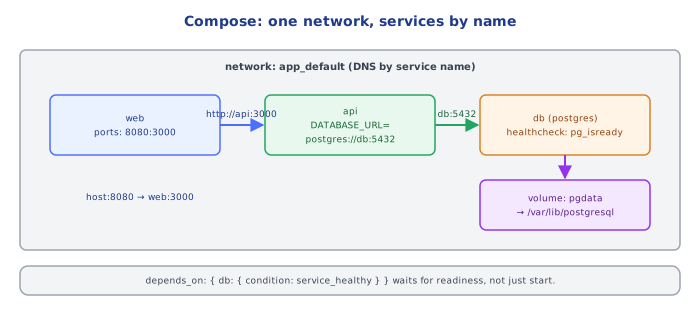
By default, Compose creates one dedicated bridge network for the whole project, and attaches every service to it. On that network, each service is reachable by other services using its service name as a hostname — db in the example above isn't a placeholder, it's a real, working hostname because Compose runs an embedded DNS resolver for the project network that maps db to that container's current IP. This is precisely why the API's DATABASE_URL above can just say db:5432 instead of a hardcoded, brittle IP address that would change every time the container restarts.
4depends_on — Start Order, Not Readiness
services:
  api:
    depends_on:
      - db
depends_on guarantees only that db's container is started before api's container starts — it does not wait for Postgres to have finished initializing and be ready to accept connections. A database container can be "started" (the process launched) for several seconds before it's actually ready to serve queries, and code that assumes depends_on means "ready" will intermittently fail on a cold docker compose up. The full fix is a health check plus a condition, covered in section 6.
5Environment Variables and .env
services:
  api:
    environment:
      - NODE_ENV=${NODE_ENV:-development}
    env_file:
- .env# .env, sits next to compose.yaml, auto-loaded by `docker compose`
NODE_ENV=development
API_PORT=3000Compose automatically reads a .env file in the same directory for variable substitution inside the compose file itself (${NODE_ENV:-development} above, with a default if unset). env_file: under a service is a separate mechanism — it injects the named file's variables directly into that container's environment at runtime. The two can reference the same physical .env file but serve different purposes: one expands placeholders while Compose parses the YAML, the other populates the running container's environment.
6Health Checks and depends_on: condition
services:
  db:
    image: postgres:16-alpine
    healthcheck:
      test: ["CMD-SHELL", "pg_isready -U user"]
      interval: 5s
      timeout: 3s
      retries: 5

  api:
    build: .
    depends_on:
      db:
        condition: service_healthy
This is the real fix for section 4's problem: a healthcheck defines how Compose (and Docker generally) determines whether a container is actually ready, and depends_on's expanded object form can require db to report service_healthy — not merely "started" — before api's container is created at all.
7Multiple Compose Files and Overrides
docker compose -f compose.yaml -f compose.override.yaml upCompose automatically merges compose.yaml with a same-directory compose.override.yaml if present, and -f lets you layer additional files explicitly (a common pattern: a base file plus a compose.prod.yaml that swaps build: for a pinned image: tag, drops bind-mount volumes, and adds production resource limits) — later files' values override earlier ones per-key, they aren't wholesale replacements of a service definition.
Under the HoodHow it works internally▾
Compose is an orchestration layer over the same Docker Engine API docker run uses — it does not introduce a second runtime. docker compose up translates the YAML into the equivalent sequence of docker network create, docker volume create, docker build/docker pull, and docker run (or docker create + docker start) calls, tagging every resource it creates with project-scoped labels (com.docker.compose.project=<dir-name>) so that docker compose down knows exactly what to tear back down. This is why docker ps still shows Compose-managed containers as perfectly ordinary containers — there's no separate "compose runtime" process supervising them at runtime, only at up/down time.
The embedded DNS resolution for service names is a property of the bridge network Compose creates, not of Compose itself — any container attached to that same user-defined bridge network gets the same name-based resolution, which is also why Docker Fundamentals' default (unnamed) bridge network does not support this: Docker only runs the embedded resolver on user-defined networks, a distinction Compose's auto-created project network relies on.
⚠️ Common Pitfalls
- Assuming
depends_onmeans "ready," not just "started" — leads to intermittent connection failures on a cold start; use ahealthcheck+condition: service_healthyfor anything that must be truly ready first. - Hardcoding a container's IP address instead of its service name — container IPs are not stable across restarts; the service name is the only address Compose guarantees to keep working.
- Putting real secrets directly under
environment:in a compose file checked into version control — use.env(gitignored) or a real secrets mechanism instead of committing credentials in plain YAML. - Forgetting
docker compose down -vleaves named volumes behind — plaindownremoves containers and networks but deliberately preserves volume data; omitting-vis usually correct (you don't want to lose a database on every teardown) but surprises people expecting a full reset. - Not realizing
build:re-runs on everyuponly if something changed — Compose uses the same layer cache as a plaindocker build; a common confusion is expectingupto always rebuild, when in fact it reuses a cached image unless you pass--build.
📋 Quick Reference
services:              one entry per container, build: (Dockerfile) or image: (registry)
  <name>:
    build / image
    ports: ["HOST:CONTAINER"]
    environment: / env_file:
    volumes: ["named-volume:/path"] or ["./host/path:/path"]
    depends_on: [other-service]  or  { other-service: { condition: service_healthy } }
    healthcheck: { test, interval, timeout, retries }

volumes:                top-level named volume declarations
networks:                top-level custom network declarations (auto-created project network by default)

Service-name DNS: any service reaches another by its service name as hostname
  (embedded resolver, only on user-defined bridge networks)

docker compose up [-d]        build+start everything
docker compose down [-v]      stop+remove containers/networks [+volumes]
docker compose logs -f <svc>  stream one service's logs
docker compose ps             list this project's containers
-f a.yaml -f b.yaml            merge multiple compose files, later overrides earlier
🧠 Key takeaways
- Compose defines services, networks and volumes for a multi-container app in one file.
- Services reach each other by service name on the project network; only publish ports you need.
depends_oncontrols start order only; use healthchecks + condition: service_healthy (and retries in the app).- Use
.envfor local variables and override files for environment differences.
🎤 Interview Q&A
Q1What is Docker Compose used for?core▾
Defining and running multi-container applications with a YAML file: services, networks, volumes, environment, and dependencies. Ideal for local development and integration testing; not a production orchestrator for multiple hosts.
- Compose in production? Possible on a single host, but Kubernetes/ECS for real scaling and resilience.
Q2How do services find each other in Compose?core▾
Compose creates a default network where each service is reachable by its service name via DNS (postgres:5432).
- Why not localhost? Each container has its own network namespace.
Q3Does depends_on wait for a service to be ready?core▾
Only for start order by default. Use depends_on with condition: service_healthy plus a healthcheck on the dependency, or retry connections in the app.
- Best practice anyway? Apps should retry dependencies at startup.
Q4How do you manage environment-specific Compose configs?senior▾
Override files (compose.override.yaml auto-loaded for dev, -f compose.yaml -f compose.prod.yaml), .env files for variables, and profiles to enable optional services.
- What are profiles? Groups of services started only when the profile is enabled.
Q5How do you persist data in Compose?core▾
Named volumes for databases (pgdata:/var/lib/postgresql/data), bind mounts for source code in development (hot reload).
- What does
docker compose down -vdo? Removes containers and named volumes, deleting data.
🛠️ Practice exercises
Each exercise is a file in this topic folder. Code exercises are self-checking: run them and make the checks pass.
✅ Check yourself
Answer the questions — feedback is instant.