Volumes and Networks
Containers are ephemeral and isolated by default. Volumes keep data alive past docker rm; networks let containers find each other by name. See the difference between losing a database and keeping it.
🎯 What you'll learn
- Named volumes, bind mounts and tmpfs
- Volumes vs the container writable layer
- Bridge, user-defined, host and none networks
- Publishing ports vs container-to-container traffic
📚 Before you start
1Why This Topic Exists
Two facts from earlier topics create a problem this topic solves: containers are ephemeral (their writable layer disappears on docker rm, per Docker Fundamentals), and each container gets an isolated network namespace by default (per Docker Fundamentals' namespace list). Volumes solve the first problem — giving data a lifetime independent of any one container. Networks (beyond the single default bridge) solve the second — letting containers find and talk to each other deliberately, and no one else.
2Volumes: Three Kinds of Mounted Storage
docker run -v pgdata:/var/lib/postgresql/data postgres:16-alpine   # named volume
docker run -v $(pwd)/src:/app/src myapp                             # bind mount
docker run --tmpfs /app/cache myapp # tmpfs mount- Named volume — storage Docker manages entirely (
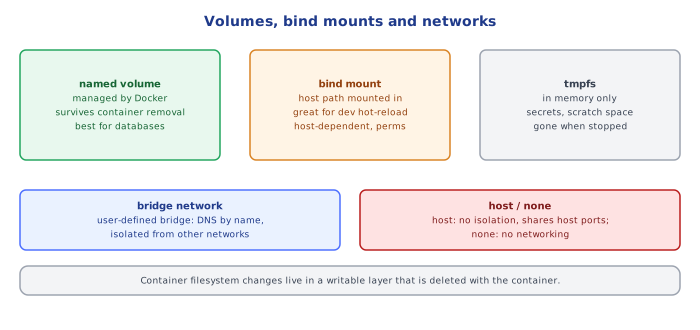
docker volume create pgdata, or created implicitly on first use). Lives under Docker's own managed storage area on the host, survivesdocker rm, and is the right default for anything a container needs to persist (database files, uploaded content) without caring exactly where on the host disk it physically sits. - Bind mount — maps a specific, existing host path directly into the container. You choose the exact host location, which is precisely why bind mounts are the standard tool for local development (mounting your live source tree into a container so edits on the host are visible inside without rebuilding), and precisely why they're a portability liability in production (the path has to exist, in that exact form, on whatever host runs the container).
- tmpfs mount — memory-backed, never touches disk at all, and is wiped the instant the container stops. Used for small amounts of sensitive or purely transient data (short-lived secrets, scratch space) where you specifically do NOT want persistence, not even accidentally.
3Named Volumes vs. the Container's Writable Layer
Both survive as long as the container that uses them exists, but they behave completely differently at the boundary that matters: a named volume is not part of the union filesystem's layer stack (from Images and Containers) — Docker mounts it directly at the specified path, bypassing OverlayFS's copy-on-write mechanics entirely. This is why writing a large, frequently-changing file (a database's data files, application logs) into a volume is cheap, while writing the same file into the container's writable layer over a file that originated in a read-only image layer triggers a full copy-up first, every time. It's also why a volume survives docker rm — removing a container only ever removes its writable layer and namespaces, never anything mounted into it from outside.
4Docker Networks: Bridge, Host, None, and User-Defined
docker network create my-app-net           # a user-defined bridge network
docker run --network my-app-net --name api myapp
docker run --network my-app-net --name db postgres:16-alpine- Default bridge network — every container gets attached to it unless told otherwise. Containers on it can reach each other only by IP address, never by container name — the embedded DNS resolver (covered in the Docker Compose topic) deliberately does not run on this network, which is the single biggest reason to avoid relying on it for anything beyond quick one-off containers.
- User-defined bridge network (
docker network create) — functionally similar isolation to the default bridge, but WITH the embedded DNS resolver active: containers on the same user-defined network can reach each other by container name, exactly like Compose services reach each other by service name (because Compose's project network is itself just an auto-created user-defined bridge network). hostnetwork — the container shares the host's network namespace directly, with no isolation at all; a process binding port 3000 inside the container is binding port 3000 on the host, literally. Occasionally used for performance-sensitive cases avoiding the bridge's NAT overhead, but it forfeits port-remapping and network isolation entirely.nonenetwork — no networking at all; used for containers that deliberately shouldn't have any network access (a batch job operating only on a mounted volume, for example).
5Publishing a Port vs. Being on the Same Network
docker run -d --network my-app-net --name api -p 3000:3000 myapp
docker run -d --network my-app-net --name db postgres:16-alpine
api reaching db needs only the shared network (db:5432 resolves and connects, no -p involved) — inter-container traffic never leaves the Docker network bridge. -p 3000:3000 is a completely separate concern: it's what makes api reachable from outside Docker entirely (your host machine's browser, an external client). A container never needs to publish a port to be reachable by another container on the same user-defined network; publishing is only for host-external access.
Under the HoodHow it works internally▾
A named volume is a directory Docker manages under its own data root (typically /var/lib/docker/volumes/<name>/_data on Linux), and the volume driver (the default local driver, or a plugin for network-attached storage) is responsible for making that directory available at the mount path inside the container's mount namespace — this is an ordinary bind-mount-like kernel operation from the container's point of view, just aimed at a Docker-managed host directory instead of one you chose yourself. This is exactly why a named volume's contents remain fully accessible as ordinary files on the host to anything with sufficient privilege, even though docker volume inspect is the supported way to find its actual path.
User-defined bridge networks each get their own embedded DNS server, run by the Docker daemon and reachable only from containers attached to that specific network — this is a purpose-built resolver for container-name-to-IP lookups, not a general DNS server, and it's why two entirely separate Docker networks can each have a container named db without any naming conflict: name resolution is scoped per-network, exactly as container IP addresses already are.
⚠️ Common Pitfalls
- Assuming a bind-mounted source directory works identically across machines — a teammate's absolute host path, or a Windows-vs-Linux path separator difference, breaks a bind mount that isn't relative and portable (
$(pwd)/srcor a Compose-relative./src). - Relying on the default bridge network's IP-only addressing — brittle and non-portable; a container's IP can change across restarts, whereas a user-defined network's name-based resolution doesn't.
- Storing a database's data files in the container's writable layer instead of a named volume — works fine until the container is removed for any reason (a redeploy, a crash-and-recreate), at which point the data is gone; this is the single most common way people accidentally lose "persistent" data.
- Forgetting
-pdoesn't matter for container-to-container traffic — publishing every internal service's port to the host "just in case" needlessly expands the attack surface for no networking benefit inter-container. - Using
--network hostfor isolation-unaware convenience — it silently disables the network namespace isolation that's one of Docker's core security properties (from Docker Fundamentals), and should be reserved for cases that specifically need it.
📋 Quick Reference
Named volume   docker managed, survives docker rm, bypasses OverlayFS copy-on-write
Bind mount     you choose the exact host path, best for local dev live-reload
tmpfs mount    memory-only, gone the instant the container stops

docker volume create <name>          docker run -v <name>:/path <image>
docker run -v $(pwd)/x:/path <image> bind mount
docker run --tmpfs /path <image>     tmpfs mount

Default bridge      IP-only addressing, no name resolution — avoid beyond quick tests
User-defined bridge  container-NAME resolution via embedded DNS (what Compose uses)
host network          no isolation, container shares host's network namespace directly
none network            no networking at all

-p HOST:CONTAINER    makes a container reachable from OUTSIDE Docker (host/internet)
shared network only   is sufficient for container-to-container reachability, no -p needed
🧠 Key takeaways
- Named volumes survive
docker rm; bind mounts map host paths (great for dev); tmpfs is memory-only. - Data in the writable layer dies with the container.
- User-defined networks provide DNS by container name; the default bridge doesn't.
-pexposes ports to the host; containers on the same network talk without it. Avoid--network host.
🎤 Interview Q&A
Q1Volumes vs bind mounts vs tmpfs?core▾
Volumes: managed by Docker, portable, best for persistent data. Bind mounts: map a host path into the container, great for development. tmpfs: in-memory, non-persistent, for sensitive temporary data.
- Why prefer volumes for databases? Better performance on Mac/Windows and managed lifecycle.
Q2What network drivers exist?core▾
bridge (default, isolated network on a host), host (shares the host's network stack), none, overlay (multi-host in Swarm), macvlan (container gets a MAC on the physical network).
- Default bridge vs user-defined bridge? User-defined bridges provide DNS by container name and better isolation.
Q3How does port publishing work?senior▾
-p 8080:80 maps host port 8080 to container port 80 via iptables/NAT. Bind to 127.0.0.1:8080:80 to avoid exposing it on all interfaces.
- Security gotcha? Docker's iptables rules can bypass host firewalls like ufw.
Q4How do you back up a Docker volume?core▾
Run a temporary container mounting the volume and an output directory, and archive it (tar), or use database-native dumps for consistency.
- Why prefer DB dumps? Copying live database files may produce inconsistent backups.
Q5How do containers on different hosts communicate?core▾
Overlay networks in Swarm, or in Kubernetes via the CNI plugin that gives every pod a routable IP.
- What's a CNI? Container Network Interface plugin (Calico, Cilium, AWS VPC CNI).
🛠️ Practice exercises
Each exercise is a file in this topic folder. Code exercises are self-checking: run them and make the checks pass.
✅ Check yourself
Answer the questions — feedback is instant.
--network host means…