Logging (Platform View)
Logs are the detailed record of what happened, and at scale they're also a cost and compliance problem. Build a pipeline from structured stdout logs to a searchable store, see where PII gets redacted, and understand Loki vs Elasticsearch trade-offs.
🎯 What you'll learn
- The logging pipeline: emit, collect, process, store, query
- Structured JSON logs with a consistent schema
- Storage models, retention and cost
- Multiline gotchas, security and compliance
📚 Before you start
backend/frameworks/13-logging covered how an application writes good logs (levels, structured JSON, child loggers, redaction). This topic covers what happens to logs after they leave the process: collection, shipping, parsing, storage, querying, retention and cost — the logging platform.
1The Pipeline
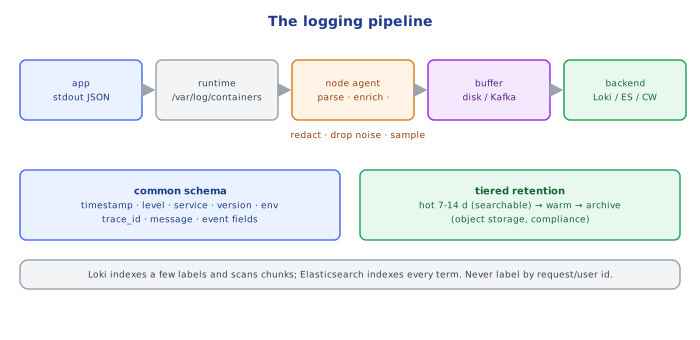
app → stdout/stderr (JSON lines)
    → container runtime writes /var/log/containers/<pod>_<ns>_<container>-<id>.log
    → node agent (Fluent Bit / Vector / OTel Collector DaemonSet) tails files
         · parses JSON / multiline stack traces
         · enriches: k8s namespace, pod, labels, node, cluster, region
         · redacts / drops / samples
    → buffer (disk/memory; sometimes Kafka for large fleets)
    → backend: Loki · Elasticsearch/OpenSearch · CloudWatch Logs · Datadog · Splunk
    → query UI, alerts on log patterns, archive to object storage
Apps write to stdout; the platform does the rest (twelve-factor). Apps should never know where logs end up.
2Structure and Schema
Agree on a common schema across services so queries work fleet-wide:
| Field | Example | Why |
|---|---|---|
timestamp | RFC 3339 with ms, UTC | ordering, correlation |
level | info | filtering |
service, version, env | checkout, 2.3.1, prod | which deploy produced it |
trace_id, span_id | W3C ids | jump from a trace to its logs (03-tracing_and_correlation_ids/) |
message | constant event name | grouping |
| event-specific fields | order_id, duration_ms, status | filtering, aggregation |
OpenTelemetry's log data model and Elastic Common Schema (ECS) are ready-made conventions.
Unstructured
2026-10-20 09:12:03 ERROR payment failed for user 42 amount 45.00 card 4242424242424242Hard to query, and it leaks a card number.
Structured JSON
{"ts":"2026-10-20T09:12:03Z","level":"error","service":"payments",
 "msg":"payment failed","user_id":"42","amount_cents":4500,
 "error":"card_declined","trace_id":"4bf92f35…"}
Queryable fields, a trace ID for correlation, no PAN.
3Storage Models and Cost
| Backend style | Indexes | Query | Cost profile |
|---|---|---|---|
| full-text indexed (Elasticsearch/OpenSearch, Splunk) | every field/term | fast arbitrary search | high storage + RAM for indexes |
| label-indexed (Loki) | only a few labels (app, namespace, level); content scanned at query time | fast for label filters, slower for broad text search | cheap: compressed chunks in object storage |
| managed cloud (CloudWatch Logs) | per log group, Insights scans | ad-hoc queries billed per GB scanned | ingest + storage + query billed |
Log volume is usually the biggest observability bill. Control it with:
- levels:
infoin prod;debugonly temporarily/targeted - sampling of repetitive success logs (keep 100% of errors)
- dropping noisy health-check/access logs at the agent
- tiered retention: hot (7–14 days, searchable) → warm/cold → archive (object storage, months/years for compliance)
- metrics instead of logs for counts and latencies (
02-metrics/)
4Multiline, Parsing and Gotchas
- Stack traces span many lines; log them as one JSON field (
"stack": "...") rather than relying on multiline regexes at the agent. - Mixed formats (JSON + plain text from a library) need fallback parsing — standardize the logger.
- Clock skew between nodes reorders lines; trust per-event timestamps from the app, and NTP everywhere.
- Back-pressure: when the backend is down, agents buffer to disk and then drop — monitor agent buffer usage and dropped-record counters.
- Cardinality in label-indexed stores: never use request IDs or user IDs as Loki labels (same rule as metrics).
5Security and Compliance
- Logs are a data store: PII and secrets in logs are a breach waiting to happen. Redact at the source and at the agent.
- Access control per team/namespace; audit who queried what for sensitive logs.
- Audit logs (who did what) have different retention and integrity requirements (append-only, tamper-evident) than debug logs.
- Data residency: logs from EU users may need to stay in the EU.
Under the HoodWhy Loki Is Cheap and Elasticsearch Is Fast▾
Elasticsearch builds an inverted index (term → list of document IDs) for every field, using Lucene segments that are merged in the background. Any word in any field can be found in milliseconds — but the index is often as large as the raw data, must live on fast disks with plenty of RAM, and ingestion pays the indexing CPU cost for every line.
Loki indexes only the label set of each stream (e.g. {app="checkout", namespace="prod", level="error"}). Log lines of a stream are appended to compressed chunks stored in object storage. A query first selects streams by labels via the small index, then scans (decompresses and greps) the chunks in the time range — brute force, parallelized across queriers. Ingestion is cheap and storage costs object-storage prices; queries that can't narrow by labels and time are slow. Hence the design rule: few, low-cardinality labels; everything else in the line.
⚠️ Common Pitfalls
- Writing log files inside containers — lost on restart, invisible to the agent.
- No common schema — every team's logs need different queries.
- Infinite retention by default — runaway cost.
- High-cardinality labels in Loki / mapping explosions in Elasticsearch (dynamic fields per user).
- Secrets/PII in logs.
- Not monitoring the logging pipeline itself — silent drops during incidents, exactly when you need logs.
📋 Quick Reference
app → stdout JSON → node agent (parse, enrich, redact, buffer) → backend → query/alerts → archive
common schema: timestamp, level, service, version, env, trace_id, message, fields
cost: levels, sampling, drop noise, tiered retention, metrics for counts
Loki: few labels + scan · Elasticsearch: index everything
🧠 Key takeaways
- Emit structured JSON to stdout with a consistent schema (service, level, trace_id…).
- Collect with agents, process (parse, redact, enrich, drop noise) before storing.
- Cost = bytes × retention: tier hot vs archive; Loki indexes labels (cheap), Elasticsearch indexes content (fast search).
- Never log secrets/PII; restrict access; correlate with trace IDs.
🎤 Interview Q&A
Q1What makes logs useful in production?core▾
Structured format (JSON), consistent fields (timestamp, level, service, trace ID), meaningful messages with context, appropriate levels, centralized collection and search, and retention policies.
- Why trace IDs? To correlate logs across services for one request.
Q2How do logs get from containers to a central system?core▾
Apps write to stdout/stderr; the runtime stores them on the node; a log agent (Fluent Bit, Vector, Promtail, CloudWatch agent) tails, enriches with metadata (pod, namespace) and ships to Elasticsearch/OpenSearch, Loki, CloudWatch or a SaaS.
- Why stdout rather than files? 12-factor: the platform handles routing and rotation.
Q3How do you manage log volume and cost?senior▾
Use appropriate levels, sample noisy logs, drop health-check logs, avoid logging payloads, set retention tiers, and convert frequent counts into metrics.
- Loki vs Elasticsearch? Loki indexes labels only (cheaper); Elasticsearch indexes full text (powerful, costlier).
Q4What must never appear in logs?core▾
Passwords, tokens, API keys, session IDs, full card numbers, and unnecessary personal data. Use redaction and review logging in code review.
- Why? Logs are broadly accessible and retained, creating compliance and security risks.
Q5Logs vs metrics vs traces: when to use each?core▾
Metrics for trends and alerting (cheap aggregates), traces for latency and flow across services, logs for detailed context about specific events and errors.
- Which is cheapest at high volume? Metrics.
🛠️ Practice exercises
Each exercise is a file in this topic folder. Code exercises are self-checking: run them and make the checks pass.
✅ Check yourself
Answer the questions — feedback is instant.