Metrics
Metrics are cheap numeric time series that power dashboards and alerts. Learn the four metric types, instrument a service, pull vs push, the PromQL queries you'll use daily, and why labels, not events, drive cost.
🎯 What you'll learn
- Counters, gauges, histograms and summaries
- Instrumenting a service and the /metrics endpoint
- Pull vs push collection
- PromQL essentials and label cardinality
📚 Before you start
1What a Metric Is
A metric is a numeric measurement sampled over time and stored as a time series: name{labels} → [(t1, v1), (t2, v2), …]. Metrics are cheap to store and fast to query because they're aggregated at the source — you count requests, you don't store each one.
http_requests_total{service="checkout", route="/v1/orders", method="POST", status="201"}  10342
http_requests_total{service="checkout", route="/v1/orders", method="POST", status="500"} 172The Four Metric Types (Prometheus / OpenMetrics)
| Type | Behaviour | Example | Query with |
|---|---|---|---|
| Counter | only goes up (resets to 0 on restart) | http_requests_total, bytes_sent_total | rate(), increase() |
| Gauge | goes up and down | queue_depth, memory_bytes, in_flight_requests | raw value, avg_over_time() |
| Histogram | counts observations into cumulative buckets + _sum + _count | http_request_duration_seconds | histogram_quantile() |
| Summary | client-side quantiles (p50/p99) per instance | legacy | can't be aggregated across instances |
Prefer histograms for latency and sizes: quantiles computed at query time over all instances. Summaries' pre-computed p99s can't be averaged meaningfully.
3Instrumenting a Service
import client from "prom-client";
const httpDuration = new client.Histogram({
  name: "http_request_duration_seconds",
  help: "HTTP request latency",
  labelNames: ["route", "method", "status"],
  buckets: [0.01, 0.025, 0.05, 0.1, 0.25, 0.5, 1, 2.5, 5],
});
app.use((req, res, next) => {
  const end = httpDuration.startTimer();
  res.on("finish", () => end({ route: req.route?.path ?? "unmatched", method: req.method, status: String(res.statusCode) }));
  next();
});
app.get("/metrics", async (_req, res) => { res.type(client.register.contentType).send(await client.register.metrics()); });
Exposition format scraped by Prometheus:
# HELP http_request_duration_seconds HTTP request latency
# TYPE http_request_duration_seconds histogram
http_request_duration_seconds_bucket{route="/v1/orders",method="POST",status="201",le="0.1"} 812
http_request_duration_seconds_bucket{route="/v1/orders",method="POST",status="201",le="0.25"} 990
http_request_duration_seconds_bucket{route="/v1/orders",method="POST",status="201",le="+Inf"} 1000
http_request_duration_seconds_sum{route="/v1/orders",method="POST",status="201"} 84.2
http_request_duration_seconds_count{route="/v1/orders",method="POST",status="201"} 10004Pull vs Push
- Pull (Prometheus): the server scrapes
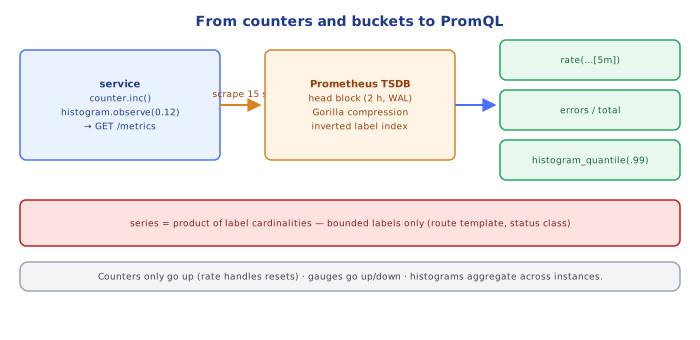
/metricson every target every N seconds, discovered via Kubernetes/Consul/EC2 service discovery. A failed scrape is itself a signal (up == 0). - Push (OTLP, StatsD, CloudWatch PutMetricData, Pushgateway): the app sends metrics. Needed for short-lived jobs and across network boundaries.
- OpenTelemetry metrics can be exported either way; the OTel Collector bridges.
5PromQL Essentials
# request rate per route (per second, over the last 5 minutes)
sum by (route) (rate(http_requests_total[5m]))

# error ratio
sum(rate(http_requests_total{status=~"5.."}[5m])) / sum(rate(http_requests_total[5m]))

# p99 latency across all instances
histogram_quantile(0.99, sum by (le) (rate(http_request_duration_seconds_bucket[5m])))

# saturation: memory used vs limit per pod
container_memory_working_set_bytes / on(pod) kube_pod_container_resource_limits{resource="memory"}
rate() handles counter resets (a restart drops the counter to 0; rate detects the decrease and compensates).
6Labels and Cardinality
Every unique label combination is a separate series. Series count = product of label cardinalities:
route (40) × method (4) × status (10) × instance (30) × le buckets (10) = 480,000 seriesThat's already a lot for one metric. Never label with user IDs, request IDs, email addresses, full URLs, or error messages — unbounded values belong in logs/traces. Use route templates (/users/:id), status classes when possible, and drop unused labels at scrape time (relabeling).
Under the HoodHow Prometheus Stores Series▾
Prometheus's TSDB keeps the most recent ~2 hours of samples in an in-memory head block, backed by a write-ahead log for crash recovery. Each series has its own chunks; samples are compressed with the Gorilla scheme: timestamps as delta-of-delta (scrapes are regular, so most deltas-of-deltas are 0 → 1 bit), values as XOR with the previous value (slowly changing floats share most bits) — about 1.3 bytes per sample. Every 2 hours the head is cut into an immutable block on disk with an inverted index (label=value → posting list of series IDs); queries intersect posting lists to find series, then decode only the needed chunks. Old blocks are compacted into larger ones. Memory use is dominated by the number of active series in the head (each costs a few KB), which is why cardinality, not sample count, is what takes Prometheus down. Long-term storage (Thanos, Mimir, Cortex) ships these blocks to object storage.
⚠️ Common Pitfalls
- High-cardinality labels — memory explosion.
- Averages for latency — hide the tail; use histogram quantiles.
- Summaries aggregated across instances — mathematically meaningless.
- Using
rate()on gauges or raw counters withoutrate(). - Badly chosen histogram buckets — p99 estimates are only as precise as the bucket boundaries around them.
- Metric names without units/suffixes (
_seconds,_bytes,_total).
📋 Quick Reference
| Need | Use |
|---|---|
| how many / how fast | counter + rate() |
| current level | gauge |
| latency distribution | histogram + histogram_quantile() |
| error ratio | rate(errors) / rate(total) |
| naming | snake_case, unit suffix, _total for counters |
| labels | bounded values only |
🧠 Key takeaways
- Types: counter (only up; use rate), gauge (up/down), histogram (buckets → quantiles), summary.
- Expose
/metricsand let Prometheus pull; push only for short-lived jobs (Pushgateway) or OTLP. - Core queries: rate(), error ratios, histogram_quantile over summed buckets.
- Cost is driven by series count (cardinality): never label by unbounded values.
🎤 Interview Q&A
Q1What metric types does Prometheus use?core▾
Counter (monotonically increasing, e.g. requests_total; use rate()), gauge (up/down value, e.g. memory), histogram (bucketed observations for latency percentiles, aggregatable), summary (client-side quantiles, not aggregatable).
- Why prefer histograms over summaries? You can aggregate histograms across instances.
Q2How does Prometheus collect metrics?core▾
It pulls (scrapes) /metrics endpoints at intervals, discovering targets via service discovery (Kubernetes), stores time series locally, and evaluates recording and alerting rules. Short-lived jobs use the Pushgateway.
- Long-term storage? Thanos, Cortex/Mimir, or managed services.
Q3What is cardinality and why does it matter?senior▾
The number of unique label combinations. Labels with unbounded values (user IDs, full URLs, request IDs) create millions of series, exploding memory and cost. Use bounded labels like route templates and status classes.
- How do you find high-cardinality metrics? Prometheus TSDB status page or
count by (__name__)queries.
Q4Which metrics would you expose for an HTTP service?core▾
RED: request rate (http_requests_total by route/method/status), errors (5xx), duration histogram; plus saturation (in-flight requests, pool usage, queue depth), runtime metrics (GC, memory, threads), and business metrics.
- How do you compute p99 in PromQL?
histogram_quantile(0.99, sum(rate(http_request_duration_seconds_bucket[5m])) by (le)).
Q5What's OpenTelemetry's role in metrics?core▾
A vendor-neutral API/SDK and collector for metrics (and traces/logs), letting you instrument once and export to Prometheus, Datadog, CloudWatch, etc.
- What's the OTel Collector? A pipeline that receives, processes and exports telemetry.
🛠️ Practice exercises
Each exercise is a file in this topic folder. Code exercises are self-checking: run them and make the checks pass.
✅ Check yourself
Answer the questions — feedback is instant.