SQS and SNS
SQS queues work for consumers to pull; SNS pushes notifications to many subscribers. Watch the visibility timeout make SQS at-least-once, compare Standard vs FIFO, and build the SNS → SQS fan-out pattern.
🎯 What you'll learn
- SQS basics: visibility timeout, long polling, DLQ redrive
- Standard vs FIFO queues
- SNS topics, subscriptions and filtering
- Fan-out, and Lambda vs worker consumers
📚 Before you start
AWS's managed messaging building blocks (distributed-systems/message-brokers/05-queues_and_topics):
- SQS (Simple Queue Service) — a queue: each message is processed by one consumer.
- SNS (Simple Notification Service) — a topic: each message is pushed to every subscriber.
- Together (SNS → SQS fan-out) they give "every service gets every event, instances of one service share the work".
1SQS Basics
aws sqs create-queue --queue-name orders-email \
  --attributes VisibilityTimeout=60,MessageRetentionPeriod=345600,ReceiveMessageWaitTimeSeconds=20
aws sqs send-message --queue-url $Q --message-body '{"orderId":"o-17"}'
aws sqs receive-message --queue-url $Q --max-number-of-messages 10 --wait-time-seconds 20
aws sqs delete-message --queue-url $Q --receipt-handle "$HANDLE"
The consumer lifecycle:
ReceiveMessage → message becomes INVISIBLE for VisibilityTimeout seconds
  ├─ process OK → DeleteMessage (this is the "ack")
└─ crash / no delete → after the timeout it becomes visible again → redelivered| Setting | Meaning | Guidance |
|---|---|---|
| visibility timeout | how long a received message stays hidden | > p99 processing time (≈ 6× for Lambda); extend with ChangeMessageVisibility for long jobs |
long polling (WaitTimeSeconds up to 20) | wait for messages instead of returning empty | always on — fewer empty receives, lower cost |
| retention | 1 min – 14 days (default 4 days) | longer than any expected consumer outage |
| delay | hide new messages for up to 15 min | simple delayed jobs |
| max message size | 256 KB | larger payloads → S3 + pointer |
| redrive policy | after maxReceiveCount receives → DLQ | always configure (distributed-systems/message-brokers/10-dead_letter_queues) |
2Standard vs FIFO
| Standard | FIFO (.fifo suffix) | |
|---|---|---|
| throughput | nearly unlimited | 300 msg/s per API action (3,000 with batching; much higher in high-throughput mode, per message group) |
| delivery | at least once (occasional duplicates) | exactly-once processing within a 5-minute dedup window |
| ordering | best effort | strict per MessageGroupId |
| dedup | none | MessageDeduplicationId or content-based |
Use FIFO when per-entity order matters (MessageGroupId = orderId); otherwise Standard + idempotent consumers.
3SNS Basics
aws sns create-topic --name order-events
aws sns subscribe --topic-arn $T --protocol sqs --notification-endpoint $EMAIL_QUEUE_ARN \
  --attributes '{"RawMessageDelivery":"true","FilterPolicy":"{\"type\":[\"OrderPlaced\"]}"}'
aws sns publish --topic-arn $T --message '{"orderId":"o-17"}' \
  --message-attributes '{"type":{"DataType":"String","StringValue":"OrderPlaced"}}'
Subscribers: SQS, Lambda, HTTP(S) endpoints, email, SMS, mobile push, Kinesis Firehose. Filter policies let a subscriber receive only the messages it cares about (on attributes or the body). SNS retries failed deliveries with backoff and can send undeliverable messages to a DLQ (per subscription).
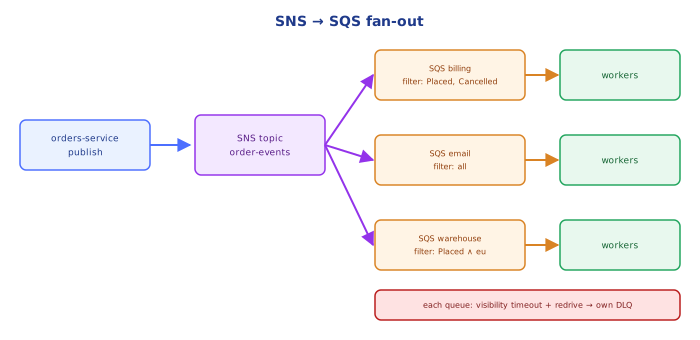
4Fan-Out Pattern
orders-service ──publish──► SNS topic "order-events"
                                ├─► SQS "billing"        ─► billing workers (compete)
                                ├─► SQS "email"   (filter: OrderPlaced) ─► email workers
                                └─► SQS "analytics"      ─► Lambda batch → S3
Each subscriber service gets its own queue: independent pace, retries, DLQ and scaling; a slow analytics consumer can't delay billing. The SQS queue's access policy must allow the SNS topic to sqs:SendMessage (condition on aws:SourceArn).
5Consumers: Lambda vs Workers
- Lambda event source mapping polls SQS for you, invokes with batches (up to 10, or up to 10,000 with a batching window), scales concurrency with queue depth, deletes messages on success. Use partial batch responses (
ReportBatchItemFailures) so one bad message doesn't fail the whole batch. - ECS/EC2 workers long-poll in a loop; autoscale on
ApproximateNumberOfMessagesVisible/ age of oldest message (11-scalability_and_monitoring).
Under the HoodWhy SQS Is At-Least-Once▾
A standard queue stores each message redundantly across multiple servers and AZs. Receives are served by sampling a subset of servers (which is also why a short-polling receive can return empty even though messages exist — long polling queries all servers). Visibility is tracked per copy; in rare races (e.g. a server that was unavailable during a receive or delete comes back), a copy that was already deleted elsewhere can be delivered again — hence occasional duplicates and only best-effort ordering. FIFO queues trade throughput for a stronger design: messages of a group are ordered and locked to one consumer at a time (the next message in the group isn't released until the in-flight one is deleted or times out), and a deduplication store rejects repeated IDs within 5 minutes.
⚠️ Common Pitfalls
- Visibility timeout shorter than processing — messages processed twice (or forever).
- Short polling — high cost, empty receives.
- No DLQ — poison messages loop until retention expires.
- Non-idempotent consumers on Standard queues.
- One queue shared by different services instead of SNS → per-service queues.
- Forgetting the SQS access policy for SNS — publishes succeed, nothing arrives.
- Huge payloads — use S3 + pointer (extended client library).
📋 Quick Reference
| Need | Use |
|---|---|
| work queue | SQS Standard + idempotent workers |
| ordered per entity | SQS FIFO, MessageGroupId = entity id |
| fan-out to services | SNS → one SQS per service (+ filter policies) |
| poison messages | redrive policy → DLQ + alarm |
| serverless consumers | Lambda event source mapping + partial batch failures |
| scaling signal | ApproximateAgeOfOldestMessage, queue depth |
🧠 Key takeaways
- SQS: consumers poll (use long polling); a received message is hidden for the visibility timeout until deleted.
- Delivery is at-least-once (Standard) with best-effort order; FIFO gives ordering per group + dedup (lower throughput).
- SNS pushes to subscribers; SNS → SQS fan-out gives each service its own durable queue (with filter policies).
- Configure DLQs (maxReceiveCount) and set the visibility timeout > processing time (6× the Lambda timeout for event source mappings).
🎤 Interview Q&A
Q1SQS vs SNS?core▾
SQS is a queue: messages are pulled and processed by one consumer, with retries and DLQs. SNS is pub/sub: a message published to a topic is pushed to all subscribers (SQS queues, Lambda, HTTP, email, SMS). Combine them for fan-out: SNS → multiple SQS queues.
- Why fan out to queues instead of Lambda directly? Buffering, retries and independent processing rates.
Q2Standard vs FIFO queues?core▾
Standard: nearly unlimited throughput, at-least-once delivery, best-effort ordering. FIFO: exactly-once processing within a deduplication window and strict ordering per message group ID, with lower throughput limits.
- How do you parallelize FIFO? Use many message group IDs (e.g. per customer).
Q3How does the visibility timeout work?core▾
When a consumer receives a message, it becomes invisible for the visibility timeout; if not deleted before it expires, it reappears for another consumer. Set it longer than processing time, and extend it for long tasks.
- What sends a message to the DLQ? Exceeding
maxReceiveCountin the redrive policy.
Q4How do you reduce SQS cost and latency?senior▾
Long polling (WaitTimeSeconds up to 20) to avoid empty receives, batch send/receive/delete up to 10 messages, and right-size consumers.
- Max message size? 256 KB; store larger payloads in S3 and send a reference.
Q5How do you filter which messages subscribers receive in SNS?core▾
Subscription filter policies on message attributes (or body), so each subscriber receives only relevant events without separate topics.
- Alternative for complex routing? EventBridge rules.
🛠️ Practice exercises
Each exercise is a file in this topic folder. Code exercises are self-checking: run them and make the checks pass.
✅ Check yourself
Answer the questions — feedback is instant.