Queues and Topics
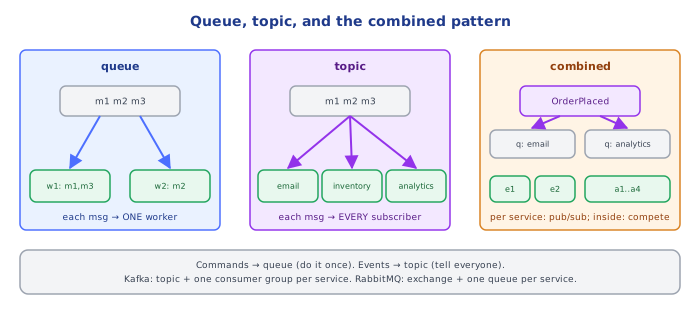
Queues hand each message to one consumer; topics hand every message to every subscriber. Learn when each shape fits (commands vs events), and watch the pattern real systems use: a topic with one queue or consumer group per service.
🎯 What you'll learn
- Point-to-point queues vs publish/subscribe topics
- Commands vs events, and why naming matters
- Topic + one queue/consumer group per subscriber
- Durable vs transient subscriptions, hierarchies and wildcards
📚 Before you start
1Two Delivery Shapes
Every messaging system offers some combination of two fundamental shapes:
| Queue (point-to-point) | Topic (publish/subscribe) | |
|---|---|---|
| Each message goes to | one consumer | every subscriber |
| Adding consumers | splits the work (competing consumers) | adds another independent copy of the stream |
| Mental model | a to-do list shared by workers | a newsletter / radio broadcast |
| Typical use | jobs, commands ("resize this image") | events ("order was created") |
QUEUE:                          TOPIC:
             ┌─► worker 1 (m1, m3)              ┌─► email      (m1, m2, m3)
 producer ──►│                    publisher ───►├─► inventory  (m1, m2, m3)
└─► worker 2 (m2) └─► analytics (m1, m2, m3)2Commands vs Events
The shape usually follows the meaning of the message:
- A command ("ChargeCard", "SendWelcomeEmail") asks for something to happen once, by whoever handles it. → queue.
- An event ("OrderPlaced", "UserSignedUp") states a fact; any number of services may care, and the publisher shouldn't know which. → topic.
Naming reflects this: commands are imperative, events are past tense. Mixing them up leads to classic bugs — e.g. publishing SendEmail on a topic where two email services both subscribe, so customers get two emails.
Command published on a topic
SendWelcomeEmail published to a topic → the legacy email service AND the new one both subscribe → every customer gets two emails.
Event on a topic, command on a queue
Publish the fact UserSignedUp on a topic. The email service decides to send one email, enqueueing SendEmail on its own queue where exactly one worker handles it.
3Combining Both: Topic + Queue per Subscriber
Real systems usually need both: every interested service gets every event (pub/sub), and within a service, multiple instances share that service's copy (competing consumers).
- RabbitMQ: a fanout/topic exchange (pub/sub) with one queue per subscribing service; each service runs N consumers on its own queue.
- Kafka: a topic (pub/sub) and one consumer group per service; partitions are split among the group's instances (
07-consumer_groups_partitions_offsets/). - AWS: SNS topic → one SQS queue per subscriber ("fan-out"), see
devops-cloud/aws/07-sqs_and_sns.
                         ┌─► queue "email"     ─► email-1, email-2      (compete)
OrderPlaced ─► exchange ─┼─► queue "inventory" ─► inventory-1
└─► queue "analytics" ─► analytics-1..4 (compete)4Subscription Lifetime: Durable vs Transient
- Durable subscription: messages published while the subscriber is offline are kept and delivered later (a durable RabbitMQ queue bound to the exchange; a Kafka consumer group with committed offsets).
- Transient subscription: only receives messages while connected (an exclusive, auto-delete queue; Redis Pub/Sub). Fine for live UI updates, wrong for anything that must not be missed.
Redis Pub/Sub is the cautionary example: there's no storage at all — a subscriber that disconnects for one second misses everything published in that second. Redis Streams add persistence and consumer groups.
5Topic Hierarchies and Wildcards
Topic names are often hierarchical so subscribers can choose granularity:
| System | Example name | Wildcards |
|---|---|---|
| RabbitMQ topic exchange | orders.eu.created | * = one word, # = zero or more words |
| MQTT | factory/line1/temp | + = one level, # = rest |
| Kafka | orders.created (flat) | regex subscription on topic names |
| NATS | orders.eu.created | * one token, > rest |
Under the HoodHow Fan-Out Is Implemented▾
There are two ways a broker can give N subscribers the same message:
- Copy on publish (RabbitMQ, SNS→SQS): the exchange evaluates bindings and enqueues a reference into each matching queue. RabbitMQ stores the message body once and keeps per-queue references, but each queue tracks delivery and acknowledgement independently, so one slow subscriber's backlog doesn't affect others. Cost grows with the number of subscribers at publish time.
- Shared log + per-reader cursors (Kafka, Redis Streams, Pulsar): the message is written once to a log; each subscriber (consumer group) keeps an offset. Fan-out costs nothing at publish time — adding the 20th subscriber is just another cursor. The trade-off: retention is global for the topic, not per subscriber, so a subscriber that falls further behind than the retention window loses data.
Competing consumers on one queue are the mirror image: the broker hands each message to one of the connected consumers (round-robin, limited by each consumer's prefetch window), and only redelivers it to another if the first consumer dies or nacks it.
⚠️ Common Pitfalls
- Commands on a topic — duplicated side effects when two services subscribe.
- Events on a single shared queue — services steal each other's messages; each event reaches only one of them.
- Transient subscriptions for data that matters (Redis Pub/Sub for orders) — anything published during a disconnect is gone.
- One queue shared by different services "for simplicity" — impossible to scale or deploy them independently.
- Assuming subscribers receive in the same order relative to each other — each copy is consumed independently.
📋 Quick Reference
| Need | Shape |
|---|---|
| do this once | queue (competing consumers) |
| tell everyone this happened | topic (pub/sub) |
| every service gets it, instances share load | topic + one queue / consumer group per service |
| survive subscriber downtime | durable subscription |
| live-only updates | transient subscription is fine |
🧠 Key takeaways
- Queue = each message to one consumer (work distribution); topic = each message to every subscriber.
- Commands (imperative) go on queues; events (past tense) go on topics.
- Standard pattern: topic + one queue (RabbitMQ/SQS) or consumer group (Kafka) per service.
- Use durable subscriptions for anything that matters; Redis Pub/Sub drops messages during disconnects.
🎤 Interview Q&A
Q1What's the difference between a queue and a topic?core▾
A queue delivers each message to one of the competing consumers (work distribution). A topic delivers each message to all subscribers (broadcast of events). Choose based on whether the message is a task to do once or a fact many services may react to.
- Example of each? Queue: 'resize this image'. Topic: 'OrderPlaced', consumed by billing, email and analytics.
Q2How does SNS + SQS fan-out work on AWS?core▾
A producer publishes to an SNS topic; several SQS queues subscribe to it, one per consuming service. Each service gets its own durable copy and processes at its own pace with its own retries and DLQ.
- Why not have services subscribe to SNS directly over HTTP? Queues buffer messages if a consumer is down; HTTP push would be lost or retried less reliably.
Q3What are competing consumers?core▾
Multiple instances reading from the same queue, each message processed by one of them. It scales throughput horizontally and provides failover, at the cost of ordering guarantees.
- How do you keep order per entity? Message groups (SQS FIFO group ID) or partition keys.
Q4Durable vs non-durable subscriptions?senior▾
A durable subscription keeps messages while the subscriber is offline and delivers them when it reconnects; a non-durable one only delivers while connected. Business events need durable subscriptions.
- Where are non-durable ones fine? Live dashboards or presence updates where old data is useless.
Q5How do you design topic names and granularity?core▾
Name by domain and event (orders.order-placed.v1), one topic per event type or per aggregate stream depending on ordering needs, and version breaking changes. Avoid one giant topic everyone filters, and avoid thousands of tiny topics.
- Why include a version? So breaking schema changes can be introduced side by side.
🛠️ Practice exercises
Each exercise is a file in this topic folder. Code exercises are self-checking: run them and make the checks pass.
✅ Check yourself
Answer the questions — feedback is instant.