Scalability and Monitoring on AWS
Auto Scaling groups add and remove instances to match load; target tracking does the math for you. Compute what target tracking will do, compare policy types, and monitor an elastic system before load testing proves it works.
🎯 What you'll learn
- Auto Scaling groups, launch templates, health checks
- Scaling policies: target tracking, step, scheduled, predictive
- Other elastic building blocks (Lambda, Fargate, DynamoDB on-demand)
- Monitoring elastic systems and load testing
📚 Before you start
This topic ties the AWS track together: how a service scales automatically with load and how you know it's healthy while it does.
1Auto Scaling Groups (EC2)
An Auto Scaling group (ASG) keeps a fleet of EC2 instances between a min and max, at a desired capacity, across several AZs, launched from a launch template (AMI, instance type, user data, IAM instance profile, SGs — 03-ec2/).
aws autoscaling create-auto-scaling-group --auto-scaling-group-name api-asg \
  --launch-template LaunchTemplateName=api-lt,Version='$Latest' \
  --min-size 3 --max-size 30 --desired-capacity 3 \
  --vpc-zone-identifier "subnet-private-a,subnet-private-b,subnet-private-c" \
  --target-group-arns $TG_ARN \
  --health-check-type ELB --health-check-grace-period 120
--health-check-type ELB: instances failing the load balancer's health check are replaced (not just ones whose VM is down).- Instances are spread across AZs and rebalanced after an AZ recovers.
- Instance refresh rolls a new launch template version through the fleet (a rolling deployment).
- Lifecycle hooks pause launches/terminations for custom work (warm caches, drain connections).
- Warm pools keep pre-initialized stopped instances for fast scale-out.
2Scaling Policies
| Policy | How it works | Use for |
|---|---|---|
| target tracking | keep a metric near a target (e.g. CPU 50%, ALBRequestCountPerTarget 800) — AWS computes the adjustments | default choice |
| step scaling | add/remove N instances per alarm breach size | non-linear reactions, custom metrics |
| scheduled | change min/desired at set times | known daily peaks, events |
| predictive | ML forecast of daily/weekly patterns launches capacity ahead | cyclical traffic with slow boot |
Choosing the metric matters most: scale on what saturates first. CPU for CPU-bound services; requests per target for typical web APIs; queue backlog per instance (ApproximateNumberOfMessagesVisible / running workers, or age of oldest message) for workers.
aws autoscaling put-scaling-policy --auto-scaling-group-name api-asg --policy-name rps-target \
  --policy-type TargetTrackingScaling --target-tracking-configuration '{
    "PredefinedMetricSpecification": {"PredefinedMetricType": "ALBRequestCountPerTarget",
                                      "ResourceLabel": "app/shop-alb/50dc/targetgroup/api/943f"},
    "TargetValue": 800, "DisableScaleIn": false }'
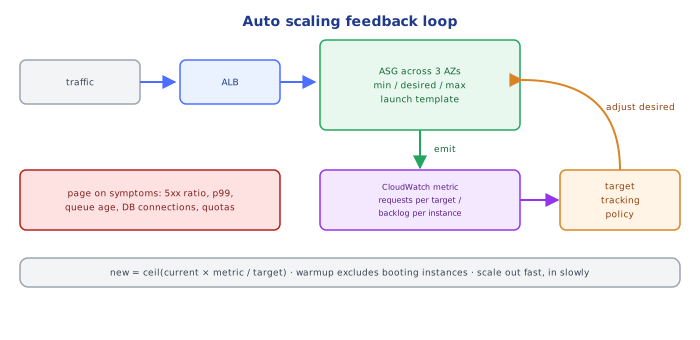
Scale out fast, scale in slowly (cooldowns / default instance warmup) to avoid flapping. Remember the limits that autoscaling can't fix: database connections (an ASG of 30 instances × 20 connections = 600 — use RDS Proxy or pool limits), downstream rate limits, and account quotas.
3Other Elastic Building Blocks
- ECS Service Auto Scaling / EKS (HPA + Karpenter/Cluster Autoscaler): the same target-tracking idea for tasks/pods, plus capacity for the nodes underneath.
- Lambda: scales per request automatically; control it with reserved/maximum concurrency to protect downstreams.
- DynamoDB on-demand / auto scaling, Aurora read replica auto scaling, Aurora Serverless v2: scale the data tier.
- CloudFront + caching: often the cheapest "scaling" — fewer requests reach the origin (
06-load_balancer_and_cloudfront).
4Monitoring the Elastic System
From 08-cloudwatch/ and devops-cloud/observability/:
| Layer | Watch |
|---|---|
| user experience | ALB TargetResponseTime p99, HTTPCode_Target_5XX_Count ratio, Synthetics canary success |
| fleet | ASG GroupInServiceInstances vs desired, scaling activity failures, UnHealthyHostCount |
| resources | CPU, memory (agent), DB connections, ReplicaLag, FreeStorageSpace |
| queues | ApproximateAgeOfOldestMessage, DLQ depth |
| capacity limits | service quotas (vCPU limits, Lambda concurrency), NAT ErrorPortAllocation |
| cost | Cost Explorer anomaly detection, budgets with alerts |
Alarm on symptoms (SLO burn: error ratio, latency) to page; use resource metrics to diagnose and to drive scaling.
5Load Testing Before It Matters
Validate scaling with load tests (k6, Locust, Distributed Load Testing on AWS): ramp traffic, watch how long scale-out takes (instance boot + app warm-up + health-check grace), find the first bottleneck (often the database), and check quotas. If boot takes 4 minutes and traffic doubles in 1 minute, you need headroom, warm pools, predictive or scheduled scaling.
Under the HoodHow Target Tracking Decides▾
Target tracking creates two CloudWatch alarms behind the scenes (a high one for scale-out, a low one for scale-in, the latter with more evaluation periods). On breach, Auto Scaling computes the new capacity proportionally: desired = ceil(current × metricValue / targetValue) (bounded by min/max). For an aggregate metric like average CPU 75% on 10 instances with a 50% target → ceil(10 × 75/50) = 15. That only works for metrics that decrease proportionally when capacity is added (CPU, requests per target); a metric like total request count or queue depth doesn't, which is why queue-based scaling uses backlog per instance. New instances are excluded from the aggregate during the instance warmup period so half-booted instances don't trigger another round of scaling.
⚠️ Common Pitfalls
- Scaling on the wrong metric (CPU for an I/O-bound service).
- Health check type EC2 instead of ELB — broken-but-running instances stay in service.
- Scale-in too aggressive — flapping; or no scale-in at all — cost.
- Ignoring boot time — scaling reacts after the spike is over.
- Forgetting the data tier — more app instances exhaust DB connections.
- Hitting service quotas during the peak you scaled for.
📋 Quick Reference
ASG: launch template · min/desired/max · multi-AZ · ELB health checks · instance refresh
policy: target tracking on requests/target, CPU, or backlog per instance; scheduled/predictive for known peaks
protect downstreams: RDS Proxy, Lambda max concurrency, rate limits
monitor: symptoms page (5xx ratio, p99, canaries) · resources diagnose · quotas and cost alarms
load test the scaling path before the peak
🧠 Key takeaways
- ASGs keep min/desired/max instances across AZs from a launch template, replacing unhealthy ones (use ELB health checks).
- Prefer target tracking (e.g. CPU 50% or requests per target); add scheduled/predictive scaling for known peaks.
- Configure warm-up/cooldown and fast-booting AMIs; serverless services scale for you.
- Monitor capacity, latency and queue depth, and load test before real traffic does it for you.
🎤 Interview Q&A
Q1How do Auto Scaling groups scale?core▾
With target tracking (keep a metric like CPU 50% or requests per target), step scaling (rules by alarm thresholds), scheduled scaling, and predictive scaling from historical patterns. Health checks replace failed instances.
- Simplest effective policy? Target tracking on ALB request count per target or CPU.
Q2What slows down scale-out and how do you speed it up?core▾
Instance boot, configuration and app warm-up time. Use pre-baked AMIs/containers, warm pools, smaller start-up work, and scale earlier (lower targets, predictive scaling).
- What's a warm pool? Pre-initialized stopped instances ready to start quickly.
Q3How do you monitor a scalable AWS architecture?core▾
CloudWatch metrics and alarms on golden signals, ALB and target metrics, ASG activity, queue depth, database metrics, X-Ray/OpenTelemetry tracing, and dashboards per service; alert on SLO burn.
- Which ALB metrics matter most? TargetResponseTime, HTTPCode_Target_5XX_Count, RequestCount, HealthyHostCount.
Q4How do you scale the data tier along with the compute tier?senior▾
Read replicas and caching for reads, Aurora Serverless or larger instances for writes, DynamoDB on-demand/auto scaling, and queues to buffer write spikes. Compute scaling alone often just moves the bottleneck to the database.
- What's a scaling anti-pattern? Autoscaling app servers until DB connections run out.
Q5How do you test that scaling works?core▾
Load tests that ramp traffic beyond expected peaks, watching scale-out timing, latency and errors; game days simulating AZ loss; and verifying scale-in doesn't drop in-flight work.
- Scale-in protection? Prevents specific instances (doing long jobs) from being terminated.
🛠️ Practice exercises
Each exercise is a file in this topic folder. Code exercises are self-checking: run them and make the checks pass.
✅ Check yourself
Answer the questions — feedback is instant.