CloudWatch
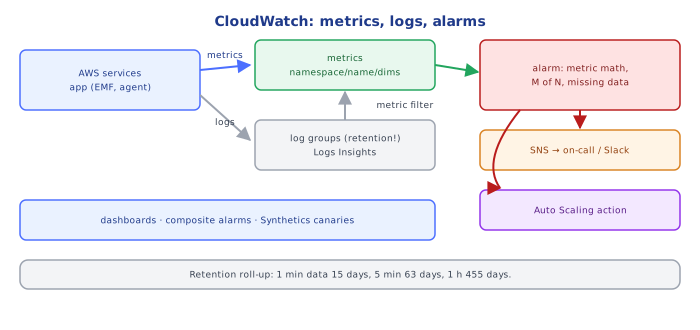
CloudWatch is AWS's built-in metrics, logs and alarms. Learn namespaces and dimensions, log groups and retention, and alarm states, including the missing-data trap that silences alarms exactly when an app dies.
🎯 What you'll learn
- Metrics: namespaces, dimensions, statistics, resolution
- Logs: groups, streams, retention, Logs Insights, metric filters
- Alarms: periods, M of N, missing data, actions
- Dashboards and synthetics
📚 Before you start
CloudWatch is AWS's built-in observability service: metrics, logs, alarms, dashboards, plus events/scheduling (now EventBridge) and some tracing integration (X-Ray / Application Signals). Concepts map directly onto devops-cloud/observability/.
1Metrics
A metric is identified by namespace + name + dimensions:
namespace: AWS/ApplicationELB
name:      TargetResponseTime
dimensions: LoadBalancer=app/shop-alb/50dc6c495c0c9188, TargetGroup=targetgroup/api/943f017f100becff- AWS services publish metrics automatically (EC2
CPUUtilization, ALBHTTPCode_Target_5XX_Count, SQSApproximateAgeOfOldestMessage, RDSReplicaLag, LambdaErrors/Duration/Throttles…). Default EC2 resolution is 5 minutes; detailed monitoring gives 1 minute. - Custom metrics via
PutMetricData, the CloudWatch agent (memory, disk — not visible to the hypervisor!), or Embedded Metric Format (EMF): write a structured JSON log line and CloudWatch extracts metrics from it — no API calls in the hot path. - Statistics:
Sum,Average,Minimum,Maximum,SampleCount, and percentilesp50,p99… Every unique dimension combination is a separate (billed) metric — keep dimensions low-cardinality.
aws cloudwatch put-metric-data --namespace Shop --metric-name OrdersPlaced \
--dimensions Service=checkout,Env=prod --value 1 --unit Count2Logs
- Log groups (one per app/environment, with a retention setting — default is never expire, which silently accumulates cost) contain log streams (one per instance/container/Lambda execution environment).
- Shipping: Lambda and ECS (
awslogsdriver) send stdout automatically; EC2 uses the CloudWatch agent. - Logs Insights queries structured/JSON logs:
fields @timestamp, requestId, route, durationMs
| filter level = "error" and route like /checkout/
| stats count(*) as errors, pct(durationMs, 99) as p99 by bin(5m)
| sort errors desc- Metric filters turn log patterns into metrics (e.g. count of
"level":"error"lines); subscription filters stream logs to Lambda/Kinesis/OpenSearch.
3Alarms
An alarm watches one metric (or a metric math expression) and moves between OK, ALARM and INSUFFICIENT_DATA:
aws cloudwatch put-metric-alarm --alarm-name api-5xx-rate \
  --metrics '[
    {"Id":"e","MetricStat":{"Metric":{"Namespace":"AWS/ApplicationELB","MetricName":"HTTPCode_Target_5XX_Count","Dimensions":[{"Name":"LoadBalancer","Value":"app/shop-alb/50dc"}]},"Period":60,"Stat":"Sum"},"ReturnData":false},
    {"Id":"r","MetricStat":{"Metric":{"Namespace":"AWS/ApplicationELB","MetricName":"RequestCount","Dimensions":[{"Name":"LoadBalancer","Value":"app/shop-alb/50dc"}]},"Period":60,"Stat":"Sum"},"ReturnData":false},
    {"Id":"ratio","Expression":"100 * e / MAX([r, 1])","Label":"5xx %","ReturnData":true}]' \
  --evaluation-periods 5 --datapoints-to-alarm 3 --threshold 1 \
  --comparison-operator GreaterThanThreshold --treat-missing-data notBreaching \
  --alarm-actions arn:aws:sns:eu-west-1:123456789012:oncall
M out of Ndatapoints (3 of 5) avoids flapping on one bad minute.treat-missing-datamatters: missing data for an error count usually means "no errors" (notBreaching); for a heartbeat metric it means "dead" (breaching).- Composite alarms combine alarms with boolean logic (page only if 5xx AND latency are both bad) to cut noise.
- Anomaly detection alarms learn a band from history (daily/weekly seasonality).
- Actions: SNS (→ PagerDuty/Slack/email), Auto Scaling policies, EC2 actions (recover/reboot), Systems Manager incidents.
4Dashboards and Synthetics
Dashboards show metrics and Logs Insights widgets, cross-account and cross-region. Synthetics canaries run scripted checks (Puppeteer/Selenium) against your endpoints every few minutes — catching outages even when there's no traffic. RUM measures real browser performance.
Under the HoodResolution, Retention and Aggregation▾
CloudWatch stores metric data points with automatic roll-up: 1-second (high-resolution custom metrics) data is kept for 3 hours, 1-minute data for 15 days, 5-minute for 63 days, 1-hour for 455 days. Older data is only available at the coarser resolution — a 1-minute spike from two months ago is gone. Percentile statistics are computed from the raw values (or, for high-volume sources, from server-side sketches) per period and can't be re-aggregated from other percentiles, which is why you must publish raw values (or EMF) rather than pre-computed p99s from each instance. Alarms evaluate on a fixed schedule over the metric's period; a metric published late (e.g. delayed log extraction) may be evaluated as missing first — tune datapoints-to-alarm and missing-data handling accordingly.
⚠️ Common Pitfalls
- Log groups with no retention — costs grow forever.
- Alarming on single datapoints — flapping pages.
- Wrong missing-data treatment — silent dead services or false alarms.
- High-cardinality dimensions (user ID, request ID) — metric explosion and cost.
- Assuming EC2 memory/disk metrics exist — they need the agent.
- Averages for latency — alarm on p95/p99.
📋 Quick Reference
| Need | CloudWatch feature |
|---|---|
| service health numbers | metrics (namespace/name/dimensions) |
| app metrics cheaply | EMF structured logs |
| search logs | Logs Insights |
| log → metric | metric filters |
| alert | alarm (M of N, missing-data policy) → SNS |
| reduce noise | composite alarms, anomaly detection |
| outside-in checks | Synthetics canaries |
🧠 Key takeaways
- Metrics live in namespaces with dimensions; choose statistics carefully (p99 vs Average).
- Set log retention (default is never expire!); use Logs Insights and metric filters.
- Alarms evaluate M of N datapoints per period; configure treatMissingData deliberately.
- Alarm on symptoms (5xx, latency, queue age); use dashboards and synthetics (canaries) for end-to-end checks.
🎤 Interview Q&A
Q1What does CloudWatch provide?core▾
Metrics (AWS services and custom), logs (Logs Insights queries), alarms (trigger SNS, autoscaling, actions), dashboards, events, synthetics canaries, and application monitoring features like Application Signals/X-Ray integration.
- Default EC2 metric gap? Memory and disk usage need the CloudWatch agent.
Q2How do you create good CloudWatch alarms?core▾
Alarm on user-facing symptoms (ALB 5xx rate, p99 latency, SQS age of oldest message) with sensible periods and datapoints-to-alarm to avoid flapping, treat missing data deliberately, and route to on-call via SNS.
- What's a composite alarm? Combines alarms with logic to reduce noise.
Q3How do you control CloudWatch Logs costs?senior▾
Set retention periods (default is forever), reduce log verbosity, use the Infrequent Access log class, export old logs to S3, and avoid high-cardinality custom metrics.
- Why are custom metrics costly? Each unique dimension combination is a billed metric.
Q4How do you query logs effectively?core▾
With CloudWatch Logs Insights, e.g. fields @timestamp, @message | filter level = 'error' | stats count() by bin(5m). Structured JSON logs make fields queryable.
- Metric filters? Turn log patterns into metrics for alarms.
Q5What's the Embedded Metric Format?core▾
Writing metrics as specially structured JSON log lines that CloudWatch extracts into metrics asynchronously, avoiding PutMetricData API calls (useful in Lambda).
- Benefit? No synchronous API latency and logs plus metrics in one write.
🛠️ Practice exercises
Each exercise is a file in this topic folder. Code exercises are self-checking: run them and make the checks pass.
✅ Check yourself
Answer the questions — feedback is instant.